
Introduction
Thank you for choosing the SONRU Bluetooth 5.3 FM Transmitter. This manual provides detailed instructions for setting up, operating, and maintaining your device. Please read this manual thoroughly before use to ensure optimal performance and safety.
Product Overview
Components
The SONRU Bluetooth 5.3 FM Transmitter features a robust design with multiple functionalities. Key components include:
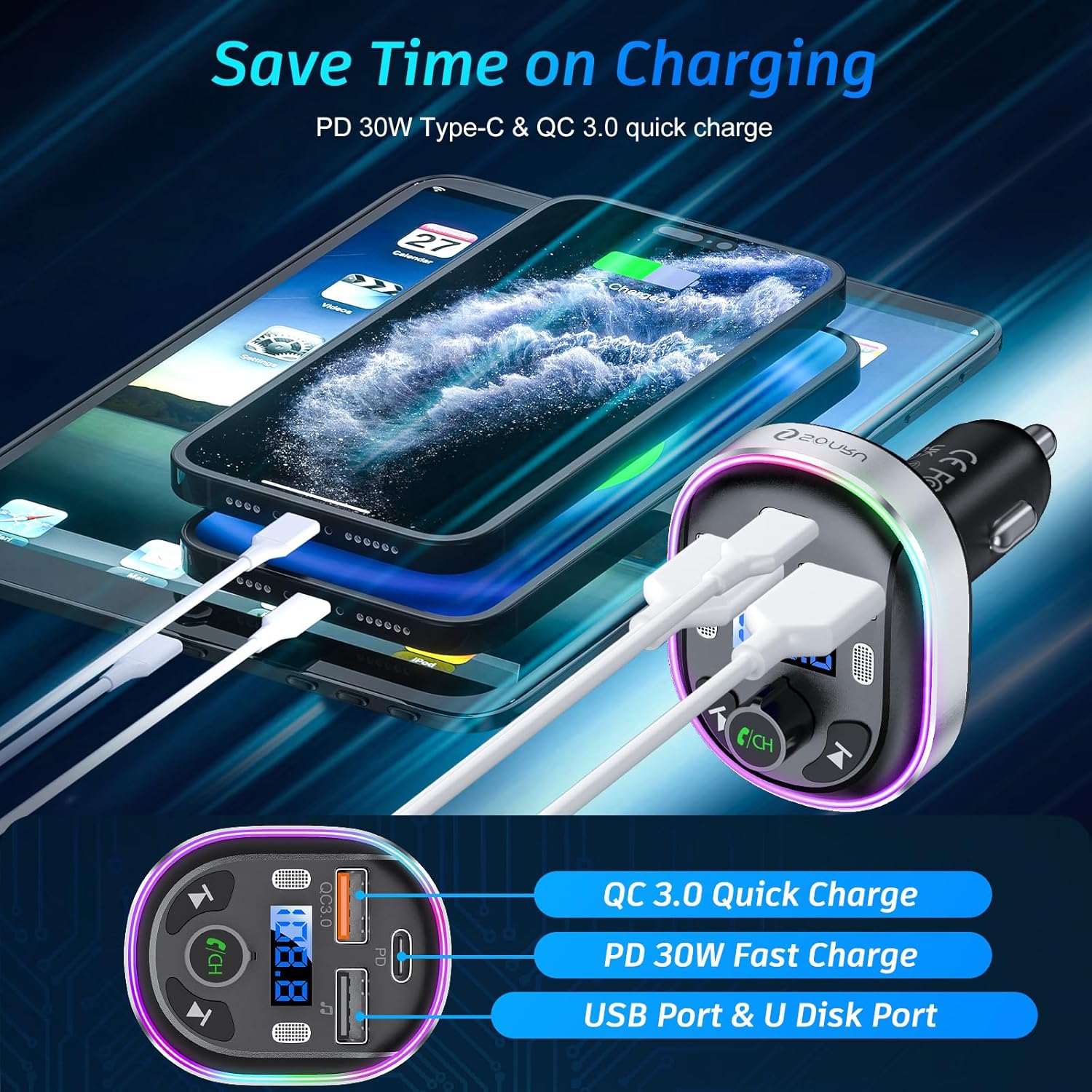
- PD 30W Type-C Charging Port: For fast charging compatible devices.
- QC3.0 18W USB Charging Port: For quick charging compatible devices.
- U Disk / 5V/1A USB Port: For music playback from a USB drive and standard charging.
- Dual Microphones: Enhanced for clearer voice during calls.
- Light Switch: To cycle through 7-color LED light modes, breathing light, or dark mode.
- Display: Shows FM frequency and other status indicators.
- Multifunction Button (MFB): For call management, volume control, and frequency adjustment.
- Previous/Next Buttons: For track control.

Features
- Premium Metal Construction: Durable aluminum alloy outer circle for better heat dissipation.
- Enhanced Dual Microphones: Work in tandem with CVC 8.0 noise reduction for clear calls.
- Advanced Bluetooth 5.3: Provides faster, more stable, and smarter connection with CD-like sound quality.
- PD 30W & QC3.0 18W Fast Charging: Offers rapid charging for up to three compatible devices simultaneously.
- 3 Modes 7-Color Changing Light: Customizable LED backlight for ambient car interior lighting.
- Clear & Stable Hands-Free Calling: Supports Siri, Google voice navigation, and seamless call management.
Setup Instructions
Follow these steps to set up your SONRU FM Transmitter:
- Tune Car Radio: Tune your car radio to a blank FM channel (one with no active broadcast). Frequencies between 87.5-108.0MHz are typically suitable.
- Insert Transmitter: Insert the FM transmitter into your car's cigarette lighter socket. The display will light up.
- Match Frequencies: Tune the FM transmitter to the same blank FM channel as your car radio. Use the MFB (Multi-function Button) to adjust the frequency. Rotate clockwise to increase, counter-clockwise to decrease.
- Pair Bluetooth: On your mobile device, enable Bluetooth and search for available devices. Select "T81" from the list to connect. Once connected, you will hear a confirmation tone.

Operating Instructions
Music Playback
- Bluetooth Streaming: Once paired, music from your Bluetooth device will automatically stream through your car's speakers.
- U Disk Playback: Insert a USB flash drive (U Disk) with MP3/WMA/WAV/FLAC audio files into the 5V/1A USB port. The transmitter will automatically detect and play music from the U Disk.
- Volume Control: Rotate the MFB to adjust the volume.
- Track Control: Use the Previous (<<) and Next (>>) buttons to skip tracks.
Hands-Free Calling
The dual microphones and CVC 8.0 noise reduction technology ensure clear communication.
- Answer Call: Short press the MFB.
- Hang Up Call: Short press the MFB during a call.
- Reject Call: Long press the MFB.
- Redial Last Number: Double short press the MFB.
- Activate Voice Assistant (Siri/Google): Long press the MFB to activate your phone's voice assistant.

Charging Functions
Utilize the fast-charging ports for your devices:
- PD 30W Type-C Port: Connect compatible devices for Power Delivery fast charging.
- QC3.0 18W USB Port: Connect compatible devices for Quick Charge 3.0 fast charging.
- 5V/1A USB Port: For standard charging of devices or U Disk music playback.
LED Light Modes
Customize the ambient lighting with the light switch button:
- 7-Color Light: Static display of all seven colors.
- 7-Color Breathing Light: Colors cycle and fade in/out.
- Dark Mode: Turns off the LED lights.

Official Product Video
Maintenance
To ensure the longevity and proper functioning of your SONRU FM Transmitter, please follow these maintenance guidelines:
- Cleaning: Use a soft, dry cloth to wipe the device. Do not use liquid cleaners or abrasive materials.
- Storage: When not in use for extended periods, store the device in a cool, dry place away from direct sunlight and extreme temperatures.
- Handling: Avoid dropping the device or subjecting it to strong impacts.
- Power Source: Always ensure the device is connected to a stable 12V-24V car power outlet.
Troubleshooting
If you encounter issues with your SONRU FM Transmitter, refer to the following common problems and solutions:
| Problem | Possible Cause | Solution |
|---|---|---|
| No power/Device not turning on | Loose connection; Car cigarette lighter faulty; Vehicle power off. | Ensure the transmitter is firmly inserted. Check car's cigarette lighter fuse. Turn on vehicle ignition. |
| Poor audio quality/Static | FM frequency interference; Volume too low/high; Bluetooth connection issue. | Find a blank FM frequency on your car radio and match it on the transmitter. Adjust volume on both transmitter and car radio. Re-pair Bluetooth device. |
| Bluetooth connection unstable/slow | Interference; Device too far; Old Bluetooth version on phone. | Ensure no other strong Bluetooth signals nearby. Keep phone close to the transmitter. Restart both devices and try pairing again. |
| Hands-free call quality is poor | Microphone obstructed; High background noise; Low volume. | Ensure nothing is blocking the microphones. Adjust call volume. The CVC 8.0 noise reduction should minimize most road noise. |
| Device not charging phone | Incorrect cable; Phone not compatible with fast charging; Port faulty. | Use a certified charging cable. Verify your phone supports PD or QC3.0. Try a different charging port on the transmitter. |
Specifications
| Feature | Detail |
|---|---|
| Brand | SONRU |
| Model | FT1016-big |
| Bluetooth Version | 5.3 |
| FM Frequency Range | 87.5-108.0 MHz |
| Input Voltage | DC 12V-24V |
| PD Output | 30W (Type-C) |
| QC3.0 Output | 18W (USB-A) |
| U Disk/USB Output | 5V/1A (USB-A) |
| Microphones | Dual Mics with CVC 8.0 Noise Reduction |
| LED Backlight | 7 Colors with 3 Modes |
| Material | Metal |
| Item Weight | 2.89 ounces |
| Package Dimensions | 3.94 x 2.72 x 2.36 inches |
Warranty and Support
SONRU products are designed and manufactured to the highest quality standards. This product comes with a standard manufacturer's warranty. For detailed warranty information, product support, or any inquiries, please contact SONRU customer service through the retailer's platform or the official SONRU website.
Please retain your proof of purchase for warranty claims.
