
NEWTRY NT-901D
NEWTRY NT-901D Professional Portable Battery Spot Welder User Manual
Model: NT-901D
1. Introduction
This manual provides essential information for the safe and effective operation of your NEWTRY NT-901D Professional Portable Battery Spot Welder. Please read this manual thoroughly before using the device to ensure proper function and to prevent damage or injury. The NT-901D is designed for precise spot welding of various battery cells, including 18650, 26650, 32650, and LiFePO4 batteries, utilizing advanced capacitor energy storage technology for high power and efficiency.

Figure 1: Wide applications of the NEWTRY NT-901D spot welder, including mobile phone battery repair, circuit board welding, and electrical component assembly.
2. Safety Information
Always observe the following safety precautions to prevent electric shock, fire, or injury:
- Ensure the power supply voltage matches the device's requirements (100V~240V 50/60Hz).
- Do not operate the welder in wet or damp conditions.
- Wear appropriate personal protective equipment (PPE), including safety glasses, during operation.
- Keep hands and other body parts clear of the welding electrodes during operation.
- Do not attempt to disassemble or repair the device yourself. Refer to qualified service personnel.
- Disconnect the power supply before cleaning or performing any maintenance.
- Store the device in a dry, safe place away from children.
- Be aware that the welding process generates heat and sparks. Ensure proper ventilation and keep flammable materials away from the work area.
3. Product Overview and Components
The NEWTRY NT-901D is a high-power, portable spot welder featuring a capacitor energy storage system. It is designed for efficient and precise welding of battery nickel strips.

Figure 2: NEWTRY NT-901D Spot Welder with its primary components.
3.1 Key Features:
- High Power Output: Up to 11.6 kW, capable of welding nickel strips up to 0.4 mm thick.
- Fast Charging: Reduced charging time, typically 20-30 minutes.
- Capacitor Energy Storage: Utilizes automotive-type capacitors (6000F) for stable and efficient energy delivery.
- HD LCD Display: A three-inch display shows voltage, current, pulse level, pulse time, and charge status.
- Multiple Welding Modes: Supports automatic spot welding, foot pedal spot welding, and pressure spot welding.
3.2 Included Accessories:

Figure 3: All accessories included with the NT-901D spot welder.
- Fixed welding head
- Mobile welding pen
- Welding machine (main unit)
- Welding base
- Battery holder
- Universal charger
- 0.15mm Nickel sheet *50
- 0.1mm Nickel sheet *50
- Installation tool set
- Replacement needles
- Foot pedal
4. Setup
Follow these steps for initial setup:
- Unpacking: Carefully remove all components from the packaging. Inspect for any damage.
- Power Connection: Connect the universal charger to the welding machine's input port and then to a suitable power outlet (100V~240V).
- Initial Charging: Allow the device to charge fully. The LCD display will show the charging status. Initial charging may take 20-30 minutes. The device is ready when the voltage displayed reaches approximately 5.7V.
- Attach Welding Tool: Depending on your task, attach either the mobile welding pen or the fixed welding head to the welding machine's output terminals. Ensure connections are secure.
- Foot Pedal (Optional): If using the foot pedal welding mode, connect the foot pedal to its designated port on the side of the main unit.
5. Operating Instructions
The NT-901D offers flexible operation modes for various welding needs.
5.1 Understanding the Display and Controls:
The LCD display provides real-time information:
- Voltage (DCV): Current capacitor voltage.
- Pulse Level (T): Adjustable welding power level (0-99T).
- Pulse Time (ms): Adjustable welding pulse duration (0-20ms).
- Charge Status: Indicates if the unit is charging or fully charged.
Use the UP and DOWN buttons to adjust parameters. The PWR/SET button is used to power on/off and confirm settings.
5.2 Welding Modes:
The device supports three main welding modes:
- Automatic Spot Welding (AT Mode - Mobile Welding Pen):
In this mode, the welding process initiates automatically when sufficient pressure is applied to the welding pen tips on the nickel strip and battery. This mode is ideal for quick, repetitive welds.
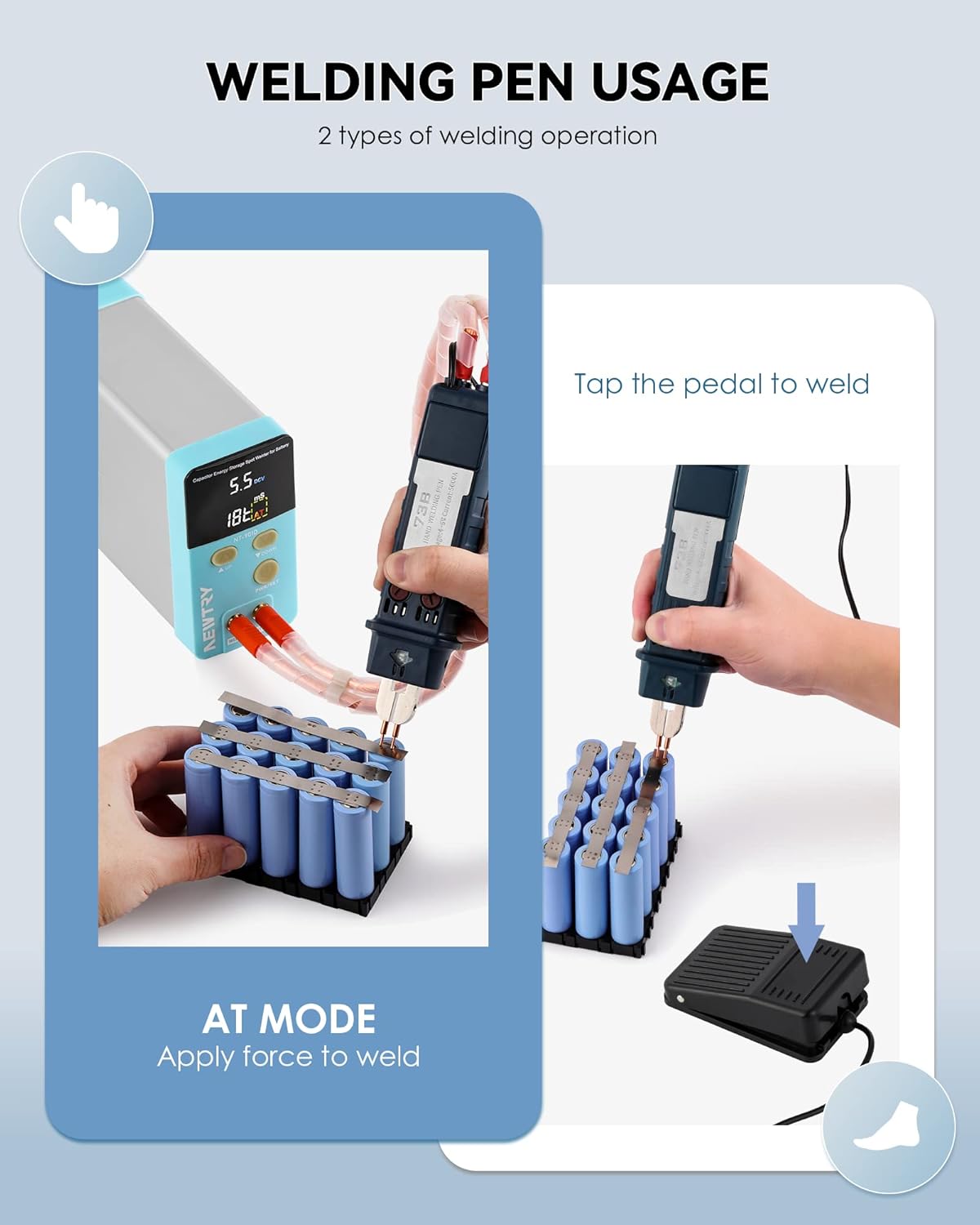
Figure 4: Automatic Spot Welding (AT Mode) with Mobile Welding Pen.
- Foot Pedal Spot Welding (Mobile Welding Pen):
Connect the foot pedal. Apply the welding pen tips to the nickel strip and battery, then press the foot pedal to initiate the weld. This provides precise control over the welding timing.
- Pressure Spot Welding (Fixed Welding Head):
For the fixed welding head, place the battery and nickel strip under the electrodes. Turn the handle to bring the needles into contact with the nickel sheet, applying pressure to complete the weld. This mode is suitable for stable, high-precision welding tasks.
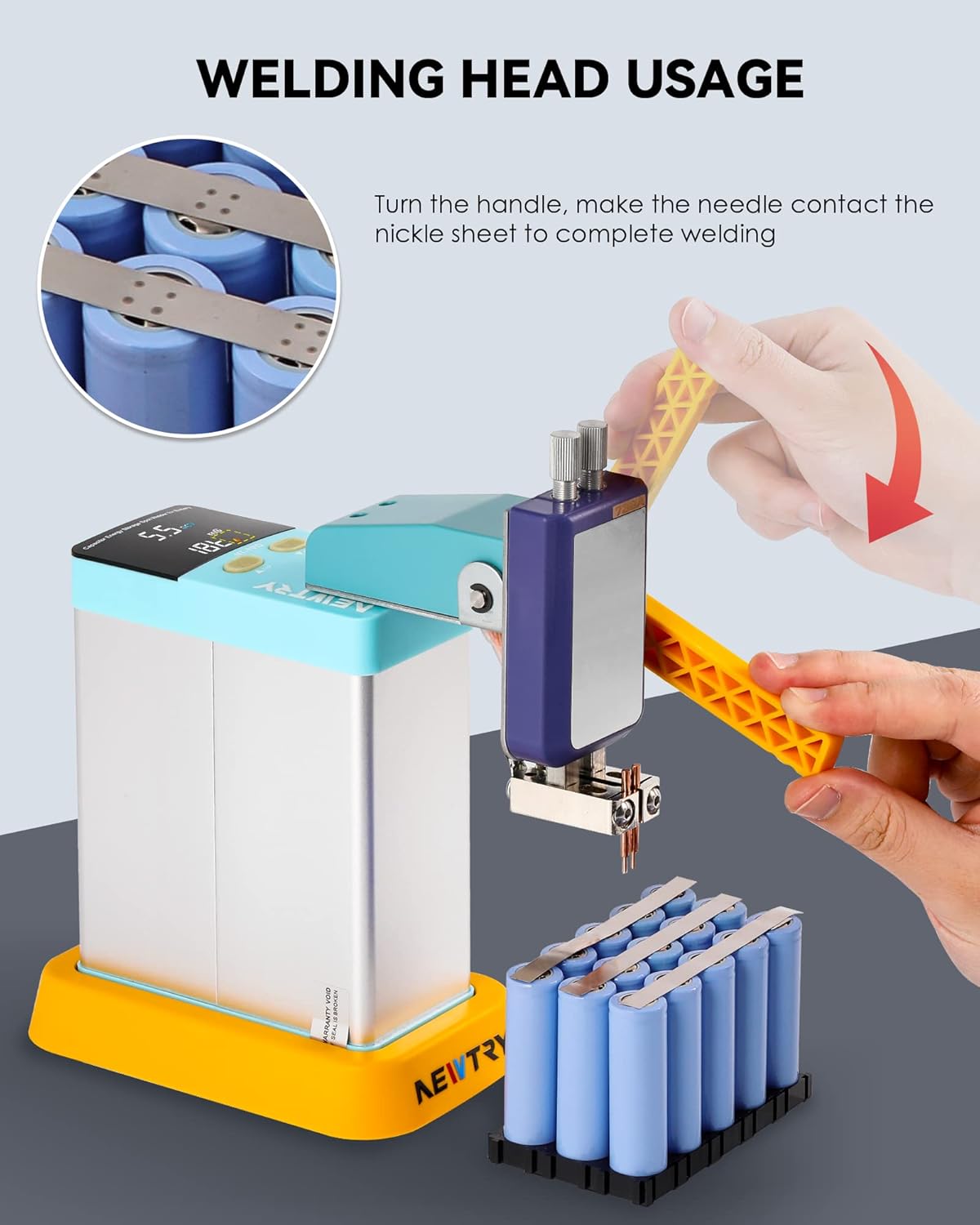
Figure 5: Pressure Spot Welding with Fixed Welding Head.
5.3 Adjusting Welding Parameters:
Optimal welding results depend on proper parameter settings. Experiment with the pulse level (T) and pulse time (ms) based on the thickness of your nickel strip and battery type. Start with lower settings and gradually increase until a strong, clean weld is achieved.
- Nickel Strip Thickness: Thicker strips require higher pulse levels and/or longer pulse times.
- Battery Type: Different battery chemistries and capacities may require slight adjustments.
- Test Welds: Always perform test welds on scrap material before welding your final battery packs.
6. Maintenance
Regular maintenance ensures the longevity and optimal performance of your spot welder.
- Cleaning: Disconnect power before cleaning. Wipe the main unit and accessories with a dry, soft cloth. Do not use abrasive cleaners or solvents.
- Electrode Maintenance: Regularly inspect the welding electrodes (tips) for wear or oxidation. Replace them with the provided replacement needles when they become dull or pitted to ensure consistent weld quality.
- Cable Inspection: Check all cables and connections for signs of wear, fraying, or damage. Ensure they are securely connected before each use.
- Storage: Store the welder in a cool, dry place, away from direct sunlight and moisture, when not in use.
7. Troubleshooting
If you encounter issues with your NT-901D spot welder, refer to the following common problems and solutions:
| Problem | Possible Cause | Solution |
|---|---|---|
| Welder does not power on. | No power supply; faulty charger; power button not pressed. | Check power outlet and charger connection. Ensure charger is functional. Press and hold the PWR/SET button. |
| Weak or inconsistent welds. | Insufficient power settings; dirty/worn electrodes; poor contact; low capacitor charge. | Increase pulse level (T) or pulse time (ms). Clean or replace electrodes. Ensure firm contact with nickel strip and battery. Allow unit to fully charge. |
| Overheating. | Continuous heavy use without cooling. | Allow the unit to cool down. Operate within recommended duty cycles. Ensure proper ventilation. |
| Display not working or showing errors. | Internal fault; loose connection. | Power cycle the device. If the problem persists, contact customer support. |
If the problem persists after attempting these solutions, please contact NEWTRY customer support for assistance.
8. Specifications
Detailed technical specifications for the NEWTRY NT-901D Professional Portable Battery Spot Welder:
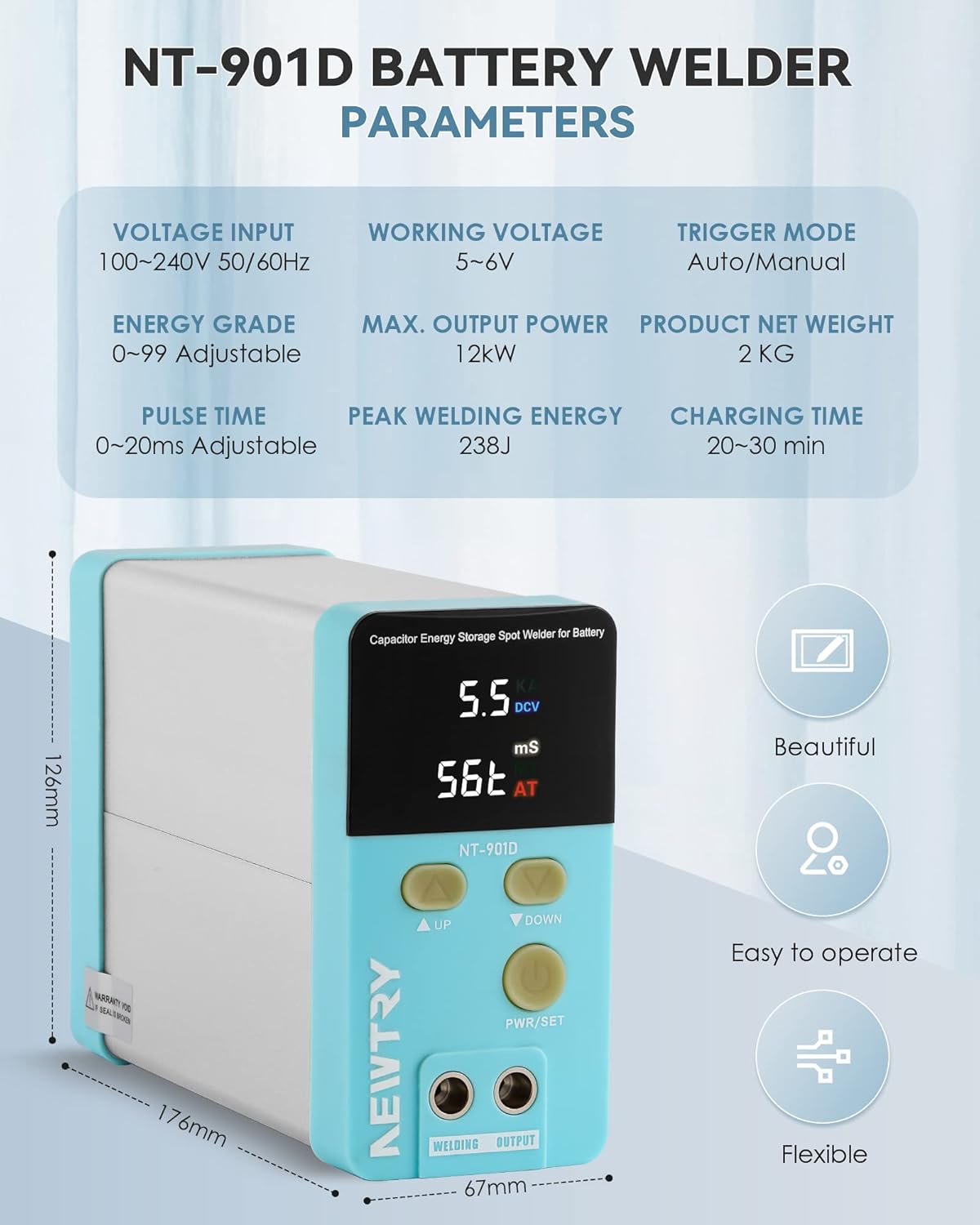
Figure 6: NT-901D Battery Welder Parameters.
| Parameter | Value |
|---|---|
| Brand | NEWTRY |
| Product Name | Battery Powered Spot Welder NT-901D |
| Energy Storage Medium | Automotive type capacitors |
| Capacity | 6000F |
| Adjustable Pulse | 0~99T |
| Adjustable Pulse Time | 0~20ms |
| Peak Current | Up to 2000A |
| Output Power | Up to 12kW |
| Input Voltage | 100V~240V 50/60Hz universal |
| Product Size | 176*126*67mm |
| Product Weight | 2 kg (unit only), 3.48 kg (parcel) |
| Welding Thickness | Up to 0.4 mm nickel strip |
| Scope of Application | 18650/26650/32650 and other lithium batteries or LiFePO4 battery |
9. Warranty and Support
For warranty information and technical support, please refer to the documentation provided with your purchase or contact NEWTRY customer service directly. Keep your purchase receipt as proof of purchase for warranty claims.
Contact Information: Please refer to the official NEWTRY website or your purchase platform for the most up-to-date contact details for customer support.
Ask a question about this manual
Ask about setup, troubleshooting, compatibility, parts, safety, or missing instructions. Manuals+ will review the question and use this page’s manual context to help answer it.