
Important Safeguards
Please read all instructions carefully before using this appliance and retain for future reference.
- Do not immerse the motor unit in water or any other liquid. Only the removable grinding bowl is washable.
- Ensure the power supply voltage matches the rating label on the appliance.
- Unplug the grinder from the outlet when not in use, before cleaning, or when assembling/disassembling parts.
- Keep hands and utensils out of the grinding bowl during operation to prevent injury.
- Do not operate the appliance with a damaged cord or plug, or after the appliance malfunctions or is dropped.
- This appliance is for household use only. Do not use outdoors.
- Keep out of reach of children. Close supervision is necessary when any appliance is used by or near children.
Product Overview
The Mecity Electric Coffee Blade Grinder is designed for efficient and versatile grinding. Equipped with 6 stainless steel blades and a 200 Watt motor, it can quickly process various dry ingredients to your desired consistency.

The Mecity Electric Coffee Blade Grinder features a sleek blue design with a stainless steel band, ready for grinding coffee beans and spices.

This versatile grinder is suitable for various ingredients including coffee, spices, salt, and herbs, making it a multi-purpose kitchen tool.

Equipped with six durable stainless steel blades, the grinder ensures efficient and consistent results for various grinding needs.
Setup
Follow these steps to set up your Mecity Electric Coffee Blade Grinder for first use:
- Assemble Grind Chamber: Ensure the stainless steel grinding bowl is securely placed into the main unit.
- Add Ingredients: Place your desired ingredients (coffee beans, herbs, spices) into the grinding bowl. Do not exceed the MAX line.
- Place Covers: Securely place the inner clear lid, then the outer transparent cover onto the unit.
- Connect Power: Plug the grinder into a suitable power outlet.
A visual guide demonstrating the assembly of the grind chamber, adding ingredients, placing the double covers, and pressing to start grinding.
Setup Video Guide
This video provides a comprehensive overview of the Mecity Electric Grinder, demonstrating its features and initial setup.
Operating Instructions
Grinding Coffee Beans
For optimal coffee grinding, ensure beans are dry. Press down on the top cover to activate the grinder. The grinding time determines the fineness of the grind:
- Coarse Grind: Grind for approximately 6 seconds. Ideal for French press or percolator.
- Fine Grind: Grind for approximately 12-20 seconds. Suitable for drip coffee makers or espresso.

Visual comparison showing coffee ground to a coarse consistency in 6 seconds versus a fine consistency in 12 seconds.
Grinding Spices and Other Ingredients
This grinder is versatile and can be used for various dry and wet ingredients. For wet ingredients like sauces or pastes, ensure the capacity does not exceed 100ml. For dry ingredients like coffee beans, do not exceed 40 grams.
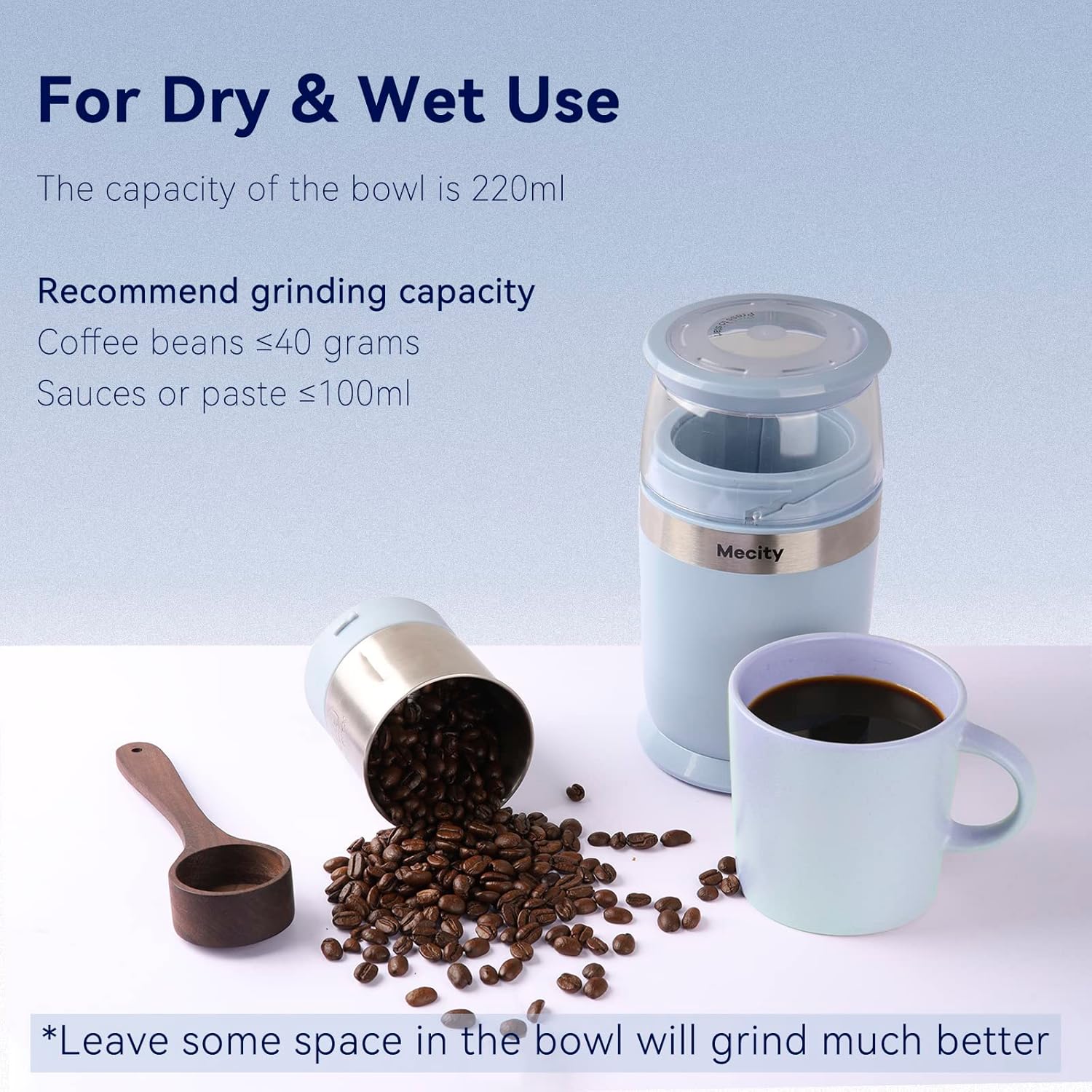
The grinder is suitable for both dry ingredients like coffee beans (max 40g) and wet ingredients like sauces (max 100ml).
Coffee Preparation Video
This video demonstrates how to make pour-over coffee using the Mecity Electric Grinder and a compatible electric kettle, showcasing the grinding process and brewing technique.
Maintenance and Cleaning
Regular cleaning ensures optimal performance and longevity of your grinder. The removable grinding bowl is dishwasher safe for convenience.
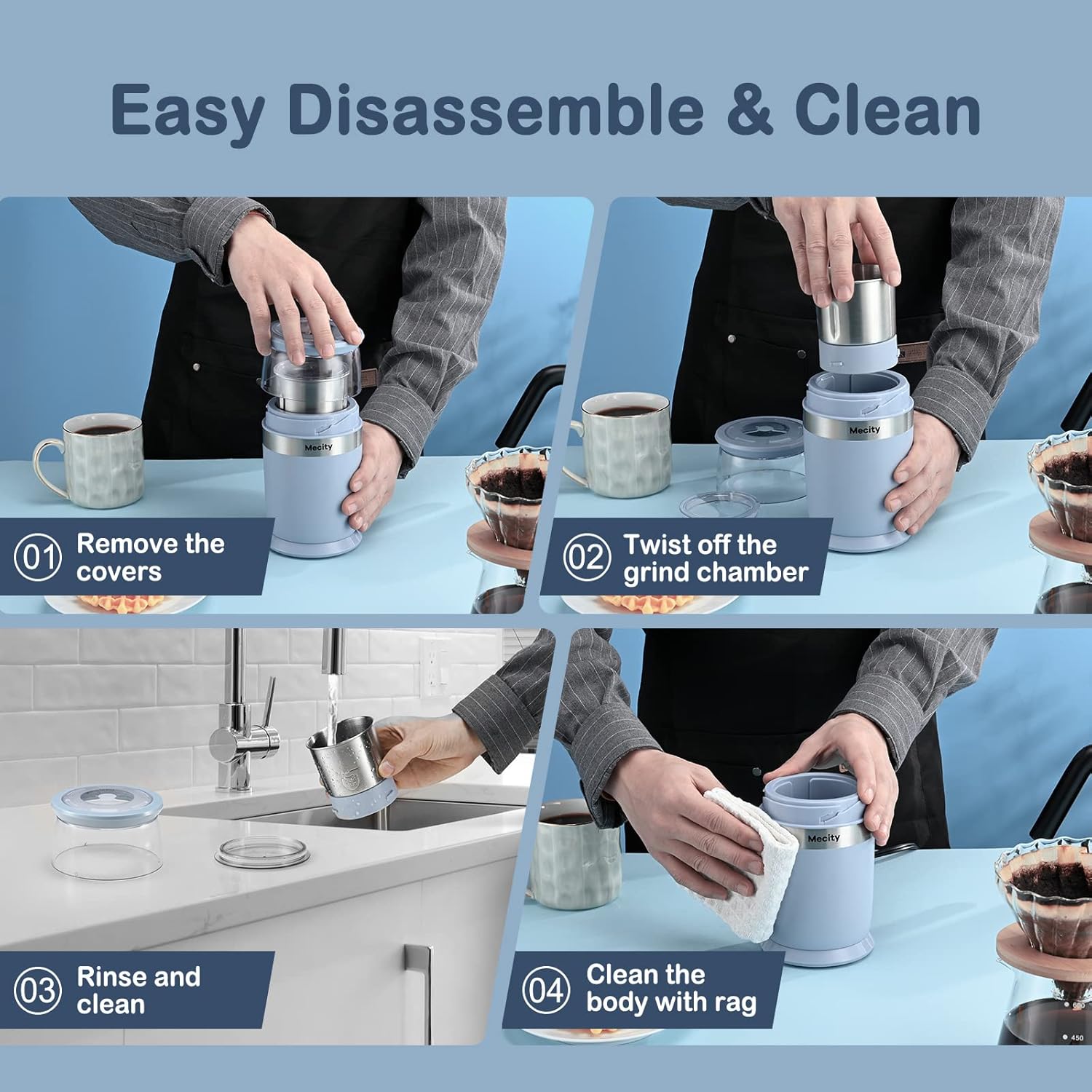
- Remove Covers: Take off the outer transparent cover and the inner clear lid.
- Remove Grind Chamber: Twist the grinding bowl counter-clockwise to unlock and lift it out from the main unit.
- Rinse and Clean: Rinse the grinding bowl and inner lid under running water or place them in the dishwasher. Use the provided brush to clean any residue.
- Clean Body: Wipe the main unit's exterior with a damp rag. Do not immerse the main unit in water.
- Cord Storage: The power cord can be coiled neatly under the bottom of the unit for compact storage.

The grinder features double covers to prevent spillover during operation, ensuring a cleaner grinding experience.

A visual guide demonstrating how to easily disassemble the grinder, remove the covers and grind chamber, rinse, and clean the body.
Troubleshooting
Refer to the table below for common issues and their solutions:
| Issue | Possible Cause / Solution |
|---|---|
| The coffee grinder has stopped working. | The heat sensor may have been triggered by motor overheating. Unplug the coffee grinder and allow it to cool for 30 minutes before using it again. |
| Coffee grounds are getting stuck and not circulating during grinding. | Stop grinding and gently shake the coffee grinder up and down to redistribute the grounds. |
| Coffee grounds are being ground too finely. | Press the top lid down for a shorter period of time for a coarser grind size. |
Specifications
| Feature | Detail |
|---|---|
| Model Number | OK2008-BE |
| Color | Blue |
| Brand | Mecity |
| Product Dimensions | 3.7"L x 3.7"W x 7.5"H |
| Rated Power | 200W |
| Voltage | 120V (AC) |
| Item Weight | 2.28 pounds |
| Blade Material | Stainless Steel (6 blades) |
| Grinding Bowl Capacity | 220ml |
Warranty Information
Mecity products are designed for quality and durability. This product comes with a standard manufacturer's warranty covering defects in materials and workmanship under normal use. Please refer to the product packaging or contact customer support for specific warranty terms and conditions.
Customer Support
For any questions, assistance, or troubleshooting not covered in this manual, please contact Mecity customer support. You can also visit the official Mecity Brand Store for more information and product updates: