
1. Introduction
The NOESIS Florio 2in1 Robot Vacuum and Mop Combo is an advanced robotic cleaning device designed to automate floor cleaning. It features both vacuuming and mopping capabilities, a self-emptying dustbin, auto-changing mop pads, and intelligent navigation for comprehensive home cleaning.

Image: The NOESIS Florio robot vacuum and its accompanying self-emptying and self-refilling docking station, displayed alongside a smartphone screen illustrating the device's mapping and control interface.
2. Setup and Installation
Follow these steps to set up your NOESIS Florio robot vacuum and mop combo for first use.
- Unboxing and Placement: Carefully remove all components from the packaging. Place the docking station on a hard, flat surface against a wall, ensuring there is adequate clear space around it (at least 0.5 meters on each side and 1.5 meters in front).
- Power Connection: Connect the power cord to the docking station and plug it into a wall outlet. Ensure the station receives continuous power.
- Water Tank and Mop Pads: Fill the clean water tank with water and, if desired, a compatible cleaning solution. Insert the clean mop pads into their designated slot in the docking station. The station can hold up to 40 new mop pads.
- Robot Placement: Place the robot vacuum onto the docking station to charge. The robot will announce its status.
- App Installation: Download the official NOESIS app from your smartphone's app store. Follow the in-app instructions to connect your device to your home Wi-Fi network and pair it with the Florio robot.
- Initial Mapping: Once paired, initiate the mapping process through the app. The robot will navigate your home to create a detailed floor plan, which will be displayed in the app.

Image: An illustration of the fully automated docking station, highlighting its features including a 30-day self-changing mop pad supply, a 2.0-liter water tank, a 2.5-liter dust bag, and a 3-hour full charge time.
For detailed visual instructions, please refer to the Installation Manual (PDF).
3. Operating Instructions
The NOESIS Florio offers various cleaning modes and intelligent features for efficient floor care.
3.1 Cleaning Modes
- Vacuum Only: Ideal for carpets and dry debris. The powerful 5100 Pa suction and rubber sweeping brushes effectively clear carpets.
- Mop Only: For hard floors requiring wet cleaning. The Advanced Dynamic Scrub mopping system mimics human hand scrubbing for thorough cleaning.
- Vacuum and Mop Combo: Simultaneously vacuums and mops hard floors.
3.2 Smart Features
- App Control: Use the NOESIS app to start/stop cleaning, set schedules, define no-go zones, adjust suction power, and customize mop pad coverage for different rooms.
- Dual NeuralVision Obstacle Detection: An AI camera combined with Stereovision sensors allows the robot to identify and avoid most obstacles, including cables and small items.
- Anti-Drop Sensors: Integrated sensors prevent the robot from falling down stairs or steps.
- Mop Lift Technology: The robot automatically raises both the mop pad and brush by 20mm when moving between rooms or onto carpets to prevent cross-contamination.
- D-Shaped Design: This innovative design allows the Florio to reach edges and corners more effectively than traditional round robot vacuums.

Image: A visual representation demonstrating the Intelligent Auto-Lifting Brush & Mop feature, showing the roller brush lifting 7mm after cleaning and mop heads raising 20mm to avoid carpet contamination.

Image: The NOESIS Florio robot vacuum demonstrating its Pioneering Dual NeuralVision AI Obstacle Detection by identifying and navigating around a coiled charging cable on the floor.
4. Maintenance
Regular maintenance ensures optimal performance and longevity of your NOESIS Florio.
4.1 Docking Station Maintenance
- Self-Emptying Dust Bag: The docking station automatically collects dust from the robot into a 2.5-liter dust bag, reducing manual emptying frequency. Replace the dust bag when full.
- Auto-Changing Mop Pads: The station automatically replaces dirty mop pads with clean ones. It stores up to 40 new pads and 15-20 dirty pads. Regularly check and replenish the clean mop pad supply and empty the dirty mop pad box.
- Water Tank Refill: The station automatically refills the robot's water tank from its 2.0-liter reservoir. Ensure the station's clean water tank is filled.
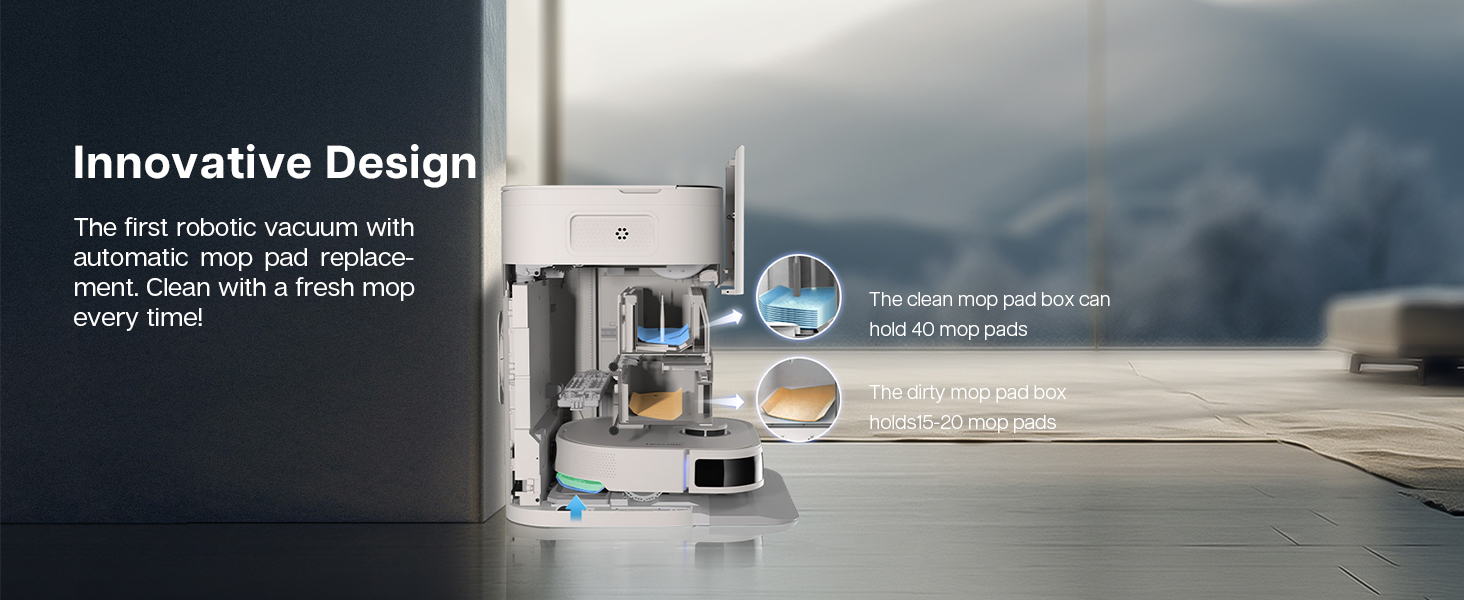
Image: An internal diagram of the docking station illustrating the innovative design for automatic mop pad replacement, showing the compartments for clean (up to 40) and dirty (15-20) mop pads.
4.2 Robot Maintenance
- Roller Brush Cleaning: Periodically remove the main roller brush and clean any tangled hair or debris. This is especially important for homes with pets.
- Filter Cleaning/Replacement: The robot uses a cartridge filter. Clean the filter regularly according to the app's instructions or replace it as needed to maintain suction efficiency.
- Sensor Cleaning: Wipe the robot's sensors (including anti-drop and obstacle detection sensors) with a dry, soft cloth to ensure accurate navigation.
5. Troubleshooting
This section addresses common issues you might encounter with your NOESIS Florio.
- Robot gets stuck frequently:
- Ensure the floor is clear of small obstacles like cables, socks, or toys before cleaning.
- Check if the robot's wheels or brushes are tangled with hair or debris.
- Verify that no-go zones are correctly set in the app for areas where the robot might get stuck. - Mapping issues or robot losing its map:
- Ensure the docking station is in a stable location and not moved frequently.
- Perform a new mapping cycle through the app if the map becomes inaccurate.
- Check for strong Wi-Fi signal in the robot's operating area. - Side brush error:
- Remove and clean the side brush, ensuring no hair or debris is wrapped around its base.
- Reinstall the side brush correctly. If the error persists, the brush might need replacement. - Poor cleaning performance:
- Check the dust bag and water tank levels in the docking station.
- Ensure clean mop pads are available and dirty ones are removed.
- Clean the main roller brush and filter.
- Select a higher suction power or deeper mopping mode in the app. - Robot not charging:
- Ensure the docking station is powered on and the power cord is securely connected.
- Clean the charging contacts on both the robot and the docking station with a dry cloth.
If issues persist, please contact NOESIS customer support.
6. Specifications
| Feature | Specification |
|---|---|
| Brand | NOESIS |
| Model Name | NR200L |
| Item Model Number | F10 |
| Special Features | App Smart Control, Auto-Changing mopping pads, Dual NeuralVision Obstacle Detection, Self-Emptying, Self-Refilling |
| Color | White |
| Product Dimensions | 15.4"L x 13"W x 18.5"H |
| Included Components | Battery, Docking Station |
| Filter Type | Cartridge |
| Battery Life | 3 Hours |
| Power Source | Battery Powered |
| Batteries Included | Yes (1 Lithium Ion battery required) |
| Compatible Devices | Amazon Echo |
| Form Factor | Robotic |
| Item Weight | 31 pounds |
7. Warranty and Support
The NOESIS Florio 2in1 Robot Vacuum and Mop Combo comes with a 2-year warranty.
For technical support, warranty claims, or any inquiries, please contact NOESIS customer service:
- Phone: 855-813-8377
- Operating Hours: Monday - Friday, 9 a.m. - 6 p.m. EST

Image: A graphic displaying a shield icon with '2 YEAR' indicating the product warranty, along with the NOESIS brand name and customer service contact information.
