
Product Overview
This GreenForest computer desk is designed for home office, study, or gaming use, offering a compact and ergonomic workspace. It features a movable monitor stand and adjustable storage shelves to optimize space and comfort. The desk is constructed with durable particle board and a robust metal frame, ensuring stability and a modern aesthetic.

Image: The GreenForest 39-inch computer desk in a black finish, featuring a monitor stand and integrated side shelves. A computer monitor, keyboard, mouse, and other office items are arranged on the desk, which is placed near a window.
Key Features
- Built-in Monitor Stand: A movable stand (18.89 x 7.87 inches) elevates your computer monitor to promote a comfortable sitting posture and free up desktop space for other items like laptops, earphones, and keyboards.
- Reversible Storage Shelves: The desk includes 2-tier storage shelves that can be installed on either the left or right side, depending on your space and preference. These open shelves are suitable for books, storage boxes, or other accessories.
- Removable Middle Shelf: The middle shelf of the storage unit can be removed to create additional space, accommodating larger items such as a computer tower.
- Sturdy Construction: Built with a 40mm premium metal frame and thick particleboard, this desk offers stability and durability for long-term use. The modern black design complements various interior styles.
- Compact Size: Measuring 39.37 x 19.68 x 29.52 inches (L*W*H), the desk provides 26.37 inches of legroom, making it an ideal choice for smaller spaces without compromising comfort.
Specifications
| Brand | GreenForest |
| Model Number | Noir |
| Product Dimensions | 100 x 50 x 75 cm (39.37 x 19.68 x 29.52 inches) |
| Item Weight | 14.8 kg |
| Material Type | Engineered Wood, Metal |
| Colour | Black |
| Special Features | Monitor Stand, Adjustable Storage Shelves |
| Mounting Type | Freestanding |

Image: A diagram illustrating the precise dimensions of the GreenForest computer desk, including the length, width, height, monitor stand size, and shelf measurements.
Assembly Instructions
The GreenForest computer desk is designed for straightforward assembly. All necessary tools and instructions are included in the package, with parts clearly labeled to facilitate the process. Assembly typically takes approximately 30 minutes.
- Unpack Components: Carefully remove all parts from the packaging and verify against the included parts list.
- Assemble Frame: Attach the metal frame components according to the diagrams provided in the instruction manual. Ensure all screws are tightened securely.
- Attach Desktop: Secure the desktop panel to the assembled metal frame.
- Install Storage Shelves: Decide whether to install the 2-tier storage shelves on the left or right side of the desk. Follow the instructions to attach them to the frame.
- Position Monitor Stand: Place the movable monitor stand on the desktop in your desired location.
- Final Check: Ensure all connections are tight and the desk is stable before placing items on it.
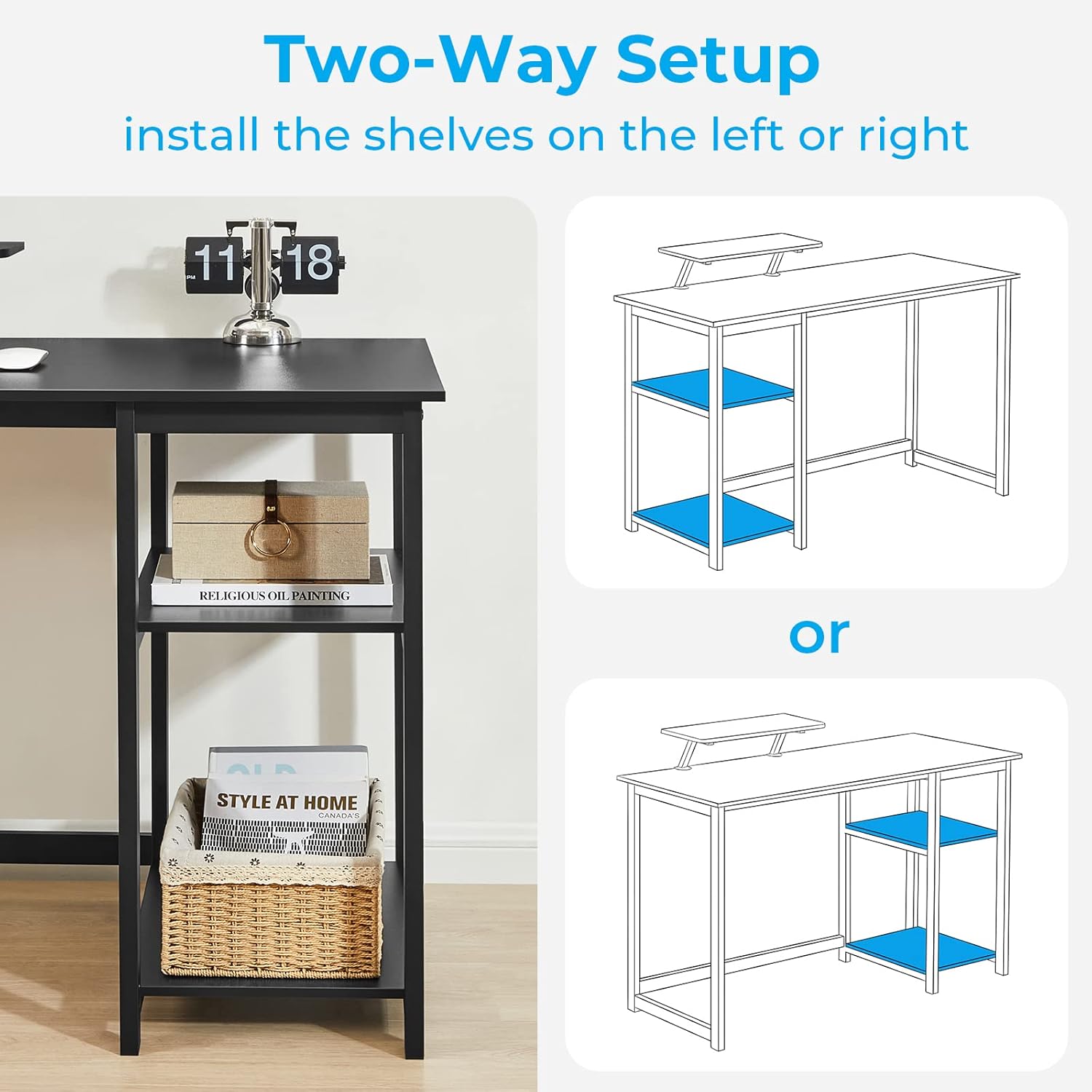
Image: Illustration demonstrating the reversible design of the storage shelves, allowing installation on either the left or right side of the desk.

Image: A visual guide showing the removal of the middle shelf to accommodate a larger computer tower within the storage compartment.
Usage and Operation
This desk is designed for versatile use in various settings. Follow these guidelines for optimal operation:
- Monitor Stand Placement: Utilize the movable monitor stand to raise your screen to an ergonomic height, reducing neck and eye strain. Adjust its position as needed for comfort.
- Storage Customization: Arrange the items on the 2-tier shelves to suit your organizational needs. If you have a large computer tower, remove the middle shelf for a dedicated space.
- Weight Distribution: Distribute weight evenly across the desktop and shelves to maintain stability. Avoid placing excessively heavy items on one side.

Image: An illustration demonstrating the correct ergonomic posture achieved by using the monitor stand, compared to an incorrect posture without it.
Video: A demonstration of the GreenForest computer desk's features, including the movable monitor stand, reversible shelves, and how it can accommodate a computer tower. It also shows different color options and usage scenarios.
Maintenance
To ensure the longevity and appearance of your GreenForest computer desk, follow these simple maintenance tips:
- Cleaning: Wipe the desk surfaces with a soft, damp cloth. Avoid using harsh chemicals or abrasive cleaners, which can damage the finish.
- Spills: Clean up spills immediately to prevent staining or damage to the engineered wood.
- Hardware Check: Periodically check all screws and fasteners to ensure they remain tight. Retighten if necessary to maintain stability.
- Avoid Excessive Heat/Moisture: Do not place hot items directly on the desktop without protection. Keep the desk away from excessive moisture or direct sunlight to prevent warping or fading.
Troubleshooting
If you encounter any issues with your GreenForest computer desk, refer to the following common troubleshooting steps:
- Desk Wobbles:
- Ensure all screws and bolts are securely tightened.
- Check if the desk is placed on an even surface. Adjust floor levelers if available.
- Parts Missing/Damaged:
- Review the parts list in the instruction manual.
- Contact GreenForest customer support for assistance with replacement parts.
- Difficulty Assembling:
- Double-check the instruction manual diagrams and steps.
- Ensure you are using the correct hardware for each step.
Warranty and Support
For warranty information, product support, or to inquire about replacement parts, please contact GreenForest customer service. Refer to the contact details provided with your purchase or visit the official GreenForest website.
Video: A short preview video showcasing the GreenForest computer desk alongside a matching printer stand, highlighting their complementary design and functionality in a workspace.


