1. Introduction
Thank you for choosing the Casio Edifice EFR-526L-2CVUDF Chronograph Watch. This manual provides detailed instructions on how to set up, operate, and maintain your watch to ensure optimal performance and longevity. Please read this manual thoroughly before using your watch.
2. Product Overview
The Casio Edifice EFR-526L-2CVUDF is a sophisticated analog chronograph watch featuring a stainless steel case, a genuine leather band, and 100-meter water resistance. It includes a 1/10-second stopwatch and a date display.
2.1 Watch Components
- Crown: Used for setting time and date.
- Pushers (A and B): Used for operating the chronograph functions.
- Main Dial: Displays hours, minutes, and seconds.
- Sub-dials: 1/10-second stopwatch, stopwatch minutes, stopwatch seconds.
- Date Display: Shows the current date.

Figure 1: Front view of the Casio Edifice EFR-526L-2CVUDF watch, showing the main dial, sub-dials, and date display.
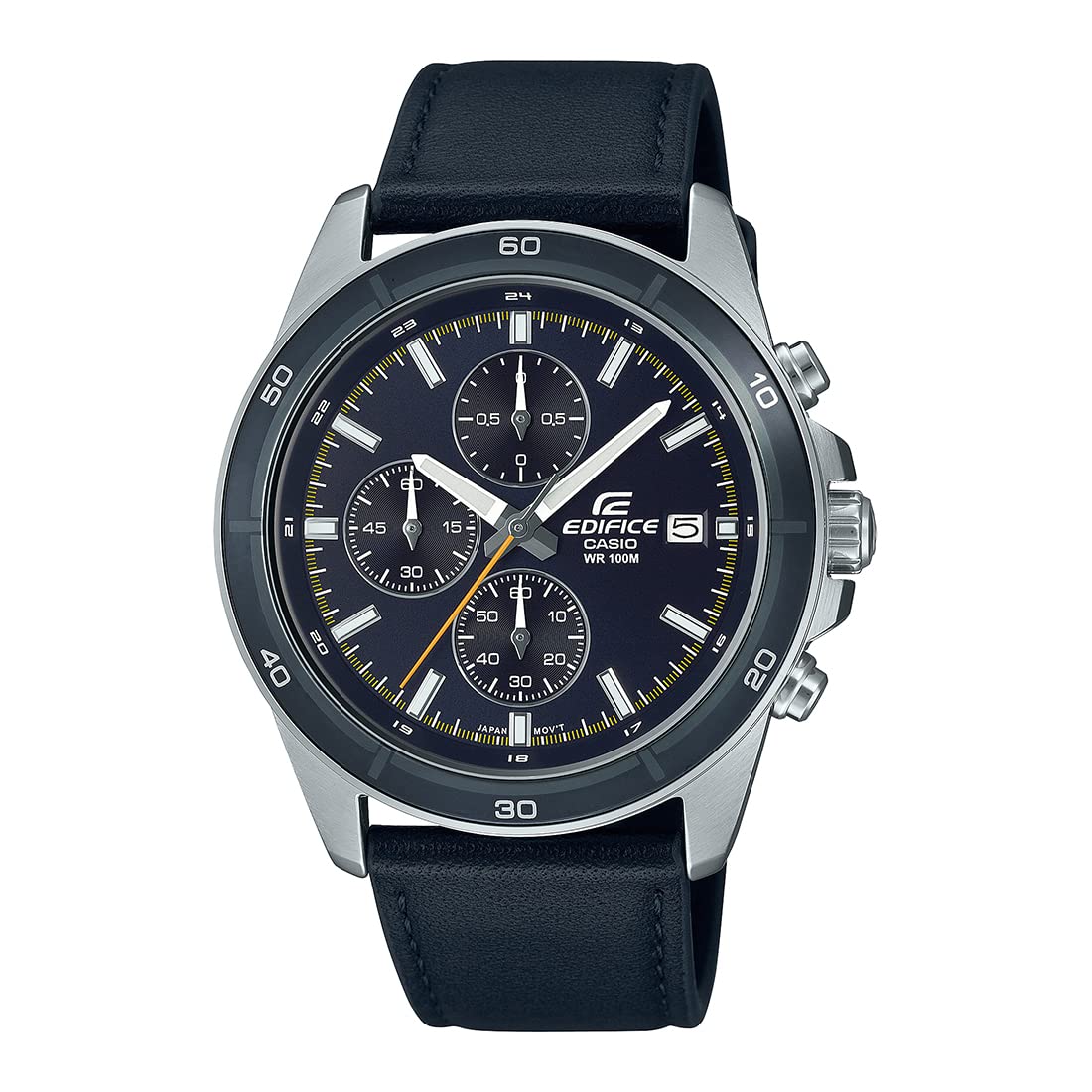
Figure 2: Side view of the watch, highlighting the crown and the two pushers (A and B) used for chronograph operations.

Figure 3: Rear view of the watch, showing the stainless steel screw lock back and the genuine leather band with its buckle.
3. Setup
3.1 Setting the Time
- Pull the crown out to the second click position. The second hand will stop.
- Rotate the crown to set the hour and minute hands. Ensure the AM/PM setting is correct if your watch has a 24-hour indicator or if setting the date.
- Push the crown back in to the normal position. The second hand will resume movement.
3.2 Setting the Date
- Pull the crown out to the first click position.
- Rotate the crown to adjust the date. Rotate it until the desired date appears.
- Push the crown back in to the normal position.
Note: Avoid setting the date between 9:00 PM and 1:00 AM, as this may interfere with the automatic date change mechanism.
4. Operating the Watch
4.1 Timekeeping
The watch displays the current time using three analog hands: hour, minute, and second. The main dial provides a clear and precise reading of the time.
4.2 Chronograph (Stopwatch) Functions
Your Edifice watch is equipped with a 1/10-second stopwatch, capable of measuring up to 59 minutes and 59.9 seconds.
Starting and Stopping the Stopwatch:
- Press pusher A to start the stopwatch. The stopwatch second hand, 1/10-second hand, and minute hand will begin moving.
- Press pusher A again to stop the stopwatch. The elapsed time will be indicated by the sub-dials.
- Press pusher B to reset the stopwatch to zero.
Measuring Split Times:
- Press pusher A to start the stopwatch.
- Press pusher B to measure a split time. The stopwatch hands will stop to indicate the split time, while timing continues internally.
- Press pusher B again to release the split time and display the current elapsed time.
- To stop the stopwatch, press pusher A.
- To reset, press pusher B.
Measuring 1st and 2nd Place Times:
- Press pusher A to start the stopwatch.
- When the first runner finishes, press pusher B to record their time.
- When the second runner finishes, press pusher A to stop the stopwatch.
- Press pusher B to display the second runner's time.
- Press pusher B again to reset the stopwatch.
5. Maintenance
5.1 Water Resistance
This watch is rated for 100-meter water resistance. This means it is suitable for swimming, showering, and snorkeling. However, it is not suitable for scuba diving. Do not operate the crown or pushers while the watch is wet or submerged in water.
5.2 Cleaning
Wipe the watch case and band with a soft, dry cloth to remove dirt and moisture. For stubborn dirt, use a soft cloth dampened with water and a mild neutral detergent, then wipe dry. Avoid using chemical cleaners or solvents.
5.3 Leather Band Care
The genuine leather band can deteriorate over time due to exposure to water, sweat, and direct sunlight. Avoid prolonged exposure to moisture and direct sunlight. If the band gets wet, gently wipe it dry with a soft cloth and allow it to air dry completely before wearing.
5.4 Battery Replacement
The watch is powered by an SR920SW battery, which has an approximate life of 2 years. When the watch stops or the second hand moves erratically, it is time to replace the battery. Battery replacement should be performed by a qualified watch technician to ensure proper sealing and water resistance.
6. Troubleshooting
- Watch not running: Check if the crown is pushed in completely. If it is, the battery may need replacement.
- Incorrect time/date: Refer to Section 3.1 and 3.2 to reset the time and date. Ensure the crown is fully pushed in after setting.
- Chronograph hands not resetting to zero: This may require a chronograph zero position adjustment. Consult a Casio service center for assistance.
- Water inside the watch: Immediately take the watch to a qualified service center. Do not attempt to open the watch yourself.
7. Specifications
| Model Number | EFR-526L-2CVUDF |
| Case / Bezel Material | Stainless Steel |
| Band Material | Genuine Leather |
| Water Resistance | 100 Meters (10 BAR) |
| Glass | Mineral Glass |
| Back Plate | Screw Lock Back |
| Movement Type | Quartz |
| Stopwatch | 1/10-second, Measuring capacity: 59'59.9'' |
| Battery Type | SR920SW |
| Battery Life | Approx. 2 years |
| Accuracy | ±20 seconds per month |
| Product Dimensions | 20.5 x 1.2 x 4.4 cm (L x W x H) |
| Case Diameter | 43.8 Millimetres |
| Item Weight | 74 g |

Figure 4: Watch dimensions illustration, showing case measurements for reference.
8. Warranty and Support
8.1 Warranty Information
Your Casio Edifice EFR-526L-2CVUDF watch comes with an extended warranty. Please refer to the warranty card included with your purchase for specific terms, conditions, and duration of coverage. Keep your proof of purchase for warranty claims.
8.2 Customer Support
For any questions, service, or repair needs not covered in this manual, please contact your authorized Casio dealer or visit the official Casio website for customer support information and service center locations. Do not attempt to repair the watch yourself, as this may void the warranty.
You can find more information and support on the official Casio website: www.casio.com


