
LARKSOUND L210
LARKSOUND 2.1 Sound Bar with Subwoofer User Manual
Model: L210
Brand: LARKSOUND
Introduction
Thank you for purchasing the LARKSOUND 2.1 Sound Bar with Subwoofer. This manual provides comprehensive instructions for setting up, operating, and maintaining your new audio system. Please read this manual thoroughly before use to ensure proper functionality and to maximize your listening experience.
Safety Information
- Do not expose this appliance to dripping or splashing.
- Do not place objects filled with liquids, such as vases, on the apparatus.
- Ensure proper ventilation. Do not block any ventilation openings.
- Place the sound bar and subwoofer on a stable, flat surface.
- Use only the power adapter supplied with the unit.
- Unplug the appliance during lightning storms or when unused for long periods.
- Do not attempt to disassemble or repair the unit yourself. Refer all servicing to qualified personnel.
Package Contents
Please check to ensure all items are included in your package:
- LARKSOUND 2.1 Sound Bar (two detachable halves)
- Wired Subwoofer
- Remote Control
- AUX Cable
- Optical Cable
- User Manual
- Wall Mount Template
- Mount Screws
- Extra-long Bracket
- Power Adapter

Image: All components included in the LARKSOUND 2.1 Sound Bar package, showing the soundbar, subwoofer, remote control, AUX cable, optical cable, user manual, wall mount template, mount screws, and extra-long bracket.
Product Overview
The LARKSOUND 2.1 Sound Bar system consists of a main sound bar unit and a dedicated wired subwoofer, designed to deliver enhanced audio for your television and other media devices.

Image: The LARKSOUND 2.1 Sound Bar system, featuring the main soundbar unit, the wired subwoofer, and the remote control.
Key Features:
- Room-Filling Sound: Maximizes sound clarity and reduces voice delay for a dynamic audio experience.
- Deep Bass: Dedicated wired subwoofer with a 5.25-inch driver provides powerful and rich bass.
- Professionally Tuned EQ Modes: Includes Music, Movie, Voice, Normal, and a unique Night Mode.
- Multiple Connectivity Options: Supports Bluetooth 5.0, USB, AUX IN, HDMI (ARC), and Optical connections.
- Compact, Low Profile Design: The soundbar is designed to fit subtly under most TVs without obstructing the view.
- Detachable Design: The soundbar can be split into two halves for easier transport or storage.
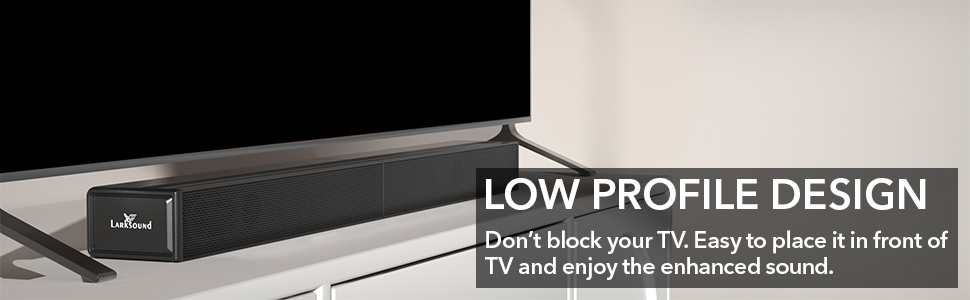
Image: The soundbar's low-profile design, illustrating how it fits discreetly in front of a television without blocking the screen.

Image: A close-up view of the bottom of the subwoofer, highlighting its 5.25-inch speaker for enhanced bass.
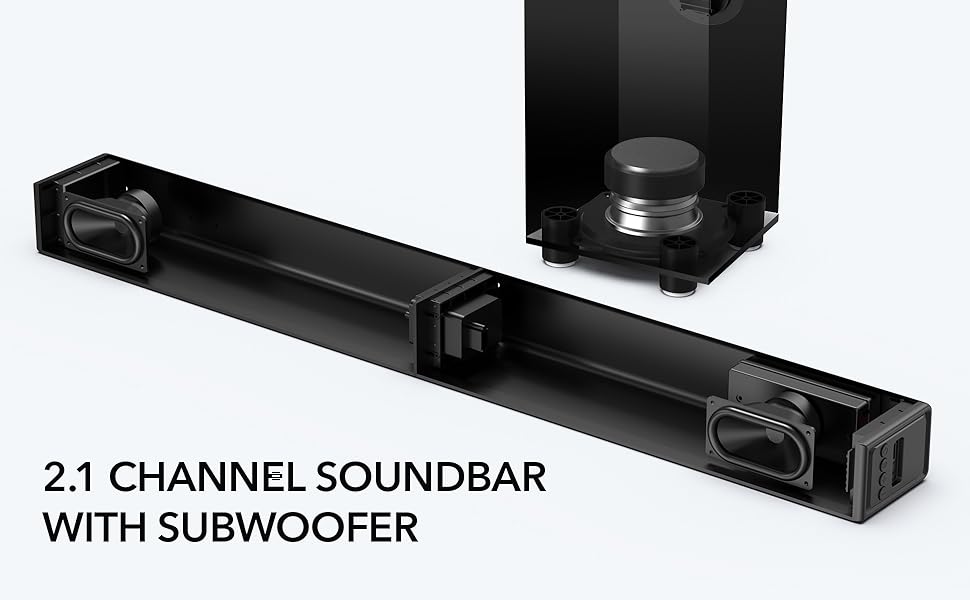
Image: An internal view demonstrating the 2.1 channel configuration of the soundbar and subwoofer, showing the speaker components.
Setup
Assembling the Sound Bar:
- If the soundbar is in two halves, plug the audio connector from one half into the audio input port on the other main unit.
- Align the arrow on the sticker of one half to the edge of the other main unit.
- Merge the two main units together.
- Move the two main units to one line until it locks securely.
Note: The soundbar will not work when split and the audio connector unplugged.
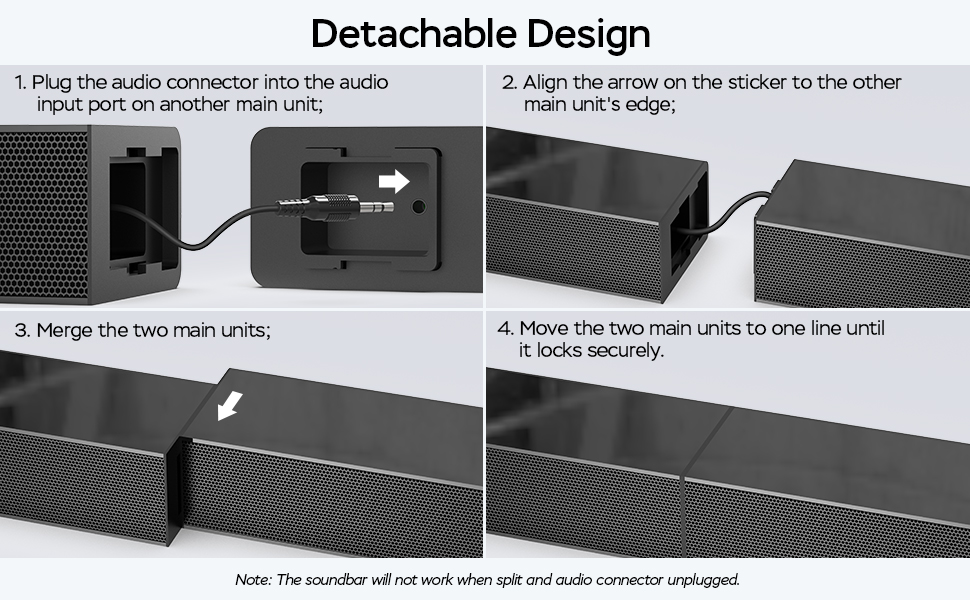
Image: Visual instructions for assembling the detachable soundbar, showing the connection of the two halves.
Placement Options:
The sound bar can be placed on a TV stand or wall-mounted.
- TV Stand Placement: Position the sound bar centrally in front of your TV. Ensure it does not block the TV's remote sensor.
- Wall Mounting: Use the included wall mount template, screws, and brackets for secure wall installation. Refer to the wall mount template for detailed instructions.

Image: The soundbar wall-mounted above a television, demonstrating its compatibility with wall installation.
Connecting the Subwoofer:
Connect the wired subwoofer to the sound bar using the dedicated cable. The subwoofer can be placed on the floor near the sound bar or in a location that provides optimal bass response for your room.
Connecting to Your TV/Devices:
The sound bar offers multiple connection options:
- HDMI (ARC): For the best audio quality and TV remote control integration. Connect an HDMI cable (not included) from the sound bar's HDMI ARC port to your TV's HDMI ARC port. Ensure your TV's audio output is set to PCM audio and Dolby/DTS are turned OFF.
- Optical: Use the included optical cable to connect from the sound bar's OPTICAL port to your TV's optical audio output.
- AUX IN: Use the included 3.5mm AUX cable to connect to devices with a 3.5mm audio output.
- USB: Insert a USB drive with audio files into the USB port for direct playback.
- Bluetooth: For wireless connection to smartphones, tablets, and other Bluetooth-enabled devices.

Image: A detailed view of the soundbar's connection ports, including HDMI, USB, Optical, AUX IN, and Bluetooth, illustrating the multiple connectivity options.

Image: The soundbar connected to a TV via an HDMI cable, demonstrating how HDMI-CEC technology allows control of the soundbar volume with the TV remote.
Operating Instructions
Power On/Off:
Press the Power button on the remote control or on the side of the sound bar to turn the unit on or off.
Selecting Input Source:
Press the 'Input' button on the remote or the sound bar to cycle through available input sources (HDMI, Optical, AUX, USB, Bluetooth). The soundbar will display a white, blue, green, or orange light to indicate the selected input.
Volume Control:
Use the Volume Up (+) and Volume Down (-) buttons on the remote or sound bar to adjust the volume. If connected via HDMI ARC, you may be able to control the sound bar volume with your TV remote.
EQ Modes:
Optimize your audio experience with specialized sound modes:
- Music Mode: Provides an immersive sound effect for music listening.
- Movie Mode: Enhances surround sound effects for a cinematic experience.
- Voice Mode: Improves clarity of dialogue, making voices crisper.
- Normal Mode: Standard audio setting.
- Night Mode: Lowers the volume by 50% immediately to prevent disturbing others while they sleep.

Image: An illustration of the three specialized sound modes (Dialogue, Movie, Music) and their application to different types of media content on a television screen.

Image: A graphic detailing the benefits of Music, Movie, and Dialogue sound modes, explaining how each enhances specific audio experiences.

Image: A person using the remote control to activate Night Mode on the soundbar, which reduces volume by 50% for quiet listening.
Bluetooth Pairing:
- Select Bluetooth input on the sound bar. The indicator light will flash.
- Enable Bluetooth on your device (smartphone, tablet, etc.).
- Search for "LARKSOUND L210" (or similar) in your device's Bluetooth settings and select it to pair.
- Once paired, the indicator light will become solid, and you can stream audio wirelessly.

Image: A couple enjoying music streamed wirelessly from a smartphone to the soundbar via Bluetooth 5.0 connectivity.
Maintenance
- Cleaning: Use a soft, dry cloth to clean the surfaces of the sound bar and subwoofer. Do not use liquid cleaners or aerosols.
- Ventilation: Ensure the ventilation openings are clear of dust and debris to prevent overheating.
- Storage: If storing the unit for an extended period, disconnect it from the power outlet and store it in a cool, dry place.
Troubleshooting
| Problem | Possible Cause | Solution |
|---|---|---|
| No power | Power cable not connected or power outlet not working. | Ensure power cable is securely plugged into the sound bar and a working power outlet. |
| No sound | Incorrect input source selected; volume too low; audio cable not connected properly; TV audio output settings incorrect. | Select the correct input source. Increase volume. Check all audio cable connections. For HDMI ARC/Optical, ensure TV audio output is set to PCM and Dolby/DTS are OFF. |
| Sound distortion or static | Poor cable connection; interference; source audio quality. | Check and re-secure all audio cables. Move sound bar away from other electronic devices. Try a different audio source. |
| Bluetooth pairing issues | Sound bar not in pairing mode; device too far; device already paired with another unit. | Ensure sound bar is in Bluetooth pairing mode. Keep device within 33 feet. Disconnect from other Bluetooth devices. |
| Remote control not working | Batteries low or dead; obstruction between remote and sound bar. | Replace remote batteries. Ensure no obstructions and point remote directly at the sound bar's sensor. |
Specifications
| Feature | Detail |
|---|---|
| Model Name | 2.1 CH Soundbar with Subwoofer |
| Brand | LARKSOUND |
| Speaker Type | Soundbar |
| Surround Sound Channel Configuration | 2.1 |
| Connectivity Technology | Bluetooth 5.0, USB, AUX IN, HDMI (ARC), Optical |
| Speaker Maximum Output Power | 180 Watts |
| Soundbar Dimensions (D x W x H) | 4.13" x 30.98" x 2.36" |
| Subwoofer Dimensions (D x W x H) | 5.9" x 5.9" x 15.74" |
| Subwoofer Speaker Size | 5.25 Inches |
| Color | Brushed Black |
| Control Method | Remote Control, Buttons on Soundbar |
| Mounting Type | Tabletop, Wall Mount |
| Item Weight | 10.5 pounds (total system) |
Warranty and Support
For warranty information and technical support, please refer to the warranty card included with your product or contact LARKSOUND customer service directly. Contact details can typically be found on the product packaging or the official LARKSOUND website.
Related documentsL210


Ask a question about this manual
Ask about setup, troubleshooting, compatibility, parts, safety, or missing instructions. Manuals+ will review the question and use this page’s manual context to help answer it.