
LARKSOUND 2.1 CH Sound Bar (16 inch Glossy)
LARKSOUND 2.1 CH Sound Bar
User Manual
Model: 16 inch Glossy (B0BRCQT22P)
1. Introduction
Thank you for purchasing the LARKSOUND 2.1 CH Sound Bar. This sound bar is designed to enhance your audio experience for TV, PC, and gaming, featuring a built-in subwoofer and multiple connectivity options. This manual provides detailed instructions for setup, operation, maintenance, and troubleshooting to ensure optimal performance and longevity of your device. Please read this manual thoroughly before using the product and retain it for future reference.
2. Package Contents
Carefully unpack the box and ensure all the following items are included:
- LARKSOUND 2.1 CH Sound Bar
- Remote Control
- Optical Cable
- AUX Cable
- Wall Mounting Kit (includes mounting template and screws)
- User Manual

Image: All components included in the LARKSOUND 2.1 CH Sound Bar package, including the sound bar, remote control, various cables, and wall mounting accessories.
3. Product Overview
Familiarize yourself with the sound bar's components and connection ports.
3.1 Front and Top View

Image: The main view of the LARKSOUND 2.1 CH Sound Bar, showcasing its sleek, glossy design and speaker grille.
The sound bar features a compact, low-profile design that fits easily under most televisions or monitors without obstructing the screen or remote sensor. The front grille covers the main speaker drivers, while the top surface is smooth and glossy.
3.2 Bottom View and Internal Components

Image: The underside of the sound bar, highlighting the integrated down-firing subwoofer for enhanced bass performance.
The sound bar incorporates a built-in down-firing subwoofer on its underside, providing powerful bass without the need for a separate external subwoofer unit. This design contributes to its compact form factor.

Image: An exploded diagram illustrating the dual full-range drivers and the down-firing subwoofer, demonstrating how these components work together to deliver balanced and powerful audio.
Internally, the sound bar is equipped with dual full-range drivers and a dedicated down-firing subwoofer. This configuration ensures a balanced and powerful audio experience across a wide frequency range, from low to high frequencies.
3.3 Connection Ports and Controls

Image: A detailed view of the sound bar's rear panel, displaying the HDMI (ARC), Optical, USB, and AUX IN ports, along with integrated control buttons.
The sound bar offers a variety of input options on its rear panel, including HDMI (ARC), Optical, USB, and AUX IN. On the side, you will find integrated control buttons for power, volume, and input selection.
4. Setup
Follow these steps to set up your LARKSOUND 2.1 CH Sound Bar.
4.1 Power Connection
Connect the power cable from the sound bar to a standard wall outlet. The sound bar will enter standby mode.
4.2 Connecting to Your TV or Device
The sound bar supports multiple connection methods:
- HDMI (ARC) Connection:
For the best audio quality and convenience, connect the sound bar to your TV's HDMI ARC port using an HDMI cable (not included). This allows you to control the sound bar's volume with your TV remote.
- Connect one end of an HDMI cable to the HDMI (ARC) port on the sound bar.
- Connect the other end to the HDMI (ARC) port on your TV.
- On your TV, navigate to audio settings and ensure the audio output is set to PCM. Disable Dolby and DTS settings if present.

Image: Illustration of the sound bar connected to a television using an HDMI cable, highlighting the HDMI (ARC) port for simplified control.
- Optical Connection:
Use the included optical cable for a high-quality digital audio connection.
- Connect one end of the optical cable to the OPTICAL port on the sound bar.
- Connect the other end to the Optical Digital Audio Out port on your TV or device.
- On your TV, navigate to audio settings and ensure the audio output is set to PCM.
- AUX (3.5mm) Connection:
For analog audio devices, use the included 3.5mm AUX cable.
- Connect one end of the AUX cable to the AUX IN port on the sound bar.
- Connect the other end to the headphone jack or audio out port on your device.
- USB Connection:
Insert a USB drive containing audio files into the USB port on the sound bar for direct playback.
- Bluetooth Connection:
Wirelessly stream audio from your Bluetooth-enabled devices.
- Turn on the sound bar and switch to Bluetooth mode using the remote or the input button on the sound bar. The indicator light will flash.
- On your device (smartphone, tablet, etc.), enable Bluetooth and search for "LARKSOUND Sound Bar".
- Select the sound bar from the list of available devices to pair. Once connected, the indicator light will stop flashing.

Image: A visual representation of the sound bar's Bluetooth connectivity, allowing users to stream music wirelessly from their mobile devices.
5. Operating Instructions
Learn how to use your sound bar's features and controls.
5.1 Remote Control Functions
The included remote control allows full command over your sound bar. Ensure batteries are inserted correctly.
| Button | Function |
|---|---|
| Power | Turns the sound bar On/Off. |
| Input (Source) | Switches between HDMI (ARC), Optical, AUX, USB, and Bluetooth inputs. |
| Volume +/- | Adjusts the master volume level. |
| Mute | Mutes or unmutes the sound. |
| EQ Modes (Music, Movie, Voice, Normal) | Selects preset equalizer modes optimized for different audio content. |
| Night Mode | Lowers volume by 50% and compresses bass to minimize disturbance. |
5.2 EQ Modes
The sound bar offers specialized sound modes to optimize your listening experience:
- Music Mode: Provides an immersive sound effect, making you feel like you are inside the action.
- Movie Mode: Delivers better surround sound effects, enhancing your movie-watching experience with impactful explosions and clear dialogue.
- Voice Mode: Enhances the clarity of spoken words, making dialogue crisper and easier to understand.
- Normal Mode: Standard audio profile for general listening.
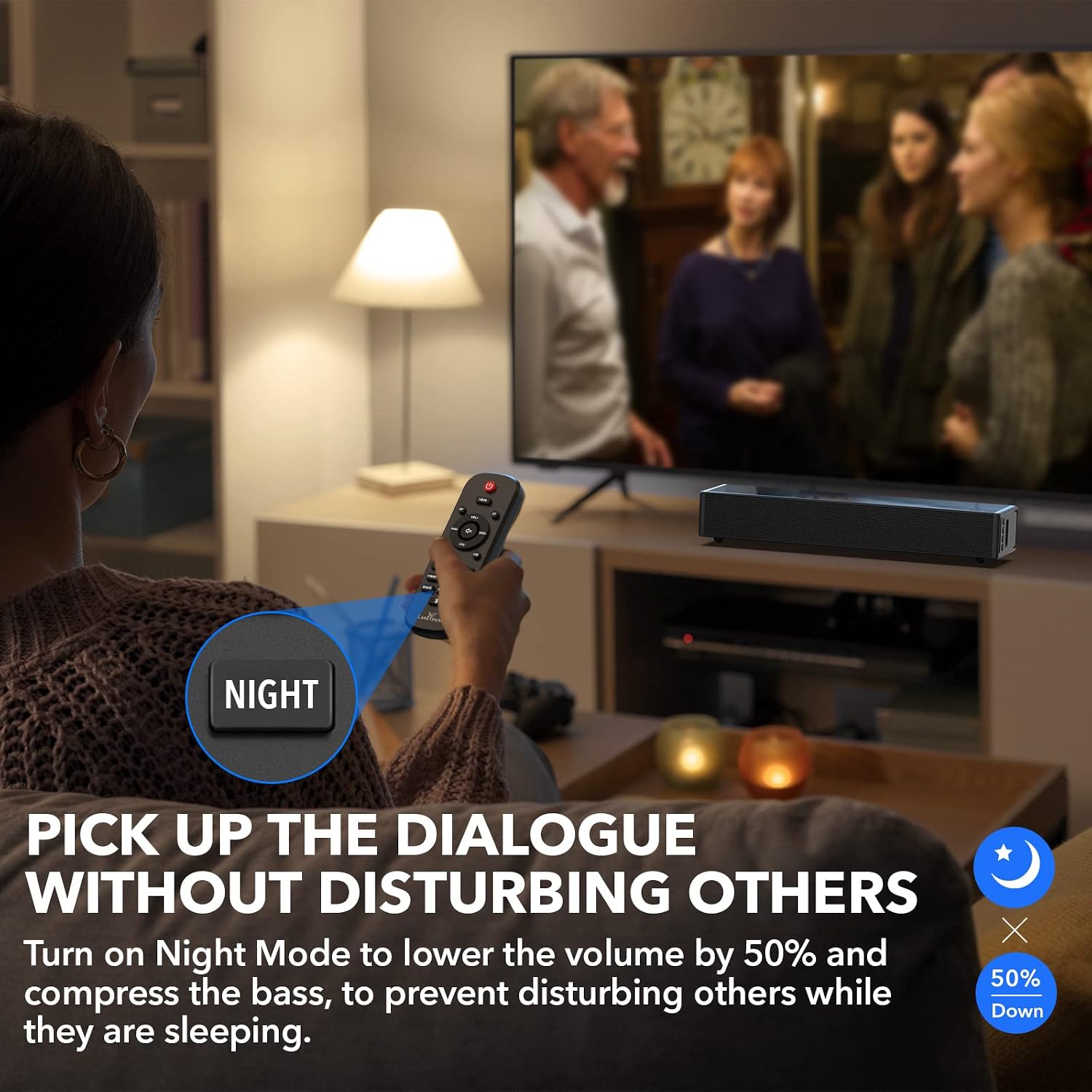
Image: Visual representation of the three specialized sound modes: Dialogue, Movie, and Music, each designed for specific audio content.
5.3 Night Mode
Activate Night Mode to enjoy audio without disturbing others. This mode immediately lowers the volume by 50% and compresses the bass, making it ideal for late-night viewing or listening.
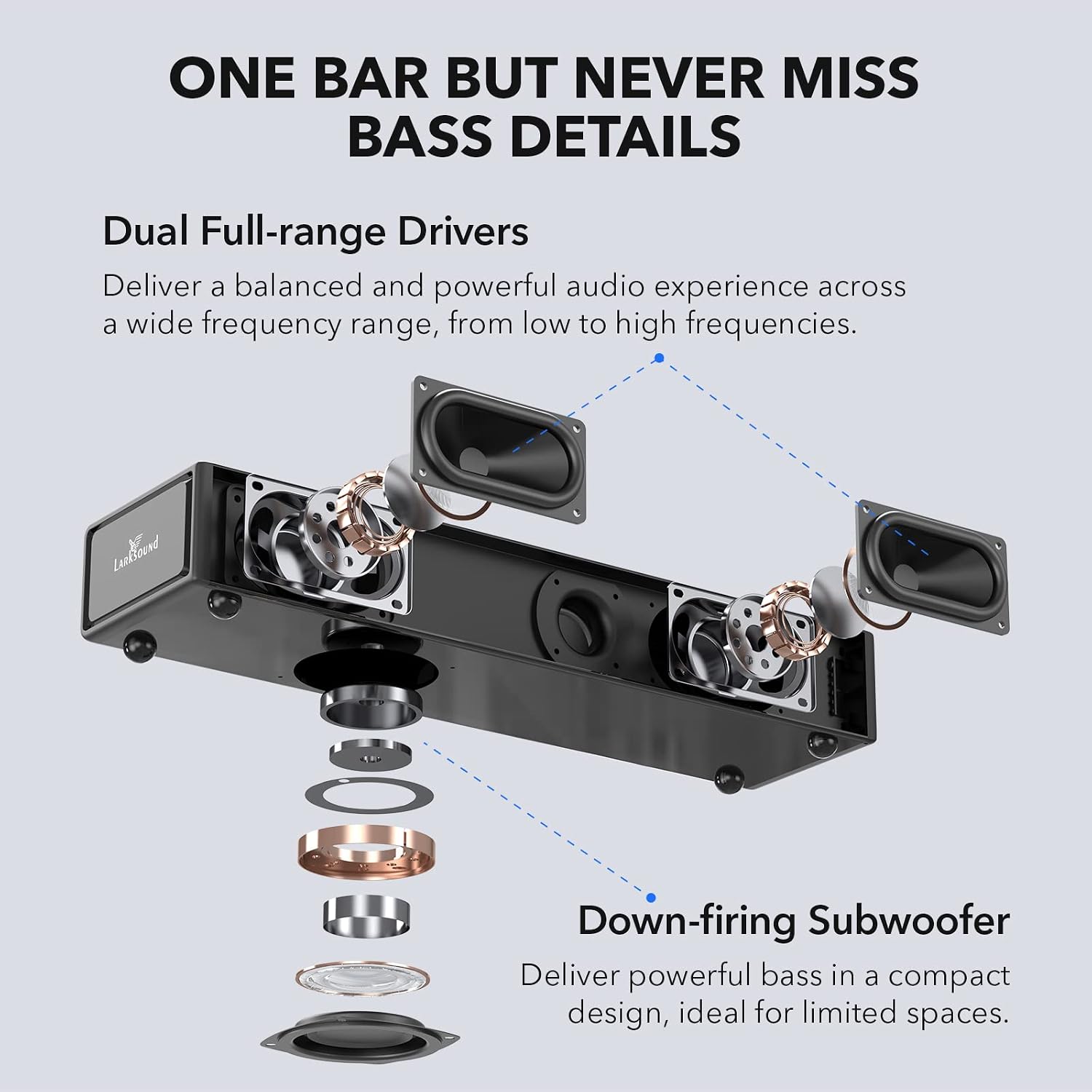
Image: The Night Mode feature, showing its activation button on the remote and explaining its function to reduce volume and compress bass for quiet environments.
6. Wall Mounting
The sound bar can be conveniently mounted on a wall using the included wall mounting kit. Refer to the mounting template and follow the step-by-step guide provided in the kit for easy installation.
Image: The sound bar elegantly mounted on a wall beneath a television, demonstrating its space-saving and aesthetic benefits.
7. Troubleshooting
If you encounter issues with your sound bar, please refer to the following common problems and solutions:
| Problem | Possible Solution |
|---|---|
| No power | Ensure the power cable is securely connected to the sound bar and a working wall outlet. Check if the power indicator light is on. |
| No sound |
|
| Remote control not working |
|
| Bluetooth pairing issues |
|
| Distorted sound |
|
8. Specifications
Detailed technical specifications for the LARKSOUND 2.1 CH Sound Bar:
| Feature | Detail |
|---|---|
| Brand | LARKSOUND |
| Model | 2.1 CH Sound Bar (16 inch Glossy) |
| ASIN | B0BRCQT22P |
| Speaker Type | Soundbar with Built-in Subwoofer |
| Surround Sound Channel Configuration | 2.1 |
| Connectivity Technology | Bluetooth, Auxiliary, USB, Optical, HDMI (ARC) |
| Bluetooth Version | 5.0 |
| Bluetooth Range | Up to 33 feet (10 meters) |
| Speaker Maximum Output Power | 110 Watts |
| Frequency Response | 20 KHz (Upper limit, typical for soundbars) |
| Audio Output Mode | Stereo |
| Product Dimensions (D x W x H) | 4.13"D x 15.75"W x 2.36"H |
| Item Weight | 4.2 pounds (1.91 Kilograms) |
| Power Source | Wall Socket |
| Control Method | Remote Control, On-device buttons |
| Mounting Type | Wall Mount, Tabletop |
| Recommended Uses | For Televisions, PC, Gaming |
| Color | Glossy Black |
9. Maintenance
Proper care and maintenance will ensure the longevity of your sound bar:
- Cleaning: Use a soft, dry cloth to clean the surface of the sound bar. Do not use liquid cleaners or abrasive materials, as they may damage the finish.
- Ventilation: Ensure the sound bar has adequate ventilation. Do not block the speaker grilles or the subwoofer opening.
- Placement: Avoid placing the sound bar in direct sunlight, near heat sources, or in areas with high humidity or dust.
- Power Off: If the sound bar will not be used for an extended period, unplug it from the power outlet.
10. Warranty and Support
For warranty information and customer support, please refer to the warranty card included in your product packaging or visit the official LARKSOUND website. Keep your purchase receipt as proof of purchase for any warranty claims.
For technical assistance or further inquiries, please contact LARKSOUND customer service through the contact details provided on their official website.
Related documents2.1 CH Sound Bar (16 inch Glossy)


Ask a question about this manual
Ask about setup, troubleshooting, compatibility, parts, safety, or missing instructions. Manuals+ will review the question and use this page’s manual context to help answer it.