
Zephyr ZMD-M90B
Zephyr ZMD-M90B Modena Island Range Hood User Manual
Model: ZMD-M90B | Brand: Zephyr
1. Introduction
This manual provides essential information for the safe installation, operation, and maintenance of your Zephyr ZMD-M90B Modena Island Range Hood. Please read all instructions carefully before installation and use to ensure optimal performance and safety.
The Zephyr Modena island range hood features a sleek design with LumiLight LED lighting and ICON Touch controls. It is engineered to effectively remove cooking fumes and odors from your kitchen environment.

Image 1.1: Front view of the Zephyr ZMD-M90B Modena Island Range Hood.
2. Important Safety Information
To reduce the risk of fire, electric shock, or injury, observe the following:
- Read all instructions thoroughly before operating the range hood.
- Installation work and electrical wiring must be done by qualified person(s) in accordance with all applicable codes and standards, including fire-rated construction.
- Do not operate any fan with a damaged cord or plug. Discard fan or return to an authorized service facility for examination and/or repair.
- Sufficient air is needed for proper combustion and exhausting of gases through the flue (chimney) of fuel burning equipment to prevent backdrafting. Follow the heating equipment manufacturer’s guideline and safety standards such as those published by the National Fire Protection Association (NFPA), and the American Society for Heating, Refrigeration and Air Conditioning Engineers (ASHRAE), and the local code authorities.
- When cutting or drilling into wall or ceiling, do not damage electrical wiring and other hidden utilities.
- Ducted fans must always be vented to the outdoors.
- Clean grease filters frequently. Grease should not be allowed to accumulate on fan or filter.
- Never leave surface units unattended at high settings. Boil-overs cause smoking and greasy spillovers that may ignite.
- Always turn hood ON when cooking at high heat or when flambéing food.
- Use appropriate pan size for each surface unit.
3. Package Contents
Verify that all components are present before beginning installation:
- Zephyr ZMD-M90B Modena Island Range Hood Unit
- Duct Cover Sections (Upper and Lower)
- Mounting Bracket and Hardware
- Grease Filters (Mesh Type)
- LumiLight LED Lights (Pre-installed or separate)
- Instruction Manual
4. Setup and Installation
The Zephyr Modena range hood features a Quick-Lock Installation System designed for a streamlined setup process. Professional installation is recommended.
4.1 Pre-Installation Steps
- Unpacking: Carefully remove all packaging materials and inspect the hood for any shipping damage.
- Location: Ensure the installation location provides adequate clearance above the cooking surface and structural support for the hood's weight (approximately 234 lbs).
- Ducting: Plan for proper ducting to the outdoors. This model is designed for ducted ventilation. An extension duct cover kit is available to accommodate ceiling heights up to 12 feet.
- Electrical: Ensure a dedicated 120V electrical supply is available at the installation point.
4.2 Quick-Lock Installation System
The Quick-Lock system simplifies the installation of island range hoods. The process generally involves:
- Assemble the mounting frame securely to the ceiling structure.
- Lift the main hood unit and engage it with the Quick-Lock mechanism on the frame.
- Secure the hood in place.
- Connect the electrical wiring according to local codes.
- Install the ducting to the exhaust outlet.
- Assemble and attach the 4-piece duct covers, ensuring they are properly aligned and secured.

Image 4.1: The Zephyr Modena range hood installed above an island cooktop.
4.3 Airflow Control Technology (ACT)
Your range hood is equipped with Airflow Control Technology (ACT), which allows installers to set the maximum CFM levels to comply with local code requirements. This setting is typically configured during installation by a qualified technician.
5. Operating Instructions
The Zephyr Modena range hood features intuitive ICON Touch™ controls for easy operation.
5.1 ICON Touch™ Controls
The ICON Touch™ controls are seamlessly integrated into the stainless steel canopy. These controls allow you to manage the fan speed, lighting, and other functions.
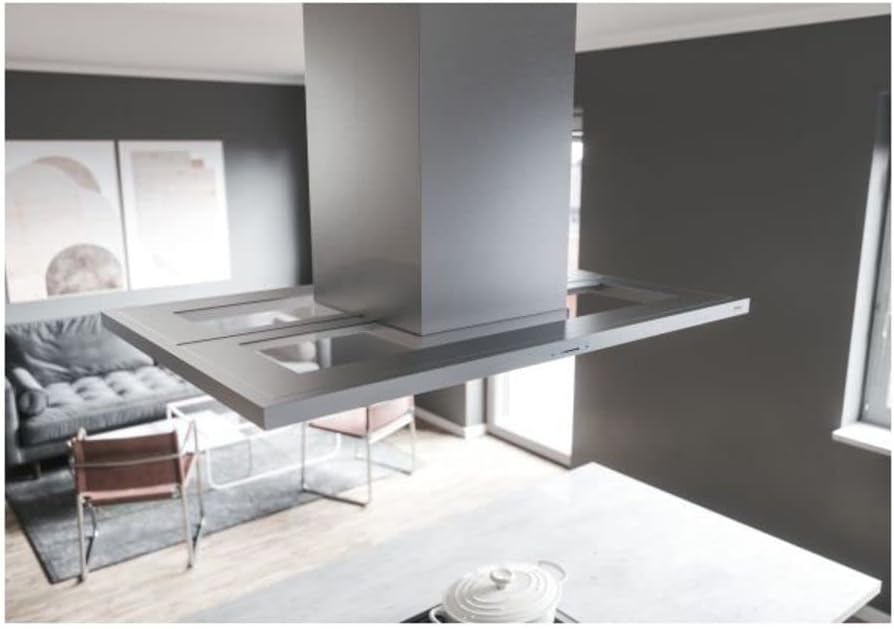
Image 5.1: Detail of the ICON Touch controls and LumiLight LED lights.
- Power On/Off: Press the power button to turn the hood on or off.
- Fan Speed: The hood offers 5 fan speeds. Use the fan speed controls to adjust the blower output from 200 CFM to 600 CFM, depending on your cooking needs. Higher speeds are recommended for heavy cooking or strong odors.
- LumiLight LED Lighting: Activate the LumiLight LED lights to illuminate your cooking area. These lights are multi-level dimmable. Press the light button repeatedly to cycle through brightness settings.
- Delay-Off Function: This feature allows the hood to continue running for a set period after cooking, then automatically shut off. Consult the full manual for specific delay-off programming.
- Auto Reminders: The ICON Touch controls may include auto reminders for filter cleaning or other maintenance tasks.
6. Maintenance
Regular maintenance ensures the longevity and optimal performance of your range hood.
6.1 Cleaning the Exterior
- Clean the stainless steel surfaces regularly with a soft cloth and a non-abrasive stainless steel cleaner.
- Always wipe in the direction of the grain to prevent scratching.
- Avoid using abrasive cleaners, steel wool, or scouring pads, as these can damage the finish.
6.2 Cleaning the Grease Filters
The mesh grease filters should be cleaned frequently to prevent grease buildup, which can affect performance and pose a fire hazard.
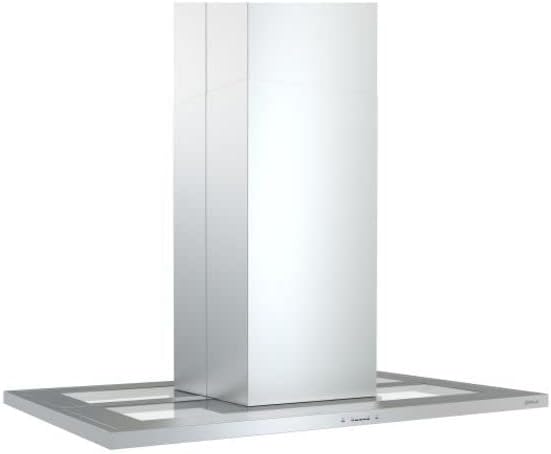
Image 6.1: Underside of the hood with mesh filters visible.
- Turn off the range hood and disconnect power before cleaning.
- Remove the mesh filters by disengaging their locking mechanisms.
- Wash the filters in hot, soapy water or in a dishwasher. For stubborn grease, a degreasing agent may be used.
- Rinse thoroughly and allow to dry completely before reinstalling.
- Reinstall the filters, ensuring they are securely locked in place.
6.3 LumiLight LED Lighting
The LumiLight LED lights are designed for long life (over 25,000 hours) and typically do not require frequent replacement. If a light needs replacement, contact Zephyr customer support for assistance or refer to the detailed service manual.
7. Troubleshooting
Before contacting customer service, review the following common issues and solutions:
| Problem | Possible Cause | Solution |
|---|---|---|
| Hood does not turn on | No power supply; circuit breaker tripped; loose wiring. | Check power connection; reset circuit breaker; ensure wiring is secure (consult technician). |
| Poor ventilation performance | Clogged grease filters; restricted ducting; incorrect fan speed. | Clean or replace filters; check ductwork for obstructions; increase fan speed. |
| Lights not working | LED light failure; loose connection. | Ensure power is on; contact customer support for light replacement. |
| Excessive noise | Loose components; motor issue; ducting obstruction. | Check for loose parts; inspect ducting; contact customer support if motor noise persists. |
8. Specifications
| Feature | Detail |
|---|---|
| Model | ZMD-M90B |
| Mounting Type | Island Mount |
| Material | Stainless Steel |
| Dimensions (Product) | 27.5 x 35.5 x 50 inches |
| Item Weight | 234 pounds |
| Air Flow Capacity | 200-600 CFM (Adjustable via ACT) |
| Number of Speeds | 5 |
| Controls Type | ICON Touch™ |
| Light Source Type | LumiLight LED |
| Voltage | 120 Volts |
| Wattage | 480 watts |
| Filter Type | Mesh |
| Ventilation Type | Ducted (Ductless/Recirculating option may be available with separate kit) |
9. Warranty and Support
Your Zephyr ZMD-M90B Modena Island Range Hood is covered under a 1-year labor warranty and a 3-year parts warranty from the date of purchase.
For warranty claims, technical assistance, or to purchase replacement parts, please contact Zephyr customer support. Ensure you have your model number (ZMD-M90B) and proof of purchase available when contacting support.
For the most current support information, please visit the official Zephyr website or refer to the contact details provided with your product documentation.
Related documentsZMD-M90B


Ask a question about this manual
Ask about setup, troubleshooting, compatibility, parts, safety, or missing instructions. Manuals+ will review the question and use this page’s manual context to help answer it.