
1. Introduction
The VIHELM HT-03 is a digital multifunction thermal imager designed for various applications requiring temperature measurement and thermal imaging. It features a 120x90 infrared resolution, a 2.8-inch full-color screen, and a wide temperature measurement range. This manual provides detailed instructions for the proper setup, operation, and maintenance of your device.
2. What's in the Box
Upon unpacking, please verify that all items listed below are present and in good condition:
- HT-03 Thermal Imager (x1)
3. Product Overview
Familiarize yourself with the main components and controls of the HT-03 thermal imager.
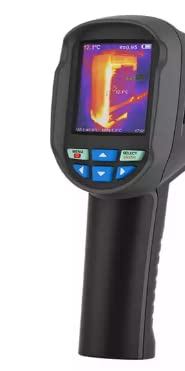
Figure 3.1: Front View
This image displays the front of the HT-03 thermal imager, highlighting its 2.8-inch full-color display and the intuitive control panel located below the screen. The control panel includes 'MENU', 'SELECT/ENTER', and directional arrow buttons for navigation.
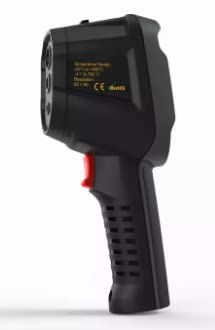
Figure 3.2: Side View
This image shows the side profile of the HT-03 thermal imager, featuring the ergonomic grip and the measurement trigger button. The front section indicates the location of the infrared lens and visible light camera.
4. Setup
Before using your HT-03 thermal imager, follow these steps for initial setup.
4.1. Battery Installation and Charging
The HT-03 uses a built-in rechargeable 18650 battery. Ensure the device is fully charged before first use. Connect the device to a power source using the provided Micro USB 2.0 cable.
4.2. SD Card Insertion
The device supports image storage on an SD card (4GB included, with approximately 1.5GB actual available memory). Locate the SD card slot, typically protected by a rubber cover on the side of the device. Insert the SD card with the contacts facing down until it clicks into place.
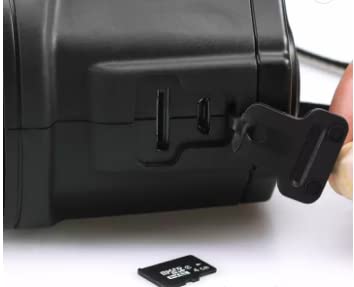
Figure 4.1: SD Card Insertion
This image illustrates the process of inserting the SD card into the designated slot on the side of the thermal imager. Ensure the card is correctly oriented.
5. Operating Instructions
This section details how to operate your HT-03 thermal imager for various functions.
5.1. Power On/Off
- To power on, press and hold the power button (usually located near the screen or on the handle) until the screen illuminates.
- To power off, press and hold the power button again until the device shuts down. The device also features automatic power-off options (5 minutes, 20 minutes, or disabled) which can be configured in the settings.
5.2. Menu Navigation
Use the 'MENU' button to access the main menu, the directional arrow buttons to navigate through options, and the 'SELECT/ENTER' button to confirm selections.
5.3. Image Capture and Viewing
To capture a thermal image, aim the imager at the target and press the trigger button. Images are saved to the SD card in JPG format.
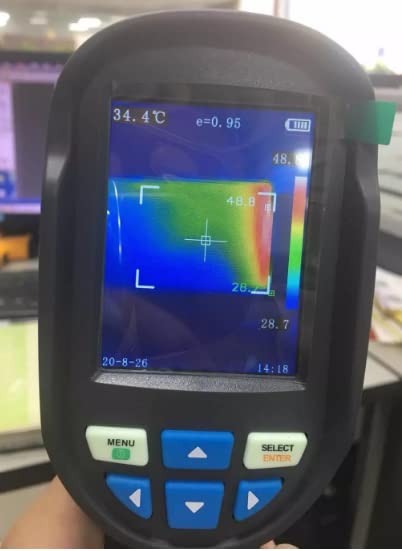
Figure 5.1: Live Thermal View
This image shows the HT-03 display during live thermal imaging, indicating temperature values and a measurement area. The screen also displays current time and emissivity settings.
To view saved images:
- Press the 'MENU' button.
- Navigate to the 'Check Images' option and press 'SELECT/ENTER'.
- Use the arrow buttons to browse through your saved images.
5.4. Adjusting Color Palettes
The HT-03 offers several color palettes to visualize thermal data. To change the palette:
- Access the menu.
- Select 'Application of color palette' (or similar option).
- Choose from options like Rainbow, Iron Oxide Red, Cold Color, Black & White, or White & Black.
5.5. Setting Emissivity
Emissivity is crucial for accurate temperature measurements. The HT-03 allows adjustment from 0.02 to 1.0.
- Access the menu.
- Navigate to 'Measure Objects' or 'Emissivity Setting'.
- Adjust the emissivity value according to the material being measured. Consult an emissivity table for common materials if unsure.
5.6. System Settings
Configure various device settings such as language, date, time, and automatic power-off.
- Access the menu.
- Select 'Time Setting' or 'System Settings'.
- Adjust options like 'Unit adjustment of localization', 'language', 'date time version', and 'automatic power off'.
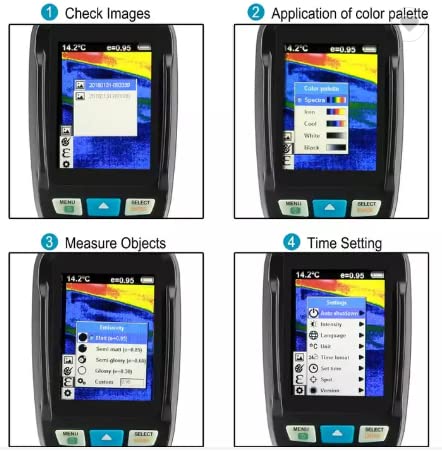
Figure 5.2: User Interface Examples
This composite image illustrates key user interface screens: (1) Browsing saved images, (2) Selecting a color palette, (3) Adjusting emissivity for accurate measurements, and (4) Configuring system settings like date and auto-shutdown.
6. Data Transfer
To transfer images from your HT-03 to a computer:
- Connect the HT-03 to your computer using a Micro USB 2.0 cable.
- The device should appear as a removable storage device (e.g., 'IMGS' folder).
- You can then copy the JPG image files directly to your computer.
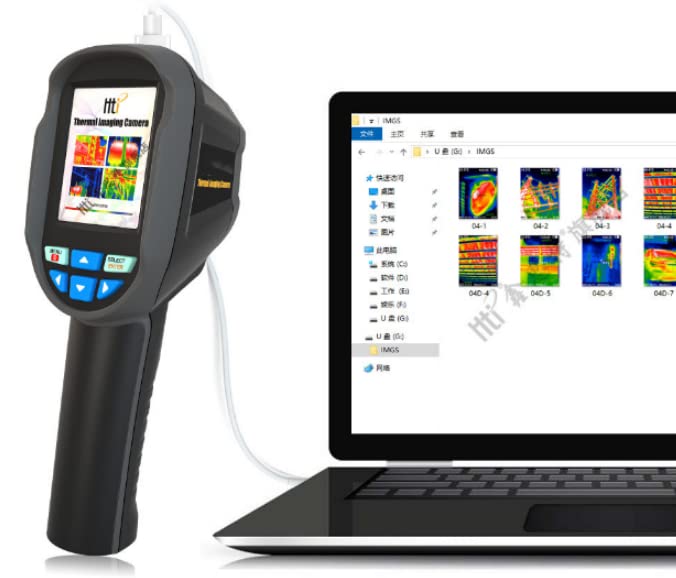
Figure 6.1: Data Transfer to PC
This image shows the HT-03 connected to a laptop via a USB cable, demonstrating how saved thermal images can be accessed and transferred to a computer for further analysis or storage.
7. Maintenance
Proper maintenance ensures the longevity and accuracy of your HT-03 thermal imager.
- Cleaning: Use a soft, dry cloth to clean the device's exterior. For the lens, use a specialized lens cleaning cloth and solution to avoid scratches.
- Storage: Store the device in a cool, dry place within the specified storage temperature range (-20°C to 60°C) and humidity (<85%RH).
- Battery Care: For long-term storage, ensure the battery is partially charged (around 50%) and recharge it periodically to maintain battery health.
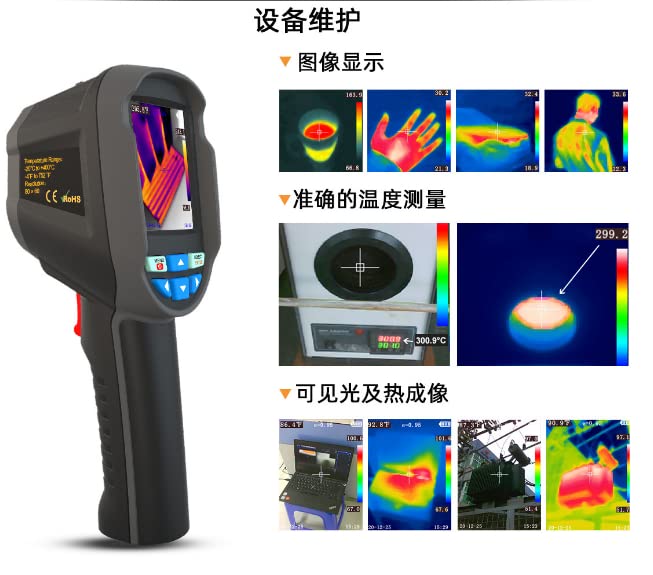
Figure 7.1: Application Examples and Maintenance Overview
This image provides a visual overview of the imager's capabilities, including various image displays, precise temperature measurement, and the integration of visible light with thermal imaging. The presence of 'Equipment Maintenance' text (translated from Chinese) indicates the importance of device care.
8. Specifications
Detailed technical specifications for the VIHELM HT-03 Digital Thermal Imager.
| Feature | Specification |
|---|---|
| Display Screen | 2.8 inch full color screen |
| Infrared Image Resolution | 120x90 |
| Total Pixels | 4800 |
| Thermal Sensitivity | 0.07°C |
| Temperature Measurement Range | -20°C to 550°C (-4°F to 1022°F) |
| Measurement Precision | ±2°C or ±2% |
| Wavelength Coverage | 8um-14um |
| Field Angle / Shortest Focus Length | 26°x19° / 3.2mm |
| Emissivity | Adjustable from 0.02 to 1.0 |
| Focus Mode | Fixed |
| Color Palettes | Rainbow, Iron Oxide Red, Cold Color, Black & White, White & Black |
| Image Storage | SD Card (4GB, approx. 1.5GB usable) |
| Image Format | JPG |
| Setting Control | Unit adjustment, Language, Date/Time, Automatic Power Off |
| Battery Type | Built-in rechargeable 18650 battery |
| Automatic Power-off Time | Selectable: 5 minutes, 20 minutes, or disabled |
| Vibration Resistance | 2G, IEC, 60068-2-6 |
| Anti-dropping | 2M |
| Product Size (L x W x H) | 96mm x 72mm x 226mm |
| Product Weight | 375g |
| Work Temperature | 0°C to 50°C |
| Storage Temperature | -20°C to 60°C |
| Relative Humidity | <85%RH |
| Visible Light Image Resolution | 0.3 M pixel |
| Image Mode | Thermal image, Visible light image, Fusion of thermal image and visible light image |
| Frame Rate of Thermal Image | 9Hz |
| USB Interface | Micro USB 2.0 |
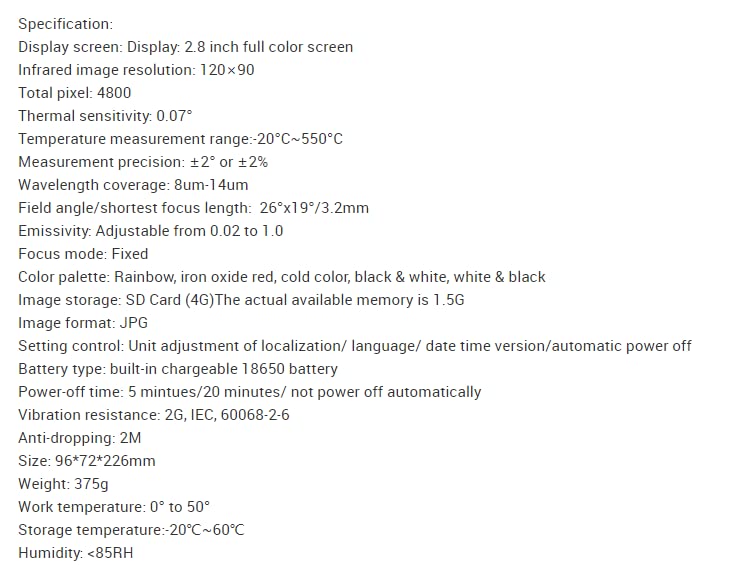
Figure 8.1: Detailed Specifications
This image provides a comprehensive list of the HT-03's technical specifications, covering display, imaging capabilities, measurement parameters, power, and environmental conditions.