
VIHELM HT-02D
VIHELM HT-02D Industrial Non-Contact Thermal Imager User Manual
1. Introduction
This manual provides detailed instructions for the safe and effective operation, maintenance, and troubleshooting of the VIHELM HT-02D Industrial Non-Contact Thermal Imager. This device is designed for industrial applications, offering non-contact temperature measurement within a range of -20°C to 300°C. Please read this manual thoroughly before using the device to ensure optimal performance and safety.
2. Safety Information
Always observe the following safety precautions to prevent injury or damage to the device:
- Do not point the thermal imager directly at the sun or other strong energy sources.
- Avoid exposing the device to extreme temperatures, humidity, or corrosive environments.
- Do not attempt to open or modify the device. Refer all servicing to qualified personnel.
- Ensure batteries are inserted correctly according to polarity markings. Remove batteries if the device will not be used for an extended period.
- Keep the lens clean and free from obstructions for accurate readings.
3. Package Contents
Upon opening the package, verify that all items listed below are present:
- VIHELM HT-02D Thermal Imager (x1)
- Carrying Case (x1)
- User Manual (x1)

Figure 3.1: The VIHELM HT-02D Thermal Imager shown with its protective carrying case.
4. Product Overview
The VIHELM HT-02D is a handheld industrial thermal imager designed for quick and accurate temperature detection. It features a clear display, intuitive controls, and robust construction suitable for various environments.

Figure 4.1: Front and rear views of the VIHELM HT-02D Thermal Imager, highlighting its ergonomic design and sensor placement.
4.1 Key Components
- Infrared Lens: Captures thermal radiation.
- Visual Camera Lens: Captures visible light images for fusion mode.
- LCD Display: Shows thermal images, temperature readings, and menu options.
- Control Buttons: For navigation, menu access, and selection.
- Trigger: Activates measurement and image capture.
- Battery Compartment: Holds 4 x 1.5V AA batteries.
- SD Card Slot: For image storage.
5. Setup
5.1 Battery Installation
- Locate the battery compartment cover on the handle of the device.
- Open the cover and insert four (4) 1.5V AA batteries, ensuring correct polarity (+/-).
- Close the battery compartment cover securely.
5.2 Powering On/Off
- To power on, press and hold the power button (usually located near the display) until the screen illuminates.
- To power off, press and hold the power button again until the device shuts down. The device also features an automatic shut-down function (default 12 minutes) to conserve battery life.
5.3 Initial Settings
Upon first use or after a factory reset, you may need to configure basic settings:
- Unit Adjustment: Select between Celsius (°C) and Fahrenheit (°F).
- Language: Choose your preferred language for the interface.
- Date/Time Format: Set the current date and time, and select the display format.
- Emissivity: Adjust the emissivity value (0.1-1.0) based on the material being measured for accurate temperature readings. Consult an emissivity table for common materials.
6. Operating Instructions
6.1 Basic Measurement
- Point the thermal imager at the target object.
- Press the trigger to capture a thermal image and display the temperature reading.
- The display will show the thermal image, along with the highest and lowest temperature points detected within the field of view.
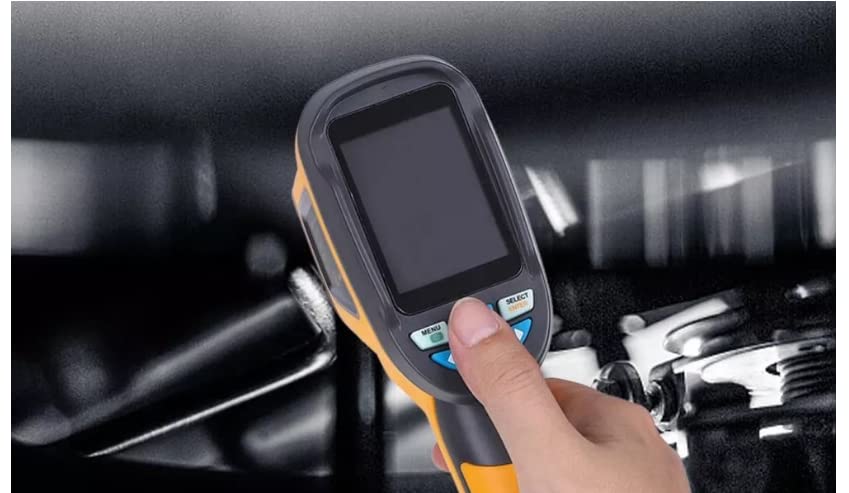
Figure 6.1: A hand demonstrating the use of the menu and select buttons on the VIHELM HT-02D.
6.2 Menu Navigation
Use the 'MENU' and 'SELECT' buttons (as shown in Figure 6.1) to navigate through the device's settings and options:
- MENU Button: Press to enter the main menu or go back to the previous screen.
- SELECT Button: Use to confirm a selection or move to the next option.
- Arrow Buttons: Navigate up, down, left, or right within menu options.
6.3 Image Capture and Storage
The HT-02D can capture thermal images and store them on an SD card (4GB included). Images are saved in BMP format.
- With the desired thermal image on screen, press the trigger button to save the image.
- Images are automatically saved to the SD card.
- To view saved images, navigate to the 'Image Storage' option in the menu.
6.4 Palette and Vision Options
The device offers various color palettes and vision modes to enhance visualization:
- Palettes: Select from Iron red, Rainbow, Rainbow high contrast, Gray scale (white glow), and Gray scale (black glow) to best represent temperature differences.
- Vision Options: Choose between full infrared, full visual, or a mixing of visible and infrared images for detailed analysis.
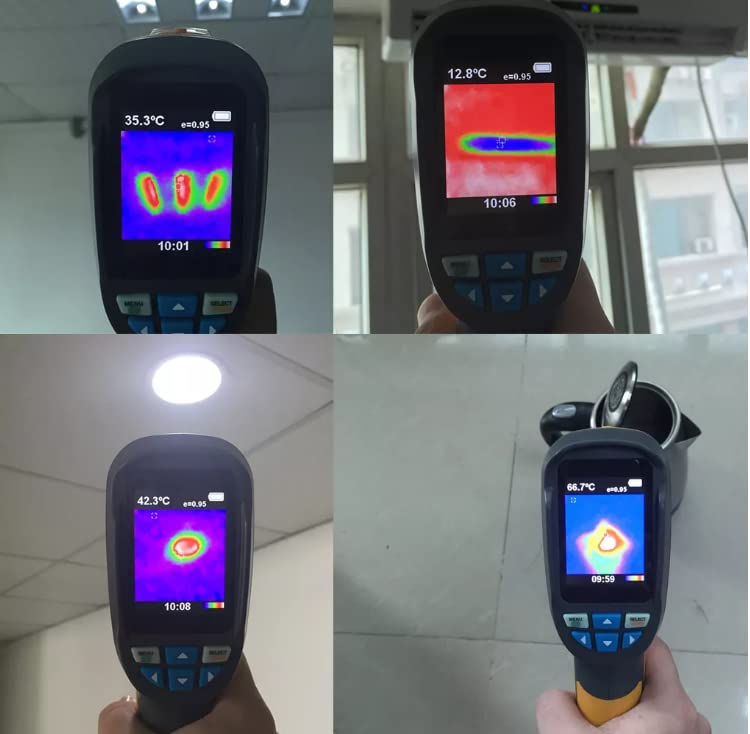
Figure 6.2: Various thermal imaging display modes and applications of the HT-02D, showing different color palettes and temperature distributions.
7. Maintenance
7.1 Cleaning
- Device Body: Wipe the exterior with a soft, damp cloth. Do not use abrasive cleaners or solvents.
- Lens: Gently clean the infrared and visual lenses with a lens cleaning cloth or a soft, lint-free cloth. Avoid touching the lens surface with bare hands.
7.2 Battery Replacement
Replace batteries when the low battery indicator appears on the display. Always use fresh 1.5V AA batteries. Refer to Section 5.1 for installation instructions.
7.3 Storage
When not in use, store the thermal imager in its carrying case in a cool, dry place. Recommended storage conditions are -20°C to 50°C (-4°F to 122°F) with relative humidity between 10% and 80% RH.
8. Troubleshooting
If you encounter issues with your VIHELM HT-02D, refer to the following common problems and solutions:
- Device does not power on: Check battery installation and ensure batteries are charged or replaced.
- Inaccurate temperature readings: Verify the emissivity setting is correct for the target material. Ensure the lens is clean and unobstructed.
- Screen is blank or frozen: Try restarting the device by powering it off and on. If the issue persists, remove and reinsert batteries.
- Cannot save images: Check if the SD card is properly inserted and has sufficient free space.
For persistent issues not covered here, please contact VIHELM customer support.
9. Specifications
The following table outlines the technical specifications of the VIHELM HT-02D Thermal Imager:
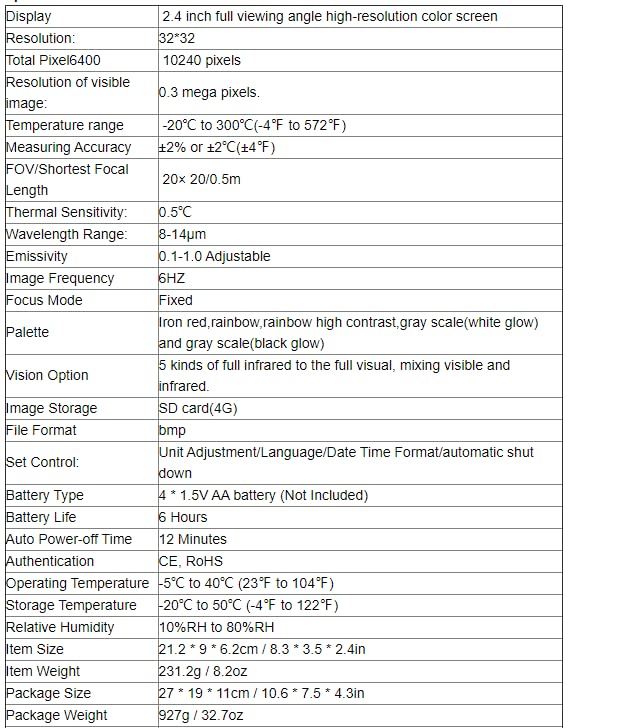
Figure 9.1: Comprehensive technical specifications for the VIHELM HT-02D.
| Feature | Specification |
|---|---|
| Display | 2.4 inch full viewing angle high-resolution color screen |
| Resolution | 32*32 |
| Total Pixel | 6400 |
| Resolution of visible image | 0.3 mega pixels |
| Temperature range | -20°C to 300°C (-4°F to 572°F) |
| Measuring Accuracy | ±2% or ±2°C (±4°F) |
| FOV/Shortest Focal Length | 20x 20/0.5m |
| Thermal Sensitivity | 0.5°C |
| Wavelength Range | 8-14μm |
| Emissivity | 0.1-1.0 Adjustable |
| Image Frequency | 6HZ |
| Focus Mode | Fixed |
| Palette | Iron red, rainbow, rainbow high contrast, gray scale (white glow), and gray scale (black glow) |
| Vision Option | 5 kinds of full infrared to the full visual, mixing visible and infrared. |
| Image Storage | SD card (4G) |
| File Format | bmp |
| Set Control | Unit Adjustment/Language/Date Time Format/automatic shut down |
| Battery Type | 4 * 1.5V AA battery (Not Included) |
| Battery Life | 6 Hours |
| Auto Power-off Time | 12 Minutes |
| Authentication | CE, RoHS |
| Operating Temperature | -5°C to 40°C (23°F to 104°F) |
| Storage Temperature | -20°C to 50°C (-4°F to 122°F) |
| Relative Humidity | 10%RH to 80%RH |
| Item Size | 21.2 * 9 * 6.2cm / 8.3 * 3.5 * 2.4in |
| Item Weight | 231.2g / 8.2oz |
| Package Size | 27 * 19 * 11cm / 10.6 * 7.5 * 4.3in |
| Package Weight | 927g / 32.7oz |
10. Warranty and Support
The VIHELM HT-02D Thermal Imager is covered by a manufacturer's warranty. Please refer to the warranty card included with your product or contact VIHELM customer support for specific warranty terms and conditions.
For technical assistance, troubleshooting, or service inquiries, please contact VIHELM customer support through their official channels. Provide your product model (HT-02D) and purchase details when seeking support.
Ask a question about this manual
Ask about setup, troubleshooting, compatibility, parts, safety, or missing instructions. Manuals+ will review the question and use this page’s manual context to help answer it.