
Dynavin D8-DCX Plus Flex - C
Dynavin D9-DCX Plus Flex - C User Manual
Android Car Radio and Navigator for Fiat Ducato, Citroën Jumper II, and Peugeot Boxer II
1. Introduction
This manual provides comprehensive instructions for the installation, operation, and maintenance of your Dynavin D9-DCX Plus Flex - C Android Car Radio and Navigator. Designed specifically for Fiat Ducato (2006-2021), Citroën Jumper II, and Peugeot Boxer II (from 2006 onwards) vehicles, this system offers advanced navigation, multimedia, and connectivity features to enhance your driving experience.

Figure 1: Dynavin D9-DCX Plus Flex - C main unit installed in a vehicle.
2. Setup and Installation
The Dynavin D9-DCX Plus Flex - C is designed for straightforward installation. It integrates seamlessly with your vehicle's existing systems. For detailed visual instructions, refer to the installation video provided by Dynavin (if available).
2.1 Vehicle Compatibility
This Android navigation radio is compatible with:
- Fiat Ducato (2006–2021)
- Citroën Jumper II (from 2006 onwards)
- Peugeot Boxer II (from 2006 onwards)
Important Note:
- For Fiat Ducato 8 vehicles from model year 2021, the optional DVN-APTDC8 frame is required.
- The D8-UFT02 CAN-bus adapter is designed for vehicles that were delivered with a factory-installed Fiat radio (optional).
2.2 Optional Components
DVN-APTDC8 Frame (for Fiat Ducato 8 2021-2024)

This frame is necessary for proper fitment in newer Fiat Ducato 8 models.
D8-UFT02 CAN-Bus Adapter
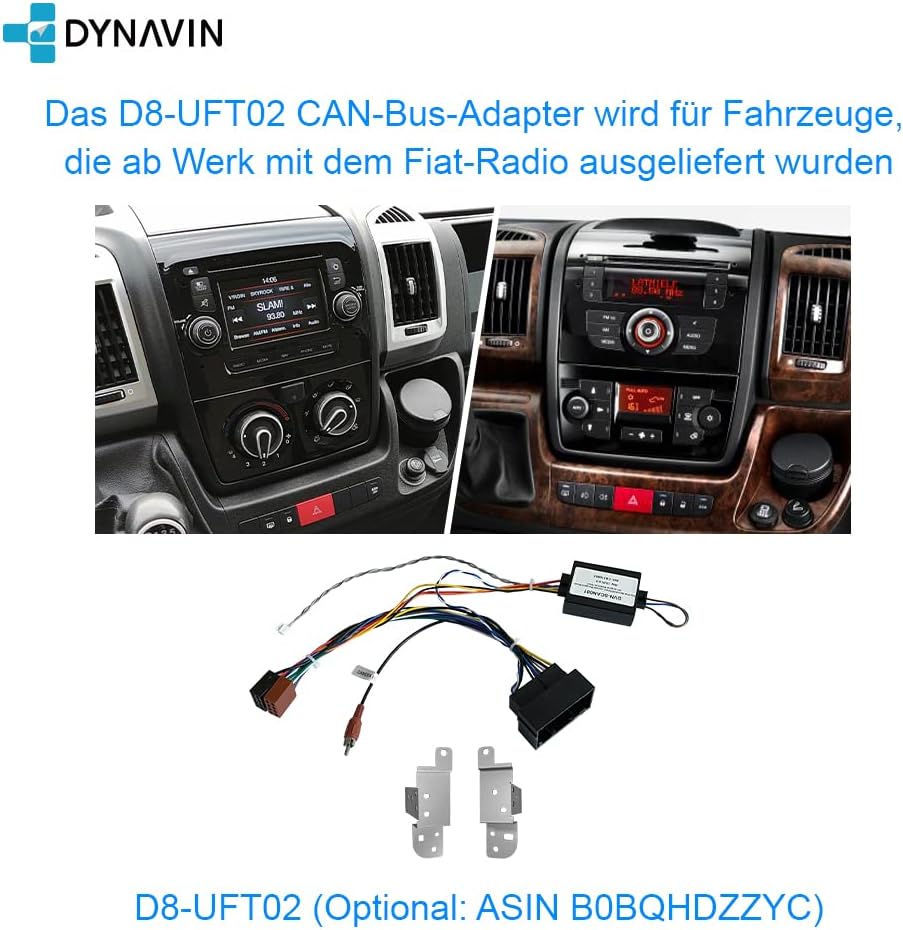
Required for vehicles with factory-installed Fiat radios to ensure full integration.
2.3 Included Accessories
Your Dynavin system comes with a comprehensive set of accessories for installation and operation. Refer to the image below for a visual guide to the included components.

Figure 2: Included Accessories List.
- Display Screen
- Main Unit
- Bezel
- Connection Cables
- GPS Antenna
- OEM USB Socket with Extension Cable
- Microphone
- Rearview Camera Adapter
- Antenna Adapters
- Steering Wheel Control Cable
- Remote Control
- BT/Wi-Fi Antenna
- HUD 150 (Head-up Display)
- Display Connection Cable
- Screws (1M5.0*8)
- Installation Manual
- Quick Guide
3. Operating Instructions
3.1 Display and User Interface
The unit features a 10.1-inch optimized high-resolution anti-glare screen with 1280 x 720 pixels. It runs on Android 11 OS with a quad-core CPU and 4 GB RAM, providing a responsive and intuitive user experience.

Figure 3: Main User Interface of the Dynavin System.
3.2 Head-Up Display (HUD)
The system includes a Head-Up Display (HUD) that shows navigation information from Dynaway, Apple Maps with CarPlay, and Google Maps with Android Auto. It also displays vehicle speed and speed camera information, enhancing driving safety and convenience.

Figure 4: Head-Up Display in operation.
3.3 Wireless CarPlay and Android Auto
The unit is compatible with wireless CarPlay, Android Auto, and smartphone mirroring. These features allow seamless integration of your smartphone for navigation, music, calls, and more. Note that these features may require activation codes after a 31-day test phase.

Figure 5: Wireless CarPlay in action.
3.4 Navigation
Integrated GPS navigation software is included (part of the Dynapp package after a 31-day test phase). It provides detailed maps and speed camera information. The Dynapp package also grants access to the Google Play Store for third-party app installations.

Figure 6: Integrated Navigation Software.
3.5 Audio Features
The system features an integrated Sound DSP processor with an equalizer and runtime correction for optimal audio quality. It supports DAB+ digital radio and offers various sound adjustment options.
Fader Balance and Time Correction

Adjust audio distribution and timing for a personalized sound stage.
Professional Equalizer

Fine-tune your audio output with a multi-band equalizer.
Gain Settings

Adjust input gain for various audio sources.
DAB/DAB+ Digital Radio

Enjoy high-quality digital radio broadcasts.
3.6 Hands-Free Calling
The unit includes a compact digital dual microphone with a unique noise reduction algorithm, ensuring excellent call quality during driving. Connect your phone via Bluetooth for hands-free communication.

Figure 7: Dynavin Digital Dual-Microphone.

Figure 8: Hands-Free Function Interface.
3.7 Rearview Camera Support
The system is prepared for rearview camera integration. It is compatible with both factory-installed rearview cameras and optional Dynavision Aftermarket rearview cameras. It also supports displaying front and side camera feeds via the optional DVN 6901 MO.

Figure 9: Rearview Camera Display.
3.8 Steering Wheel Control
The system supports steering wheel remote control, allowing you to manage audio and other functions without taking your hands off the wheel.

Figure 10: Multifunction Steering Wheel.
4. Maintenance
To ensure the longevity and optimal performance of your Dynavin unit, follow these general maintenance guidelines:
- Cleaning: Use a soft, dry cloth to clean the display and exterior surfaces. Avoid abrasive cleaners or solvents.
- Software Updates: Periodically check for software updates from Dynavin to ensure you have the latest features and bug fixes.
- Environmental Conditions: Avoid exposing the unit to extreme temperatures, direct sunlight for prolonged periods, or excessive moisture.
5. Troubleshooting
If you encounter issues with your Dynavin system, refer to the following common troubleshooting steps:
- No Power: Check all power connections and fuses. Ensure the unit is properly seated in its harness.
- No Sound: Verify speaker connections. Check audio settings (volume, mute, fader/balance). Ensure the correct audio source is selected.
- Navigation Issues: Ensure the GPS antenna is properly connected and has a clear view of the sky. Check map data for updates.
- CarPlay/Android Auto Not Connecting: Ensure your phone's Bluetooth and Wi-Fi are enabled. Check for any required activation codes. Restart both the unit and your phone.
- Touchscreen Unresponsive: Perform a soft reset of the unit (refer to the quick guide for instructions). If the issue persists, contact support.
For more complex issues, consult the full installation manual or contact Dynavin customer support.
6. Specifications
| Feature | Detail |
|---|---|
| Brand | Dynavin |
| Model Name | DYNAVIN Android Autoradio Navi |
| Part Number | D8-DCX Plus Flex - C |
| Display Size | 10.1 inches |
| Screen Resolution | 1280 x 720 pixels (optimized high-resolution anti-glare) |
| Operating System | Android 11 OS |
| Processor | Quad-core CPU |
| RAM | 4 GB |
| Connectivity Technology | Bluetooth, USB, Wi-Fi |
| Special Features | DAB+, Wireless CarPlay, Android Auto, Smartphone Mirroring, Head-Up Display, Integrated Sound DSP, Equalizer, Runtime Correction, Hands-free, Rearview Camera Support, Steering Wheel Control Support |
| Map Type | Europe (integrated navigation software) |
| Audio Output Mode | Stereo |
| Included Components | USB cable, Microphone, GPS Antenna, Remote Control, Installation accessories (as per accessory list) |
| Package Dimensions | 61.6 x 29.4 x 10.4 cm; 3.25 kg |
| First Available Date | 29 December 2022 |
7. Warranty and Support
7.1 Warranty Information
The Dynavin D9-DCX Plus Flex - C comes with a 1-year warranty. Please retain your proof of purchase for warranty claims. The warranty covers manufacturing defects and malfunctions under normal use conditions.
Guaranteed software updates until: Unknown (as per product specifications).
7.2 Customer Support
For technical assistance, troubleshooting beyond this manual, or warranty inquiries, please contact Dynavin customer support. Dynavin has 15 years of experience in car audio design and offers German research & development as well as German customer service.
Refer to the official Dynavin website or your purchase documentation for contact details.

Figure 11: Why Choose Dynavin?

Figure 12: Dynavin's Commitment to Sound Quality.
Related documentsD8-DCX Plus Flex - C


Ask a question about this manual
Ask about setup, troubleshooting, compatibility, parts, safety, or missing instructions. Manuals+ will review the question and use this page’s manual context to help answer it.