
1. Introduction
The Coast WPH34R Headlamp is a high-performance, waterproof lighting device designed for demanding environments. It features a powerful 2000 lumen output, IP68 waterproof rating, and a versatile dual power system. This manual provides essential information for the safe and effective use, maintenance, and troubleshooting of your WPH34R headlamp.

Image 1.1: The Coast WPH34R Headlamp, showcasing its design and adjustable strap.
2. Key Features
- IP68 Waterproof Rating: Engineered to withstand full submersion, making it suitable for use in wet conditions.
- 2000 Lumen Output: Provides ultra-bright illumination for various tasks and environments.
- Dual Power System: Operates with the included COAST ZITHION-X rechargeable lithium-ion battery or three AAA alkaline batteries, offering flexibility and extended use.
- Tri-Color Beam: Features white, red, and green light modes. White for general utility, red for preserving night vision and emergency signaling, and green for reduced detectability.
- Fixed Focus Beam: Easily switch between a focused spot beam for long-distance viewing and a wide flood beam for close-up area illumination.
- Hinged Beam Adjustment: The light body tilts in its bracket, allowing for precise directional control of the beam.
- Detachable Light Body: The headlamp can be detached from the strap for use as a handheld light.
- COAST Ultra-Strap: A silicone-lined, non-slip, breathable mesh band with an integrated buckle ensures a secure and comfortable fit.
- Hardhat Compatible: Designed to be rugged enough for use on hardhats.

Image 2.1: The WPH34R headlamp provides 2000 lumens and a beam distance of 180 meters.

Image 2.2: The WPH34R is IP68 rated, waterproof up to 5 meters and dirt proof.

Image 2.3: The Rechargeable Plus system allows use of either the ZITHION-X rechargeable battery or AAA alkaline batteries.
3. Setup
3.1 Battery Installation
- To install the COAST ZITHION-X rechargeable battery (ZX955), unscrew the end cap of the headlamp.
- Insert the battery with the positive (+) end facing towards the headlamp lens.
- Securely screw the end cap back on.
- Alternatively, to use AAA alkaline batteries, insert three AAA batteries into the provided battery cartridge, observing correct polarity. Insert the cartridge into the headlamp body and secure the end cap.

Image 3.1: The ZITHION-X battery is front-loaded into the headlamp.
3.2 Charging the ZITHION-X Battery
- Locate the USB-C charging port on the headlamp body.
- Connect the provided USB-C cable to the headlamp and a compatible USB power source (e.g., wall adapter, computer USB port).
- The battery indicator light will show charging status. Refer to the operating instructions for indicator details.
- A full charge typically takes several hours. Disconnect the cable once charging is complete.

Image 3.2: Included components: headlamp, ZITHION-X battery, and USB charging cables.
3.3 Strap Adjustment
The COAST Ultra-Strap is adjustable for a secure and comfortable fit. Use the buckles on the side straps and the top strap to customize the fit around your head or hardhat. The silicone lining helps prevent slipping.

Image 3.3: The COAST Ultra-Strap features reflective elements, breathability, and a quick-release buckle.
4. Operating Instructions
4.1 Power On/Off and Mode Selection
The WPH34R headlamp features a single power button for all functions. Press the button to cycle through the available light modes:
- First Press: Activates the primary white light in a specific mode (e.g., high).
- Subsequent Presses: Cycles through different white light brightness levels (High, Medium, Low) and then through the red and green light modes.
- Long Press: Hold the button for approximately 2 seconds to turn the headlamp off from any mode.

Image 4.1: The WPH34R offers 6 light modes, including various white light levels, red, and green.

Image 4.2: Multi-color options include white, red, and green beams for different applications.
4.2 Beam Adjustment (Spot/Flood)
The WPH34R features a fixed focus beam system. To switch between spot and flood illumination, rotate the bezel of the headlamp. Turning it one way will provide a concentrated spot beam, while turning it the other way will expand the light into a wide flood beam.
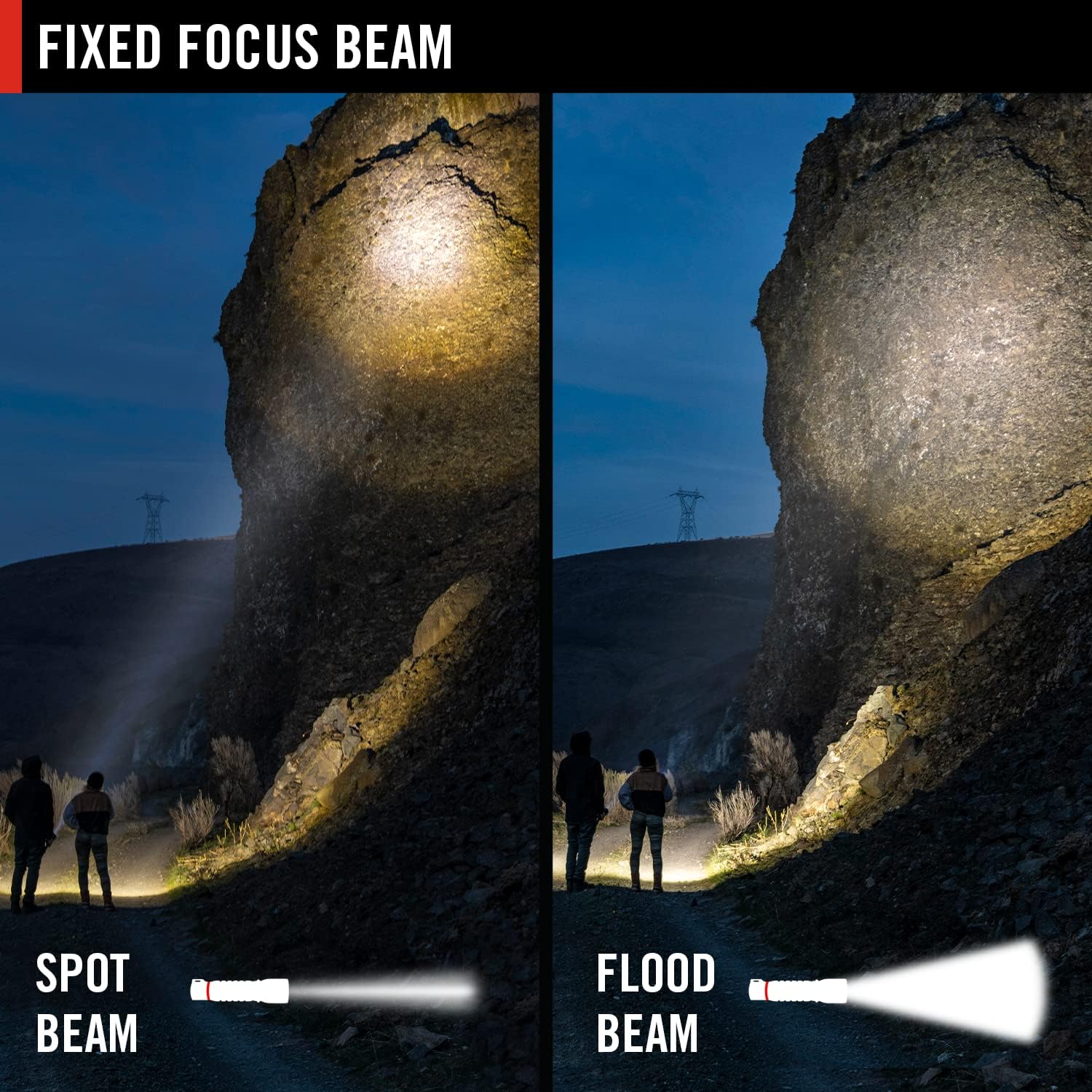
Image 4.3: The fixed focus beam allows for easy transition between spot and flood illumination.
4.3 Tilting Head
The headlamp body is hinged, allowing you to tilt the light up or down to direct the beam precisely where needed without adjusting your head position.
4.4 Battery Charge Indicator
The headlamp includes a battery charge indicator to show the remaining power level. Consult the indicator lights for current battery status, especially before extended use.

Image 4.4: The battery charge indicator provides visual feedback on power levels.
5. Maintenance
5.1 Cleaning
- Wipe the headlamp body with a soft, damp cloth to remove dirt and debris.
- Do not use abrasive cleaners or solvents, as these can damage the finish or seals.
- Ensure the charging port cover is securely closed when not charging to maintain waterproofing.
5.2 Battery Care
- For optimal performance and longevity of the ZITHION-X rechargeable battery, charge it regularly and avoid complete discharge.
- If using AAA alkaline batteries, remove them if the headlamp will not be used for an extended period to prevent leakage.
- Store the headlamp and batteries in a cool, dry place.
5.3 Waterproofing Integrity
Periodically inspect the O-rings and seals for any signs of wear or damage. Ensure all caps and covers are tightly secured before exposing the headlamp to water to maintain its IP68 rating.
6. Troubleshooting
- Headlamp not turning on:
- Check if the battery is correctly installed with the correct polarity.
- Ensure the battery is charged (for ZITHION-X) or replace with fresh AAA batteries.
- Verify that the battery compartment cap is fully tightened.
- Light is dim or flickers:
- The battery may be low. Recharge the ZITHION-X battery or replace AAA batteries.
- Ensure battery contacts are clean and free of corrosion.
- Charging issues:
- Ensure the USB-C cable is properly connected to both the headlamp and the power source.
- Try a different USB-C cable or power adapter.
- Verify the power source is active.
- Water inside the headlamp:
- Immediately remove the battery.
- Allow the headlamp to dry completely.
- Inspect O-rings and seals for damage or improper seating. Replace if necessary.
7. Specifications
| Feature | Detail |
|---|---|
| Model Number | WPH34R (30833) |
| Light Output (Maximum) | 2000 Lumens |
| Beam Distance (Maximum) | 195 meters (639 feet) |
| Water Resistance Level | IP68 (Waterproof up to 5 meters) |
| Power Source | Battery Powered |
| Battery Type | 1 x ZITHION-X Lithium-Ion (included) or 3 x AAA Alkaline |
| Voltage | 3.7 Volts |
| Item Weight | 8 ounces (0.5 Pounds) |
| Product Dimensions | 2.05"D x 4.1"W x 1.73"H |
| Light Source Type | LED |
| Material | Aluminum |
| Color | Black/Blue |
| Run Time (ZITHION-X) | Up to 10 hours (depending on mode) |

Image 7.1: The WPH34R headlamp weighs approximately 8.4 ounces.

Image 7.2: The headlamp's main body measures approximately 2.4 inches in length.

Image 7.3: Battery run times vary by mode: High (4.75H), Medium (7H), Low (36H).
8. Warranty and Support
8.1 Lifetime Warranty
The Coast WPH34R Headlamp is backed by COAST's Lifetime Warranty. This warranty covers defects in materials and workmanship for the lifetime of the original owner. For full details and to register your product, please visit the official Coast website or contact customer support.
8.2 Customer Support
For any questions, technical assistance, or warranty claims, please contact Coast customer support through their official website or the contact information provided with your product packaging.


