
1. Introduction and Overview
The LOFREE 1% Transparent Wireless Mechanical Keyboard is a compact 68-key keyboard designed for both aesthetic appeal and high performance. Featuring a transparent PC material chassis and keycaps, it offers a unique visual experience while providing a comfortable and responsive typing experience with pre-lubed Kailh Jellyfish switches. This manual provides essential information for setting up, operating, and maintaining your keyboard.

Figure 1.1: The LOFREE 1% Transparent Wireless Mechanical Keyboard, showcasing its full transparent design and 68-key layout.
2. Key Features
- 1% Inspiration Design: Crafted with transparent PC material for both the chassis and keycaps, highlighting the internal craftsmanship and providing a minimalist aesthetic.
- High Transparency Keycaps: Utilizes premier PC material for keycaps, achieving 99% high transparency for a clear view of the switches and backlighting.
- Smooth Typing Experience: Equipped with pre-lubed Kailh Jellyfish Switches, featuring PC housings, transparent stems, and gold-plated springs for improved tactile feel, minimized noise, and maximized rebound.
- Durable Keycap Legends: Character legends on each keycap are processed with pad printing and UV coating to ensure non-fading and resistance to fingerprints.
- Dual Mode Connectivity: Supports both Bluetooth and USB-C wired connections, offering flexibility for various devices.
- Long Battery Life: Provides up to 60 hours of continuous use or up to one week of normal usage in Bluetooth mode.
- White LED Backlighting: Features white LED backlighting with 7 distinct effects for enhanced visibility and ambiance.
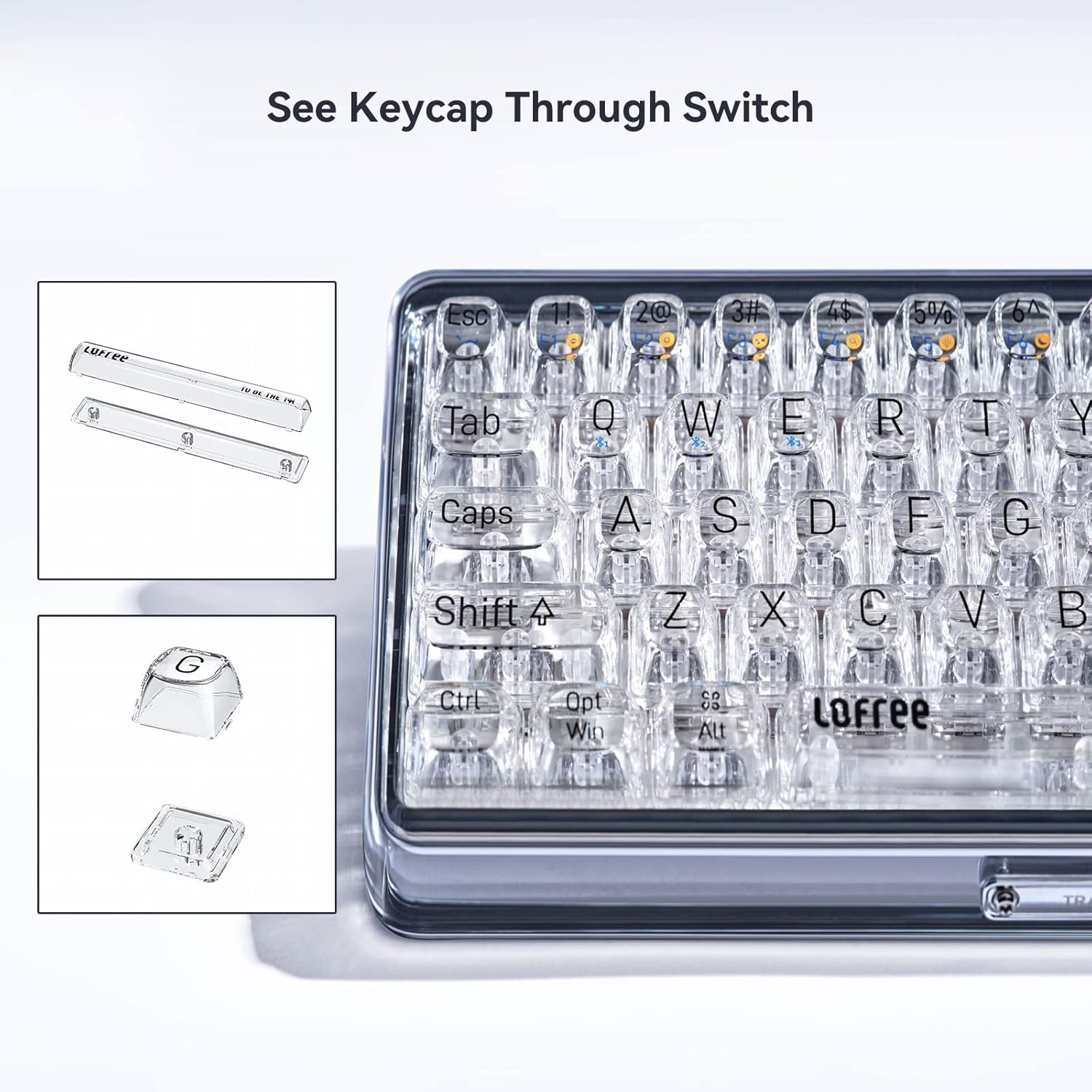
Figure 2.1: Close-up view of the transparent keycaps and switches, demonstrating the keyboard's unique see-through design.

Figure 2.2: Detailed view of the pre-lubed Kailh BOX Jellyfish Switches, designed for smooth and quiet operation.

Figure 2.3: The keyboard illuminated by its white LED backlighting, showcasing one of the 7 available lighting effects.

Figure 2.4: The LOFREE 1% keyboard demonstrating its compatibility with various devices, including laptops, tablets, and smartphones.
Video 2.1: An official product video titled "To be the 1%" showcasing the transparent design and features of the LOFREE 1% keyboard. This video highlights the keyboard's unique aesthetic and build quality.
3. What's in the Box
Upon unboxing your LOFREE 1% keyboard, please ensure all the following items are present:
- LOFREE 1% Transparent Wireless Mechanical Keyboard
- USB Cable (for charging and wired connection)
- User Manual (this document)
4. Setup
4.1 Initial Charging
Before first use, it is recommended to fully charge your keyboard. Connect the provided USB-C cable to the keyboard's USB-C port and the other end to a USB power source (e.g., computer USB port, wall adapter). The LED indicator will show charging status and turn off when fully charged.
4.2 Connectivity
4.2.1 Bluetooth Connection
- Ensure the keyboard is powered on and in Bluetooth mode. There is typically a switch on the keyboard to toggle between wired and wireless modes.
- Press and hold the Fn key along with one of the Bluetooth pairing keys (e.g., Fn + 1, Fn + 2, Fn + 3) to enter pairing mode. The indicator light will flash rapidly.
- On your device (Laptop, PC, Tablet, Smartphone), go to Bluetooth settings and search for new devices.
- Select "LOFREE 1%" from the list of available devices.
- Follow any on-screen prompts to complete the pairing process. The indicator light on the keyboard will become solid once connected.
4.2.2 Wired Connection
To use the keyboard in wired mode, simply connect the provided USB-C cable from the keyboard to your computer's USB port. The keyboard will automatically switch to wired mode and function without needing a Bluetooth connection. This mode also charges the keyboard's internal battery.
5. Operating Instructions
5.1 Key Functions
The LOFREE 1% keyboard features a compact 68-key layout. Many keys have secondary functions accessible via the Fn (Function) key. Refer to the keycap legends for specific combinations.
- Fn + F1-F12: Typically control multimedia functions (e.g., volume, play/pause, track skip) or system functions (e.g., brightness).
- Fn + Other Keys: May activate specific shortcuts or toggle modes as indicated by the secondary legends on the keycaps.
5.2 LED Backlight Effects
The keyboard supports 7 different white LED backlight effects. Use the designated Fn key combinations (refer to your keyboard's specific keycaps, often Fn + Right Shift or similar) to cycle through these effects or adjust brightness.
6. Maintenance
Proper maintenance ensures the longevity and performance of your LOFREE 1% keyboard.
- Cleaning: Use a soft, lint-free cloth slightly dampened with water or a mild cleaning solution to wipe the keycaps and chassis. Avoid harsh chemicals or abrasive materials. For dust between keys, use compressed air.
- Storage: Store the keyboard in a cool, dry place away from direct sunlight and extreme temperatures.
- Avoid Liquids: While the keyboard is durable, it is not waterproof. Avoid spilling liquids on it.
7. Troubleshooting
If you encounter issues with your LOFREE 1% keyboard, try the following solutions:
- Keyboard not responding: Ensure the keyboard is charged. Try connecting via the USB-C cable to rule out battery or Bluetooth issues.
- Bluetooth connection issues: Ensure the keyboard is in pairing mode. Delete the keyboard from your device's Bluetooth list and attempt to re-pair. Ensure your device's Bluetooth is enabled and working.
- Keys not working: Check for debris under the keycaps. If a specific key is not working, it might indicate a switch issue.
- Backlight not working/dim: Ensure the keyboard is charged. Use the Fn key combinations to adjust brightness or cycle through effects.
- Lag or delay: Ensure the keyboard is close to your device for Bluetooth connection. Avoid interference from other wireless devices.
If problems persist, please refer to the manufacturer's official support channels.
8. Specifications
| Feature | Detail |
|---|---|
| Model Number | 1% |
| Dimensions | 12.6 x 4.6 x 1.8 inches (32.0 x 11.7 x 4.6 cm) |
| Weight | 1.79 pounds (0.81 kg) |
| Number of Keys | 68 Keys |
| Keyboard Type | Mechanical |
| Switch Type | Kailh Jellyfish Switch (Pre-lubed) |
| Connectivity | Bluetooth, USB-C Wired |
| Battery Type | Lithium Polymer (included) |
| Battery Life | Up to 60 hours (Bluetooth mode) |
| Backlighting | White LED, Single Color, 7 Effects |
| Compatible Devices | Laptop, PC, Tablet, Smartphone (Mac, Windows) |
| Special Features | Transparent Base, Transparent Keycaps, Rechargeable |
9. Warranty and Support
For information regarding warranty coverage, technical support, or service inquiries, please refer to the official LOFREE website or the documentation included with your purchase. You may also contact LOFREE customer service directly through their provided contact channels.


