
1. Introduction
Thank you for choosing the Lifelong Duos Mixer Grinder and Dry Iron Combo. This manual provides important information regarding the safe operation, maintenance, and troubleshooting of your new appliances. Please read it thoroughly before first use and keep it for future reference.
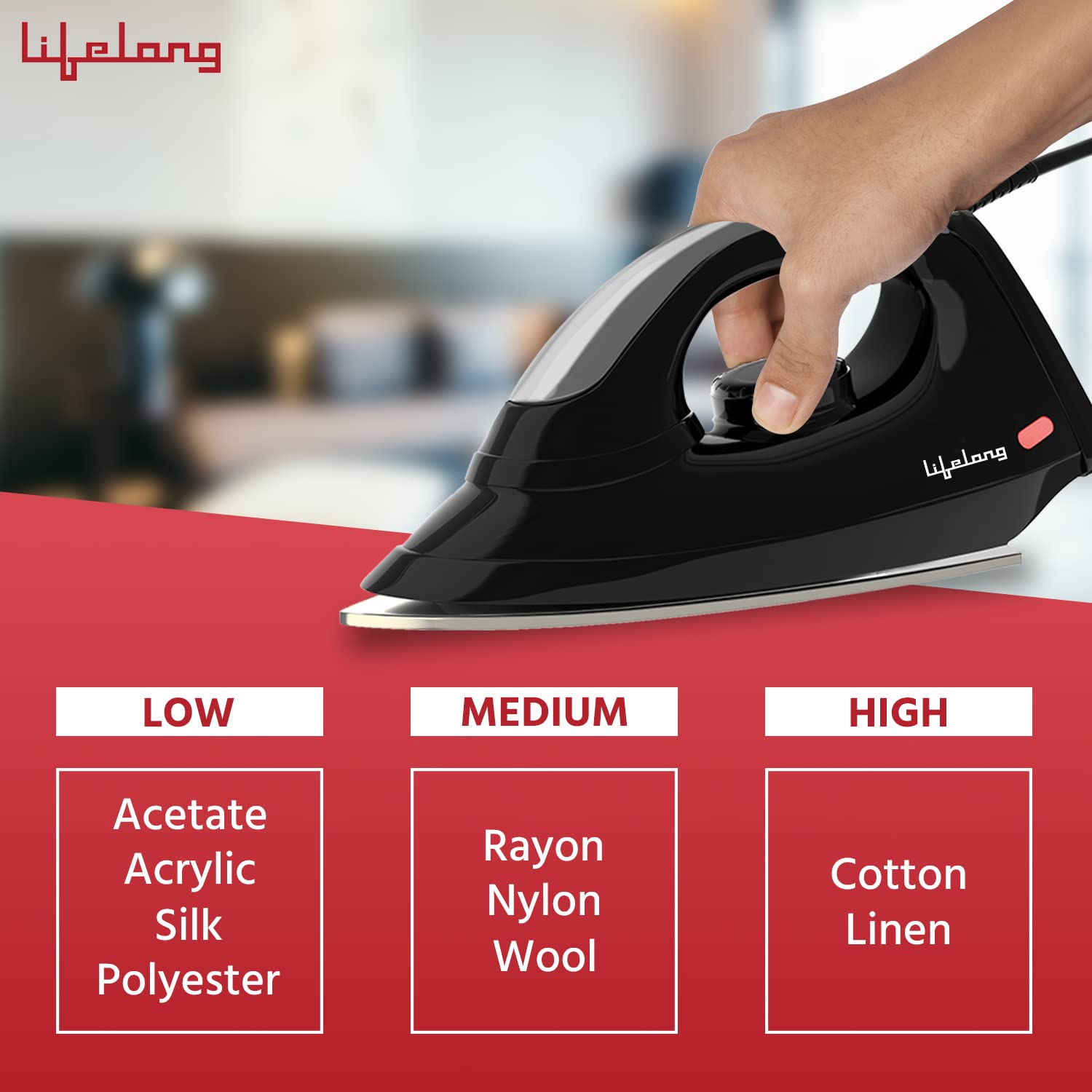
Image 1: The Lifelong Duos Mixer Grinder and Dry Iron Combo.
2. Safety Instructions
Always follow basic safety precautions when using electrical appliances to reduce the risk of fire, electric shock, and personal injury.
- Read all instructions carefully before operating the appliance.
- Do not immerse the motor unit of the mixer grinder or the iron in water or any other liquid.
- Keep appliances out of reach of children.
- Unplug the appliance from the power outlet when not in use, before cleaning, or before assembling/disassembling parts.
- Do not operate any appliance with a damaged cord or plug, or after the appliance malfunctions or has been damaged in any manner. Contact customer service for assistance.
- Avoid contact with moving parts.
- Do not use attachments not recommended or sold by the manufacturer.
- Ensure the voltage indicated on the appliance matches your local power supply before connecting.
3. Product Overview
3.1 Mixer Grinder Components
- Motor Unit (500W)
- Liquidizing Jar (1.2 Liters)
- Chutney Jar (350 ml)
- Lids for Jars
- 3-Speed Control Knob
- Anti-Skid Feet
- Overload Protector

Image 2: Key features of the Lifelong Duos Mixer Grinder, including its 500W motor, anti-skid feet, ISI certification, and overload protector.
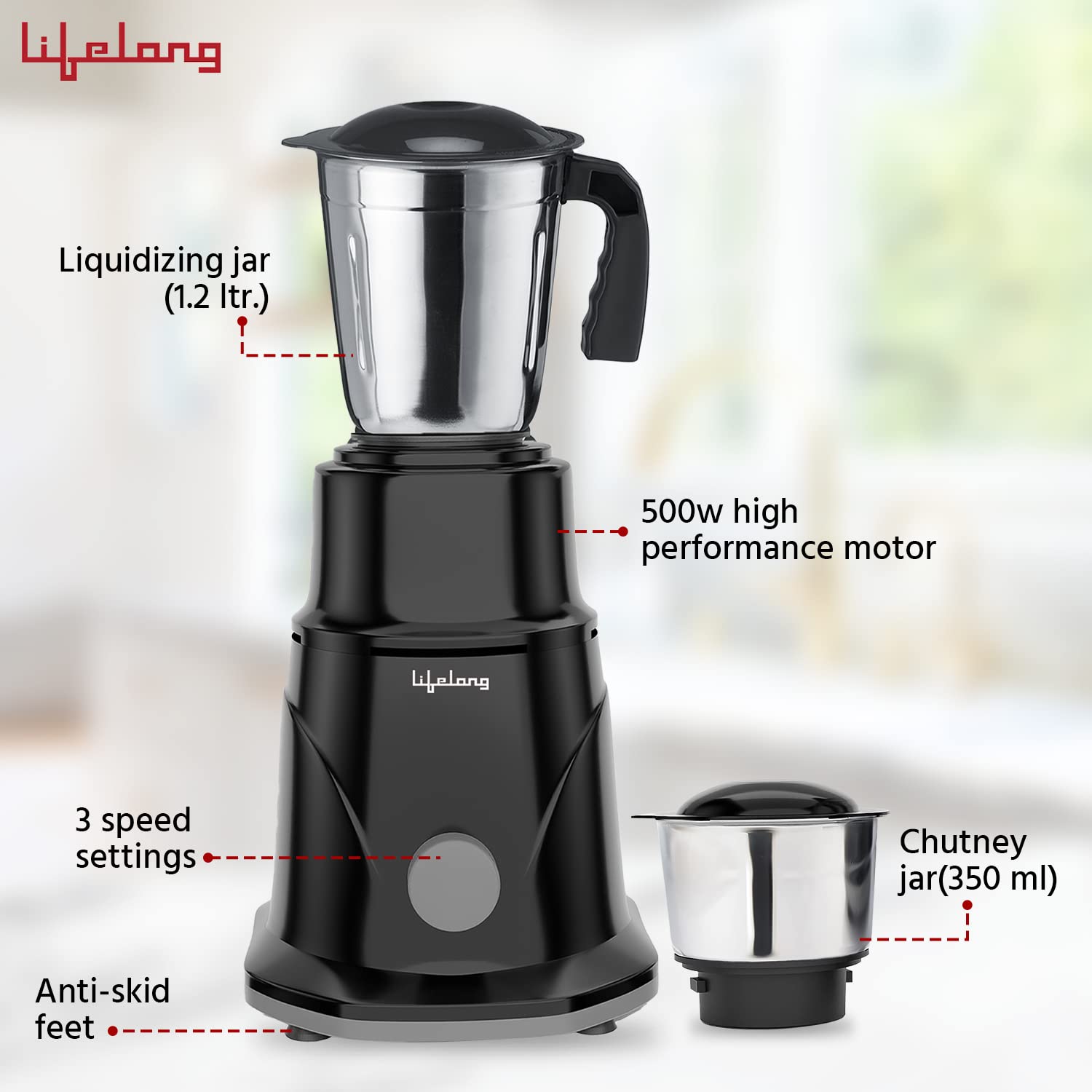
Image 3: The Mixer Grinder showing the 1.2-liter liquidizing jar, 350 ml chutney jar, 500W motor, 3 speed settings, and anti-skid feet.
3.2 Dry Iron Components
- Iron Body (1100W)
- Non-Stick Soleplate
- Temperature Control Knob
- 180° Swivel Cord
- Indicator Light

Image 4: Key features of the Lifelong Duos Dry Iron, including temperature control, 180° swivel cord, non-stick soleplate, and a design that reaches into tricky areas.
4. Setup
4.1 Unpacking
- Carefully remove all components from the packaging.
- Check for any damage during transit. If any damage is found, do not use the product and contact customer support.
- Retain the packaging for future storage or transport.
4.2 Initial Cleaning
- Mixer Grinder: Wash the jars and lids with warm soapy water, rinse thoroughly, and dry. Wipe the motor unit with a damp cloth.
- Dry Iron: Wipe the soleplate and body with a slightly damp cloth to remove any dust or residue.
4.3 Mixer Grinder Assembly
- Place the motor unit on a stable, flat, and dry surface.
- Ensure the motor unit is unplugged before attaching any jar.
- Place the desired jar onto the motor unit and twist gently to lock it into position. Ensure it is securely seated.
- Place the lid firmly on the jar.
4.4 Dry Iron Preparation
- Place the iron on its heel rest on a stable, heat-resistant surface.
- Ensure the temperature control knob is set to the 'OFF' or minimum position before plugging in.
5. Operating Instructions
5.1 Mixer Grinder Usage
- Ensure the mixer grinder is properly assembled and the jar is securely locked.
- Add ingredients to the jar. Do not overfill.
- Secure the lid firmly.
- Plug the power cord into a suitable electrical outlet.
- Turn the 3-speed control knob to the desired speed setting (1, 2, or 3). Use the pulse function for short bursts.
- After use, turn the knob to 'OFF' and unplug the appliance.
- Wait for the blades to stop completely before removing the jar.
Note on Initial Use: It is normal to experience a slight burning smell during the first few uses. This is due to the motor varnish heating up and will dissipate with subsequent uses. If the smell persists, contact customer care.
5.2 Dry Iron Usage
- Ensure the garment is suitable for ironing. Check fabric care labels.
- Plug the iron into a suitable electrical outlet.
- Adjust the temperature control knob according to the fabric type. The indicator light will illuminate while heating and turn off when the desired temperature is reached.
Image 5: Recommended temperature settings for different fabric types: Low for Acetate, Acrylic, Silk, Polyester; Medium for Rayon, Nylon, Wool; High for Cotton, Linen.
- Begin ironing once the indicator light turns off.
- After ironing, set the temperature knob to 'OFF' and unplug the iron.
- Allow the iron to cool down completely before storing.
6. Maintenance and Care
6.1 Cleaning the Mixer Grinder
- Always unplug the appliance before cleaning.
- Wash jars and lids with warm soapy water. Use a brush for thorough cleaning of blades. Rinse and dry immediately.
- Wipe the motor unit with a damp cloth. Do not immerse the motor unit in water.
- Note: The jars are not dishwasher safe.
6.2 Cleaning the Dry Iron
- Ensure the iron is unplugged and completely cool before cleaning.
- Wipe the soleplate with a damp cloth. For stubborn stains, use a mild, non-abrasive cleaner specifically designed for iron soleplates.
- Wipe the body of the iron with a damp cloth.
6.3 Storage
- Store both appliances in a dry, cool place, away from direct sunlight and moisture.
- Ensure cords are neatly wrapped and not kinked.
7. Troubleshooting
- Burning Smell on First Use: This is normal due to motor varnish. It should subside after a few uses. If it persists, contact customer support.
- Mixer Grinder Not Starting: Check if the power cord is securely plugged in. Ensure the jar is correctly locked onto the motor unit. Check for an activated overload protector (a red button usually at the bottom of the motor unit; press to reset after cooling).
- Iron Not Heating: Ensure the power cord is plugged in and the temperature knob is set to a heat setting (not 'OFF'). Check if the indicator light illuminates.
- Poor Grinding Performance: Do not overfill the jar. Ensure ingredients are cut into smaller pieces if necessary. Add a small amount of liquid for wet grinding if needed.
8. Specifications

Image 6: A user demonstrating the Lifelong Duos Dry Iron in use.
| Feature | Detail |
|---|---|
| Brand | Lifelong |
| Model Name | Duos |
| Model Number | LLCMG01 |
| Colour | Black |
| Product Dimensions | 43D x 23W x 19H Centimeters |
| Material | Stainless Steel (Jars), Plastic (Body) |
| Mixer Grinder Wattage | 500 Watts |
| Dry Iron Wattage | 1100 Watts |
| Voltage | 230 Volts |
| Mixer Grinder Jar Capacity | 1.2 Liters (Liquidizing), 350 ml (Chutney) |
| Controls Type | Knob Control |
| Number of Speeds (Mixer) | 3 |
| Special Features | Adjustable Speed Control, Anti-Skid, Auto Shut Off (Overload Protector), Portable |
| Included Components | 1 N Mixer Grinder, 1 N Dry Iron |
| Item Weight | 2100 Grams |
| Blade Material | Stainless Steel |
| Dishwasher Safe (Jars) | No |
9. Warranty
This Lifelong Duos Mixer Grinder and Dry Iron Combo comes with a 1-year brand warranty from the date of purchase. Please retain your purchase receipt as proof of warranty. The warranty covers manufacturing defects under normal household use. It does not cover damage resulting from misuse, accidents, unauthorized repairs, or commercial use.
10. Customer Support
For any queries, service requests, or assistance with your Lifelong Duos product, please contact our customer care team:
- Phone: +91 9711558877
- Email: customercare@lifelongonline.com
- Manufacturer Address: 5th Floor, Unit No. 508, DLF South Court, Saket District Center, Saket New Delhi, India - 110017
You can also visit the official Lifelong Store for more information: Lifelong Store on Amazon
