
WORKPRO W159021AU
WORKPRO 3.6V Cordless Grass and Shrub Shear User Manual
Model: W159021AU
Introduction
Thank you for choosing the WORKPRO 3.6V Cordless Grass and Shrub Shear. This versatile 2-in-1 tool is designed for efficient trimming of grass edges and small shrubs. It features a lightweight design, powerful motor, and a long-lasting battery for convenient outdoor use. Please read this manual carefully before operation to ensure safe and effective use of the product.

Image: The WORKPRO 3.6V Cordless Grass and Shrub Shear, showing the main unit, the grass shear blade, the shrub shear blade, and the Type-C charging cable.
Safety Information
Always observe basic safety precautions when using electrical tools to reduce the risk of fire, electric shock, and personal injury.
- Read the Manual: Read and understand all instructions before operating the tool.
- Keep Area Clear: Keep children, bystanders, and pets away from the operating area.
- Wear Protective Gear: Always wear safety glasses, gloves, and appropriate footwear.
- Avoid Contact with Blades: Never touch the blades while the tool is running or connected to power.
- Secure Grip: Always hold the tool firmly with both hands during operation.
- Double Switch Safety: The tool features a double switch mechanism to prevent accidental activation. Ensure both switches are engaged for operation.
- Charging: Use only the provided Type-C charging cable and a compatible 5V/1A charger. Do not use the tool while charging.
- Storage: Store the tool in a dry, secure place, out of reach of children.
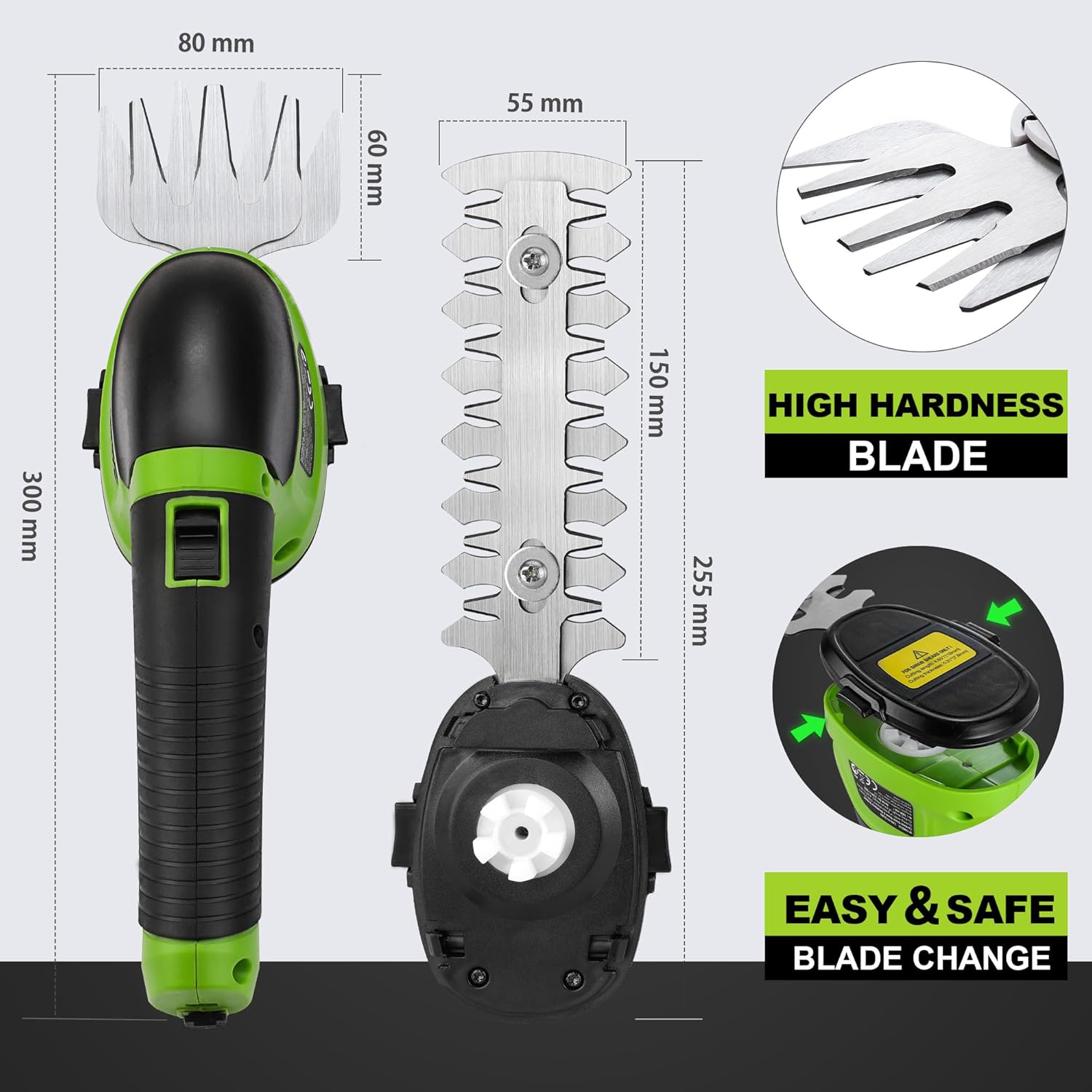
Image: Close-up of the ergonomic safety lock and ON/OFF switch, highlighting the dual activation mechanism for safe operation.
Package Contents
Verify that all items are present and in good condition upon unpacking:
- 1 x WORKPRO Grass and Shrub Shear Unit
- 1 x Grass Blade (75 mm wide)
- 1 x Shrub Blade (120 mm length)
- 1 x Type-C Charging Cable
- 1 x User Manual
Product Overview
Familiarize yourself with the components of your WORKPRO shear:

Image: Diagram showing key components: Type-C Charging Port with Indicator, Type-C Cable (1M), Safety Lock-off Button, ON/OFF Switch, Blade Release Button, TPR Anti-Slip Handle, and Shrub Blade. The unit weighs approximately 370g.
- Main Unit: Ergonomic body with integrated motor and battery.
- Grass Blade: Designed for trimming grass edges, 75mm cutting width.
- Shrub Blade: Designed for shaping shrubs and small branches, 120mm cutting length.
- Type-C Charging Port: For recharging the internal battery.
- Safety Lock-off Button: Prevents accidental starting.
- ON/OFF Switch: Activates the motor when the safety lock is disengaged.
- Blade Release Button: Allows for quick and easy blade changes.
- TPR Anti-Slip Handle: Provides a comfortable and secure grip.
Setup
Charging the Battery
The tool is equipped with a 2000mAh Lithium-ion battery. Before first use, fully charge the battery.
- Locate the Type-C charging port on the tool.
- Connect the provided Type-C charging cable to the tool and to a 5V/1A USB power source (e.g., power bank, Type-C charger, car charger, laptop/PC USB port). Note: USB charging brick is not included.
- The charging indicator light will illuminate (typically red) during charging.
- Once fully charged, the indicator light will change (typically green). Charging time is approximately 2-3 hours.
- Disconnect the charger once charging is complete.

Image: Illustration of the WORKPRO shear being charged via a Type-C cable, showing compatible power sources like a power bank, Type-C charger, car charger, and laptop/PC. The charging indicator lights (red for charging, green for fully charged) are also depicted.
Installing/Changing Blades
Ensure the tool is turned off and disconnected from any power source before changing blades.
- Press the Blade Release Button located on the top of the tool.
- Carefully remove the currently installed blade by pulling it away from the unit.
- Align the desired blade (grass or shrub) with the slot on the tool.
- Push the blade firmly into place until it clicks, indicating it is securely locked.
- Verify the blade is securely attached by gently pulling on it.

Image: Diagram illustrating the dimensions of both the grass and shrub blades, and a close-up showing the easy and safe blade change mechanism with the blade release button.
Operating Instructions
Always wear appropriate safety gear before operating the shear.
Starting and Stopping the Tool
- Ensure the desired blade is securely installed.
- Hold the tool firmly.
- To start, press and hold the Safety Lock-off Button with your thumb.
- While holding the safety button, press the ON/OFF Switch with your index finger. The blades will begin to move.
- To stop, release the ON/OFF Switch. The blades will stop.
Using the Grass Shear Blade
The grass shear blade is ideal for trimming grass edges around flowerbeds, pathways, and other areas inaccessible to larger mowers.
- Ensure the grass blade (75mm wide) is installed.
- Hold the tool with the blade parallel to the ground or at a slight angle for precise edging.
- Move the tool slowly and steadily along the grass edge.
- Avoid cutting wet grass, as it can clog the blades and reduce efficiency.

Image: Depicts the two cutting modes: Grass Shear with a maximum cutting width of 75mm, and Hedge Trimmer with a maximum cutting length of 118mm and maximum cutting thickness of 7.8mm.
Using the Shrub Shear Blade
The shrub shear blade is suitable for shaping and trimming small shrubs, hedges, and ornamental plants. It can cut branches up to 7.8mm in diameter.
- Ensure the shrub blade (120mm length) is installed.
- Hold the tool at a comfortable angle for trimming.
- Work in small sections, making smooth, even passes.
- Do not force the blades through thick branches. If resistance is met, reposition the tool or use a different cutting tool for larger branches.

Image: Collage showing the WORKPRO shear being used for various trimming tasks, including shaping small trees, weeding, and trimming potted plants, demonstrating its versatility.
Maintenance
Regular maintenance ensures optimal performance and extends the life of your tool.
Cleaning
- Always turn off the tool and remove the blade before cleaning.
- Use a soft brush or cloth to remove debris, sap, and dirt from the blades and housing.
- Do not use abrasive cleaners or solvents, as they can damage the plastic parts.
- Wipe the blades with a lightly oiled cloth to prevent rust.
Blade Care
- The blades are made of premium 65Mn steel for high hardness and wear resistance.
- Inspect blades regularly for damage or dullness.
- If blades become dull, they can be sharpened by a professional or replaced.
- Store blades in a dry place to prevent corrosion.

Image: Close-up view of the premium 65Mn steel blades, emphasizing their high hardness, wear resistance, sharpness, and long life.
Storage
- Store the tool in a cool, dry place, away from direct sunlight and moisture.
- Ensure the battery is partially charged (around 50%) before long-term storage to maintain battery health.
- Keep out of reach of children and unauthorized users.
Troubleshooting
| Problem | Possible Cause | Solution |
|---|---|---|
| Tool does not start | Battery is low or depleted Safety lock-off button not pressed Blade not properly installed | Charge the battery Ensure both safety lock and ON/OFF switch are pressed simultaneously Reinstall blade until it clicks securely |
| Blades are not cutting effectively | Blades are dull or dirty Material being cut is too thick Battery is low | Clean blades; sharpen or replace if dull Do not attempt to cut branches thicker than 7.8mm Charge the battery |
| Tool stops during operation | Battery is depleted Overload protection activated | Recharge the battery Reduce cutting load; allow tool to cool down before resuming |
Specifications
| Feature | Detail |
|---|---|
| Model Number | W159021AU |
| Battery Voltage | 3.6V |
| Battery Capacity | 2000 mAh Lithium-ion |
| No-Load Speed | 1100 RPM |
| Grass Blade Width | 75 mm |
| Shrub Blade Length | 120 mm (effective cutting length 118mm) |
| Max. Cutting Thickness (Shrub) | 7.8 mm |
| Charging Time | 2-3 hours (with 5V/1A charger) |
| No-Load Operation Time | ≥ 40 minutes |
| Product Dimensions | 26 x 6 x 10.5 cm |
| Weight | Approx. 370 g (unit only), 900 g (with packaging) |
| Blade Material | High Carbon Steel (65Mn Steel) |
| Manufacturer | Hang Zhou Great Star Industrial Co.,LTD |

Image: Visual representation of the upgraded power motor (1100rpm) and the long-lasting 2000mAh Lithium-ion battery, indicating over 40 minutes of no-load operation time.
Warranty and Support
For warranty information or technical support, please contact the manufacturer or your point of purchase. Keep your purchase receipt as proof of purchase.
Manufacturer: Hang Zhou Great Star Industrial Co.,LTD
For further assistance, visit the WORKPRO official website or contact their customer service.
Ask a question about this manual
Ask about setup, troubleshooting, compatibility, parts, safety, or missing instructions. Manuals+ will review the question and use this page’s manual context to help answer it.