
Introduction
This manual provides detailed instructions for the proper use and care of your Bowers & Wilkins Pi7 S2 True Wireless Noise Cancelling Headphones. Please read this manual thoroughly before using your headphones to ensure optimal performance and longevity.

Image: Bowers & Wilkins Pi7 S2 True Wireless Noise Cancelling Headphones in Satin Black, showing both earbuds and the charging case.
What's in the Box
- 2 earbuds
- 80 cm (31”) USB-C to USB-C charging cable
- 80 cm (31”) 3.5 mm jack to USB-C audio cable
- Small / Medium / Large ear tips
- Charging case with wireless audio retransmission

Image: The Bowers & Wilkins Pi7 S2 earbuds resting in their open charging case.
Setup
1. Charging the Headphones
Before first use, fully charge your Pi7 S2 headphones. Place the earbuds into the charging case. Connect the USB-C charging cable to the case and a power source. A full charge takes approximately 15 minutes for 5 hours of playback.
2. Pairing with a Device
- Ensure the earbuds are in the charging case and the case lid is open.
- On your device (smartphone, tablet, etc.), go to Bluetooth settings.
- Select "Bowers & Wilkins Pi7 S2" from the list of available devices to pair.
- For optimal experience, download the Bowers & Wilkins Music App from your device's app store.
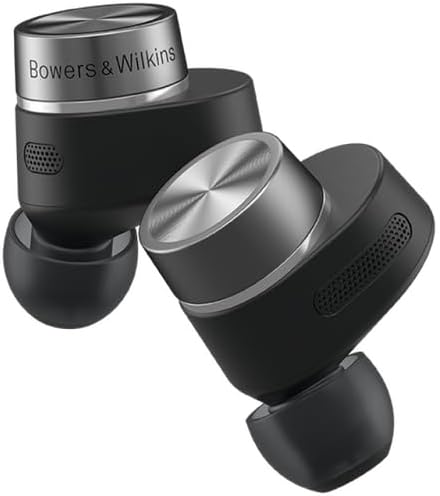
Image: A close-up view of the Bowers & Wilkins Pi7 S2 earbuds, highlighting their design.
Operating Instructions
Active Noise Cancellation (ANC) and Transparency Mode
The Pi7 S2 features Adaptive Active Noise Cancellation, which automatically adjusts to your environment. You can also manually control ANC and Transparency modes via the Bowers & Wilkins Music App. Transparency mode allows you to hear your surroundings while still enjoying your audio.

Image: A man wearing Bowers & Wilkins Pi7 S2 earbuds, with a visual representation of active noise cancellation in an urban environment.
Touch Controls
The earbuds feature intuitive touch controls for managing playback and calls. Refer to the Bowers & Wilkins Music App for detailed customization options and gestures.
Wear Detection
The Pi7 S2 earbuds are equipped with wear detection sensors. Audio playback will automatically pause when an earbud is removed from your ear and resume when placed back in. This feature can be toggled on/off in the Bowers & Wilkins Music App settings.
Wireless Audio Retransmission
The charging case doubles as a wireless audio retransmission device. Connect the case to an external audio source (e.g., in-flight entertainment system) using the provided 3.5 mm jack to USB-C audio cable. The case will then wirelessly transmit the audio to your earbuds, allowing you to enjoy your content with your Pi7 S2 headphones.

Image: The Bowers & Wilkins Pi7 S2 charging case, illustrating its capability for wireless audio retransmission from an external source.
Maintenance
To maintain the performance and appearance of your Pi7 S2 headphones:
- Regularly clean the earbuds and charging case with a soft, dry cloth.
- Avoid using abrasive materials or harsh chemicals.
- Ensure the ear tips are clean and free of debris for optimal sound and fit.
- Store the headphones in their charging case when not in use.
Troubleshooting
Connectivity Issues
- Ensure both earbuds are fully charged.
- Place earbuds back in the case, close the lid, wait a few seconds, then open to re-establish connection.
- Check your device's Bluetooth settings to ensure "Bowers & Wilkins Pi7 S2" is connected.
- If issues persist, try unpairing and re-pairing the headphones with your device.
Sound Quality Concerns
- Ensure you are using the correct size ear tips for a secure and comfortable fit to maximize sound performance and bass response.
- Clean ear tips and earbud grilles to remove any obstructions.
- Verify audio source quality. High-resolution audio sources (e.g., Qualcomm aptX Adaptive) provide the best experience.
Battery Life
- Ensure the charging case is also charged.
- A 15-minute charge provides approximately 5 hours of earbud playback.
Specifications
| Brand | Bowers & Wilkins |
| Model Number | FP43761 |
| Model Name | Pi7 S2 |
| Color | Satin Black |
| Ear Placement | In Ear |
| Connectivity Technology | Wireless (Bluetooth 5.0) |
| Bluetooth Range | 25 Meters |
| Noise Control | Active Noise Cancellation |
| Audio Driver Type | Dynamic Driver |
| Audio Driver Size | 9.2 Millimeters |
| Battery Average Life | 5 Hours (earbuds) |
| Battery Charge Time | 15 minutes (for 5 hours playback) |
| Water Resistance Level | Water Resistant |
| Item Weight | 7 Grams |
Warranty & Support
Your Bowers & Wilkins Pi7 S2 headphones come with a 2-year warranty. For detailed warranty information or technical support, please refer to the official Bowers & Wilkins website or contact their customer service.