
1. Introduction
This manual provides essential information for the proper installation, operation, and maintenance of the Dieffematic Electronic Board, model NC670R. This board is an original spare part specifically designed for DITEC 670R Line 60 Globe 7 gate automation systems. Please read this manual carefully before proceeding with any installation or maintenance to ensure safe and correct usage.
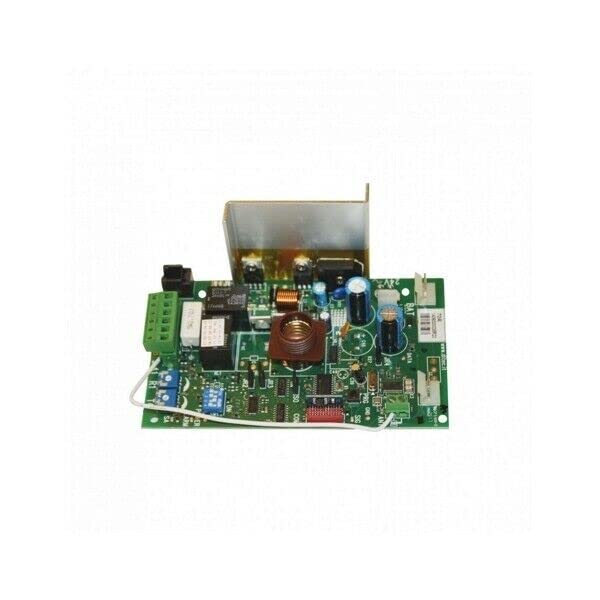
Image 1: Dieffematic Electronic Board NC670R. This image shows the electronic control board with various connectors and components, typically used in gate automation systems.
2. Safety Information
WARNING: Electrical components can cause serious injury or death. Installation and maintenance should only be performed by qualified personnel.
- Always disconnect power to the gate automation system before performing any installation, maintenance, or troubleshooting.
- Ensure all electrical connections comply with local regulations and standards.
- Protect the electronic board from moisture, dust, and extreme temperatures.
- Do not attempt to modify the electronic board. Use only original spare parts.
- Keep children and unauthorized persons away from the gate automation system during installation and operation.
3. Setup and Installation
The Dieffematic Electronic Board NC670R is a replacement part. Installation should be performed by a trained technician familiar with DITEC 670R Line 60 Globe 7 systems.
- Power Disconnection: Ensure the main power supply to the gate automation system is completely disconnected and secured against accidental reconnection.
- Access Existing Board: Carefully open the control unit housing to access the existing electronic board. Note the position and connection of all wires. It is recommended to take photographs for reference.
- Remove Old Board: Disconnect all wires from the old board. Unmount the old board from its housing.
- Install New Board: Mount the new Dieffematic NC670R electronic board in the same position as the old one.
- Reconnect Wiring: Carefully reconnect all wires to the new board, ensuring each connection matches the original configuration. Refer to the photographs taken earlier and the specific wiring diagram for the DITEC 670R Line 60 Globe 7 system.
- Secure Housing: Close and secure the control unit housing, ensuring all seals are correctly seated to protect against environmental elements.
- Power On and Test: Restore power to the system. Perform functional tests according to the DITEC 670R Line 60 Globe 7 system manual to verify correct operation of the gate.
For detailed wiring diagrams and specific installation procedures, refer to the complete manual of your DITEC 670R Line 60 Globe 7 gate automation system.
4. Operating Principles
The Dieffematic Electronic Board NC670R functions as the central control unit for the DITEC 670R Line 60 Globe 7 gate automation system. It processes signals from various inputs (e.g., remote controls, safety sensors, keypads) and controls the gate motor(s) to open, close, or stop the gate. It also manages safety features and operational parameters such as opening/closing speeds, force, and obstacle detection.
Once correctly installed and configured, the board operates automatically based on the programmed settings and user commands. Refer to the DITEC 670R Line 60 Globe 7 system manual for instructions on programming and adjusting operational parameters.
5. Maintenance
Regular maintenance helps ensure the longevity and reliable operation of the electronic board and the entire gate automation system.
- Visual Inspection: Periodically inspect the board for any signs of damage, corrosion, or loose connections. Ensure the housing is sealed and free from moisture or insect ingress.
- Cleaning: If necessary, gently clean the board and its housing with a soft, dry brush or compressed air. Do not use liquids or abrasive cleaners.
- Professional Check: It is recommended to have the entire gate automation system, including the electronic board, inspected by a qualified technician at least once a year.
6. Troubleshooting
If the gate automation system experiences issues after installing the new electronic board, consider the following general troubleshooting steps:
- No Power: Check the main power supply to the system. Verify that all power connections to the board are secure.
- Gate Not Responding:
- Ensure all control inputs (e.g., remote, keypad) are functioning correctly.
- Check safety sensors (photocells) for obstructions or misalignment.
- Verify all low-voltage control wiring connections to the board.
- Erratic Operation:
- Inspect for loose wiring or damaged insulation.
- Ensure the board is securely mounted and not subject to excessive vibration.
- Consult the DITEC 670R Line 60 Globe 7 system manual for specific error codes or diagnostic procedures.
- Still Experiencing Issues: If problems persist after performing these checks, contact a qualified technician or the manufacturer's support for assistance.
7. Specifications
| Feature | Detail |
|---|---|
| Manufacturer | Dieffematic |
| Part Number | NC670R |
| Compatible System | DITEC 670R Line 60 Globe 7 |
| ASIN | B0BQRTFKFF |
| First Available Date | 26 mei 2023 (May 26, 2023) |
8. Warranty Information
This Dieffematic Electronic Board NC670R is an original spare part. For specific warranty terms and conditions, please refer to the warranty documentation provided by Dieffematic or the authorized reseller at the time of purchase. Warranty coverage typically applies to manufacturing defects and does not cover damage caused by improper installation, misuse, or unauthorized modifications.
9. Support and Contact
For technical support, further assistance, or to inquire about other original spare parts, please contact your authorized Dieffematic dealer or visit the official Dieffematic website. When contacting support, please have your product model (NC670R) and the details of your DITEC 670R Line 60 Globe 7 system readily available.
Manufacturer: Dieffematic