NEEWER NW635II-N TTL Camera Flash Speedlite Instruction Manual
Model: NW635II-N
1. Introduction
This manual provides detailed instructions for the operation and maintenance of your NEEWER NW635II-N TTL Camera Flash Speedlite. Please read this manual thoroughly before use to ensure proper function and to maximize the lifespan of your device. This speedlite is designed for use with Nikon cameras, offering versatile lighting solutions for various photographic needs.

Image: The NEEWER NW635II-N TTL Camera Flash Speedlite, showcasing its design and compatibility.
2. Package Contents
Verify that all items are present in your package:
- 1 x NW635II-N Speedlite
- 1 x Light Diffuser
- 1 x Hot Shoe Stand
- 1 x Protective Case
- 1 x User Manual

Image: Visual representation of the NW635II-N Speedlite and its included accessories: light diffuser, hot shoe stand, protective case, and user manual.
3. Setup
3.1 Battery Installation
- Open the battery compartment cover located on the side of the speedlite.
- Insert four (4) AA alkaline batteries or four (4) nickel-metal hydride (NiMH) rechargeable batteries, ensuring correct polarity (+/-).
- Close the battery compartment cover securely.

Image: Close-up view of the battery compartment, showing the insertion points for four AA batteries.
3.2 Mounting on Camera
- Slide the speedlite's hot shoe onto your camera's hot shoe mount.
- Rotate the locking ring clockwise until the speedlite is firmly secured to the camera.
The NW635II-N is compatible with various Nikon camera models, including D4, D5, D6, D60, D70S, D90, D100, D200, D300S, D300, D500, D610, D700, D750, D780, D800, D810, D850, D3100, D3200, D3300, D3400, D3500, D5000, D5100, D5200, D5300, D5600, D7000, D7100, D7200, D7500, Z5, Z6, Z7, Z6II, and Z7II. Note: It is not compatible with Z9 or Z50 models.

Image: The NW635II-N Speedlite attached to a camera, illustrating its compact and lightweight design.
4. Operating Instructions
4.1 Power On/Off
Press and hold the power button to turn the speedlite on or off. The LCD screen will illuminate upon power-on.
4.2 Flash Modes
The NW635II-N supports multiple flash modes:
- TTL Mode: (Through-The-Lens) Automatically adjusts flash output for optimal exposure.
- Manual Mode (M): Allows manual adjustment of flash output from 1/1 (full power) to 1/128.
- Optical Slave Mode (S1/S2): Triggers the speedlite wirelessly when another flash fires. S1 mode fires when the master flash fires. S2 mode ignores the pre-flash of the master flash.
- Stroboscopic Flash Mode: Fires a series of rapid flashes during a single exposure to capture multiple movements of a subject.

Image: The speedlite's LCD screen showing various settings such as TTL mode, zoom, and exposure compensation.

Image: Demonstrates the stable 5600K±200K color temperature and adjustable flash output from 1/1 to 1/128.
4.3 Adjusting Flash Output and Exposure Compensation
In Manual mode, use the control dial to adjust the flash output from 1/1 to 1/128. In TTL mode, Flash Exposure Compensation (FEC) can be adjusted to fine-tune the flash brightness.
4.4 Flexible Bounce Angles
The flash head can be adjusted to direct light for various effects:
- Tilt: Swivel the flash head up and down between -7° and 90°.
- Rotate: Rotate the flash head 270° horizontally.
These adjustments allow for bouncing light off ceilings or walls to create softer, more natural illumination with reduced shadows.

Image: Diagram illustrating the vertical tilt (-7° to 90°) and horizontal rotation (270°) capabilities of the flash head.
4.5 Using Diffusers and Reflectors
The speedlite includes an inbuilt reflector board and a wide-angle diffuser. An external light diffuser is also provided to soften the flash output, creating a more even and balanced light effect, ideal for portraits.
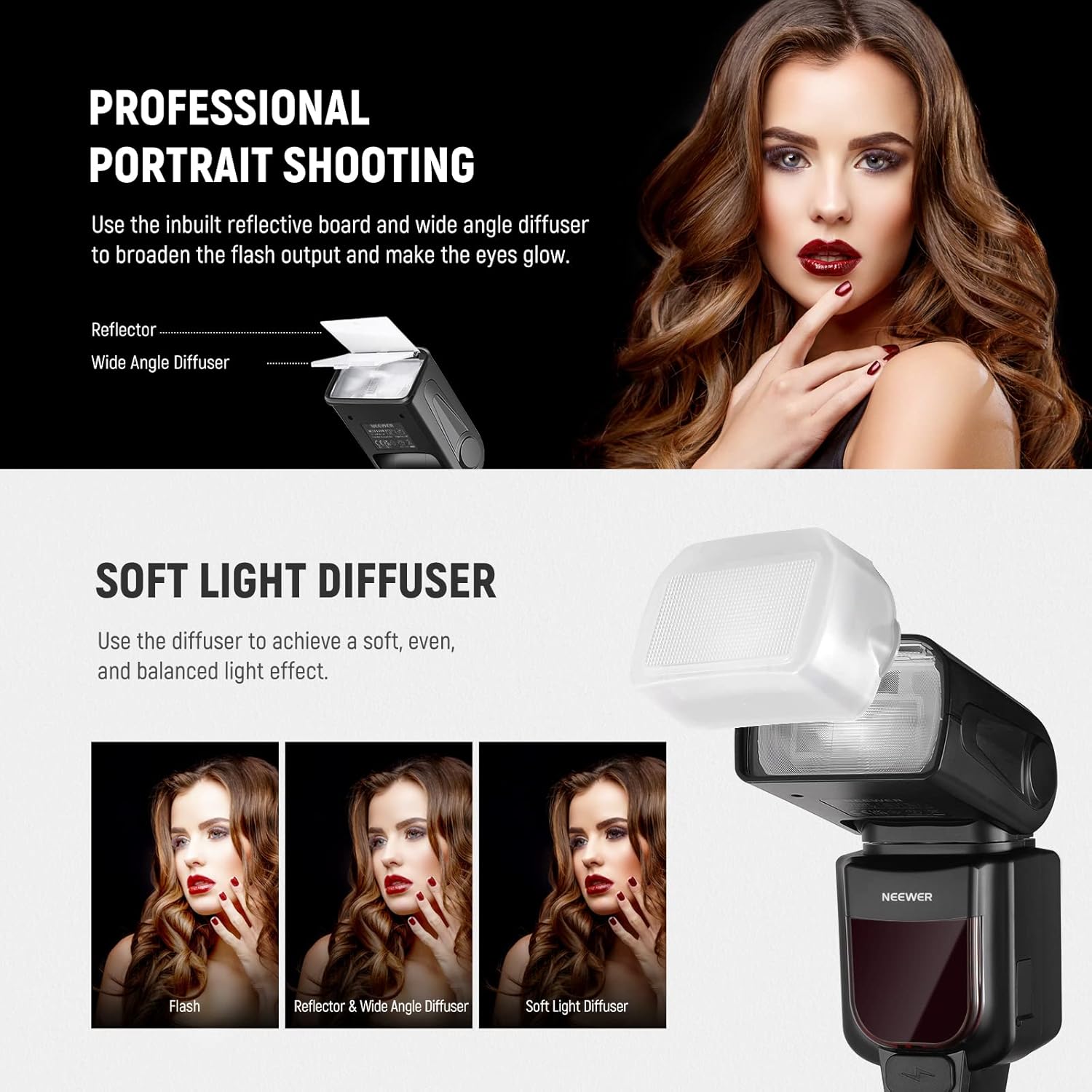
Image: Shows the effect of using the soft light diffuser compared to direct flash and reflector/wide angle diffuser.
4.6 Wireless Operation (Optical Slave)
In S1 or S2 optical slave mode, the speedlite can be triggered by another flash unit. For advanced wireless control, the speedlite is compatible with a 2.4GHz wireless trigger (e.g., NEEWER FC-16, sold separately).

Image: Depicts the speedlite in an optical slave setup, showing indoor and outdoor wireless distances.
4.7 PC Sync Port
The speedlite features a PC sync port for wired connection to cameras or external triggers that support this interface.

Image: Close-up of the PC sync port with its protective cover.
5. Maintenance
- Keep the speedlite dry. Do not handle with wet hands.
- Clean the unit with a soft, dry cloth. Avoid using solvents or harsh chemicals.
- Remove batteries if the speedlite will not be used for an extended period to prevent leakage.
- Store the speedlite in its protective case when not in use to prevent dust and damage.
6. Troubleshooting
- Flash not firing: Check battery level. Ensure the speedlite is securely mounted on the camera's hot shoe. Verify camera and flash settings are correct for the chosen mode.
- Inconsistent flash output: Ensure batteries are fully charged. Check for obstructions between the flash and subject. In TTL mode, adjust Flash Exposure Compensation if needed.
- Overheating: Continuous rapid firing can cause the flash to overheat. Allow the unit to cool down if an overheating warning appears.
- LCD screen not displaying: Check battery installation and power. If the issue persists, contact customer support.
7. Specifications
| Feature | Specification |
|---|---|
| Model | NW635II-N |
| Guide Number | GN58 (ISO 100, 180mm) |
| Flash Coverage | Auto zoom, 24-180mm manual zoom, flash head rotation |
| Flash Mode | TTL, manual, stroboscopic flash, optical slave S1/S2 |
| Wireless Flash Distance | 66'-98' / 20-30m (indoor), 33'-49' / 10-15m (outdoor) |
| Number of Full Power Flash | 230 |
| Recycling Time | 3.5s |
| Color Temperature | 5600K±200K |
| Flash Control | 1/128-1/1 |
| Tilt Angle | -7°~90° |
| Rotating Angle | -90°~180° |
| Power Supply | 4 x AA alkaline/NiMH battery |
| Dimensions | 8" x 3" x 2.4" / 203 x 76 x 61mm |
| Weight | 14.1oz / 400g |

Image: A visual summary of the key specifications for the NW635II-N Speedlite.
8. Warranty and Support
NEEWER products are designed for reliability and performance. For warranty information, technical support, or service inquiries, please refer to the warranty card included with your product or visit the official NEEWER website. Keep your purchase receipt as proof of purchase for warranty claims.


