
1. Introduction and Overview
The ZAFRO D4229B Dehumidifier is designed to efficiently remove excess moisture from your indoor environment, improving air quality and comfort. This unit is capable of removing up to 45 pints of moisture per day (rated at 50 pints under 90°F/90% RH conditions) and is suitable for areas up to 3500 square feet, including basements, offices, bathrooms, and bedrooms. It features multiple operating modes, automatic defrost, and a convenient 4-liter water tank.

Figure 1: ZAFRO D4229B Dehumidifier Overview
2. Setup
- Unpacking: Carefully remove the dehumidifier from its packaging. Retain all packaging materials for future storage or shipping.
- Placement: Place the dehumidifier on a flat, stable surface. Ensure there is at least 8 inches (20 cm) of space around all sides of the unit for proper air circulation. Avoid placing it near heat sources or in direct sunlight.
- Power Connection: Plug the power cord into a grounded electrical outlet. Ensure the voltage matches the specifications of the unit.
- Water Tank Installation: Ensure the 4-liter water tank is correctly inserted into the unit. The unit will not operate if the tank is not properly seated.
3. Operating Modes
The ZAFRO D4229B offers three distinct operating modes to suit various needs:
- Auto Mode: In this mode, both fan speed and humidity levels can be adjusted. The unit will automatically maintain the set humidity level.
- Continuous Drying Mode: The machine operates continuously to maximize moisture removal. In this mode, humidity settings and fan speed are not adjustable.
- Sleep Mode: Designed for quiet operation, the fan runs at a lower speed, and most indicator lights are dimmed or turned off. Both fan speed and humidity can be adjusted in this mode.
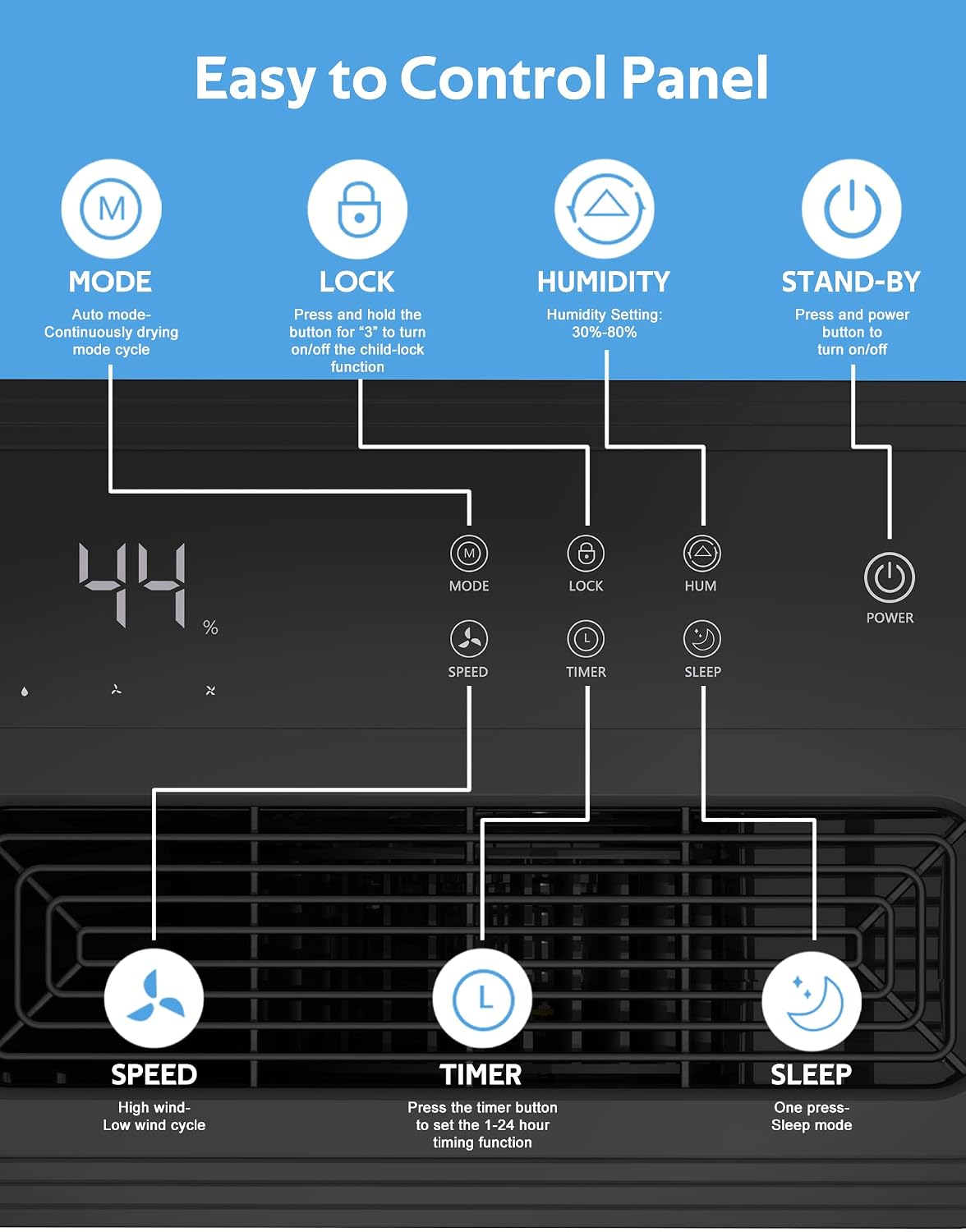
Figure 2: Three Working Modes
Control Panel Overview
The intuitive control panel allows for easy operation:

Figure 3: Easy to Control Panel
- Power Button: Press to turn the unit on or off.
- Mode Button: Cycles through Auto, Continuous, and Sleep modes.
- Lock Button: Press and hold to activate/deactivate the child-lock function.
- Humidity Setting: Adjusts desired humidity from 30% to 80%.
- Timer Button: Sets the 1-24 hour timing function.
- Speed Button: Toggles between high and low fan speeds.
- Sleep Button: Activates Sleep Mode.
Low Noise Operation
Equipped with a high-efficiency compressor, the dehumidifier operates at a low noise level (≤45dB), ensuring minimal disturbance during daily activities or sleep.

Figure 4: Low Noise Design
4. Drainage
The ZAFRO D4229B offers two methods for water drainage:
- Manual Drain: Water collects in the 4-liter (0.53 gallon) removable tank. When the tank is full, the unit will automatically stop operating, and a full indicator will light up and beep, signaling it's time to empty the tank.
- Auto Drain: For continuous drainage, connect the included 3.3-foot drain hose to the designated drainage port on the unit and direct it to a suitable drain. This bypasses the water tank, allowing for uninterrupted operation.

Figure 5: Two Methods to Drain the Water
5. Maintenance
- Filter Cleaning: The air filter should be cleaned every two weeks for optimal performance. To clean, remove the filter mesh, use a vacuum cleaner to remove dust, or rinse it under running water. Ensure the filter is completely dry before reinserting.
- Water Tank Cleaning: Periodically clean the water tank to prevent mold or mildew growth. Use mild soap and water, rinse thoroughly, and ensure it is dry before reinserting.
- Exterior Cleaning: Wipe the exterior of the unit with a soft, damp cloth. Do not use harsh chemicals or abrasive cleaners.
6. Specifications
| Feature | Detail |
|---|---|
| Brand | ZAFRO |
| Model Number | D4229B |
| Dehumidification Capacity | 45 Pints per Day (50 Pints under 90°F/90% RH) |
| Coverage Area | Up to 3500 Square Feet |
| Water Tank Volume | 4 Liters (0.53 Gallons) |
| Product Dimensions (D x W x H) | 13"D x 11"W x 27"H |
| Noise Level | ≤45dB |
| Special Features | Automatic Defrost, 12-Hour Timer, 3-Color LED Light, Recessed Handles, 4 Castor Wheels |
| Color | White |
Portability
The compact design, recessed handles, and 4 castor wheels make the ZAFRO D4229B easy to move between rooms.

Figure 6: Easy to Move Design
Dimensions

Figure 7: Product Dimensions
7. Troubleshooting
If you encounter issues with your ZAFRO D4229B Dehumidifier, please refer to the following common troubleshooting steps:
- Unit Not Turning On:
- Ensure the power cord is securely plugged into a working electrical outlet.
- Check if the water tank is properly seated. The unit has a safety feature that prevents operation if the tank is not correctly installed or is full.
- Verify that the power button on the control panel has been pressed.
- No Water Collection:
- Check the humidity setting. If the ambient humidity is below the set level, the unit will not dehumidify.
- Ensure the air filter is clean and not obstructed. A dirty filter can reduce efficiency.
- Verify that the room temperature is within the operating range (typically above 41°F / 5°C). Dehumidifiers are less effective in very cold conditions.
- Unit is Loud/Making Unusual Noises:
- Check for any obstructions in the air intake or exhaust vents.
- Ensure the unit is placed on a stable, level surface to prevent vibrations.
- If the noise persists, it may indicate an internal issue requiring professional service.
- Water Tank Full Indicator Remains On After Emptying:
- Ensure the water tank is completely empty and properly reinserted.
- Check the float switch mechanism inside the tank to ensure it is not stuck.
8. Official Product Videos
No official seller-created product videos are available for direct embedding at this time. Please refer to the product page for any available video content.
9. Warranty and Support
For detailed warranty information, please refer to the warranty card included with your product packaging or contact ZAFRO customer support directly. Keep your proof of purchase for any warranty claims.
For further assistance or technical support, please visit the official ZAFRO website or contact their customer service department. Contact information can typically be found in the included user manual or on the manufacturer's website.