
SUDOTACK SP-70B
SUDOTACK Karaoke Machine User Manual
Model: SP-70B
Brand: SUDOTACK
Introduction
Thank you for choosing the SUDOTACK Karaoke Machine SP-70B. This portable karaoke system is designed to provide high-quality audio and entertainment for various occasions, from home parties to outdoor gatherings. It features Bluetooth 5.0 connectivity, two wireless microphones, a powerful speaker with LED lights, and support for multiple audio inputs. This manual provides detailed instructions for setup, operation, maintenance, and troubleshooting to ensure you get the most out of your device.
Setup Guide
Package Contents
Before you begin, please verify that all items are present in the package:
- 1 x SUDOTACK Karaoke Speaker (SP-70B)
- 2 x Wireless Microphones
- 1 x USB Type C Charging Cable
- 1 x Shoulder Strap
- 1 x User Manual (this document)
Charging the Speaker
The karaoke machine is equipped with a built-in Lithium Ion battery. For optimal performance, fully charge the speaker before first use.
- Connect the provided USB Type C charging cable to the charging port on the speaker.
- Connect the other end of the cable to a compatible USB power adapter (not included) or a computer USB port.
- The charging indicator light will illuminate. A full charge typically takes 3-6 hours.
- Once fully charged, the indicator light may change or turn off, depending on the model. Disconnect the charging cable.
Note: A full charge provides approximately 4-8 hours of playing time, depending on usage volume and light effects.

This image shows the karaoke machine and microphones with overlaid text indicating 'Playing time 4-8h' and 'Charging time 3-6h'. It visually communicates the battery performance and charging duration for user convenience.
Microphone Setup
The wireless microphones require 2 AA batteries each (not included).
- Unscrew the bottom cap of each microphone.
- Insert 2 AA batteries into each microphone, ensuring correct polarity (+/-).
- Screw the bottom cap back on securely.
- Turn on the microphone using its power switch. The microphone will automatically pair with the speaker when the speaker is powered on and in Bluetooth mode.
Operating Instructions
Power On/Off
To power on the speaker, rotate the 'VOL' knob clockwise until the display illuminates. To power off, rotate the 'VOL' knob counter-clockwise until it clicks off.
Bluetooth Pairing
The SP-70B uses Bluetooth 5.0 for stable wireless connection.
- Power on the karaoke machine. It will automatically enter Bluetooth pairing mode, indicated by a flashing 'BLUE' on the display.
- On your smartphone, tablet, or other Bluetooth-enabled device, go to the Bluetooth settings.
- Search for available devices and select 'SP-70 Wireless Karaoke' from the list.
- Once connected, the 'BLUE' indicator on the speaker's display will stop flashing and remain solid. You can now play audio from your device through the speaker.

This image illustrates the Bluetooth 5.0 connectivity of the karaoke machine. The speaker is shown with its colorful LED lights, and a smartphone screen displaying Bluetooth settings is overlaid, indicating a successful connection to 'SP-70 Wireless Karaoke'. This highlights the ease of wireless pairing.
Microphone Usage and Controls
The SP-70B comes with two wireless microphones for duets and enhanced fun.
- Microphone Volume (MIC VOL): Use the 'MIC VOL' rotary knob on the speaker's control panel to adjust the volume of the microphones independently from the music.
- Microphone Echo (MIC ECHO): Use the 'MIC ECHO' rotary knob to add or reduce reverb effect to your voice, enhancing the karaoke experience.
- Ensure the microphones are powered on (2 AA batteries required for each). They will automatically connect to the speaker.

A detailed view of the karaoke machine's control panel, focusing on the rotary knobs for 'MIC VOL' (microphone volume), 'MIC ECHO' (microphone reverb), and 'VOL' (master speaker volume). This image clarifies how users can independently adjust audio levels for a customized karaoke experience.
Music Playback (TF/USB/AUX)
In addition to Bluetooth, the speaker supports playback from various sources:
- TF Card: Insert a Micro TF card (up to 32GB, not included) with MP3 audio files into the 'TF' slot. The speaker will automatically switch to TF card mode and begin playback.
- USB Drive: Insert a USB flash drive (up to 32GB, not included) with MP3 audio files into the 'USB' port. The speaker will automatically switch to USB mode and begin playback.
- AUX-in: Connect an external audio device (e.g., MP3 player, computer) to the 'AUX' port using a 3.5mm audio cable (not included). Press the 'Mode/LED' button to switch to AUX mode.
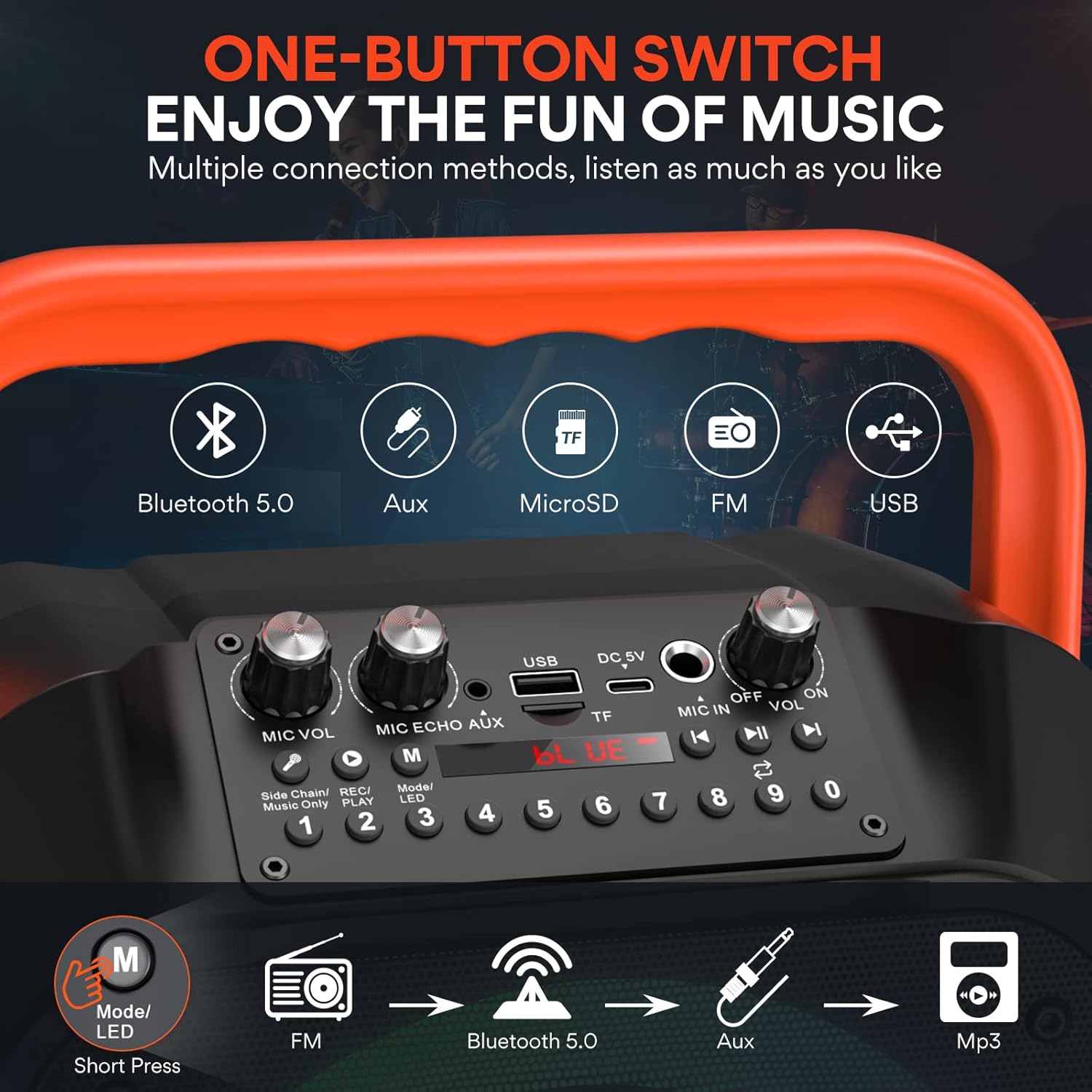
This image provides a close-up of the top control panel, illustrating the multiple connectivity options: Bluetooth 5.0, Aux-in, MicroSD card slot, FM radio, and USB port. It also shows the 'Mode/LED' button for switching between functions, highlighting the versatility of the device.
FM Radio
To use the FM radio function:
- Press the 'Mode/LED' button repeatedly until 'FM' appears on the display.
- Press the 'Play/Pause' button to automatically scan and save available FM stations.
- Use the 'Previous' and 'Next' buttons to navigate between saved stations.
TWS (True Wireless Stereo) Mode
If you have two SP-70B karaoke machines, you can connect them wirelessly for a stereo sound experience.
- Ensure both speakers are powered on and in Bluetooth mode, but not connected to any device.
- On one of the speakers (this will be the primary unit), long press the 'TWS' button (often integrated with another function button, refer to control panel diagram if available).
- The primary speaker will search for the secondary speaker. Once connected, you will hear a confirmation sound, and the 'TWS' indicator will illuminate.
- Now, connect your Bluetooth device to the primary speaker. Audio will play in stereo through both units.

This image demonstrates the TWS (True Wireless Stereo) interconnect technology, showing two SUDOTACK karaoke machines placed outdoors, wirelessly linked to create a stereo sound experience. Two individuals are depicted singing and playing guitar, illustrating a dual-speaker setup for enhanced audio.
Party Lights (RGB Mode)
The speaker features a Tricolor RGB mode with six color gradients that sync with the music.
- Long press the 'Mode/LED' button to cycle through different lighting effects or to turn the lights off.
- The lights will automatically dance in sync with the music, creating an engaging party atmosphere.
Recording Function
The SP-70B supports recording your karaoke performances.
- Ensure a USB drive or TF card is inserted into the speaker.
- Press the 'REC/PLAY' button (often labeled with a microphone icon or 'REC'). The speaker will begin recording your voice and the music.
- Press the 'REC/PLAY' button again to stop recording. The recording will be saved to the inserted storage device.
- To play back recordings, press the 'REC/PLAY' button when in USB or TF card mode.

A magnified view of specific buttons on the control panel: 'Side Chain/Music Only' and 'REC/PLAY'. This helps users identify and understand the functions related to vocal removal and recording/playback.
Maintenance
Cleaning
- Always power off the device before cleaning.
- Use a soft, dry cloth to wipe the exterior of the speaker and microphones.
- Do not use abrasive cleaners, waxes, or solvents as they may damage the finish.
- Avoid getting moisture into any openings or ports.
Storage
- Store the karaoke machine and microphones in a cool, dry place away from direct sunlight and extreme temperatures.
- If storing for an extended period, ensure the battery is partially charged (around 50%) to preserve battery health. Recharge every few months if not in use.
- Remove AA batteries from the microphones if they will not be used for a long time to prevent leakage.
Battery Care
- Avoid fully discharging the speaker's battery frequently, as this can reduce its lifespan.
- Do not expose the battery to high temperatures or direct heat.
- If the battery performance significantly degrades, contact customer support for assistance.
Troubleshooting
| Problem | Possible Cause | Solution |
|---|---|---|
| No sound from speaker | Speaker is off or low battery Volume is too low Incorrect input mode selected Bluetooth not connected | Ensure speaker is charged and powered on Increase the 'VOL' knob Press 'Mode/LED' to select correct input (Bluetooth, AUX, TF, USB) Re-pair Bluetooth device |
| Microphones not working | Microphones are off Microphone batteries are dead Microphone volume (MIC VOL) is too low | Turn on microphones Replace AA batteries in microphones Increase the 'MIC VOL' knob on the speaker |
| Bluetooth connection unstable or failing | Device is too far from speaker Interference from other devices Speaker already connected to another device | Move device closer to speaker (within 32 ft) Move away from other wireless devices Disconnect from previous device or restart speaker and try pairing again |
| TWS mode not connecting | One or both speakers are already paired to a device Speakers are too far apart | Ensure both speakers are in Bluetooth pairing mode (not connected to any device) before initiating TWS Place speakers closer to each other |
| LED lights not working or stuck | Lights are turned off Software glitch | Long press the 'Mode/LED' button to cycle through light modes or turn them on Restart the speaker |
Product Specifications

This image displays the SUDOTACK Karaoke Machine, featuring a black speaker unit with a vibrant, multi-color LED light ring on the front grille. An orange handle is prominently displayed on top, and two wireless microphones are shown alongside the speaker. A detachable shoulder strap is also visible, indicating portability.
| Feature | Detail |
|---|---|
| Brand | SUDOTACK |
| Model | SP-70B |
| Mounting Type | Tabletop |
| Power Source | Battery Powered (Lithium Ion) |
| Connector Type | USB Type C |
| Number of Channels | 2 |
| Audio Input | Bluetooth, AUX, TF/USB, Wireless Microphones |
| Recommended Uses | Home, Party, Outdoor gatherings |
| Item Weight | 17.11 pounds |
| Product Dimensions (L x W x H) | 6.3 x 10.7 x 13.8 inches |
| Speaker Count | 1 (with 6.5-inch subwoofer) |
| Output Wattage | 15 Watts |
| Bluetooth Version | 5.0 |
| Microphone Type | Wireless (requires 2 AA batteries each) |
| Playing Time | 4-8 hours (approx.) |
| Charging Time | 3-6 hours (approx.) |

An exploded view diagram showcasing the internal components of the karaoke machine's speaker, specifically highlighting the 6.5-inch subwoofer. Text indicates '15W Power' and '6.5" subwoofer', emphasizing the audio output capabilities and bass performance.
Warranty and Support
SUDOTACK is committed to providing high-quality products and customer satisfaction. For any warranty claims, technical support, or inquiries regarding your SP-70B Karaoke Machine, please contact SUDOTACK customer service through the retailer's platform or the official SUDOTACK website. Please retain your proof of purchase for warranty validation.
Ask a question about this manual
Ask about setup, troubleshooting, compatibility, parts, safety, or missing instructions. Manuals+ will review the question and use this page’s manual context to help answer it.