
BodyMed ZZHP1215EA
BodyMed Moist & Dry Heating Pad Instruction Manual
Model: ZZHP1215EA
Introduction
Thank you for choosing the BodyMed Moist & Dry Heating Pad. This device is designed to provide temporary relief from discomfort associated with muscle strains, sprains, joint issues, and swelling. It also aids in alleviating back discomfort resulting from overexertion, stress, and strain. Please read this manual thoroughly before use to ensure safe and effective operation.
Important Safety Information
WARNING: To reduce the risk of burns, electric shock, fire, and injury, this product must be used in accordance with the following instructions:
- Always use the heating pad on a flat, non-flammable surface.
- Do not leave the heating pad unattended while in use.
- Allow the heating pad to cool before storing or cleaning the cover.
- Do not use the heating pad if the cord is damaged.
- Keep the heating pad out of reach of children and pets.
- Consult a doctor before use if pregnant or have any medical conditions.
- Do not use the heating pad for more than 30 minutes at a time.
- Do not use while sleeping.
- Do not use on an infant.
- This pad is not to be used by or on an invalid, a sleeping or unconscious person, or a person with poor blood circulation.
- Do not use on areas of insensitive skin.
- Burns may occur regardless of control setting. Check the skin under the pad frequently to avoid burning and blistering.
- Never use the pad without the removable cover in place.
- Do not use pins or other metallic means to fasten this pad in place.
- Place pad on top of and not under the part of the body being heated.
- Do not sit on, or against, or crush the pad. Avoid sharp folds.
- Do not put the pad in a bed.
- Unplug when not in use.
- Never pull this pad by the supply cord. Do not use the cord as a handle.
- Carefully examine inner cover before each use. Discard the pad if inner covering shows any sign of deterioration (such as blistering or cracking).
- Loop cord loosely when storing. Tight wrapping may damage cord and internal parts.
- Read and follow all instructions on pad or carton.
- Do not use with liniments, salve, or ointment preparations.
Product Features
- Muscle Discomfort Aid: Provides temporary relief from discomfort associated with muscle strains and sprains, joint problems, and swelling.
- Back Discomfort Relief: Temporarily relieves back discomfort caused by overexertion, stress, and strain.
- Automatic Shut Off: Features a single-button controller with a lighted temperature display for effortless use. The automatic shut-off enhances safety and convenience.
- Versatile Use: Offers choice of low, medium, or high heat settings. Can be used for dry heat or moist heat application.
- Quick Heating: Heats up rapidly for fast discomfort relief.
- Removable Cover: Soft, machine-washable cover for easy cleaning.
Package Contents
Your BodyMed Moist & Dry Heating Pad package includes the following components:
- 1 Heating Pad (12" x 15" / 30.5 cm x 38.1 cm)
- 1 Heating Pad Cover
- 1 Controller with 4 heat settings (Warm, Low, Med, Hi)
- 1 Power Cord (9 ft. / 2.74 m)
- 1 Removable Sponge for Moist Heat

Figure 1: Components of the BodyMed Moist & Dry Heating Pad.
Setup Instructions
- Unpack: Carefully remove all components from the packaging.
- Insert Pad into Cover: Ensure the heating pad is fully inserted into its fabric cover. The cover must always be in place during use.
- Connect Power: Plug the power cord into a standard electrical outlet. Ensure the connection is secure.

Figure 2: Inserting the heating pad into its protective cover.
Operating Instructions
Dry Heat Application
- Placement: Place the heating pad on the desired area of your body (e.g., back, shoulder, neck). Ensure it is on a flat, non-flammable surface.
- Power On: Plug the heating pad into an electrical outlet.
- Select Heat Level: Use the controller to select your desired heat setting: Warm, Low, Medium, or High. The lighted display on the controller will indicate the selected level.
- Automatic Shut-Off: The heating pad is equipped with an automatic shut-off feature for safety. It will turn off after a period of continuous use.
- Duration: Do not use the heating pad for more than 30 minutes at a time.
- Turn Off: When finished, turn the controller to the "OFF" position and unplug the unit from the electrical outlet.

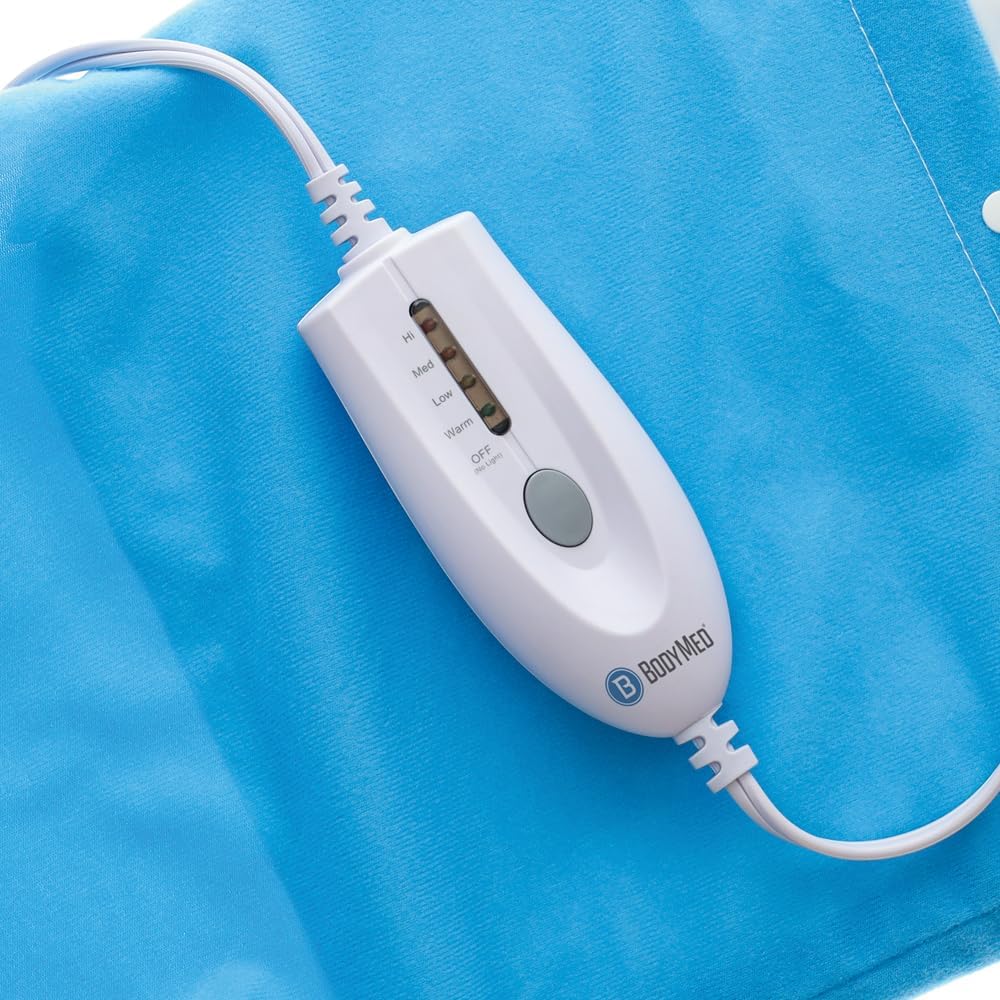
Figure 3: The heating pad controller for selecting heat levels.


Figure 4: Example of heating pad placement for back discomfort relief.
Moist Heat Application
For moist heat, follow these additional steps:
- Prepare Sponge: Run the removable sponge under water and wring it out thoroughly to remove excess water. The sponge should be damp, not dripping wet.
- Insert Sponge: Place the damp sponge inside the heating pad cover, alongside the heating pad.
- Apply Heat: Proceed with the dry heat application steps (Placement, Power On, Select Heat Level, Duration, Turn Off). The moisture from the sponge will provide moist heat therapy.
Maintenance and Cleaning
Proper maintenance ensures the longevity and hygiene of your heating pad.
- Cleaning the Cover: The fabric cover is machine-washable. Remove the heating pad and sponge before washing. Wash in cold water on a gentle cycle. Tumble dry on low heat or air dry.
- Cleaning the Pad: The heating pad itself should not be submerged in water. If cleaning is necessary, wipe it gently with a damp cloth and mild soap. Ensure the pad is completely dry before reinserting it into the cover or storing.
- Storage: Allow the heating pad to cool completely before storing. Loop the power cord loosely; do not wrap it tightly around the controller or pad, as this can damage the cord and internal components. Store in a cool, dry place.
Troubleshooting
If you encounter issues with your BodyMed Moist & Dry Heating Pad, please refer to the following common solutions:
- Pad Not Heating:
- Ensure the power cord is securely plugged into both the heating pad and the electrical outlet.
- Check if the electrical outlet is functional by plugging in another appliance.
- Verify that the controller is set to a heat level (Warm, Low, Medium, or High) and not "OFF".
- The automatic shut-off feature may have activated. Turn the unit off and then on again to reset.
- Pad Heats Unevenly:
- Ensure the heating pad is laid flat and not folded or bunched up during use.
- Check the inner cover for any signs of deterioration or damage. Discontinue use if damage is found.
- Controller Light Not On:
- Confirm the unit is plugged in and the controller is set to a heat level.
- If the issue persists, the unit may require service.
If troubleshooting steps do not resolve the issue, please contact BodyMed customer support.
Specifications
| Product Dimensions | 12 x 15 inches (30.5 x 38.1 cm) |
| Item Model Number | ZZHP1215EA |
| Weight | 1.01 Pounds (0.46 kg) |
| Material Type | Fabric |
| Color | Blue |
| Heat Settings | 3 (Low, Medium, High) + Warm setting |
| Additional Features | Automatic Shut Off |
| Power Cord Length | 9 ft. (2.74 m) |
| Manufacturer | BodyMed |
Warranty and Support
For warranty information, product support, or to inquire about replacement parts, please contact BodyMed customer service directly. Refer to the product packaging or the official BodyMed website for the most current contact details.
Ask a question about this manual
Ask about setup, troubleshooting, compatibility, parts, safety, or missing instructions. Manuals+ will review the question and use this page’s manual context to help answer it.