1. Introduction
This manual provides detailed instructions for the setup, operation, and maintenance of your Live Fine Smart WiFi Automatic Pill Dispenser (Model LVFZWPDF). This device is designed to help organize and dispense medications, vitamins, and supplements, offering up to 9 doses per day for 28 days. It features Wi-Fi connectivity for app-based monitoring and alerts, ensuring accurate medication adherence.
2. Safety Information
- For indoor use only.
- Do not expose the device to water or excessive humidity.
- Keep out of reach of children and pets.
- Ensure the device is placed on a stable, flat surface.
- Do not attempt to disassemble or repair the device yourself. Refer all servicing to qualified personnel.
3. Package Contents
Verify that all items are present in the package:
- Live Fine Smart WiFi Automatic Pill Dispenser (Frosted Lid)
- 9 Interchangeable Dosage Rings
- Manual Lock Key
- Type-C USB Power Cable
- User Manual (this document)
4. Product Overview
The Live Fine Smart WiFi Automatic Pill Dispenser is an advanced medication management system. It features a large LCD display, 28 medication compartments, a sliding retrieval window, and a secure locking mechanism. The device connects to a mobile application via Wi-Fi for remote monitoring and scheduling.

Image: The Live Fine Smart WiFi Automatic Pill Dispenser shown with its mobile application interface.
4.1. Display Features
The dispenser's LCD screen provides essential information at a glance:

Image: Detailed view of the dispenser's LCD display and its various indicators.
- Wi-Fi Connection Indicator: Shows network status.
- Current Date: Displays month, day, and year.
- Current Time: 12-hour or 24-hour format options.
- Dosage Alert: Indicates when medication is due.
- Alarm Indicator: Shows when an alarm is set.
- Current/Total Alarms: Displays active and total set alarms.
- Menu Buttons: For device settings adjustment.
- Next Alarm: Displays the time of the upcoming alarm.
- Battery Indicator: Displays battery level.
- Server Connection: Indicates connection status to the app server.
5. Setup
5.1. Unpacking and Initial Inspection
Carefully remove all components from the packaging. Inspect the dispenser for any signs of damage. If any components are missing or damaged, contact customer support.
5.2. Powering On
Connect the Type-C USB power cable to the dispenser and a suitable power adapter (not included) or USB port. The device includes a rechargeable Lithium Ion battery for backup power, providing operation during power outages or travel.
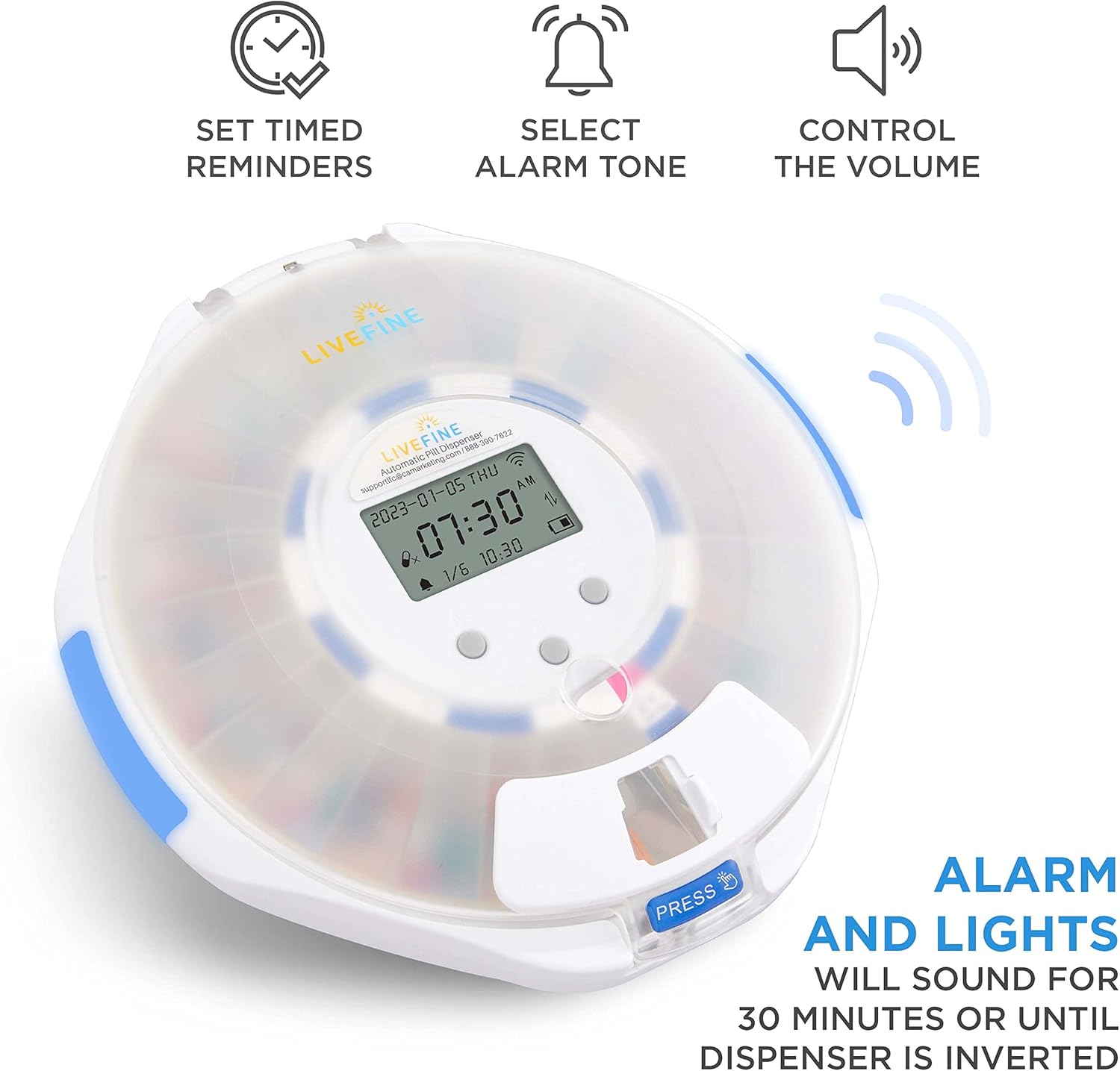
Image: The dispenser's underside, illustrating the Type-C USB power connection and battery access.
5.3. App Installation and Wi-Fi Connection
- Download the LiveFine mobile application from your device's app store.
- Open the app and create an account or log in.
- Follow the in-app instructions to add your Live Fine Smart WiFi Automatic Pill Dispenser. This typically involves pairing the device via Bluetooth or a QR code scan.
- Connect the dispenser to your home Wi-Fi network (supports 2.4GHz and 5GHz bands). This enables remote monitoring, scheduling, and notifications.

Image: The LiveFine mobile app displaying current dosage information and cycle overview.
6. Operation
6.1. Loading Medications
- Unlock the lid using the provided key.
- Open the lid and carefully place medications into the 28 individual compartments. Ensure pills are placed only in the designated slots for the current cycle.
- Avoid overfilling compartments to ensure smooth rotation and dispensing.

Image: The pill dispenser with its lid open, revealing the 28 compartments filled with medications.
6.2. Installing Dosage Rings
The dispenser includes 9 interchangeable dosage rings. Select the ring that corresponds to your prescribed medication frequency (e.g., 1x, 2x, 3x per day). Place the selected ring onto the central mechanism, ensuring it is correctly aligned. These rings help prevent double doses and improve timing accuracy.

Image: A set of nine dosage rings, used to configure the dispenser for different daily medication frequencies.
6.3. Setting Alarms and Schedule
- Use the LiveFine mobile app to set your medication schedule, including specific times and alarm tones.
- The device's LCD display will show the set alarms and upcoming dosage times.
- Customize alarm volume and beep patterns via the app or device controls to suit your preferences.
6.4. Dispensing Medication
When an alarm sounds and lights activate, the carousel will rotate, presenting the correct medication compartment at the sliding retrieval window. Slide the window open and retrieve your medication. The alarm will continue for up to 30 minutes or until the medication is removed and the device is inverted (to confirm retrieval).
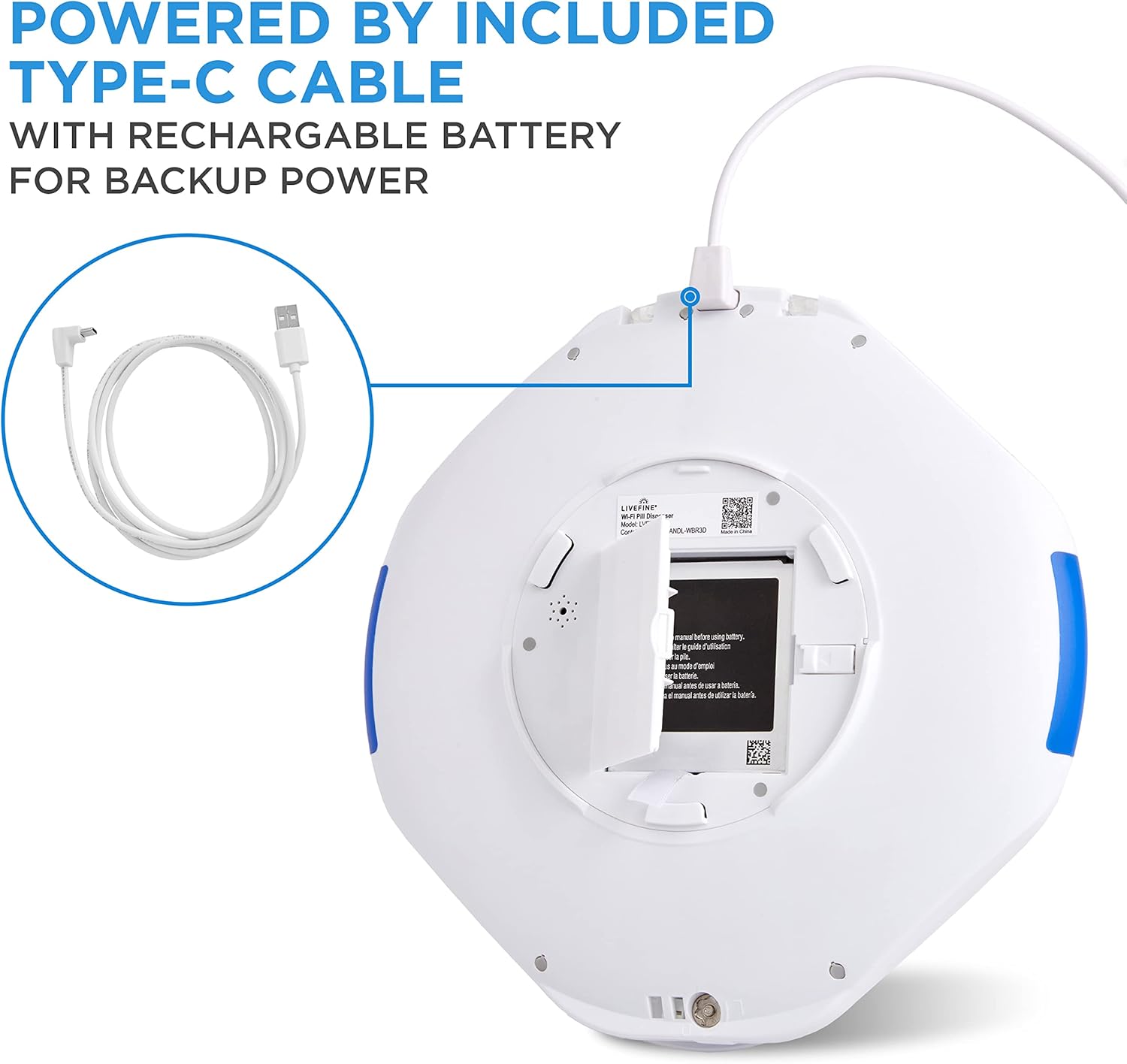
Image: A user retrieving medication from the dispenser's accessible sliding window.
6.5. Using the Mobile App
The LiveFine app provides comprehensive control and monitoring:
- Dashboard: View current dosage, remaining medication, and pill cycle.
- Monitoring: Track medication adherence and receive notifications for missed or taken doses.
- Remote Control: Adjust settings, set alarms, and manage schedules from anywhere.
- Caregiver Access: Caregivers and family members can connect to the app to monitor progress and send reminders, enhancing care coordination.
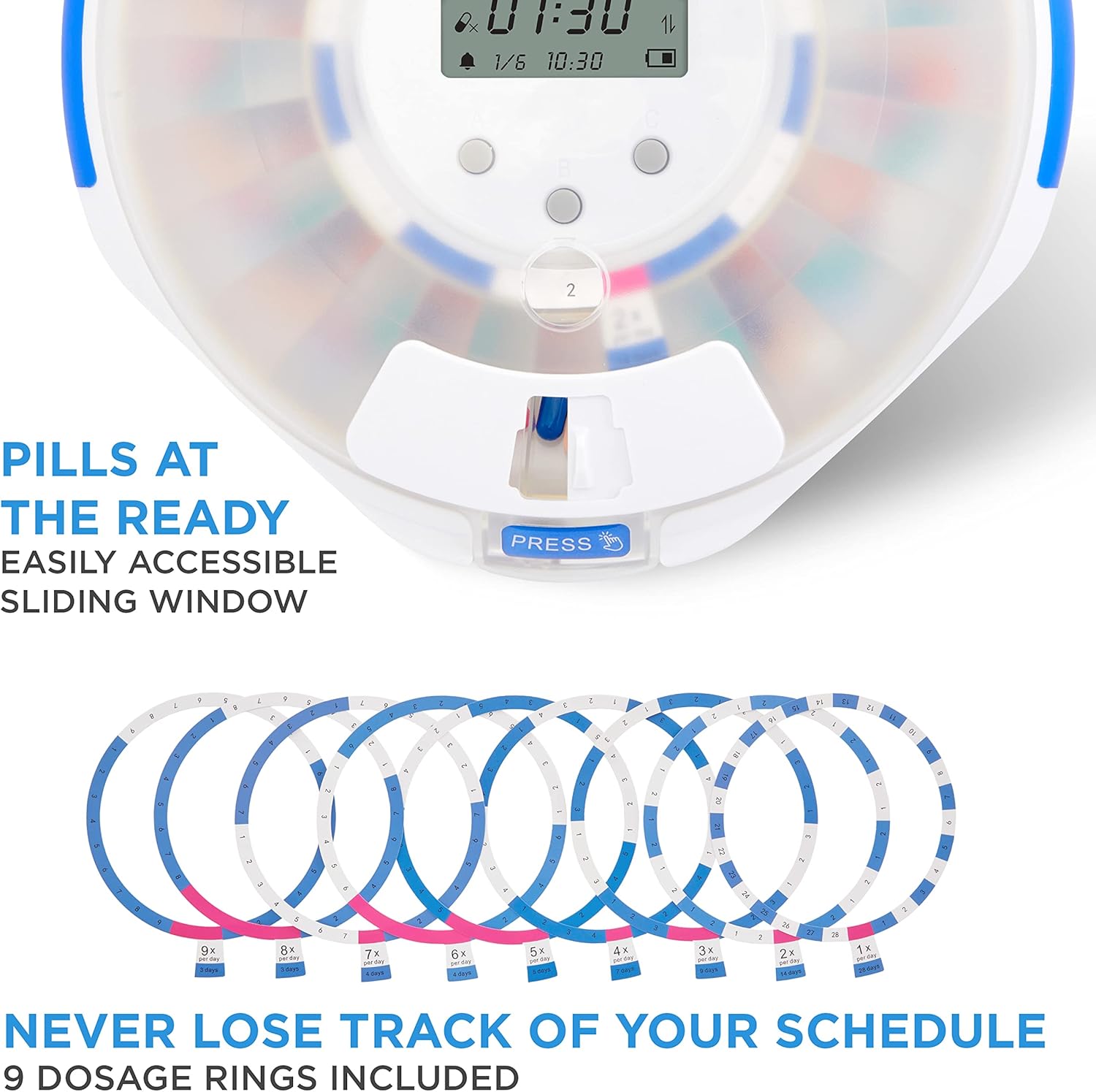
Image: The LiveFine app illustrating how multiple family members or caregivers can connect to monitor medication schedules.
6.6. Locking the Dispenser
After loading medications or adjusting settings, close the lid and lock it with the manual key. This feature prevents unauthorized access, accidental spills, or tampering, ensuring medication safety.

Image: A detailed view of the dispenser's secure locking mechanism, operated by a manual key.
7. Maintenance
7.1. Cleaning
- Disconnect the power cable before cleaning.
- Wipe the exterior of the dispenser with a soft, damp cloth. Do not use abrasive cleaners or immerse the device in water.
- The pill carousel can be removed for cleaning if necessary. Ensure it is completely dry before reinserting.
7.2. Battery Care
The internal Lithium Ion battery provides backup power during outages or travel. Keep the device connected to power when not in transit to ensure the battery remains charged. The app and device display will indicate low battery status, prompting you to recharge.
8. Troubleshooting
- Device Not Powering On: Ensure the Type-C USB cable is securely connected to both the dispenser and a working power source. Check the power adapter.
- Wi-Fi Disconnection: Verify your Wi-Fi network is active and the dispenser is within range. Re-pair the device with the app if necessary. Ensure your Wi-Fi router supports 5GHz if you are attempting to connect to that band.
- Alarms Not Sounding: Check alarm settings in the app. Ensure volume is not set to mute. Verify the device has power.
- Pills Not Dispensing: Ensure the carousel is correctly loaded and dosage rings are properly installed. Check for any obstructions in the dispensing mechanism.
- App Issues: If the app is unresponsive or displaying incorrect information, try restarting the app or your mobile device. Ensure the app is updated to the latest version.
- Lock Mechanism: If the lock key is lost or damaged, contact customer support for assistance.
9. Specifications
| Model Number | LVFZWPDF |
| Dimensions | 8.9 x 9 x 2.4 inches |
| Weight | 2.12 Pounds |
| Power | Type-C USB (rechargeable Lithium Ion battery included for backup) |
| Connectivity | Wi-Fi (up to 5GHz) |
| Capacity | 28 medication compartments |
| Dosage Rings | 9 interchangeable rings |
| Material | Plastic |
| Lid Type | Frosted Lid |
10. Warranty and Support
For warranty information or technical assistance, please refer to the contact details provided with your product packaging or visit the official Live Fine website. Keep your purchase receipt for warranty claims.