1. Introduction
Thank you for choosing the Voltero PS6 600WH Portable Power Station. This device is designed to provide reliable power for various electronic devices, both indoors and outdoors. It features multiple output ports, including AC, DC, and USB, and can be recharged via wall outlet, car charger, or solar panel. Please read this manual thoroughly before using the product to ensure safe and optimal operation.
2. Safety Instructions
To ensure safe operation and service of the Voltero PS6, please observe the following precautions:
- Do not disassemble, repair, or modify the unit.
- Do not place the unit near fire or expose it to heat.
- Do not store or use the unit in high temperatures or direct sunlight.
- Do not use or store the unit in a bathroom or in areas exposed to water or rain.
- Use only the provided or approved accessories.
- Keep the unit away from children and pets.
- Do not drop, hit, or subject the unit to strong impacts.
- Do not insert foreign objects into the ports or openings.
- If the unit overheats, emits odor, or shows other abnormalities, stop using it immediately and contact support.
- Ensure proper ventilation during use and charging.
3. Package Contents
Verify that all items listed below are included in your package:
- Voltero PS6 Portable Power Station
- AC Power Adapter
- Car Charger Cable
- User Manual

Image: The Voltero PS6 Portable Power Station shown with its AC power adapter, car charger cable, and user manual.
4. Product Overview
4.1 Front Panel and Display

Image: Front panel of the Voltero PS6, highlighting the AC outlet, power button, digital display, 12V car outlet, and USB-A and USB-C ports.
The front panel provides access to all output ports and the main control interface. The digital display shows real-time information about the power station's status.

Image: Close-up of the digital display, indicating battery charge level (%), input/output wattage, and various status icons for AC, USB-A, USB-C, Car, and DC outputs, along with temperature and fan indicators.
- Battery Level Indicator: Shows the remaining battery percentage.
- Input/Output Wattage: Displays the current power input (charging) or output (discharging).
- Status Icons: Indicate active AC, DC, USB-A, and USB-C outputs, as well as temperature warnings and fan status.
- Estimated Runtime/Recharge Time: Shows estimated hours for remaining power or full recharge.
4.2 Ports and Controls

Image: Diagram illustrating the various ports and controls of the Voltero PS6. It shows two AC outlets (220-240V/600W), two USB-A QC 3.0 ports, one USB-C fast charge 60W port, three DC ports, a car outlet, and an 8mm input port (12-30V, 100W Max).
- Power Button: Press to turn the unit on/off.
- AC Outlets (2x): 220-240V, 600W total output for household appliances.
- DC 12V/10A Output (3x): For DC-powered devices.
- Car Outlet (1x): 12V/10A output for car appliances.
- USB-A QC 3.0 Ports (2x): For fast charging compatible USB devices.
- USB-C PD 60W Port (1x): For fast charging compatible USB-C devices.
- 8mm Input Port: For charging the power station via AC adapter, car charger, or solar panel.
- Emergency LED Flashlight: Integrated light for illumination.
5. Charging the Power Station
The Voltero PS6 can be charged using three methods:

Image: Visual representation of the three charging methods for the Voltero PS6: via a wall outlet (4-5 hours with 100W adapter), a 12V car charger (4-5 hours), and a solar panel (6-7 hours with 100W solar max input, sold separately). A combined USB-C + 100W(AC) charge can achieve 0-80% in 3 hours.
- AC Wall Outlet Charging:
Connect the provided AC power adapter to the 8mm input port on the power station and plug the adapter into a standard wall outlet. Charging time is approximately 4-5 hours. For faster charging, combine with a USB-C PD charger (not included) to achieve 0-80% in approximately 3 hours.
- 12V Car Charger Charging:
Connect the provided car charger cable to the 8mm input port and plug the other end into your vehicle's 12V cigarette lighter socket. Charging time is approximately 4-5 hours.
- Solar Panel Charging:
Connect a compatible solar panel (100W max input, sold separately) to the 8mm input port. Ensure the solar panel is placed in direct sunlight for optimal charging. Charging time is approximately 6-7 hours, depending on sunlight intensity.
The display will show the input wattage and estimated time to full charge during the charging process.
6. Operating the Power Station
6.1 Powering On/Off
Press and hold the main POWER button for 3 seconds to turn the unit on or off. The display will illuminate when the unit is on.
6.2 Using AC Outputs
Press the AC button to enable the AC outlets. Plug your AC-powered devices into the outlets. The display will show the AC output wattage. Press the AC button again to turn off the AC outputs when not in use to conserve battery.
6.3 Using DC Outputs (12V Car Outlet & DC Ports)
Press the DC button to enable the 12V car outlet and DC ports. Plug your 12V DC devices into the appropriate ports. The display will show the DC output wattage. Press the DC button again to turn off the DC outputs.
6.4 Using USB Outputs
The USB-A and USB-C ports are typically active when the unit is powered on. Simply plug your USB devices into the respective ports for charging. The display will show the USB output wattage.
6.5 Emergency LED Flashlight
Locate the flashlight button on the side of the unit. Press once for constant light, press again for SOS mode, and a third time for strobe mode. Press a fourth time to turn it off.
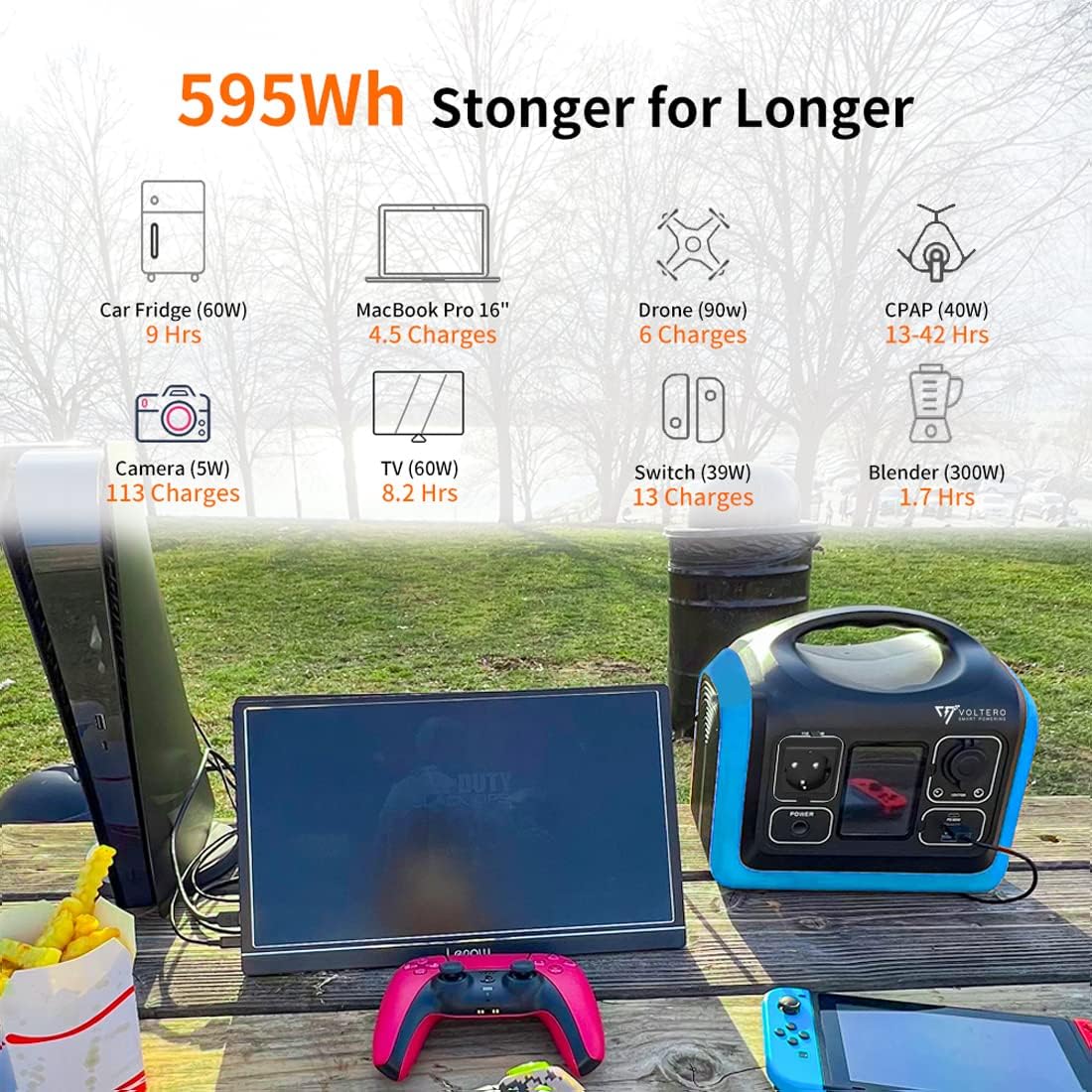
Image: The Voltero PS6 demonstrating its capacity to power multiple devices. Examples include a Car Fridge (60W for 9 hours), MacBook Pro 16" (4.5 charges), Drone (90W for 6 charges), CPAP (40W for 13-42 hours), Camera (5W for 113 charges), TV (60W for 8.2 hours), Switch (39W for 13 charges), and Blender (300W for 1.7 hours).

Image: A comprehensive diagram showing the Voltero PS6's output ports and estimated runtimes for various devices. This includes AC outlets (e.g., Hot Kettle 0.6 Hrs, Electric Drill 1.5 Hrs, Projector 4.8 Hrs, Rice Cooker 1 Hr, Heating Blanket 8 Hrs), DC 12V/10A (e.g., Car Refrigerator 8.8 Hrs, Mini Fridge 8.8 Hrs, Light 45 Hrs), USB PD 60W (e.g., iPhone 60 times, Tablet PC 35 charges), and USB QC 3.0 (e.g., Camera 27 times, Laptop 5 charges). The emergency LED flashlight is also highlighted.
7. Maintenance
Proper maintenance ensures the longevity and performance of your Voltero PS6.
- Cleaning: Use a dry, soft cloth to wipe the exterior of the unit. Do not use abrasive cleaners or solvents.
- Storage: If storing for an extended period, charge the unit to 50-80% every 3-6 months to maintain battery health. Store in a cool, dry place away from direct sunlight and extreme temperatures.
- Battery Care: The Voltero PS6 uses a LiFePO4 battery, known for its long cycle life (3,500+ cycles). Avoid fully discharging the battery frequently to prolong its lifespan.

Image: Internal view of the Voltero PS6 highlighting the LiFePO4 battery and advanced safety features such as protection against excessive heating, short circuits, and overload. It also mentions 3,500+ charge cycles.
8. Troubleshooting
If you encounter issues with your Voltero PS6, refer to the following common problems and solutions:
| Problem | Possible Cause | Solution |
|---|---|---|
| Unit does not turn on | Battery is completely discharged; Power button not pressed long enough. | Charge the unit; Press and hold the power button for 3 seconds. |
| AC output not working | AC output not enabled; Device power exceeds 600W; Overload protection activated. | Press the AC button to enable; Check device wattage; Disconnect device and restart AC output. |
| Unit not charging | Charging cable loose or faulty; Adapter not connected properly; Input source issue. | Ensure all connections are secure; Try a different charging method or cable. |
| Overheating warning on display | Poor ventilation; High ambient temperature; Excessive load. | Move unit to a well-ventilated area; Reduce load; Allow unit to cool down. |
If the problem persists, please contact Voltero customer support.
9. Specifications
| Model | PS6 |
| Battery Capacity | 595 Wh (LiFePO4) |
| AC Output | 220-240V, 600W (Pure Sine Wave) |
| DC Output | 3 x 12V/10A |
| Car Outlet Output | 1 x 12V/10A |
| USB-A Output | 2 x QC 3.0 |
| USB-C Output | 1 x PD 60W |
| Input (Charging) | 8mm Port: 12-30V, 100W Max |
| Dimensions (L x W x H) | 26.7 x 24.7 x 19.7 cm (approx. 10.5 x 9.7 x 7.8 inches) |
| Weight | 8.8 kg (approx. 19.4 lbs) |
| Operating Temperature | -10°C to 40°C (14°F to 104°F) |
| Charging Temperature | 0°C to 40°C (32°F to 104°F) |
10. Warranty & Support
Voltero provides a limited warranty for this product. For detailed warranty information, including terms and conditions, please refer to the warranty card included with your purchase or visit the official Voltero website. For technical support, troubleshooting assistance, or service inquiries, please contact Voltero customer service through their official channels.


