
AUNA Oxford SE
Auna Oxford Stereo System User Manual
Model: Oxford SE
1. Important Safety Instructions
Please read these instructions carefully before operating the unit and retain them for future reference. Follow all warnings and instructions marked on the product.
- Do not block any ventilation openings. Install in accordance with the manufacturer's instructions.
- Do not install near any heat sources such as radiators, heat registers, stoves, or other apparatus (including amplifiers) that produce heat.
- Protect the power cord from being walked on or pinched, particularly at plugs, convenience receptacles, and the point where they exit from the apparatus.
- Only use attachments/accessories specified by the manufacturer.
- Unplug this apparatus during lightning storms or when unused for long periods of time.
- Refer all servicing to qualified service personnel. Servicing is required when the apparatus has been damaged in any way, such as power-supply cord or plug is damaged, liquid has been spilled or objects have fallen into the apparatus, the apparatus has been exposed to rain or moisture, does not operate normally, or has been dropped.
2. Product Overview
The Auna Oxford Stereo System is a versatile audio device designed for playing vinyl records, CDs, and digital audio via Bluetooth, USB, DAB, and FM radio. It features a retro design with modern connectivity options.
2.1 Main Unit and Components
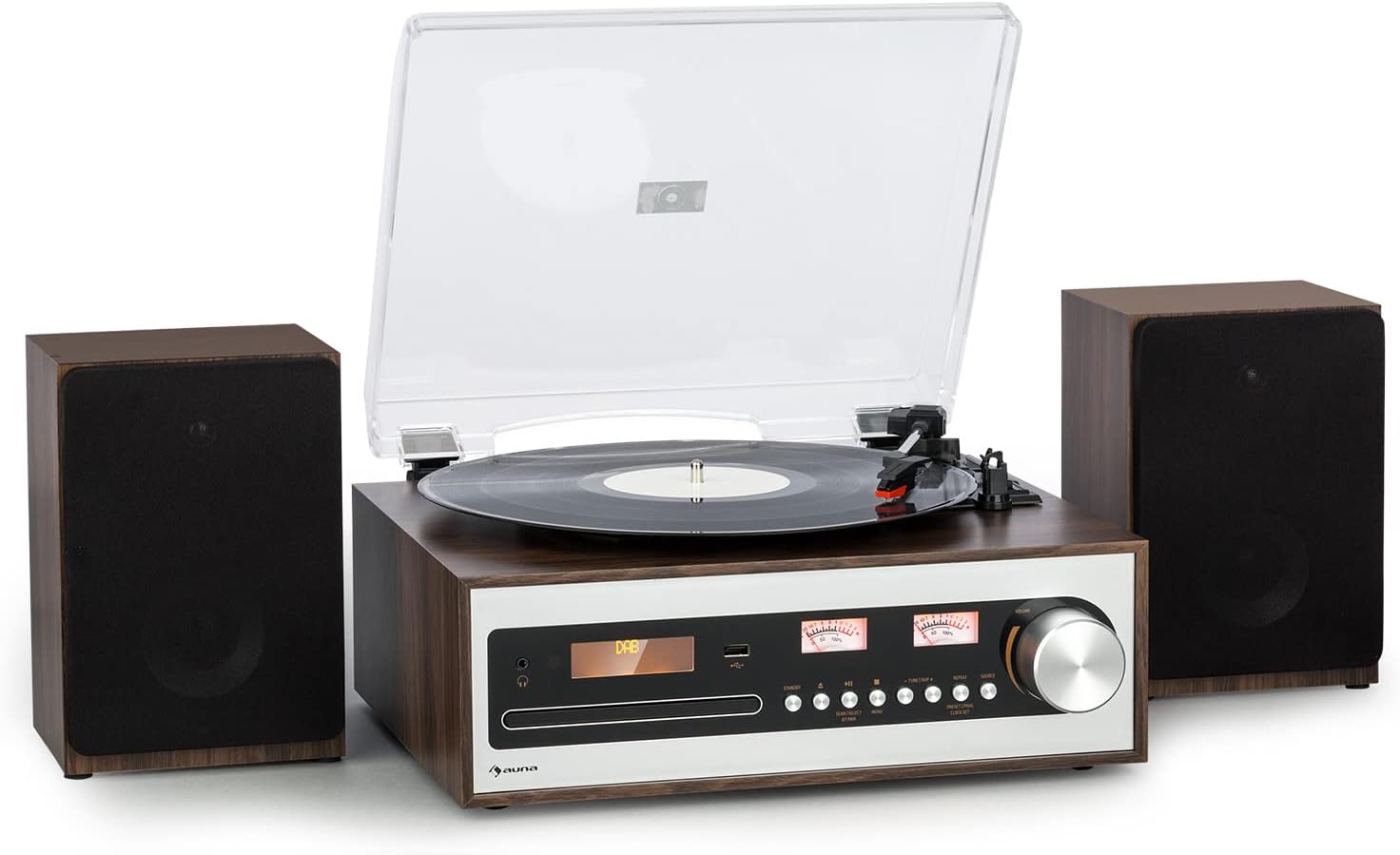
This image shows the Auna Oxford Stereo System, featuring the main unit with a turntable on top and two separate, detachable speakers positioned on either side. The main unit has a control panel with a display, buttons, and a large rotary knob. The overall design is a stylish walnut-silver finish.
2.2 Key Features
- Multi-Speed Turntable: Supports 33 1/3, 45, and 78 RPM records. Includes a 45-RPM adapter.
- Detachable Stereo Speakers: Two powerful speakers providing 2 x 10 watts max power for clear audio.
- Auto-Stop Function: Protects vinyl records by automatically stopping the turntable when a record finishes.
- Multiple Playback Options: Integrated CD player, Bluetooth connectivity for wireless streaming, AM/FM & DAB radio, and AUX input.
- USB Recording: Digitally record your vinyl collection to a USB drive.
- Remote Control: For convenient operation from a distance.

This infographic highlights the main features of the Auna Oxford Stereo System. It illustrates the 3-speed turntable, powerful 2x10W stereo speakers, and compatibility with 7", 10", and 12" records. It also emphasizes connectivity options like USB, AUX, and headphone jack, the auto-stop function for record protection, and the ceramic pick-up for best sound quality.
3. Setup Guide
3.1 Unpacking the System
Carefully remove all components from the packaging. Ensure all items listed below are present:
- 1 x Turntable with Main Unit
- 2 x Detachable Speakers
- 1 x Remote Control
- 1 x Power Adapter
- 1 x Multilingual User Manual (this document)
Retain the original packaging for future transport or storage.
3.2 Connecting the Speakers
The Auna Oxford Stereo System comes with two detachable speakers. Connect each speaker to the corresponding speaker output terminals on the rear of the main unit. Ensure the polarity is correct (red to red, black to black).

This image displays the main unit of the Auna Oxford Stereo System alongside one of its detachable speakers, emphasizing their separate nature and the long connection cable for flexible placement. The design is both decorative and sonorous, allowing for optimal sound dispersion.
3.3 Power Connection
Connect the provided power adapter to the DC IN port on the rear of the main unit, then plug the adapter into a suitable wall outlet.
3.4 Antenna Connection (for Radio)
For optimal DAB and FM radio reception, connect the included FM antenna to the dedicated port on the rear panel. Extend the antenna fully for better signal quality.

This image provides a detailed view of the rear panel of the Auna Oxford Stereo System, highlighting its various connection ports including DC IN, AUX IN, and speaker outputs (R and L). Dimensions of the main unit and speakers are also indicated, showing the compact design and numerous connectivity options for external devices like USB, Audio-Out, and Headphone.
4. Operating Instructions
4.1 Basic Operation
- Power On/Off: Press the Power button on the front panel or remote control to turn the unit on or off.
- Mode Selection: Use the "MODE" button on the front panel or remote to switch between Turntable, CD, Bluetooth, DAB, FM, and AUX modes.
- Volume Control: Adjust the volume using the large rotary knob on the front panel or the VOL +/- buttons on the remote control.

This image demonstrates the ease of operation for the Auna Oxford Stereo System. It shows the main unit on a cabinet with its multifunctional control dial, and a close-up of the remote control, highlighting the convenience of managing settings from a distance.
4.2 Turntable Operation
- Open the dust cover.
- Place a vinyl record on the platter.
- Select the appropriate speed (33 1/3, 45, or 78 RPM) using the speed selector switch. Use the 45-RPM adapter for singles.
- Gently lift the tone arm and position the stylus over the desired track on the record.
- Lower the tone arm slowly onto the record. Playback will begin.
- At the end of the record, the auto-stop function will automatically stop the platter. Lift the tone arm and return it to its rest.

This image showcases two core features of the Auna Oxford Stereo System: the classic built-in CD player with its disc tray open, and a close-up of the turntable's smooth belt drive mechanism, designed for 33 1/3, 45, or 78 rpm playback.
4.3 CD Player Operation
- Press the "MODE" button to select CD mode.
- Press the Eject button to open the CD tray.
- Place a CD (or MP3 CD) into the tray with the label side facing up.
- Press the Eject button again to close the tray. The unit will read the disc.
- Use the Play/Pause, Skip Forward, and Skip Backward buttons to control playback.
4.4 Bluetooth Pairing
- Press the "MODE" button to select Bluetooth mode. The display will show "BT" and start flashing, indicating it's in pairing mode.
- Enable Bluetooth on your mobile device (smartphone, tablet, etc.).
- Search for "Auna Oxford" in your device's Bluetooth list and select it to pair.
- Once paired, the display will stop flashing, and you can stream audio wirelessly to the system.
4.5 Radio Operation (DAB/FM)
- Press the "MODE" button to select DAB or FM radio mode.
- For DAB: The system will automatically scan for available DAB stations. Use the tuning buttons to navigate through the station list.
- For FM: Use the tuning buttons to manually tune to a station or press and hold to auto-scan for the next available station.
- To save a favorite station, refer to the detailed instructions in the full user manual for preset functions.
4.6 USB Playback and Recording
- Insert a USB flash drive into the USB port on the front panel.
- For Playback: Press the "MODE" button to select USB mode. The system will automatically detect and play compatible audio files (e.g., MP3).
- For Recording (from Vinyl/CD/AUX): While playing audio from the turntable, CD, or AUX input, press the "RECORD" button. The system will begin recording the audio to the connected USB drive. Press "RECORD" again to stop.
5. Maintenance
5.1 Cleaning the Unit
- Wipe the unit with a soft, dry cloth. Do not use abrasive cleaners, waxes, or solvents.
- For the dust cover, use a soft cloth and a mild detergent solution if necessary, then wipe dry.
5.2 Turntable Maintenance
- Stylus Care: Gently clean the stylus regularly with a soft brush designed for stylus cleaning, brushing from back to front.
- Record Care: Keep your vinyl records clean and free of dust to ensure optimal sound quality and prolong stylus life.
- Dust Cover: Keep the dust cover closed when not in use to protect the turntable from dust and debris.
6. Troubleshooting
| Problem | Possible Cause | Solution |
|---|---|---|
| No power | Power cord not connected; Power outlet faulty. | Ensure power cord is securely connected. Try a different power outlet. |
| No sound from speakers | Speakers not connected; Volume too low; Incorrect mode selected. | Check speaker connections. Increase volume. Select correct input mode. |
| Turntable not spinning | Unit not powered on; Belt dislodged; Auto-stop engaged prematurely. | Ensure power is on. Check turntable belt. Ensure record is placed correctly. |
| Bluetooth not pairing | Unit not in pairing mode; Device too far; Already paired to another device. | Ensure unit is in Bluetooth pairing mode. Move device closer. Disconnect from other devices. |
| Poor radio reception | Antenna not extended; Weak signal. | Fully extend the FM antenna. Reposition the unit for better reception. |
7. Specifications
| Feature | Detail |
|---|---|
| Model Name | Oxford SE |
| Brand | AUNA |
| Product Dimensions (Main Unit) | 36.6 x 29.4 x 11.8 cm (Width x Depth x Height) |
| Detachable Speaker Dimensions (each) | 15 x 13 x 22.1 cm (Width x Depth x Height) |
| Item Weight | 5.8 kg |
| Power Output | 2 x 10 watts max |
| Turntable Speeds | 33 1/3, 45, 78 RPM |
| Connectivity | Bluetooth, CD, USB, AUX, DAB, FM |
| Special Features | Digital Recorder (USB), Auto-Stop Function |
| Material | Plastic |
| Color | Walnut-Silver |
| Power Consumption (On-mode) | 10 watts |
8. Warranty and Support
For warranty information and technical support, please refer to the warranty card included with your product or visit the official Auna website. Keep your proof of purchase for any warranty claims.
You can also visit the AUNA Store on Amazon for more information and support:
Related documentsOxford SE


Ask a question about this manual
Ask about setup, troubleshooting, compatibility, parts, safety, or missing instructions. Manuals+ will review the question and use this page’s manual context to help answer it.