
1. Introduction
The CHINT DDSU666 is a single-phase smart electronic energy meter designed for accurate measurement of electrical energy. It features a DIN35mm rail mounting, direct connection for 5(80)A current, and an RS485 interface supporting Modbus RTU protocol. This meter is MID certified, ensuring reliable and compliant energy monitoring for various applications in industrial, mining, hotel, school, and public building environments.

Figure 1: Front view of the CHINT DDSU666 Smart Energy Meter.
2. Safety Information
WARNING: Always cut off the power supply before any installation, wiring, or maintenance work to avoid electric shock. Wear insulating gloves and safety glasses to ensure your safety. Installation and maintenance should only be performed by qualified personnel in accordance with local electrical codes and regulations.
Video 1: Official CHINT DDSU666 Installation Guide. This video provides a visual guide for safe installation and operation procedures. Please ensure to follow all safety precautions mentioned in the video and this manual.
3. Product Overview
The CHINT DDSU666 is a compact and intelligent energy meter with the following key features:
- Single-Phase Direct Connection: Designed for 5(80)A current.
- DIN35mm Rail Mounting: Easy installation in standard distribution boards.
- RS485 Communication: Supports Modbus-RTU protocol for remote control and data acquisition.
- MID Certified: CE-EMC and CE-LVD certified with Class 1 accuracy (+/-1%).
- Wide Operating Temperature: -10°C to +45°C (extreme: -25°C to +75°C).
- Measured Values: Displays instantaneous power (kW), voltage (V), current (A), power factor (PF), frequency (Hz), imported energy (EIMP kWh), exported energy (EEXP kWh), and total energy (kWh).
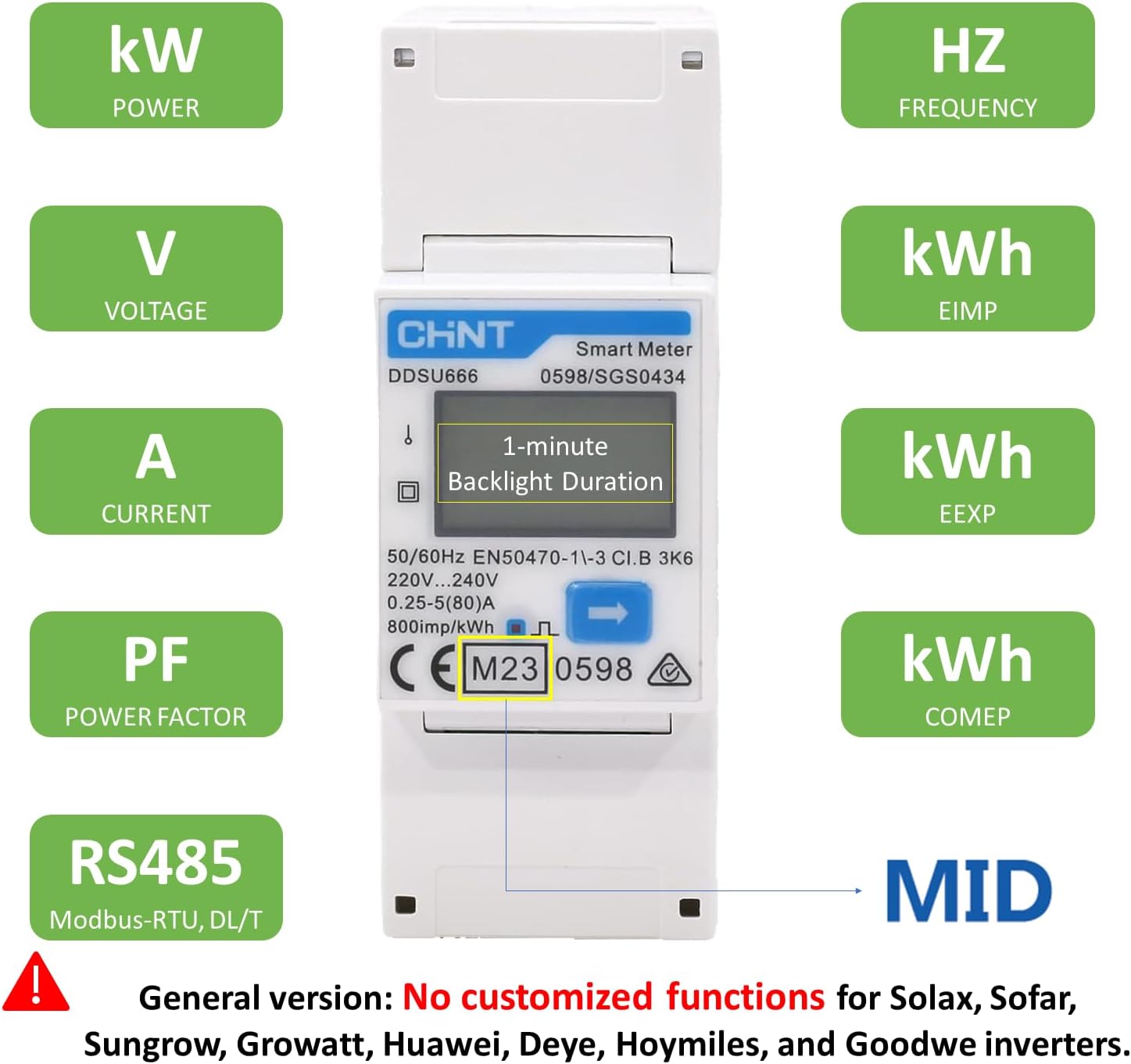
Figure 2: Display interface showing various measured parameters.
Important Note: This product is the universal version of CHINT DTSU666/DTSU666-CT/DDSU666/DDSU666-CT models. It is not compatible with inverters, Wallbox charging stations, or other devices requiring customized functionalities such as output power limitation and load balancing.
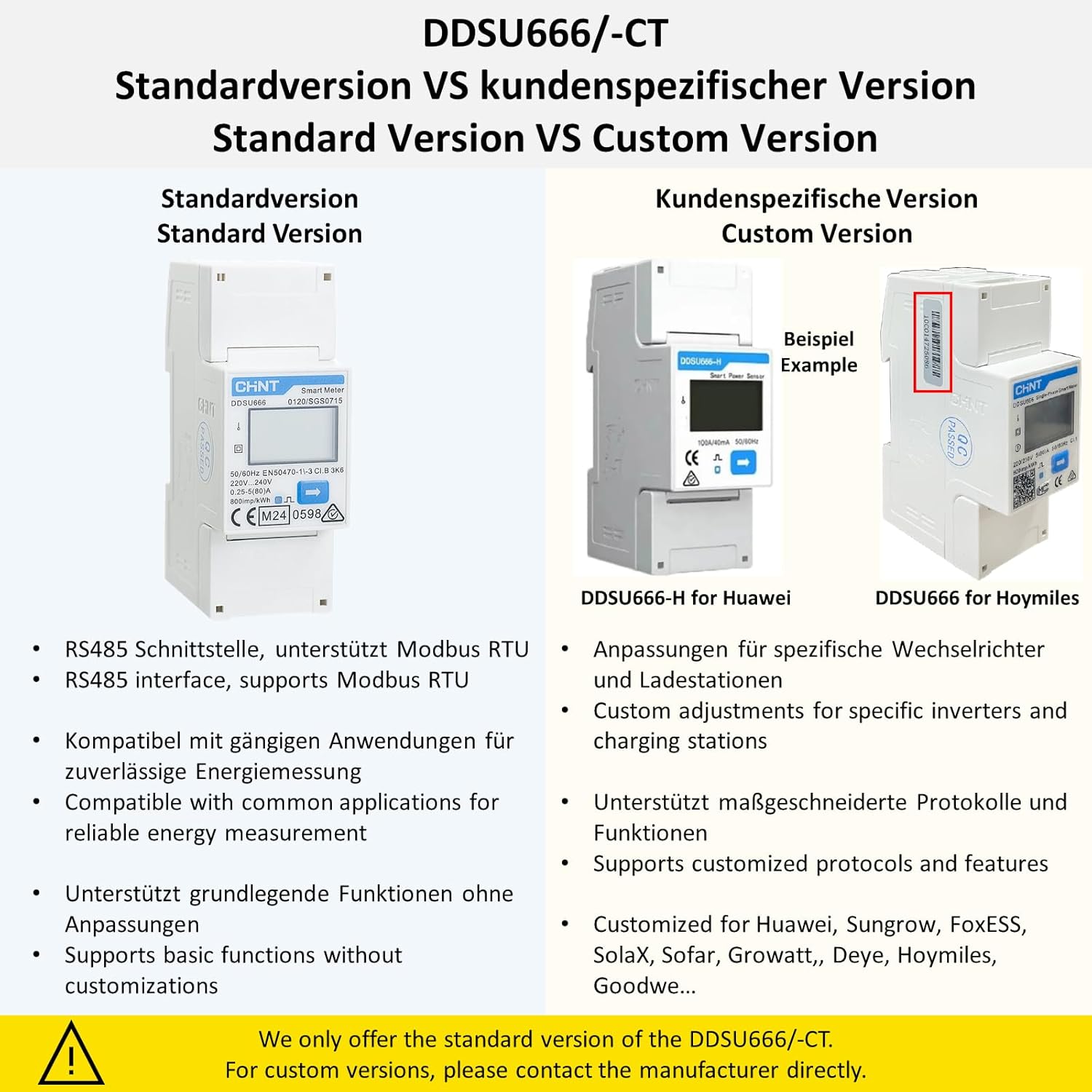
Figure 3: Comparison between the standard version (DDSU666) and custom versions of CHINT meters, highlighting the standard version's Modbus RTU support and general energy measurement capabilities.
4. Setup and Installation
Before installation, carefully read these instructions to ensure the meter is suitable for your intended use and to select an appropriate installation location. Ensure all necessary tools are available.
4.1. Tools Required
- Wire stripper
- Crimping pliers
- Appropriate cables and terminals
- Flat-head screwdriver
- Electric screwdriver (optional)
4.2. Mounting the Meter
The DDSU666 meter is designed for DIN rail mounting (35mm).
- Align the top of the meter with the upper edge of the DIN rail.
- Use a flat-head screwdriver to pull down the lower latch, then press the base of the meter firmly onto the rail to secure it.
- To remove the meter, pull down the latch with a flat-head screwdriver, lift the base of the device to detach it from the DIN rail, then tilt it forward for easy removal.

Figure 4: The DDSU666 meter securely mounted on a DIN rail.
4.3. Wiring Connections
Before wiring, select a cable cross-sectional area appropriate for the product's rated current to ensure a safe and efficient connection. Users can choose between two wiring options: top-in/bottom-out or bottom-in/top-out.
- Use a wire stripper to remove 9 to 11 mm of copper cable sheath.
- Use crimping pliers to crimp the terminal to the end of the cable, ensuring a reliable connection.
| Wires | Port Description | Port No. | Type | Cross-sectional Area | Outside Diameter |
|---|---|---|---|---|---|
| Voltage and Current Wire | L or UL, I* (Bottom-in Top-out) | 1 | Multi-core outdoor copper cable | 4mm²~25mm² | 5mm~10mm |
| N or UN (Bottom-in Top-out) | 2 | ||||
| L or UL, I* (Top-in Bottom-out) | 3 | ||||
| N or UN (Top-in Bottom-out) | 1 | ||||
| Communication Cables | RS4851A | 24 | Two-core outdoor twisted pair shielded cable | 0.25mm²~1.5mm² | 4mm~11mm |
| RS4851B | 25 | ||||
| RS4852A (optional) | 5 (optional) | ||||
| RS4852B (optional) | 6 (optional) |
*The wiring method is subject to the actual product.

Figure 5: Wiring diagram for the DDSU666 meter. Terminals 1 and 3 correspond to the phase (L) of the power supply and load, while terminal 2 corresponds to the neutral (N) of the power supply. Terminals 24 and 25 are for RS485 communication (A and B respectively).
After connecting the cables, tighten the screws firmly to ensure the stability and safety of the connection. The recommended torque for terminal screws 1, 2, 3, and 4 is 0.9-1.1 Nm (maximum 1.7 Nm). For terminal screws 5, 6, 24, and 25, the recommended torque is 0.15 Nm to 0.25 Nm (maximum 0.4 Nm).
5. Operating Instructions
Once the meter is correctly installed and powered on, the display will activate and show energy data. The meter automatically cycles through various parameters. You can also manually cycle through them using the blue arrow button on the front panel.
5.1. Display Parameters
The DDSU666 meter displays the following key parameters:
- kWh (EIMP): Imported Active Energy (total consumption).
- kWh (EEXP): Exported Active Energy (if applicable, e.g., solar).
- kW: Instantaneous Active Power.
- V: Voltage.
- A: Current.
- Hz: Frequency.
- PF: Power Factor.
The display has a 1-minute backlight duration to conserve energy.
6. Maintenance
The CHINT DDSU666 meter is designed for long-term, reliable operation with minimal maintenance. To ensure optimal performance and longevity:
- Keep the device clean and free from dust, dirt, and moisture. Use a soft, dry cloth for cleaning.
- Periodically inspect all wiring connections to ensure they remain tight and secure. Loose connections can lead to inaccurate readings or safety hazards.
- Do not attempt to open the meter casing or perform any internal repairs. This may void the warranty and pose a safety risk.
- If the meter is exposed to extreme temperatures or humidity outside its specified operating range, allow it to return to normal conditions before use.
7. Troubleshooting
If you encounter issues with your DDSU666 meter, refer to the following common troubleshooting steps:
7.1. Meter Does Not Display After Powering On
- Check Wiring: Verify that all power and communication cables are correctly connected to their respective terminals as per the wiring diagram (Figure 5). Ensure no wires are loose or incorrectly terminated.
- Check Supply Voltage: Confirm that the supply voltage is within the specified range of 220V to 240V. An abnormal voltage can prevent the meter from functioning.
If the problem persists after checking these points, or if the issue is not listed here, please contact your local supplier or a qualified electrician for assistance.
8. Specifications
| Parameter | Value |
|---|---|
| Model | DDSU 666 |
| Connection Type | 1P2W (Single-Phase, 2-Wire) |
| Accuracy Class | Class 1.0 for active energy |
| Nominal Voltage (Un) | 220V, 230V, 240V |
| Operating Range | 0.85Un ~ 1.15Un |
| Rated Current | 5(80)A |
| Frequency | 50Hz or 60Hz |
| Power Consumption | ≤ 1W, 8VA |
| Display Type | LCD (6 characters of 7 segment display) |
| Digital Size | 5.3mm × 2.8mm |
| Communication Interface | RS485 |
| Communication Protocol | Modbus-RTU |
| Working Temperature Range | -10°C to +45°C |
| Limited Temperature Range | -25°C to +75°C |
| Relative Humidity (Annually average) | ≤ 75% |
| Dimensions (L x W x H) | 98mm × 65mm × 36mm |

Figure 6: Detailed technical specifications of the DDSU666 meter.

Figure 7: Dimensions of the DDSU666 meter and view of the terminal connections.
9. Warranty and Support
For detailed warranty information, terms, and conditions, please refer to the warranty card or documentation included with your CHINT DDSU666 energy meter. Keep your original purchase receipt as proof of purchase for any warranty claims.
For technical support, troubleshooting assistance beyond what is provided in this manual, or service inquiries, please contact your authorized CHINT dealer or the point of purchase. You may also visit the official CHINT website for additional resources and contact information.


