
Introduction
This manual provides detailed instructions for the safe and effective use of your Acebeam W30 Long Range LED Flashlight. Please read this manual thoroughly before operating the device and retain it for future reference.

Image: The Acebeam W30 Long Range LED Flashlight, a black cylindrical device with a wide head and a narrower body, featuring a pocket clip.
Product Features
- Max 500 lumens brightness output.
- Max beam distance up to 2408 meters.
- Depth of diving related 100 meters.
- Powered by 1 x Micro-USB rechargeable Li-ion battery (ACEBEAM IMR NP-510A/USB), compatible with 1 x 18650 Li-ion battery using an adapter.
- Stainless steel tail switch for fast and convenient operation.
- Digitally regulated output maintains constant brightness.
- Power indicator displays battery voltage.
- Low-voltage warning reminds when battery charging is needed.
- Used Convex lens and Toughened ultra-clear glass lens with anti-reflective coating.
- Standard tripod socket compatibility.
- Made of durable aerospace-grade aluminum alloy with a premium type hard-anodized anti-abrasive finish.
- Includes a white diffuser for versatility.

Image: An illustration highlighting the key features of the Acebeam W30, including its 500 lumens output, 2408-meter beam distance, 100-meter diving depth, and compatible battery types.

Image: A diagram illustrating the difference in light beam formation between a standard LED flashlight and an LEP (Laser Excited Phosphor) flashlight with a convex lens, showing how the convex lens focuses the beam for longer throw.
Package Contents
Please check the package for the following items:
- 1x Acebeam W30 Flashlight Head
- 1x Acebeam W30 Flashlight Body
- 1x ACEBEAM IMR21700NP-510A USB Rechargeable Battery
- 1x Tailcap
- 1x White Diffuser
- 1x Battery Adapter (for 18650 battery compatibility)
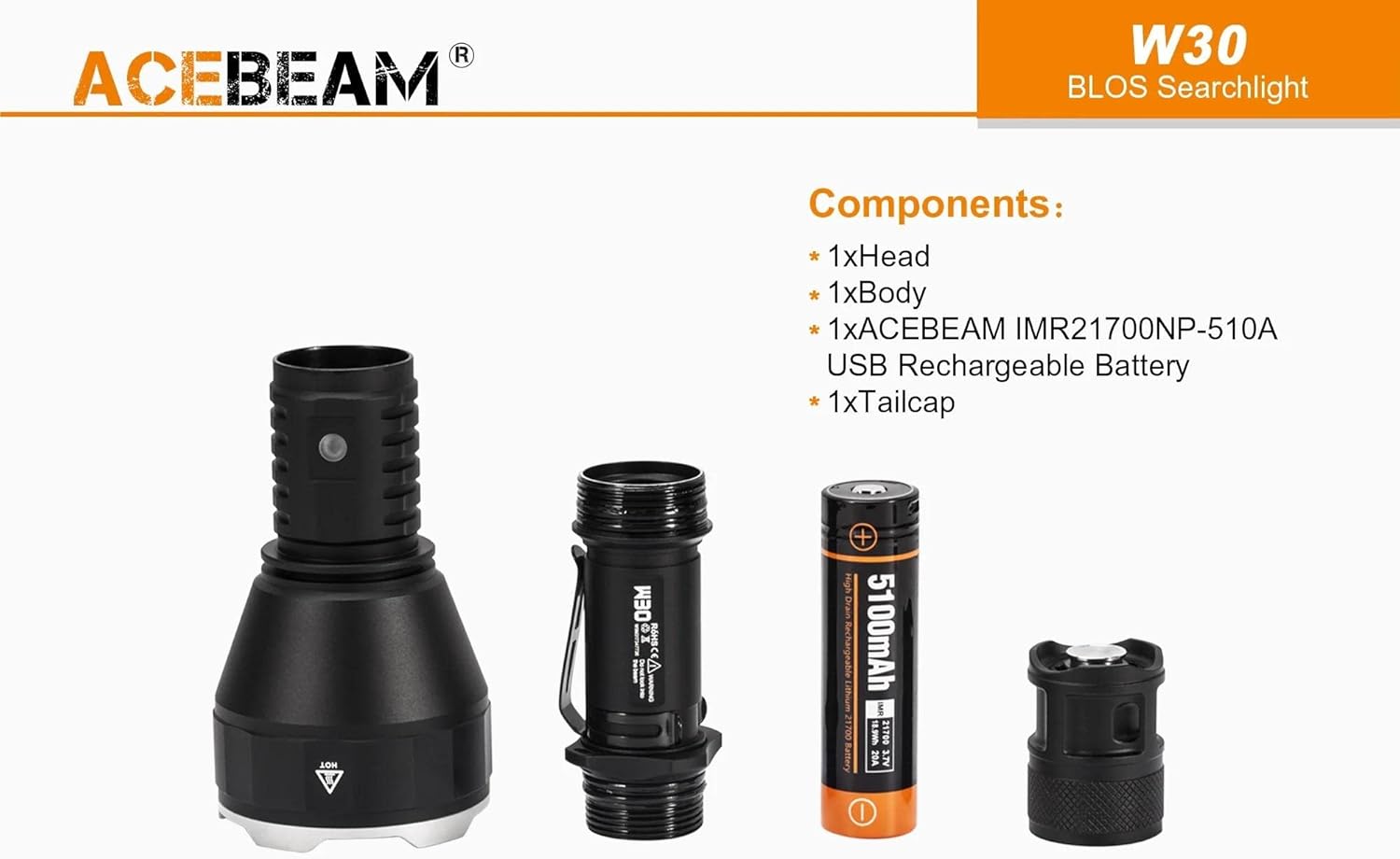
Image: A disassembled view of the Acebeam W30 flashlight, showing its main components: the head, body, 5100mAh 21700 rechargeable battery, and tailcap.
Setup
1. Battery Installation
- Unscrew the tailcap of the flashlight.
- Insert the provided ACEBEAM IMR21700NP-510A battery with the positive (+) end facing towards the head of the flashlight.
- If using an 18650 battery, place it inside the included battery adapter first, then insert it into the flashlight with the positive (+) end towards the head.
- Screw the tailcap back on tightly to ensure proper contact and water resistance.
2. Initial Charging
The included ACEBEAM IMR21700NP-510A battery features a built-in Micro-USB charging port.
- Connect the Micro-USB cable to the battery's charging port.
- Connect the other end of the USB cable to any 5V/1A output USB power source (e.g., computer, wall adapter, power bank).
- The indicator light on the battery will show red during charging and turn green when fully charged.
- The battery can also function as a power bank, providing 5V/1A output to charge other mobile devices.

Image: The Acebeam IMR21700NP-510A battery being charged via a Micro-USB cable connected to a smartphone, demonstrating its dual function as a power bank.

Image: The Acebeam IMR21700NP-510A battery connected to a laptop via a Micro-USB cable for charging, illustrating the charging process.
Operating Instructions
1. Power On/Off
- To turn the flashlight on or off, press the stainless steel tail switch.
- The W30 features a single, highly concentrated output.
2. Power Indicator
The flashlight includes a power indicator to display the battery voltage status:
- Green constant-on: Voltage ≥ 3V (Sufficient power)
- Red constant-on: Voltage < 3V (Low power, charging needed)

Image: A close-up view of the Acebeam W30 flashlight, highlighting the location of the power indicator light on the body and the stainless steel tail switch for operation.
3. Diving Use
The Acebeam W30 is designed to be waterproof up to a depth of 100 meters.
- Ensure the tailcap is screwed on tightly before submerging the flashlight.
- After diving, rinse the flashlight with fresh water and dry it thoroughly.

Image: The Acebeam W30 flashlight being used underwater by a diver, demonstrating its waterproof capability and wide beam angle of 1.8 degrees.
4. Using the White Diffuser
The included white diffuser can be attached to the head of the flashlight to soften the beam and provide a wider, more even light spread, useful for close-range illumination or as a signal light.
Maintenance
- Cleaning: Clean the flashlight body with a soft, damp cloth. Do not use abrasive cleaners or solvents.
- O-rings: Periodically inspect and lubricate the O-rings with silicone grease to maintain water resistance. Replace damaged O-rings.
- Threads: Keep the threads clean and lightly lubricated.
- Battery Care:
- Charge the battery fully before first use.
- Recharge the battery when the power indicator shows red.
- If storing the flashlight for an extended period, remove the battery and store it separately in a cool, dry place. Recharge the battery every 3-6 months to prolong its lifespan.
- Storage: Store the flashlight in a cool, dry place away from direct sunlight and extreme temperatures.
Troubleshooting
| Problem | Possible Cause | Solution |
|---|---|---|
| Flashlight does not turn on. |
|
|
| Light output is weak. | Battery is low. | Charge the battery. |
| Battery not charging. |
|
|
Specifications
| Feature | Detail |
|---|---|
| Model | Acebeam W30 |
| Light Source | LEP (Laser Excited Phosphor) |
| Brightness | 500 Lumens |
| Beam Distance | 2408 meters (7,900ft, 1.5 miles) |
| Color Temperature | Cool White 6500K |
| Power Source | 1x ACEBEAM IMR21700NP-510A USB Rechargeable Li-ion Battery (included) or 1x 18650 Li-ion Battery (with adapter) |
| Battery Capacity | 5100mAh (21700 battery) |
| Runtime | 1 hour 45 minutes (with 5100mAh battery) |
| Water Resistance | Waterproof to 100 meters (diving depth) |
| Material | Aerospace-grade aluminum alloy with hard-anodized anti-abrasive finish |
| Dimensions | Length: 199.1mm (7.84"), Head Diameter: 61mm (2.4"), Body Diameter: 30mm (1.18") |
| Weight | 248g (8.74oz) (without battery) |
| Special Features | Long Range, Rechargeable, Power Indicator, Low-voltage Warning, Tripod Socket, White Diffuser Included |

Image: An illustration detailing the physical dimensions of the Acebeam W30 flashlight, including its length (199.1mm), head diameter (61mm), body diameter (30mm), and weight (248g).
Warranty Information
The Acebeam W30 Long Range LED Flashlight comes with a limited warranty. Please refer to the official Acebeam website or your purchase documentation for specific warranty terms and conditions. This warranty typically covers manufacturing defects under normal use.
Customer Support
For technical assistance, warranty claims, or any questions regarding your Acebeam W30 flashlight, please contact Acebeam customer support through their official website or the retailer from whom you purchased the product.
Safety Warnings
- DO NOT look directly into the beam or point it into the eyes of any person or animal. The intense light can cause temporary vision impairment or permanent eye damage.
- Keep out of reach of children.
- Do not disassemble the sealed head of the flashlight, as this may damage the LEP module and void the warranty.
- Use only recommended batteries. Improper battery use may result in fire, explosion, or leakage.
- Do not expose the flashlight to extreme heat or open flames.