
1. Introduction
The Waveshare UPS Module 3S is an uninterruptible power supply designed to provide continuous power to devices like the Raspberry Pi. It supports simultaneous charging and power output from an external power supply. In the event of an external power failure, the module automatically switches to battery power, ensuring uninterrupted operation of the connected system.
Key features include multi-battery protection circuits (over charge/discharge, over current, short circuit, reverse protection, and equalizing charge), an onboard 5V regulator providing up to 5A continuous output, and I2C bus communication for real-time monitoring of battery voltage, current, and power. It also includes battery warning indicators for correct battery connection.
2. Package Contents
Verify that all items listed below are included in your package:

Image: Components included in the Waveshare UPS Module 3S package.
- UPS Module 3S board
- Battery holder (integrated with the board)
- Acrylic protective plates (top and bottom)
- Standoffs and screws for assembly
- Various connection cables (Type-C male, XH2.54 male, DC5521 female, switch button)
- Power adapter
Note: 18650 Li-ion batteries are not included and must be purchased separately.
3. Setup
3.1 Battery Installation
The UPS Module 3S requires three 18650 Li-ion batteries (not included). Ensure correct polarity when inserting the batteries into the holder. The battery warning indicators will help confirm correct installation.
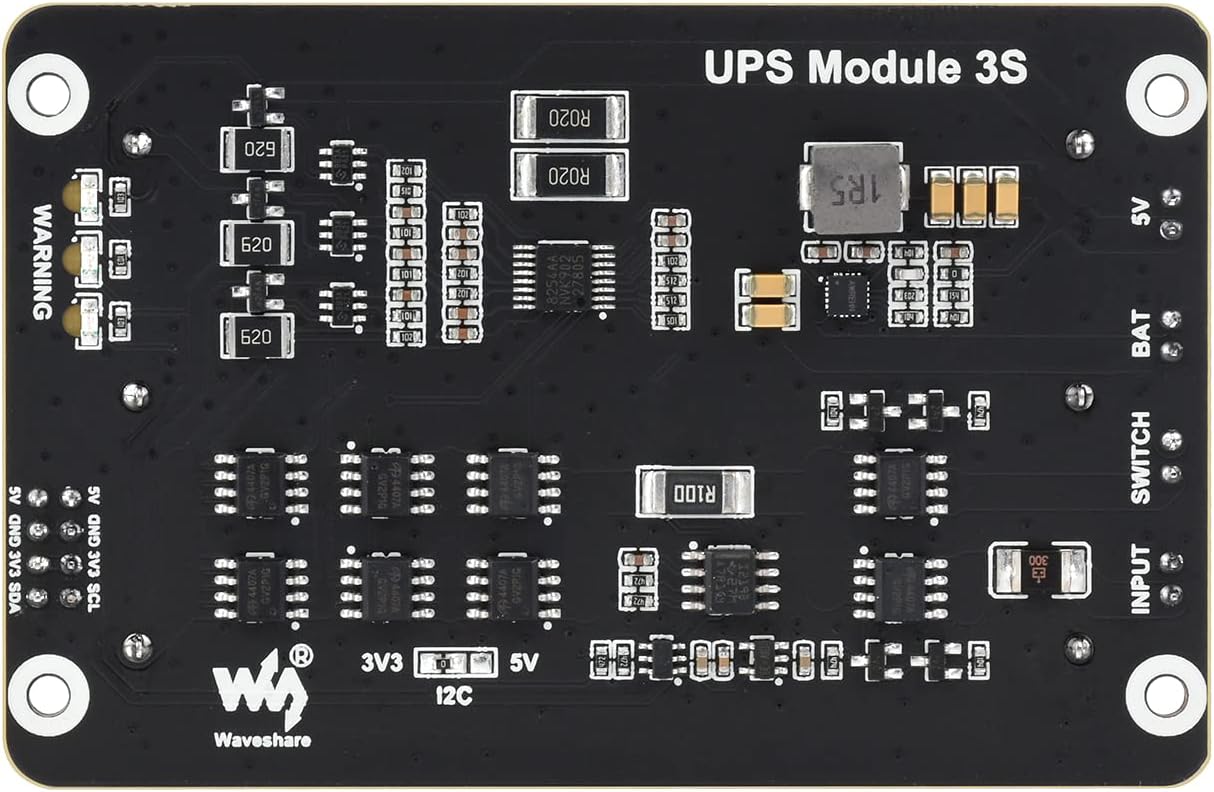
Image: Illustration of battery warning indicators. A red light indicates a reversely connected battery.
If a battery is inserted with incorrect polarity, the corresponding indicator will light up red. Do not connect the charger if any indicator is red, as this may damage the protection circuit.
3.2 Module Assembly
Assemble the UPS module using the provided acrylic plates, standoffs, and screws. The plates protect the circuit board and batteries.

Image: Exploded view showing the assembly steps for the UPS Module 3S with acrylic plates and batteries.
3.3 Connecting to Raspberry Pi
Connect the UPS module to your Raspberry Pi using the appropriate cables. The module offers various interfaces for flexible integration.

Image: Various cables and ports for connecting the UPS Module 3S, including Type-C, XH2.54, DC5521, and a switch button.
- Type-C Male Port: For 5V power output to the Raspberry Pi.
- XH2.54 Male Port: For general power connections.
- DC5521 Female Port: For external power input.
- Switch Button: To control the power output of the module.
4. Operating Instructions
4.1 Powering On/Off
Use the connected switch button to turn the power output of the UPS module on or off. Ensure all connections are secure before powering on.
4.2 Charging and Power Output
The module is designed to charge the installed batteries and provide power output to your connected device simultaneously. When an external power supply is connected, it will power the Raspberry Pi and charge the batteries. If the external power supply is disconnected, the module will automatically switch to drawing power from the batteries without interrupting the Raspberry Pi's operation.

Image: The UPS Module 3S connected to a Raspberry Pi and a display, demonstrating simultaneous charging and power output, and automatic switchover.
4.3 Real-time Monitoring (I2C)
The module supports I2C bus communication, allowing you to monitor battery voltage, current, and power in real-time. This feature is useful for integrating the UPS status into your Raspberry Pi projects.
Video: An overview of the Waveshare UPS Module 3S, demonstrating its features including battery installation, connections, and real-time monitoring capabilities via I2C. This video is provided by the seller, Waveshare.
For detailed instructions on setting up I2C communication and accessing monitoring data, refer to the online development resources provided by Waveshare.
5. Safety Precautions
Adhering to these safety guidelines is crucial for safe operation and to prevent damage to the module or injury.
- Li-ion and Li-Po batteries are unstable. Improper handling can cause fire, personal injury, or property damage. Ensure batteries are properly charged and used.
- Do not reverse the polarities when charging or discharging batteries. Use only the designated charger/charging panel.
- Do not mix old batteries with new ones, or batteries from different brands.
- When purchasing Li-ion batteries, ensure they are compatible with the expansion board and are from a reputable manufacturer. Test batteries for proper function and safety.
- Li-ion batteries have a limited cycle life. Replace them with new ones when they reach their maximum cycle life or after two years, whichever comes first.
- Store the module and batteries properly, away from flammables and explosives, and out of reach of children. Avoid any safety accidents due to careless storage.
6. Interface Definition
The UPS Module 3S features several pins for power output and I2C communication. Understanding these interfaces is essential for proper integration.

Image: Diagram illustrating the pinout and interface definitions for the UPS Module 3S, including 5V, GND, 3V3, SDA, and SCL pins.
- 5V: 5V Power Output
- GND: Ground pin
- 3V3: 3.3V Power Output
- SDA: I2C Data pin
- SCL: I2C Clock pin
7. Onboard Components
Familiarize yourself with the main components on the UPS Module 3S board:
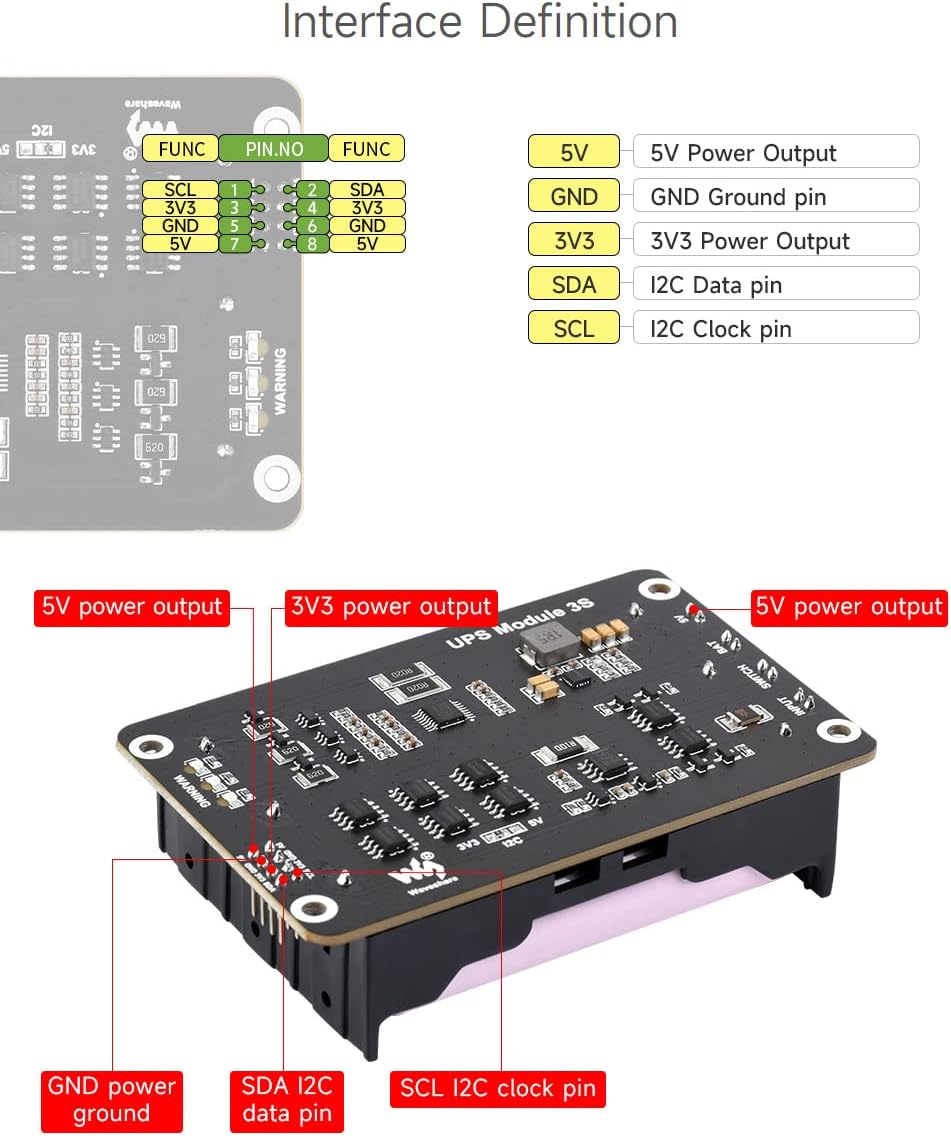
Image: Labeled diagram of the UPS Module 3S circuit board, highlighting key chips, ports, and features.
- S-8254AA: Li battery protection chip
- SY8286: 5V voltage regulator
- HY2213: Equalizing charge chip
- INA219: Voltage/current monitoring chip
- RT9193: 3.3V voltage regulator
- NDC7002N: Voltage translator
- AO4407A: Battery protection MOS tube
- Power port: 12.6V 2A power input
- Power output switch
- Batteries series power output
- 5V power output
- Reverse warning indicators
- Multi-functional expansion header
- I2C level selection: 3.3V (default) / 5V
8. Specifications
| Feature | Specification |
|---|---|
| Output Voltage | 5 Volts (DC) |
| Output Current | 5 Amps |
| Maximum Power | 25 Watts |
| Input Voltage | 12.6 Volts |
| Battery Cell Composition | Lithium Ion (3x 18650, not included) |
| Control Interface | I2C |
| Dimensions | 60 x 93mm |
| Mounting Hole Size | 3.0mm |
| Item Weight | 0.28 Kilograms |
| Material | Plastic |
9. Troubleshooting
If you encounter issues with your UPS Module 3S, consider the following:
- No Power Output: Check if the batteries are correctly installed with the right polarity. Ensure the power output switch is in the 'on' position. Verify that the external power adapter is functioning and properly connected.
- Batteries Not Charging: Confirm the external power adapter is connected and providing the correct voltage (12.6V). Check battery polarity. Ensure batteries are not fully discharged or damaged.
- I2C Communication Issues: Verify all I2C connections (SDA, SCL, GND) are correct. Ensure the I2C level selection is set appropriately for your Raspberry Pi (3.3V or 5V). Consult Waveshare's online documentation for specific software setup.
- System Instability: Ensure the 18650 batteries are of good quality and sufficient capacity for your application. Check all cable connections for looseness.
10. Maintenance
Proper maintenance ensures the longevity and reliable operation of your UPS Module 3S:
- Cleaning: Keep the module clean and free from dust and debris. Use a soft, dry cloth for cleaning. Avoid using liquids or solvents.
- Battery Care: If the module will not be used for an extended period, remove the 18650 batteries and store them in a cool, dry place at approximately 50% charge. Avoid fully discharging or overcharging batteries during storage.
- Environmental Conditions: Operate and store the module within recommended temperature and humidity ranges to prevent damage.
11. Warranty and Support
For warranty information, technical support, and additional resources, please refer to the official Waveshare website or contact their customer service. Waveshare provides online development resources and manuals to assist users.
You can find more information and support at the Waveshare Store on Amazon.


