
AFEXOA CH-06
AFEXOA Luminous Alarm Clock - User Manual
Model: CH-06
Introduction
Thank you for choosing the AFEXOA Luminous Alarm Clock. This device is designed to provide a pleasant wake-up experience with its customizable alarms, soothing sleep sounds, and vibrant color lights. It also functions as a night light and features a convenient USB charging port. Please read this manual carefully to ensure proper use and maintenance of your alarm clock.

Figure 1: AFEXOA Luminous Alarm Clock, showcasing its digital display and colorful ambient lighting.
Setup
1. Unboxing and Components
Upon opening the package, ensure all components are present:
- AFEXOA Luminous Alarm Clock (1 unit)
- USB-C Power Cord (1 unit)
- Wall Adapter (1 unit)
- User Manual (this document)

Figure 2: Included components: Wall adapter, USB-C power cord, the alarm clock, and the user manual.
2. Power Connection
- Connect the USB-C end of the power cord to the USB-C port on the back of the alarm clock.
- Plug the USB-A end of the power cord into the provided wall adapter.
- Insert the wall adapter into a standard electrical outlet.
- The display will light up, indicating the device is powered on.
Operating Instructions
1. Setting Time and Date
Refer to the specific buttons on your device (usually labeled 'SET' or 'TIME') to enter time setting mode. Use the '+' and '-' buttons to adjust hours, minutes, and date. Confirm each setting by pressing the 'SET' button again.
The clock supports both 12-hour and 24-hour formats. This setting can typically be toggled within the time setting menu.
2. Alarm Settings
The AFEXOA Luminous Alarm Clock features dual alarms, allowing you to set two separate wake-up times.
- Setting Alarms: Press the 'ALARM 1' or 'ALARM 2' button to select an alarm. Use '+' and '-' to set the desired wake-up time.
- Working Modes: Each alarm can be configured for three working modes:
- Everyday: Alarm sounds daily.
- Weekdays: Alarm sounds Monday to Friday.
- Weekends: Alarm sounds Saturday and Sunday.
- Alarm Sounds: Choose from 7 unique alarm sounds to wake up naturally and pleasantly.
- Volume Adjustment: The alarm volume can be adjusted across 16 levels. The alarm starts softly and gradually increases to the set volume.
- Snooze Function: When the alarm sounds, press the snooze button (often a large button on top) to get an extra 9 minutes of sleep. This can be repeated.

Figure 3: Illustration of the dual alarm feature with options for Everyday, Weekdays, and Weekends.

Figure 4: Demonstrates the 7 alarm sounds and the snooze function, along with the 16-level volume adjustment.
3. Night Light and Color Settings
The alarm clock features a vibrant light display with various customization options.
- Color Modes: Choose from 5 solid colors, 1 rainbow color, and 2 dynamic light modes.
- Brightness Control: Adjust the display and light brightness from 0% to 100% using the dimmer wheel located on the side of the device. There are 10 brightness levels available.
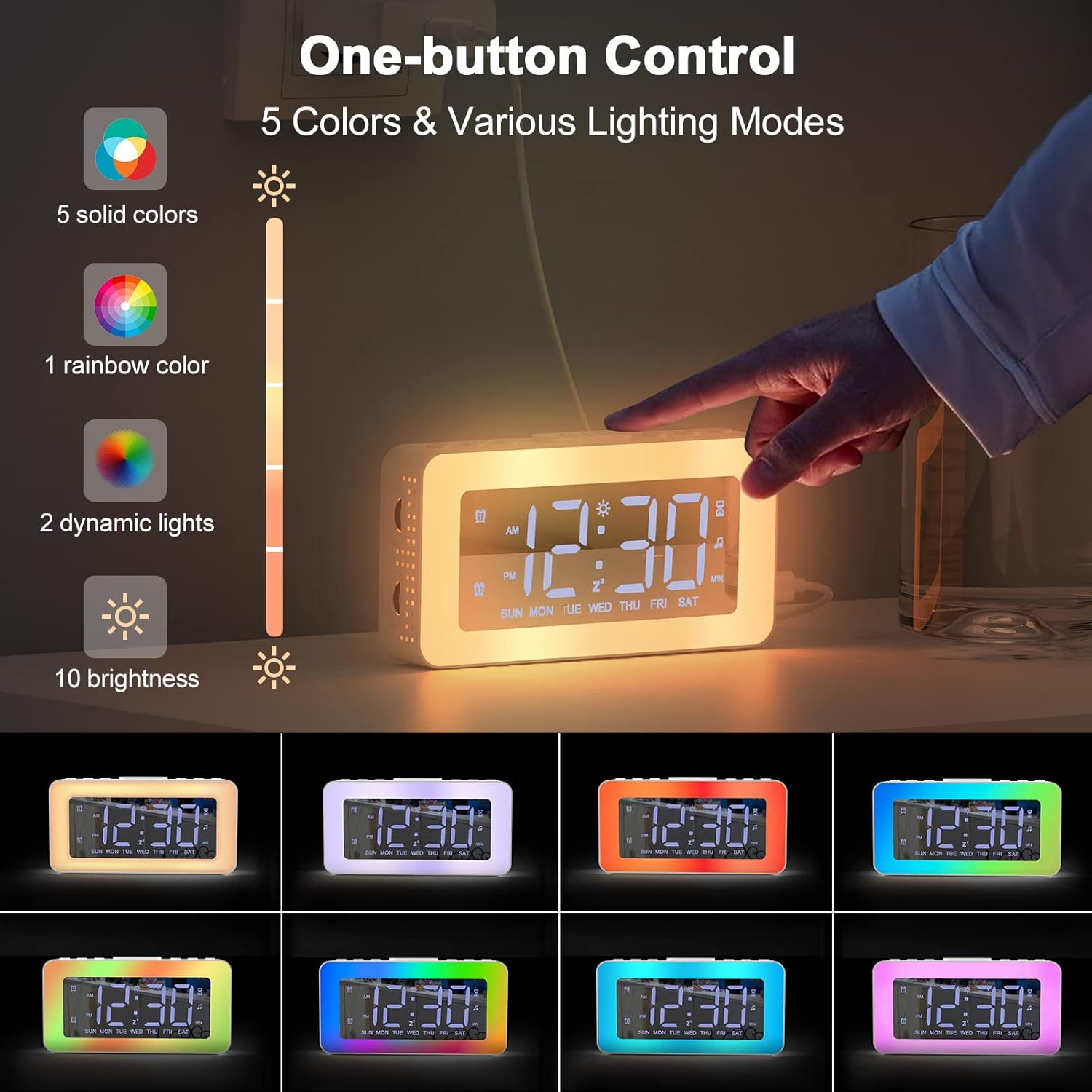
Figure 5: One-button control for selecting from 5 solid colors, 1 rainbow color, 2 dynamic lights, and 10 brightness levels.

Figure 6: Demonstrates the 0-100% adjustable dimmer function for comfortable brightness.
4. Soothing Sounds and Sleep Timer
The alarm clock includes features to aid in relaxation and sleep.
- Soothing Sounds: Access 8 different soothing sounds designed to help you fall asleep.
- Sleep Timer: Set a timer for the soothing sounds to play for 10 to 120 minutes (in 10-minute increments).

Figure 7: The 8 soothing sounds available for sleep, with a timer function from 10 to 120 minutes.
5. USB Charging Port
The alarm clock is equipped with a USB charging port, allowing you to conveniently charge your smartphone or other small electronic devices directly from the clock.
Figure 8: The alarm clock's USB charging port in use, charging a smartphone.
6. Mirror Function
The display surface of the alarm clock can also function as a mirror, providing added utility in your daily life.

Figure 9: The alarm clock's display surface acting as a mirror.
Maintenance
Cleaning
To clean your AFEXOA Luminous Alarm Clock:
- Ensure the device is unplugged from the power source before cleaning.
- Use a soft, dry, lint-free cloth to wipe the display and exterior surfaces.
- For stubborn marks, slightly dampen the cloth with water. Avoid using abrasive cleaners, solvents, or aerosol sprays, as these can damage the surface.
- Do not immerse the device in water or any other liquid.
Storage
When not in use for extended periods, store the alarm clock in a cool, dry place, away from direct sunlight and extreme temperatures.
Troubleshooting
| Problem | Possible Cause | Solution |
|---|---|---|
| Display is off or dim. | Not powered on; brightness set too low. | Ensure power cord is securely connected. Adjust brightness using the dimmer wheel. |
| Alarm does not sound. | Alarm not activated; volume too low; incorrect alarm mode. | Verify alarm is set and enabled. Increase alarm volume. Check if the alarm mode (Everyday, Weekdays, Weekends) matches the current day. |
| Time is incorrect. | Time not set correctly; power interruption. | Re-set the time following the "Setting Time and Date" instructions. |
| Soothing sounds not playing. | Sound function not activated; timer expired. | Ensure soothing sound mode is active. Check the sleep timer setting. |
Specifications
| Feature | Detail |
|---|---|
| Brand | AFEXOA |
| Model Number | CH-06 |
| Color | White |
| Dimensions (L x W x H) | 16 x 3.81 x 3.8 cm (6.3 x 1.5 x 1.5 inches) |
| Weight | 20 g (0.04 lbs) |
| Material | Plastic |
| Display Type | Digital |
| Power Source | Corded Electric |
| Special Features | Alarm, Loud Alarm, Large Display, Timer, Charging Port, Mirror Display, Color Lights, Brightness Control, 12/24 Hour Format, Snooze, Dual Alarm, 7 Alarm Sounds, 8 Sleeping Sounds |
| Battery | 1 CR2032 (included) - likely for memory backup |
Warranty and Support
For warranty information or technical support, please refer to the contact details provided on the product packaging or the official AFEXOA website. Keep your purchase receipt as proof of purchase.
If you encounter any issues not covered in this manual, please contact AFEXOA customer service for assistance.
Related documentsCH-06

Ask a question about this manual
Ask about setup, troubleshooting, compatibility, parts, safety, or missing instructions. Manuals+ will review the question and use this page’s manual context to help answer it.