
NANLITE FS-200B
Nanlite FS-200B Bi-Color Studio Spotlight User Manual
Model: FS-200B | Brand: NANLITE
1. Product Overview
The Nanlite FS-200B is a powerful bi-color LED studio spotlight designed for professional photography and videography. It offers adjustable color temperature from 2700K to 6500K and dimming capabilities, providing versatile lighting options for various shooting environments. The fixture features a Bowens Mount for wide compatibility with light modifiers and multiple control options including on-board controls, Bluetooth for the NANLINK app, and 2.4G for a separately available remote.
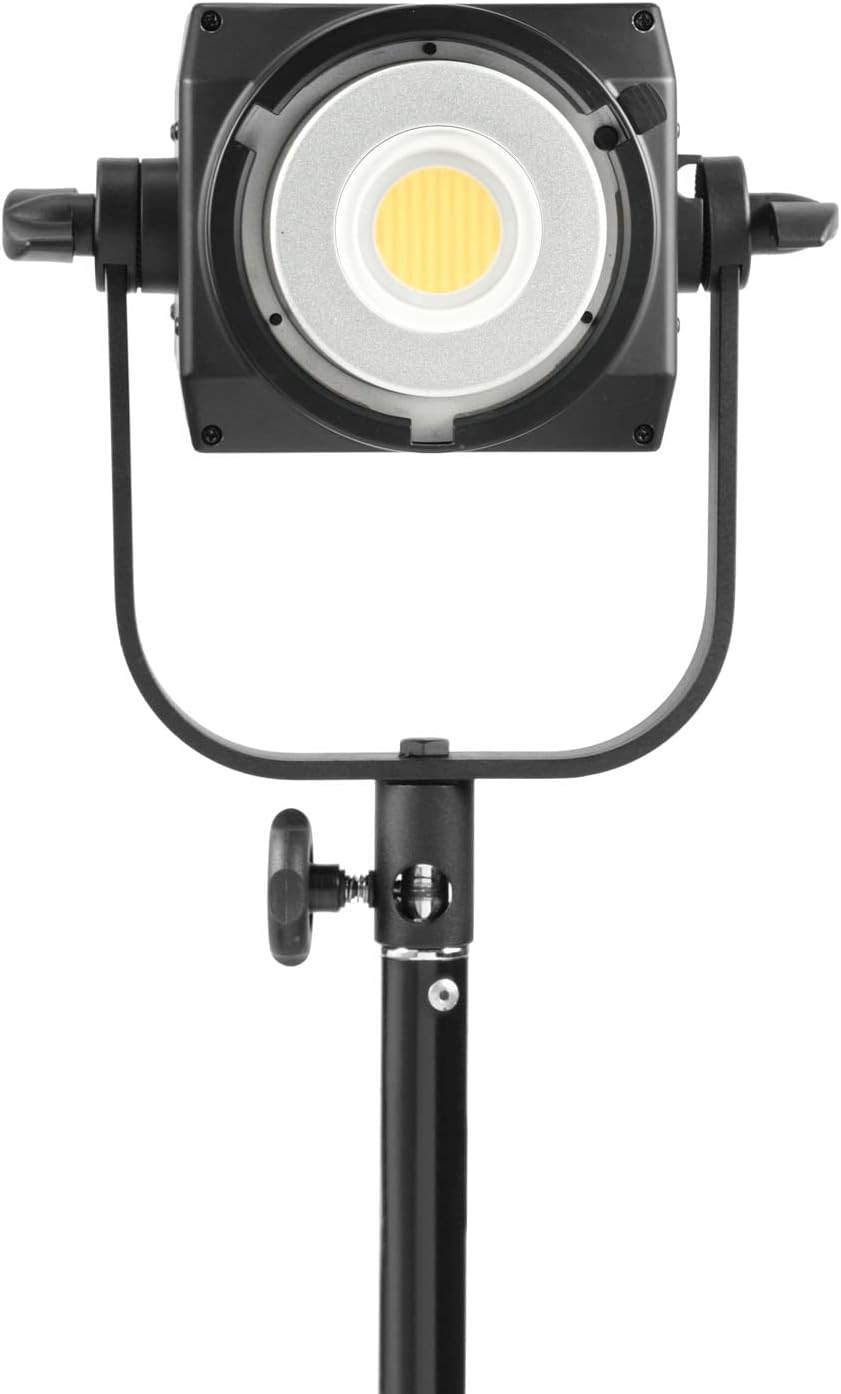
Figure 1.1: Front view of the Nanlite FS-200B mounted on a light stand. This image illustrates the compact design and the main light source.
2. What's in the Box
Please check the contents of your package to ensure all items are present and undamaged.
- Nanlite FS-200B Bi-Color Studio Spotlight
- Power Cable
- Standard 55-degree Reflector (Bowens Mount)
- Protective Cap for COB LED

Figure 2.1: All components included in the Nanlite FS-200B package. This image shows the light, reflector, power cable, and protective cap.
3. Setup Instructions
- Mounting the Light: Securely attach the FS-200B to a compatible light stand using the integrated yoke and stand mount. Ensure the locking knob is tightened to prevent accidental movement.
- Attaching the Reflector: Align the Bowens Mount of the standard reflector with the mount on the front of the FS-200B. Insert the reflector and twist clockwise until it locks into place. To remove, press the release button and twist counter-clockwise.
- Power Connection: Connect the provided power cable to the AC input port on the rear of the FS-200B. Plug the other end into a suitable AC power outlet (100-240V AC).
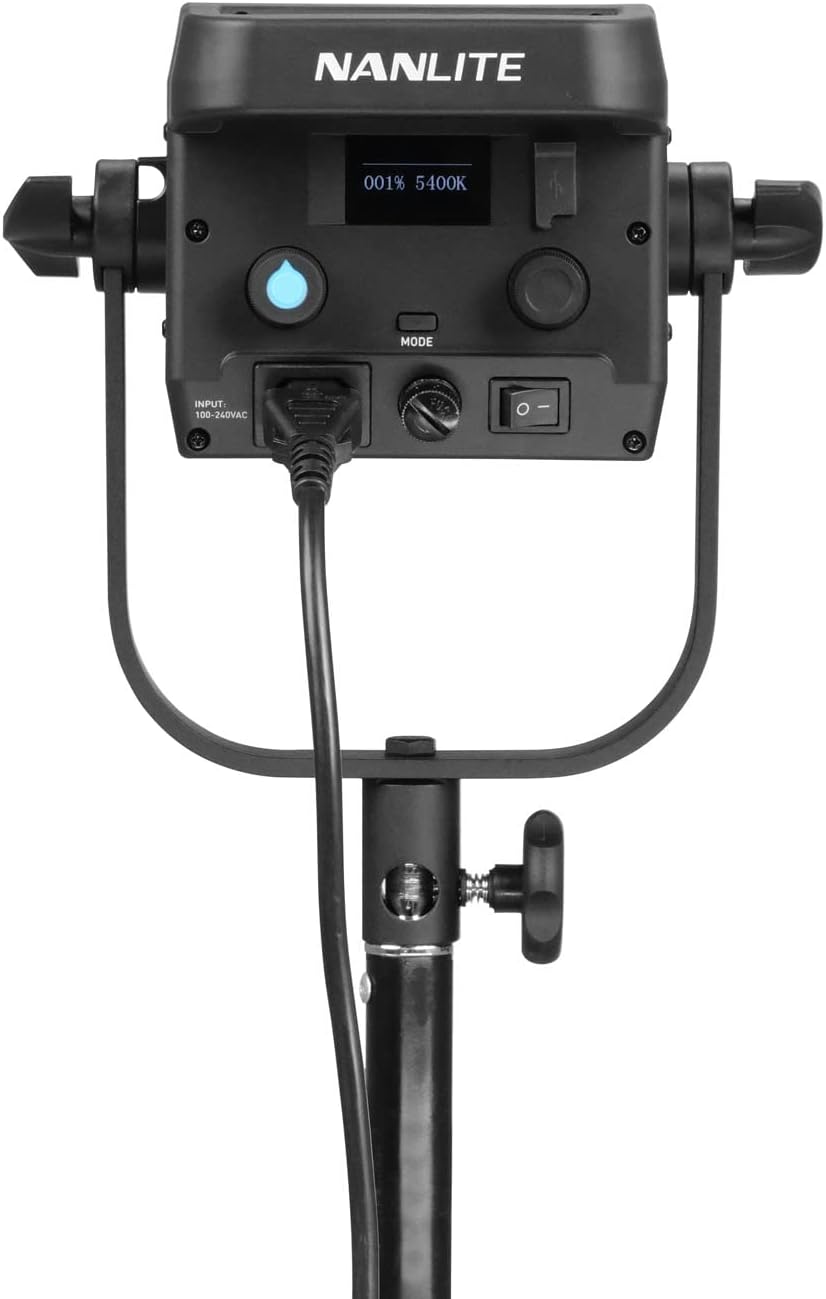
Figure 3.1: Rear panel of the FS-200B, highlighting the power input and control interface.
4. Operating the FS-200B
4.1. Basic Operation
- Power On/Off: Locate the power switch on the rear panel and flip it to the 'ON' position to power on the light. Flip to 'OFF' to power down.
- Adjusting Brightness: Use the DIM knob on the control panel to adjust the light intensity from 0% to 100%. The current percentage will be displayed on the OLED screen.
- Adjusting Color Temperature: Use the CCT knob to change the color temperature between 2700K (warm) and 6500K (cool). The selected Kelvin value will be shown on the OLED screen.
4.2. Control Options
The FS-200B offers multiple ways to control its functions:
- On-Board Controls: Directly use the knobs and buttons on the rear panel for immediate adjustments.
- Bluetooth (NANLINK App): Download the free NANLINK app for iOS and Android devices. Enable Bluetooth on your device and pair with the FS-200B to control brightness, color temperature, and special effects remotely.
- 2.4G Wireless: The FS-200B supports 2.4G wireless control with the separately available WS-RC-C2 handheld remote. Refer to the remote's manual for pairing instructions.
4.3. Special Effects
The FS-200B includes 12 built-in practical effects to enhance your creative productions. To access these effects, press the MODE button on the control panel and navigate through the options using the knobs. Effects include:
- TV
- Paparazzi
- Candle/Fire
- Fireworks
- Explosion
- Storm
- And more...

Figure 4.1: Detailed view of the FS-200B control panel, showing the OLED display, dimming and CCT knobs, and mode button.
5. Maintenance
- Cleaning: Use a soft, dry cloth to clean the exterior of the light. Do not use abrasive cleaners or solvents. Ensure the cooling vents are free from dust and obstructions.
- Storage: When not in use, store the FS-200B in a cool, dry place, away from direct sunlight and excessive humidity. It is recommended to use the original packaging or a padded case for transport and storage.
- Safety: Always disconnect the power cable before cleaning or performing any maintenance. Do not block the ventilation holes during operation.

Figure 5.1: Side view of the FS-200B, illustrating the ventilation design crucial for maintaining optimal operating temperature.
6. Troubleshooting
| Problem | Possible Cause | Solution |
|---|---|---|
| Light does not turn on. | No power supply; power cable loose; power switch off. | Check power cable connection; ensure power outlet is active; confirm power switch is in 'ON' position. |
| Controls are unresponsive. | Temporary software glitch; remote control interference. | Power cycle the unit (turn off, wait 10 seconds, turn on); ensure no other 2.4G devices are causing interference if using remote. |
| Bluetooth connection issues. | Bluetooth not enabled on device; app not updated; light too far from device. | Ensure Bluetooth is on; update NANLINK app; move device closer to the light; restart both devices. |
| Light flickers or dims unexpectedly. | Unstable power supply; overheating. | Ensure stable power source; check for blocked vents and allow light to cool down. |
7. Specifications
| Feature | Detail |
|---|---|
| Model Number | FS-200B |
| Product Dimensions | 12.17 x 9.13 x 4.84 inches |
| Item Weight | 6.38 pounds |
| Color Temperature | 2700K-6500K |
| Connectivity | Bluetooth, 2.4G |
| Mount Type | Bowens Mount |
| Flash Modes Description | Constant illumination, adjustable brightness, adjustable color temperature |
| Manufacturer | Nanlite |
8. Warranty and Support
The Nanlite FS-200B Bi-Color Studio Spotlight is covered by a manufacturer's warranty. Please refer to the warranty card included with your product for specific terms and conditions, including warranty duration and coverage details.
For technical support, service, or warranty claims, please contact Nanlite customer service through their official website or the retailer from whom you purchased the product. Keep your proof of purchase for warranty validation.
Note: No official seller videos were found for this product that meet the criteria for inclusion in this manual.
Related documentsFS-200B


Ask a question about this manual
Ask about setup, troubleshooting, compatibility, parts, safety, or missing instructions. Manuals+ will review the question and use this page’s manual context to help answer it.