
1. Product Overview
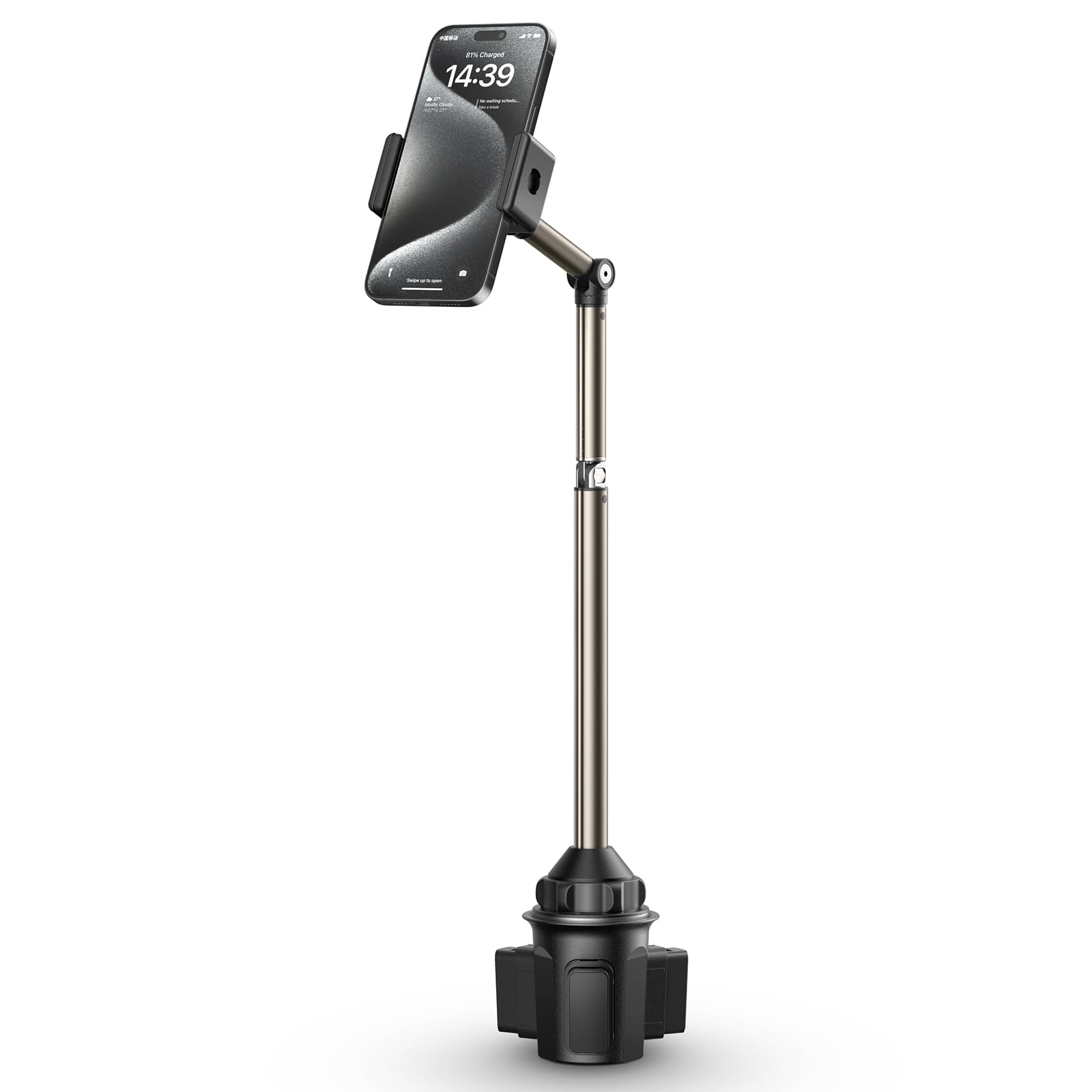
The JSAUX Car Cup Holder Phone Mount, ClipMount Model SP0210, is a robust and adjustable phone holder designed for secure placement in your vehicle's cup holder. It features a metal long-arm for stability and multiple adjustment points to achieve optimal viewing angles. This mount is compatible with a wide range of smartphones, ensuring your device remains accessible and stable during travel.
Key Features:
- Adjustable Height: The mount extends from 11.6 to 16.6 inches, allowing for customizable height to suit your preference and vehicle interior.
- Rock-Solid Stability: Constructed with a sturdy metal arm, this mount minimizes wobbling, even on uneven roads.
- Flexible Positioning: Three adjustable joints provide precise control over the viewing angle, enabling high, low, close, or distant phone placement.
- Secure Cup Holder Grip: The adjustable base is designed to fit cup holders with diameters ranging from 2.17 to 4.33 inches, ensuring a firm and stable hold.
- Universal Compatibility: Supports various smartphones, including iPhone 16/15/14/13/12/11 series, Samsung Galaxy S24/S23/S22/S21 series, Google Pixel 9/8/7/6/5/4/3/2/XL, and other similar-sized devices.
2. Package Contents
Before proceeding with installation, please ensure all components are present:
- JSAUX Car Cup Holder Phone Mount (ClipMount Model SP0210)
- Instruction Manual
3. Setup and Installation
Follow these steps to install your JSAUX Car Cup Holder Phone Mount:
- Insert the Base: Place the adjustable base of the mount into your vehicle's cup holder.
- Secure the Base: Twist the base clockwise to expand its three feet. Continue twisting until the base is firmly secured within the cup holder and does not wobble. Ensure the three feet are balanced for maximum stability.
- Adjust Height: Extend the metal arm to your desired height. The arm can be adjusted from 11.6 to 16.6 inches.
- Position Phone Holder: Utilize the three adjustable joints on the arm to set the phone holder at your preferred viewing angle. The holder can rotate 360 degrees and the joints allow for various folds (e.g., 90-degree, 180-degree) to optimize visibility and accessibility.
- Insert Phone: Gently open the phone clamp and insert your smartphone. Ensure the phone is securely gripped by the holder. The holder is designed to accommodate phones with or without cases.


4. Operating Instructions
Once installed, operating your JSAUX Car Cup Holder Phone Mount is straightforward:
- Adjusting the Arm: Loosen the locking mechanisms on the joints to adjust the angle and position of the arm. Tighten them once the desired position is achieved.
- Rotating the Phone Holder: The phone holder can be rotated 360 degrees to switch between portrait and landscape modes without removing your phone.
- Inserting/Removing Phone: Gently pull apart the spring-loaded clamps to insert or remove your phone. Ensure a snug fit to prevent accidental drops.
Official Product Video:
5. Maintenance
To ensure the longevity and optimal performance of your phone mount:
- Cleaning: Wipe the mount with a soft, damp cloth. Avoid using harsh chemicals or abrasive cleaners.
- Joint Tightness: Periodically check the tightness of the adjustable joints. If they become loose, use the provided Allen wrench (if applicable) to tighten them.
- Storage: When not in use, you can collapse the mount to a more compact size for storage.

6. Troubleshooting
If you encounter any issues with your JSAUX Car Cup Holder Phone Mount, refer to the following common solutions:
- Mount is not stable in the cup holder: Ensure the base is fully expanded by twisting it clockwise until it is snug. Check that the three expanding feet are evenly distributed and gripping the cup holder walls.
- Phone holder feels loose: Tighten the screws on the adjustable joints using the provided Allen wrench.
- Phone is not held securely: Ensure your phone is properly centered in the clamps and that the clamps are fully closed around your device.
7. Specifications
| Product Dimensions | 2.99 x 2.99 x 16.54 inches |
| Item Weight | 13.7 ounces |
| Item Model Number | SP0210 |
| Mounting Type | Cup Holder Mount |
| Special Features | Long arm, Adjustable joints, Extendable base |
| Compatible Devices | iPhone 16/16 Plus/16 Pro/16 Pro Max/15/15 Plus/15 Pro/15 Pro Max/14/14 Plus/14 Pro/14 Pro Max/13/13 Pro/13 Mini/13 Pro Max/12/12 Pro/12 Mini/12 Pro Max/SE 2020/11/11 Pro/11 Pro Max/X/Xs/Xs Max/8/8 Plus, Samsung Galaxy S24 Ultra/S24/S24+/S23 Ultra/S23/S23+/S22/S21/A55/A73/A53/A33/S20/S10 Plus/S10/S10e/S9/S8/Note 10/A53/A52, S6 Edge/S6 Edge+, Pixel 9/8/7/6/5/4/3/2/XL, Nexus 6P/5X/9, LG G6/G5/G4/G3/V20, LG, One Plus |
| Color | ClipMount |
8. Warranty and Support
For warranty information or technical support, please refer to the product packaging or contact JSAUX customer service directly. Keep your purchase receipt for warranty claims.