
1. Introduction
Thank you for choosing the GRECELL 300W Portable Power Station. This device is designed to provide reliable power for your electronic devices during outdoor activities, travel, or as an emergency backup at home. Please read this manual carefully before operation to ensure safe and efficient use.
Important: Charge the power station fully before first use. It is highly recommended to charge the EB300 when the battery level is below 20%.
2. Package Contents
The GRECELL 300W Portable Power Station package includes the following items:
- GRECELL 300W Portable Power Station (EB300)
- AC Adapter (for wall charging)
- Car Charger Cable (for car charging)
- MC4-7909 Connector Cable (for solar panel connection, solar panel not included)
- User Manual
3. Product Overview
The GRECELL EB300 is a compact and robust power station designed for portability and versatility. It features multiple output ports and a clear display for easy monitoring.
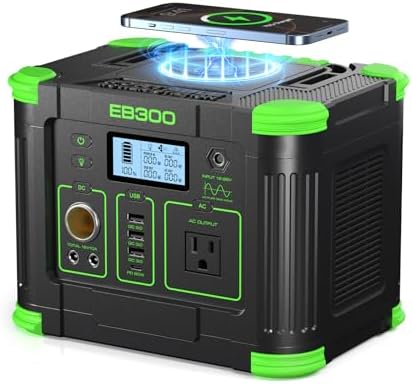
Figure 3.1: Front view of the GRECELL EB300 Portable Power Station.
3.1. Features
- 288Wh Capacity & 300W Stable Output: Provides continuous power (600W surge) for various devices.
- 8 Ports: Includes 1x 110V AC outlet, 1x 60W USB-C PD, 1x 18W USB-C PD, 2x 15W USB-A QC, and 1x car port.
- Enhanced Safety: Advanced Battery Management System (BMS) with overload, overcharge, and short-circuit protection.
- Rapid Charging: 60W USB-C PD and Quick Charge 3.0 USB-A ports for fast device charging.
- Flexible Recharging: Can be recharged via AC wall plug, car charger, or compatible solar panel (not included).
- Built-in MPPT Controller: Maximizes solar charging efficiency.
- Portable Design: Compact and lightweight (7.3 lbs) with a built-in handle.
- Integrated Flashlight: For illumination during power outages or camping.
3.2. Components
- Power Button
- Flashlight Button
- DC Output Control Button
- USB Output Ports (2x USB-A QC 3.0, 1x USB-C PD 60W, 1x USB-C PD 18W)
- AC Output Control Button
- 110V AC Output Port
- DC Input Port (12-26V)
- LCD Screen Display
- 12V/10A Car Port
- Folding Handle
- Air Intake Vent with Cooling Fan
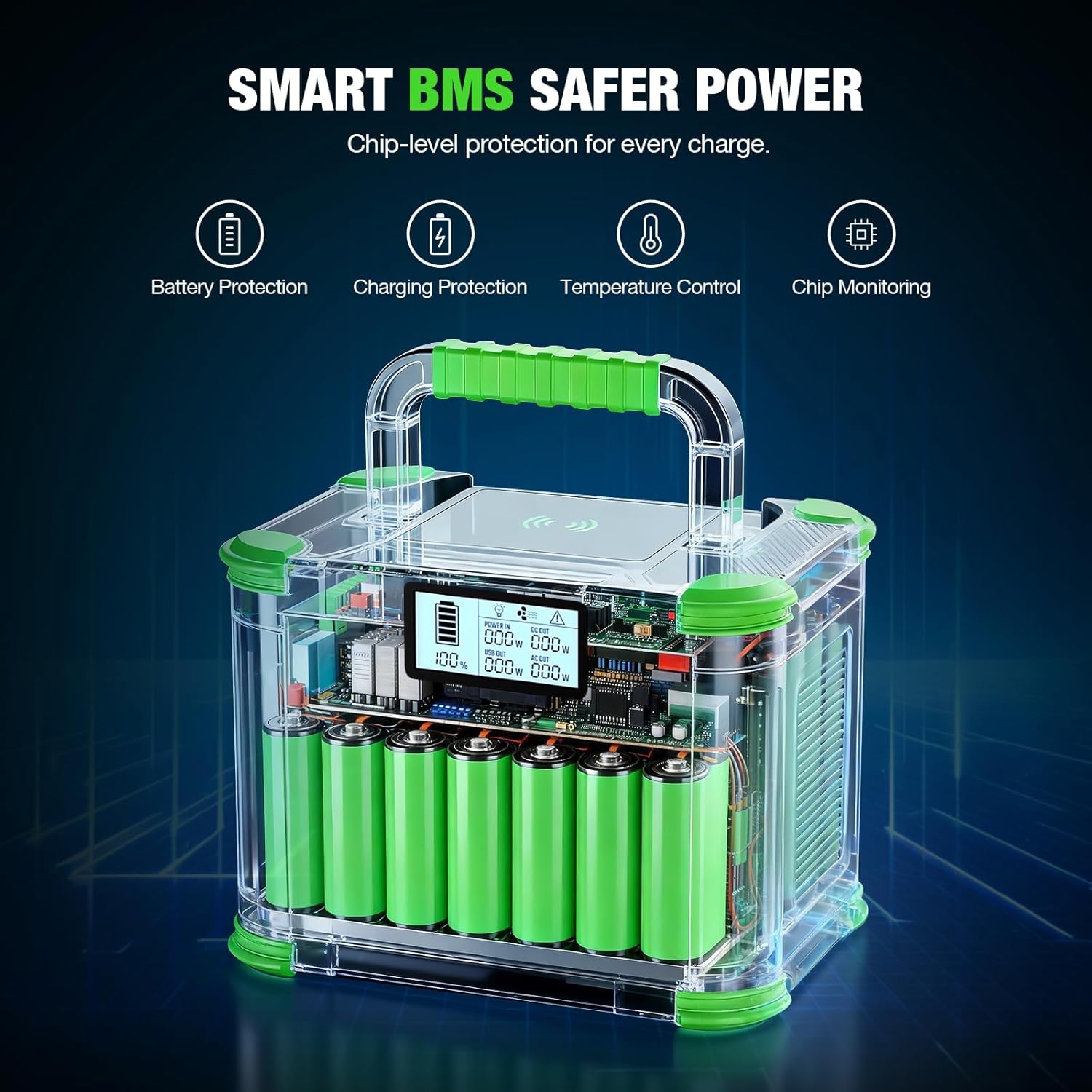
Figure 3.2: GRECELL EB300 with key components and dimensions (9.6"L x 6.9"W x 6.7"H).
4. Setup
4.1. Initial Charge
Before using your GRECELL EB300 for the first time, fully charge it using the provided AC adapter. This ensures optimal battery performance and longevity.
- Connect the AC adapter to the DC Input Port (7) on the power station.
- Plug the AC adapter into a standard wall outlet.
- The LCD screen (8) will indicate charging status. Charge until the battery indicator shows 100%.

Figure 4.1: Charging the EB300 via AC wall charger (approx. 6-7 hours).
5. Operating Instructions
5.1. Powering On/Off
To power on the unit, press and hold the Power Button (1) for a few seconds until the LCD screen (8) illuminates. To power off, press and hold the Power Button (1) again.
5.2. Using DC Output
Press the DC Output Control Button (3) to activate the 12V/10A Car Port (9) and the two DC output ports. The LCD screen will show the DC output status. Press the button again to turn off the DC output.
5.3. Using USB Output
The USB ports (4) are automatically active when the power station is on. Simply plug in your USB devices to charge. The 60W USB-C PD port charges devices significantly faster than standard USB-C ports.

Figure 5.1: Fast charging capabilities of the EB300, including 60W USB-C PD.
5.4. Using AC Output
Press the AC Output Control Button (5) to activate the 110V AC Output Port (6). The LCD screen will show the AC output status. Plug in your AC devices (rated power <300W). Press the button again to turn off the AC output.

Figure 5.2: The EB300 provides emergency backup power for home devices.
5.5. Using the Flashlight
Press the Flashlight Button (2) once to turn on the LED light. Press it again to cycle through different modes (e.g., SOS mode). Press and hold to turn off the flashlight.
5.6. Wireless Charging
The EB300 features a 5W wireless charging pad on top. Simply place your compatible device on the pad to initiate charging.

Figure 5.3: Wireless charging a smartphone on the EB300.
6. Charging Options
The GRECELL EB300 offers three convenient ways to recharge:
6.1. AC Wall Charging
Use the provided AC adapter to charge the power station from a standard wall outlet. This method takes approximately 6-7 hours for a full charge.
6.2. Car Charging
Use the provided car charger cable to recharge the power station from your vehicle's 12V car port. This method takes approximately 7-9 hours when the car is running.

Figure 6.1: Recharging the EB300 using a 12V car port.
6.3. Solar Charging
The EB300 can be recharged using a compatible solar panel (not included) via the MC4-7909 connector cable. The built-in MPPT controller optimizes solar input for efficient charging, taking approximately 5-9 hours depending on solar conditions.

Figure 6.2: Solar charging the EB300 with a compatible solar panel.
7. Safety Information
To ensure safe operation and prolong the lifespan of your GRECELL EB300, please observe the following safety guidelines:
- Do not disassemble, repair, or modify the unit.
- Keep the power station away from fire, heat sources, and direct sunlight.
- Avoid exposure to water, rain, or high humidity.
- Do not use or store the unit in environments with high temperatures.
- Keep out of reach of children.
- Ensure proper ventilation during use and charging to prevent overheating.
- Use only original or certified charging cables and adapters.
- Avoid dropping or subjecting the unit to strong impacts.

Figure 7.1: Benefits of a solar generator like the EB300 over traditional generators, including eco-friendliness and quiet operation.
8. Maintenance
Proper maintenance helps ensure the longevity and performance of your power station:
- Clean the exterior with a dry, soft cloth. Do not use abrasive cleaners or solvents.
- Store the unit in a cool, dry place away from direct sunlight and moisture.
- If storing for extended periods, charge the unit to 50-80% every 3-6 months to maintain battery health.
- Ensure the air intake vents are clear of dust and debris to allow for proper cooling.
9. Troubleshooting
If you encounter issues with your GRECELL EB300, refer to the following common problems and solutions:
| Problem | Possible Cause | Solution |
|---|---|---|
| Unit does not power on | Battery is completely drained | Charge the power station using the AC adapter. |
| AC output not working | AC output not activated or device exceeds 300W | Press the AC Output Control Button (5). Ensure device wattage is below 300W. |
| USB charging slow | Device not compatible with Quick Charge or PD | Ensure your device supports QC 3.0 or PD 60W for faster charging. |
| Solar charging not working | Insufficient sunlight or incorrect connection | Ensure solar panel is in direct sunlight and connected correctly via MC4 cable. |
If the problem persists, please contact GRECELL customer support.
10. Specifications
| Feature | Detail |
|---|---|
| Brand | GRECELL |
| Model Name | EB300 |
| Capacity | 288Wh |
| Rated Output Power | 300W (Pure Sine Wave) |
| Peak Output Power | 600W |
| AC Output | 1x 110V AC Outlet |
| USB-C Output | 1x PD 60W, 1x PD 18W |
| USB-A Output | 2x QC 3.0 (15W) |
| DC Output | 1x 12V/10A Car Port, 2x DC 12V/10A |
| Wireless Charging | 5W |
| Input (Charging) | DC 12-26V (AC Adapter, Car Charger, Solar Panel) |
| Dimensions (L x W x H) | 9.6"L x 6.9"W x 6.7"H |
| Weight | 7.3 lbs |
| Material | Aluminum, Metal Alloy, and Plastic |
| Operating Temperature | Optimal range specified in manual |
11. Warranty & Support
The GRECELL 300W Portable Power Station (Model EB300) comes with a 2-Year Warranty from the date of purchase. This warranty covers manufacturing defects and ensures your product is free from material and workmanship flaws under normal use.
For any questions, technical assistance, or warranty claims, please contact GRECELL customer support. We offer 24/7 customer support to assist you.
Contact information can typically be found on the official GRECELL website or through your purchase platform.
12. Product Videos
12.1. GRECELL Portable Power Station T300 Overview
This video provides an overview of the GRECELL T300 Portable Power Station, highlighting its features and various ports for charging devices.
12.2. GRECELL Brand Introduction
This short brand video introduces GRECELL's commitment to portable power solutions, showcasing the T300 in various settings.

