
RADIWOW D-808
SIHUADON D808 Portable Multi-Band Radio Instruction Manual
Model: D-808 | Brand: RADIWOW
1. Product Overview
The SIHUADON D808 is a versatile portable radio designed for comprehensive reception across multiple frequency bands, including AM, FM, Shortwave (SW), Longwave (LW), and Air Band. It features Single Sideband (SSB) reception, Radio Data System (RDS) functionality, an LCD display, and an alarm clock. Engineered for high sensitivity and clear audio, it is suitable for various listening environments.
Key Features:
- Multi-Band Reception: Covers FM, AM, SW, LW, and Air Band frequencies.
- DSP Digital Tuner: Enhances signal processing for improved reception quality.
- SSB Functionality: Supports USB and LSB for professional shortwave listening.
- High Sound Quality: Features a built-in speaker with clear audio and strong noise reduction.
- LCD Display: Provides clear information including time, frequency, and temperature.
- Alarm Clock & Sleep Timer: Integrated functions for daily use.
- Portable Design: Compact and lightweight for easy transport.
- Flexible Power Options: Operates on a rechargeable battery and supports USB-C charging.
- External Antenna Support: Includes a 360-degree rotating rod antenna and external antenna jack for enhanced reception.

Figure 1.1: Front view of the SIHUADON D808 radio, showcasing its LCD display, keypad, and tuning knobs.
2. What's in the Box
Upon unboxing your SIHUADON D808 radio, please verify that all the following components are included:
- 1 x SIHUADON D808 Portable Radio
- 1 x Specific Carrying Bag
- 1 x External Antenna
- 1 x Type-C USB Charging Cable
- 1 x Rechargeable Lithium-Ion Battery (pre-installed, ensure paper tab is removed before first use)
- 1 x English User Manual
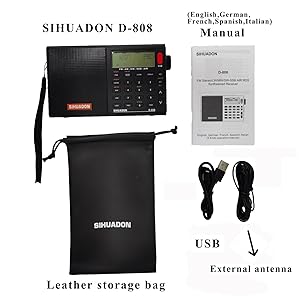
Figure 2.1: Illustration of the SIHUADON D808 radio and its included accessories: carrying bag, external antenna, USB cable, and user manual.
3. Product Layout and Controls
Familiarize yourself with the various parts and controls of your D808 radio for optimal operation.

Figure 3.1: Detailed diagram showing the location of the external antenna jack, volume control knob, earphone jack, tuning knob, fine tuning knob, Type-C charging port, and reset hole on the SIHUADON D808 radio.

Figure 3.2: The D808 radio's display indicating its full band coverage: FM (87.5-108 MHz), MW (522-1710 kHz), SW (1711-29999 kHz), LW (150-450 kHz), and AIR (118-137 MHz).
4. Setup
4.1 Battery Installation and Charging
The D808 radio comes with a rechargeable 18650 Lithium-Ion battery. Before first use, ensure the protective paper tab is removed from the battery compartment. The radio can be powered by the installed battery or directly via the USB-C charging cable.
- To install/check the battery: Open the battery compartment cover on the back of the radio. Insert the 18650 battery, ensuring correct polarity as indicated inside the compartment.
- To charge: Connect the supplied Type-C USB charging cable to the DC-IN 5V port on the side of the radio and plug the other end into a compatible USB power source (e.g., computer USB port, USB wall adapter). The display will indicate charging status.

Figure 4.1: The D808 radio's battery compartment and USB-C charging port, highlighting its power flexibility.
4.2 Initial Power On
Press the power button (usually located on the top right of the keypad) to turn on the radio. The LCD display will illuminate, showing the current time and frequency information.
5. Operating Instructions
5.1 Band Selection and Tuning
The D808 supports multiple bands. Use the dedicated band buttons (FM, AM/MW, SW, LW/MW, AIR) to switch between frequency ranges.
- Tuning Knob: Use the large tuning knob on the right side for general frequency adjustment. It supports both fast and slow tuning speeds.
- Fine Tune Knob: For precise frequency adjustments, especially critical for SSB reception, use the smaller 'FINE TUNE' wheel located below the main tuning knob.
- Direct Frequency Entry: Enter frequencies directly using the numeric keypad. Press the 'FREQ' button, then input the desired frequency, and press 'FREQ' again to confirm.
- Auto Tuning Storage (ATS): Press and hold the 'ATS' button (if available, or a combination of buttons as per the detailed manual) to automatically scan and store available stations in the current band.
- Memory Recall: Use the 'MEMO' button and number keys to recall previously saved stations.
- Up/Down Buttons: Use the arrow buttons for step-by-step frequency adjustments.
Video 5.1: An overview demonstrating the tuning and feature highlights of the SIHUADON D808 radio, including band selection, SSB operation, and display functions.
5.2 SSB (Single Sideband) Operation
The D808 supports SSB reception, which is crucial for listening to amateur radio, utility stations, and some shortwave broadcasts. To activate SSB mode, press the 'SSB' button. Use the 'USB/LSB' button to toggle between Upper Sideband (USB) and Lower Sideband (LSB). Fine-tuning is essential in SSB mode for clear reception.
5.3 Alarm Clock and Sleep Timer
- Setting Alarm: Press the 'ALARM' button, then use the number keys to set the alarm time. Confirm by pressing 'ALARM' again.
- Sleep Timer: The sleep timer allows the radio to automatically turn off after a set period (0-120 minutes). Press the sleep timer button (often integrated with the power button or a dedicated 'SLEEP' button) repeatedly to cycle through available times.
5.4 Display Information
The LCD display provides various information:
- Daily Time & Alarm Time: Shows current time and set alarm time.
- RDS (Radio Data System): Displays station information (e.g., station name, program type) on FM broadcasts where available.
- Temperature Display: Shows ambient temperature, switchable between Fahrenheit (°F) and Celsius (°C).
- Signal Strength: Indicates the strength of the received signal.
- Battery Indicator: Shows current battery level.

Figure 5.2: The D808 radio's display and icons representing features such as Auto Turn On/Off, Celsius/Fahrenheit, Ambient Temperature, World Band Broadcasting, SSB Reception, FM Stereo, Charging Function, DSP, Li-ion Battery, RDS, Sleep Timer, 500 Station Memories, Illumination, FM Freq Range, Antenna Jack, Key Lock, Air Band, and USB/LSB Selection.
5.5 Antenna Usage
The D808 features a telescopic rod antenna and an external antenna jack.
- Telescopic Antenna: Extend the telescopic antenna fully for optimal FM, SW, and Air Band reception. It can be rotated 360 degrees to find the best signal.
- External Antenna: For improved reception, especially on Shortwave and Longwave, connect the supplied external wire antenna to the 3.5mm external antenna jack.
6. Maintenance
- Cleaning: Use a soft, dry cloth to clean the radio's exterior. Do not use abrasive cleaners or solvents.
- Battery Care: If the radio will not be used for an extended period, remove the battery to prevent leakage. Recharge the battery regularly to maintain its lifespan.
- Storage: Store the radio in a cool, dry place away from direct sunlight and extreme temperatures.
7. Troubleshooting
| Problem | Possible Cause | Solution |
|---|---|---|
| No power / Radio does not turn on. | Battery is low or not installed correctly; Power button not pressed firmly. | Charge the battery or ensure it is properly installed. Press the power button firmly. If battery tab is present, remove it. |
| Poor reception / Static. | Antenna not extended; Weak signal; Interference from electronic devices. | Fully extend and rotate the telescopic antenna. Try using the external antenna. Move away from other electronic devices. |
| SSB audio is distorted or unclear. | Incorrect fine-tuning; Incorrect sideband (USB/LSB) selected. | Adjust the 'FINE TUNE' knob slowly for clarity. Toggle between USB and LSB. |
| Display is blank or frozen. | System error. | Locate the 'RESET' hole (usually a small pinhole on the bottom or back) and gently press it with a paperclip to reset the radio. |
8. Specifications
| Feature | Detail |
|---|---|
| Product Dimensions | 5.9 x 2 x 3.4 inches (15 x 5 x 8.5 cm) |
| Item Weight | 1.14 pounds (0.52 kg) |
| Item Model Number | D-808 |
| Batteries | 1 Lithium Ion battery required (included) |
| Manufacturer | RADIWOW |
| Color | Black |
| Special Feature | Rechargeable |
| Connectivity Technology | USB |
| Tuner Technology | AM, FM, SW, LW, Air Band, SSB |
| Radio Bands Supported | 12-Band |
9. Warranty and Support
For warranty information, please refer to the documentation included with your product or contact RADIWOW customer support. Keep your purchase receipt as proof of purchase for any warranty claims.
For technical assistance or further inquiries, please visit the official RADIWOW website or contact their customer service department. Contact details are typically provided in the included Owner's Manual.
Related documentsD-808

Ask a question about this manual
Ask about setup, troubleshooting, compatibility, parts, safety, or missing instructions. Manuals+ will review the question and use this page’s manual context to help answer it.