
1. Introduction and Overview
This manual provides essential information for the safe and efficient operation of your Maruson ULT-P3KRT 3000VA Online Double Conversion Sine Wave Uninterruptible Power Supply (UPS). The ULT-P3KRT is designed to provide reliable power protection for critical equipment, ensuring continuous operation during power fluctuations or outages.
The UPS features true double-conversion technology, delivering pure sine wave output for sensitive electronics. It is convertible for both rack mount and tower configurations, making it versatile for various IT environments.

Figure 1: Maruson ULT-P3KRT 3000VA UPS in tower configuration, showcasing its front panel display and ventilation.
2. Key Features
- 3000VA/2880W True Double-Conversion: Provides continuous, high-quality pure sine wave power, ideal for server rooms, routers, storage systems, surveillance systems, and other business-critical equipment.
- 0.96 Power Factor Output: Maximizes current-carrying capacity, improves voltage regulation at the load, and reduces power loss for enhanced efficiency.
- Adjustable Battery Charging Capacity: Features a 2A to 8A adjustable smart battery charger for faster recharge times.
- Frequency Converter Mode: Allows switching between 60Hz and 50Hz output with derating, offering flexibility for different power standards.
- Versatile Outlets: Equipped with 8 x NEMA 5-15/20R and 1 x L5-30R outlets, including programmable outlet groups for efficient power management.
- NEMA L5-30P 30A Locking Input Plug: Ensures a secure and reliable power connection.
- Rack Mount/Tower Convertible: Designed for flexible installation in 2U rack spaces or as a standalone tower unit.
3. Setup and Installation
3.1 Unpacking and Inspection
Carefully unpack the UPS and inspect it for any shipping damage. If any damage is found, do not install the unit and contact your dealer immediately.
3.2 Placement
The ULT-P3KRT can be installed in a standard 19-inch rack or as a tower. Ensure adequate ventilation around the unit and avoid placing it near heat sources or in direct sunlight. Maintain a clear space of at least 2 inches (5 cm) around the ventilation openings.
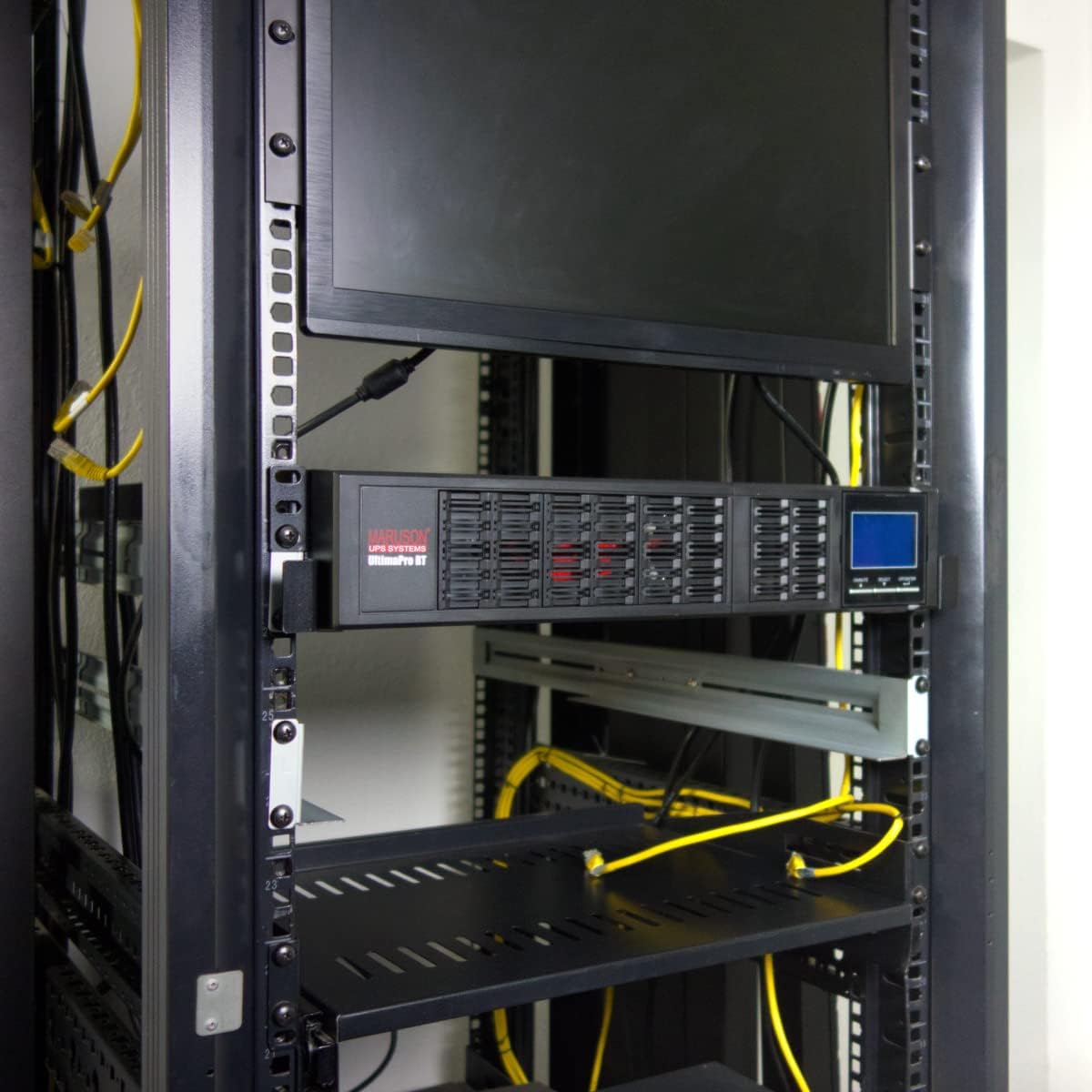
Figure 2: Maruson ULT-P3KRT UPS installed in a server rack, demonstrating its rack-mount capability.
3.3 Electrical Connections
Connect the UPS to a properly grounded power outlet using the provided NEMA L5-30P 30A locking input plug. Ensure the electrical circuit can handle the UPS's input current requirements.

Figure 3: Close-up view of the NEMA L5-30P locking plug, rated for 120V / 30A.
Connect your equipment to the UPS output receptacles. The UPS features 8 x NEMA 5-15/20R and 1 x L5-30R outlets. Refer to the rear panel diagram for outlet types and programmable groups.

Figure 4: Rear panel of the Maruson ULT-P3KRT UPS, highlighting cooling fans, USB port, RS232 port, EPO tab, external battery connector, network/fax/modem surge suppression, load segment controlled outlets, always-on outlets, and a ground lug.
3.4 Communication Ports
The UPS includes USB and RS232 communication ports for local monitoring and management. An Intelligent Slot is also available for an optional SNMP card for remote monitoring and management.
3.5 NAS Auto-Shutdown Settings Guide
For advanced integration with Network Attached Storage (NAS) devices, refer to the following video for guidance on configuring auto-shutdown settings. This ensures your NAS safely shuts down during extended power outages, preventing data loss.
Video 1: GOLDENMATE New UPS: NAS Auto-Shutdown Settings Guide. This video demonstrates how to configure NAS auto-shutdown settings when connected to a UPS, ensuring data integrity during power events.
4. Operating Instructions
4.1 Powering On/Off
To power on the UPS, press and hold the power button on the front panel until the display illuminates. To power off, press and hold the power button again until the display turns off.
4.2 LCD Display and Controls
The multifunction LCD provides local monitoring and management of the UPS status, including input/output voltage, load level, battery capacity, and estimated runtime. The display is adjustable and rotatable for easy viewing in various installation orientations.
4.3 Operating Modes
- Online Mode: The UPS continuously converts incoming AC power to DC to charge the batteries, and then converts DC back to AC to power the connected equipment. This provides a stable, pure sine wave output, isolating equipment from utility power fluctuations.
- Battery Mode: When utility power fails, the UPS seamlessly switches to battery power, providing uninterrupted power to connected devices.
- Bypass Mode: In case of an internal UPS fault or manual selection, the UPS can switch to bypass mode, supplying utility power directly to the connected equipment without battery backup.
- Frequency Converter Mode: This mode allows the UPS to convert the input frequency (e.g., 60Hz) to a different output frequency (e.g., 50Hz) with derating, suitable for specific equipment requirements.
- GreenPower UPS™ Eco Mode: This energy-saving mode improves UPS efficiency up to 97% by bypassing the double-conversion process when utility power is stable, reducing operating costs and heat generation.

Figure 5: Comparison of Sine Wave, Modified Sine Wave, and Square Wave forms. The Maruson ULT-P3KRT provides pure sine wave output.
4.4 Estimated Battery Runtime
The following table provides approximate battery runtimes for the ULT-P3KRT at various load levels. Actual runtimes may vary based on battery age, temperature, usage patterns, and altitude.
| Load | Approximate Battery Runtime* |
|---|---|
| 720W (25%) | 23 minutes |
| 1440W (50%) | 10.5 minutes |
| 2025W (75%) | 7.1 minutes |
| 2880W (100%) | 4.4 minutes |
*Battery runtimes are inherently variable, influenced by factors such as battery age, temperature, usage patterns, altitude, maintenance, and more.
5. Maintenance
5.1 Battery Replacement
The ULT-P3KRT features a tool-less front panel design for easy battery replacement. Always ensure the UPS is powered off and disconnected from the utility power before attempting to replace batteries. Refer to the specific battery replacement instructions provided with your replacement battery kit or contact Maruson support for guidance.
The UPS utilizes 6 x 12V lead-acid batteries (included). Regular battery self-tests and monitoring through the LCD or PowerPanel software can help determine when battery replacement is necessary.
5.2 Cleaning
Periodically clean the exterior of the UPS with a soft, dry cloth. Ensure ventilation openings are free from dust and debris to maintain proper airflow and prevent overheating.
6. Troubleshooting
If the UPS exhibits unusual behavior or error messages, consult the following basic troubleshooting steps. For more detailed information or persistent issues, refer to the full user manual or contact Maruson technical support.
- UPS Not Turning On: Ensure the input power cord is securely connected to both the UPS and a working utility outlet. Check the circuit breaker.
- Continuous Beeping: This typically indicates the UPS is operating on battery power due to a utility power outage. Save your work and safely shut down connected equipment if the outage is prolonged.
- Overload Warning: Reduce the load connected to the UPS. Disconnect non-essential equipment until the load level is within the UPS's capacity.
- Battery Fault/Low Battery: This may indicate aging batteries that need replacement or a battery that is not fully charged. Allow the UPS to charge for several hours. If the issue persists, consider battery replacement.
- No Output Power: Check all output connections. Ensure the UPS is not in bypass mode unintentionally.
7. Specifications
| Feature | Detail |
|---|---|
| Model Number | ULT-P3KRT |
| Capacity (VA/Watts) | 3000VA / 2880W |
| Product Dimensions | 24.8"D x 17.2"W x 3.5"H (63 x 43.7 x 8.9 cm) |
| Item Weight | 60.6 pounds (27.5 kg) |
| Voltage | 120 Volts |
| Battery Type | 6 x 12V Lead Acid (included) |
| Output Outlets | 8 x NEMA 5-15/20R, 1 x L5-30R |
| Input Plug | NEMA L5-30P 30A Locking |
| Color | Black |
| Form Factor | Rack Mount / Tower (2U) |
8. Warranty and Support
The Maruson ULT-P3KRT UPS comes with a 2-year limited warranty covering the UPS unit and its internal batteries. Additionally, it includes a $25,000 connected-equipment policy, providing peace of mind for your valuable electronics.
For technical assistance, warranty claims, or further product information, please visit the official Maruson website or contact their customer support directly. Keep your purchase receipt and product serial number handy when seeking support.
You can visit the Maruson Store for more products and information: Maruson Store on Amazon