
Introduction
This manual provides detailed instructions for the installation, operation, and maintenance of your FURITEK Aluminium CNC Motor Mount, specifically model FUR-2258. This motor mount is engineered from high-quality CNC machined billet aluminum, offering durability and lightweight performance for your RC vehicle.
The FUR-2258 motor mount is designed as a direct bolt-on replacement, ensuring a perfect fit for Furitek Mini Komodo motors in SCX24 based chassis. Its construction combines aerospace aluminum with carbon fiber elements, providing robust protection for the gear set. Additionally, the aluminum material aids in heat dissipation, contributing to cooler motor operation.
Compatibility: This specific model (FUR-2258) is compatible with SCX24 Based Trucks, Furitek Olympus Kit, and any truck utilizing an SCX24 based skid plate.
Product Overview
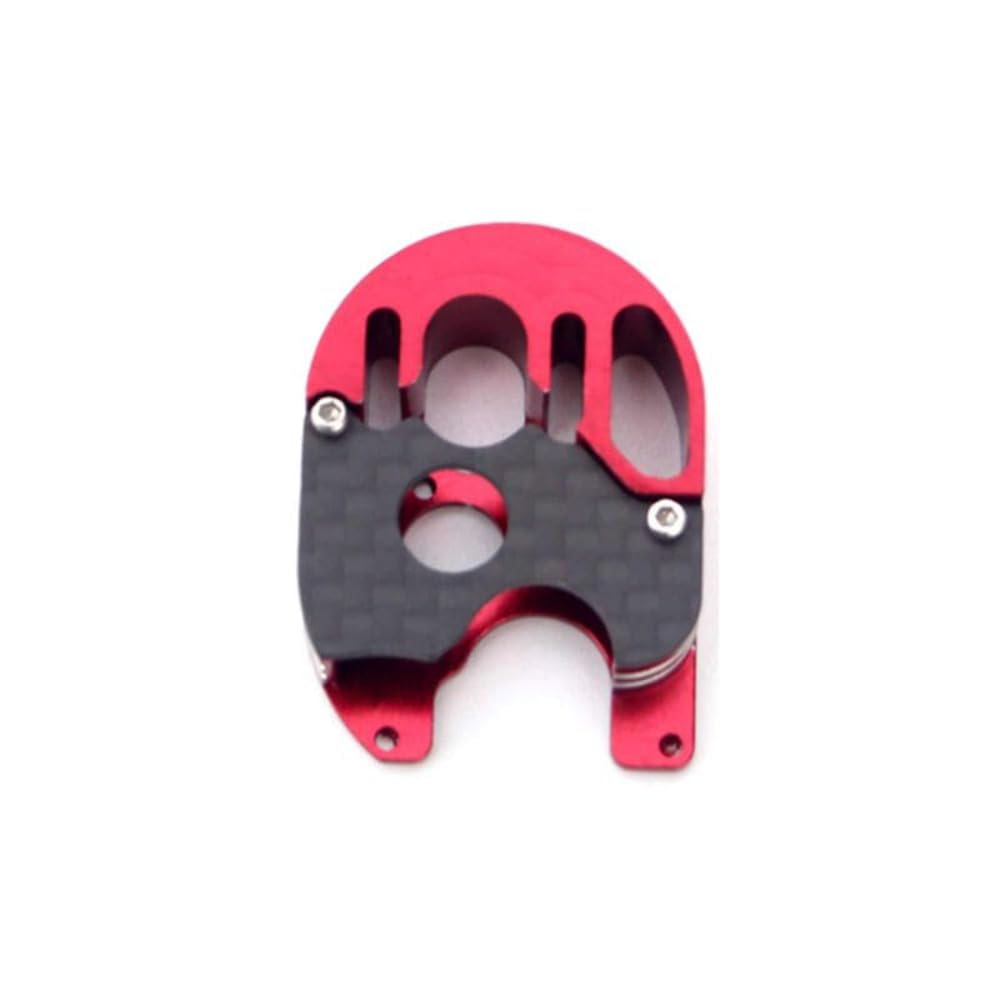
Figure 1: FURITEK Aluminium CNC Motor Mount (FUR-2258). This image displays the compact and robust design of the motor mount, highlighting its aluminum construction and gear housing.
The FURITEK Aluminium CNC Motor Mount is a precision-engineered component designed to securely house the Mini Komodo brushless motor within compatible RC vehicle chassis. Its design prioritizes both structural integrity and thermal management.
Setup and Installation
Proper installation of the motor mount is crucial for optimal performance and longevity of your RC vehicle's drivetrain. Follow these steps carefully:
- Preparation: Ensure your RC vehicle is powered off and the battery is disconnected. Gather necessary tools, including small screwdrivers and any specific tools required by your RC vehicle's manufacturer for motor or transmission removal.
- Remove Existing Motor/Mount: Carefully remove the existing motor and motor mount assembly from your SCX24 based chassis. Refer to your vehicle's original instruction manual for specific disassembly steps.
- Install Mini Komodo Motor: Attach your Furitek Mini Komodo brushless motor to the new FURITEK Aluminium CNC Motor Mount. Ensure the motor is seated correctly and secured with the appropriate screws.
- Gear Mesh Adjustment: This is a critical step. The video below demonstrates the correct method for adjusting gear mesh. Incorrect gear mesh can lead to excessive wear, noise, and reduced performance.
Video 1: This video provides a general demonstration of proper gear mesh adjustment for an RC motor and gearbox. It illustrates how to check and set the correct spacing between gears to prevent damage and ensure smooth operation.
- Insert a small piece of paper between the pinion gear (on the motor) and the spur gear (on the transmission).
- Push the motor firmly against the transmission while tightening the motor mounting screws.
- Rotate the gears by hand. The paper should come out with a slight resistance, indicating proper mesh. The gears should rotate smoothly without binding or excessive play.
- If the gears are too tight or too loose, loosen the motor screws and readjust.
- Mount Assembly into Chassis: Once the motor is securely attached and gear mesh is set, install the entire motor mount assembly back into your SCX24 based chassis. Secure it using the original mounting hardware.
- Connect Wiring: Reconnect the motor wiring to your Electronic Speed Controller (ESC) according to the ESC's instructions.
- Final Check: Before powering on, manually rotate the wheels to ensure the drivetrain moves freely without any binding or unusual resistance.
Operating Guidelines
The motor mount itself does not require specific operational steps beyond proper installation. Its function is to provide a stable and efficient platform for your Mini Komodo motor. Ensure the following for optimal performance:
- Regular Inspection: Periodically check the motor mount and surrounding components for any signs of loosening screws or damage, especially after rigorous use.
- Temperature Monitoring: While the aluminum acts as a heat sink, always monitor motor temperatures during operation, especially during extended or demanding runs. Excessive heat can indicate an issue with gear mesh, motor load, or ESC settings.
- Environmental Considerations: Avoid exposing the motor mount and motor to excessive dirt, water, or corrosive substances, as this can affect performance and longevity.
Maintenance
To ensure the longevity and optimal performance of your FURITEK motor mount and associated components, regular maintenance is recommended:
- Cleaning: After use, especially in dusty or dirty conditions, gently clean the motor mount and gears. Use a soft brush or compressed air to remove debris. Avoid using harsh chemicals that could damage the aluminum or carbon fiber.
- Gear Lubrication: Apply a small amount of appropriate RC gear grease to the gears periodically. This reduces friction, wear, and noise. Do not over-lubricate, as this can attract more dirt.
- Screw Tightness: Regularly check all mounting screws for tightness. Vibrations during operation can cause screws to loosen over time. Do not overtighten, as this can strip threads.
- Bearing Inspection: If accessible, inspect the motor bearings and any bearings within the gear reduction unit for smooth operation. Replace worn bearings as necessary.
Troubleshooting
If you encounter issues with your motor mount or the motor's performance, consider the following common troubleshooting steps:
- Excessive Noise or Grinding:
- Cause: Incorrect gear mesh (too tight or too loose).
- Solution: Re-adjust gear mesh following the "Setup and Installation" section.
- Cause: Debris in gears.
- Solution: Clean gears thoroughly.
- Cause: Worn gears or bearings.
- Solution: Inspect and replace damaged components.
- Motor Overheating:
- Cause: Incorrect gear mesh (too tight).
- Solution: Adjust gear mesh.
- Cause: Excessive load on the motor.
- Solution: Consider a smaller pinion gear or check for drivetrain binding elsewhere in the vehicle.
- Cause: Motor or ESC issues.
- Solution: Consult the motor/ESC manual or contact their respective support.
- Loose Motor Mount:
- Cause: Mounting screws have vibrated loose.
- Solution: Tighten all mounting screws. Apply a small amount of thread-locking compound if issues persist (use caution with plastic parts).
Specifications
| Feature | Detail |
|---|---|
| Model Number | FUR-2258 |
| Material | CNC Machined Billet Aluminium, Carbon Fiber |
| Compatibility | SCX24 Based Trucks, Furitek Olympus Kit, SCX24 based Skid plates (for Mini Komodo motors) |
| Item Weight | 22.7 g (0.8 oz) |
| Product Dimensions | 6.35 x 10.16 x 3.56 cm (2.5 x 4 x 1.4 inches) |
| Manufacturer | FURITEK |
Warranty Information
FURITEK products are manufactured to high standards. This product is covered by a limited warranty against manufacturing defects. Please retain your proof of purchase. For specific warranty terms and conditions, refer to the official FURITEK website or contact customer support. The warranty typically covers defects in materials and workmanship under normal use.
Customer Support
For technical assistance, troubleshooting, or inquiries regarding your FURITEK Aluminium CNC Motor Mount, please visit the official FURITEK website for FAQs, support resources, and contact information. You may also reach out to your authorized dealer for assistance.