Introduction
Thank you for choosing the ODK ZJZ-SZWJ L-Shaped Gaming Desk. This manual provides essential information for the safe assembly, operation, and maintenance of your new desk. Please read these instructions carefully before beginning assembly and retain them for future reference.
Important Safety Information:
- Do not exceed the maximum recommended weight of 15 kg on any single shelf or the monitor stand. The overall desk structure is designed for stability, but individual components have weight limits.
- Ensure the desk is assembled correctly by following all provided instructions. Incorrect assembly can lead to instability and potential injury.
- Always place the desk on a flat, stable, and level surface to ensure maximum stability and prevent tipping.
- Keep small parts away from children during assembly to prevent choking hazards.
- Regularly check all fasteners to ensure they remain tight. Retighten as necessary.
Package Contents
Before assembly, please verify that all components listed below are present and undamaged. If any parts are missing or damaged, please contact customer support.
- L-shaped desktop panels (2 sections)
- Metal frame components (legs, support bars)
- Storage shelves (various sizes)
- Mobile monitor stand
- Iron hooks (2 pieces)
- Adjustable foot pads
- Assembly hardware (screws, bolts, Allen wrench)
- Instruction manual
Setup & Assembly
Follow these steps carefully to assemble your ODK L-Shaped Gaming Desk. It is recommended to have two people for assembly.
Step 1: Unpack and Identify Parts
Carefully remove all components from the packaging. Lay them out on a clean, soft surface (like a carpet) to prevent scratches. Identify each part by comparing it with the parts list in the manual.

Image: Product Dimensions Diagram. This diagram illustrates the overall dimensions of the L-shaped desk, including the lengths of the two main sections (148cm and 120cm), and the height and depth measurements for the integrated shelves and the mobile monitor stand.
Step 2: Assemble the Metal Frame
Begin by connecting the main metal frame components. Use the provided screws and Allen wrench. Do not overtighten screws until the entire frame is loosely assembled.

Image: Assembly Diagram. This image demonstrates the connection points for the desk's frame and the integration of the monitor support brackets. It also highlights the adjustable feet at the base of the desk legs.
Step 3: Attach Desktop Panels and Shelves
Once the frame is stable, place the L-shaped desktop panels onto the frame and secure them with the designated hardware. Then, attach the storage shelves and the PC tower stand to their respective positions. Ensure all connections are secure.

Image: Storage Shelves. This image details the integrated storage solutions of the desk, showing a dedicated space for a PC tower on the left side and two multi-purpose shelves on the right side for organizing books, files, or other accessories.
Step 4: Install Monitor Stand and Hooks
Place the mobile monitor stand on the desktop as desired. Attach the two iron hooks to the side of the desk frame. These hooks are designed for headphones or other light accessories.
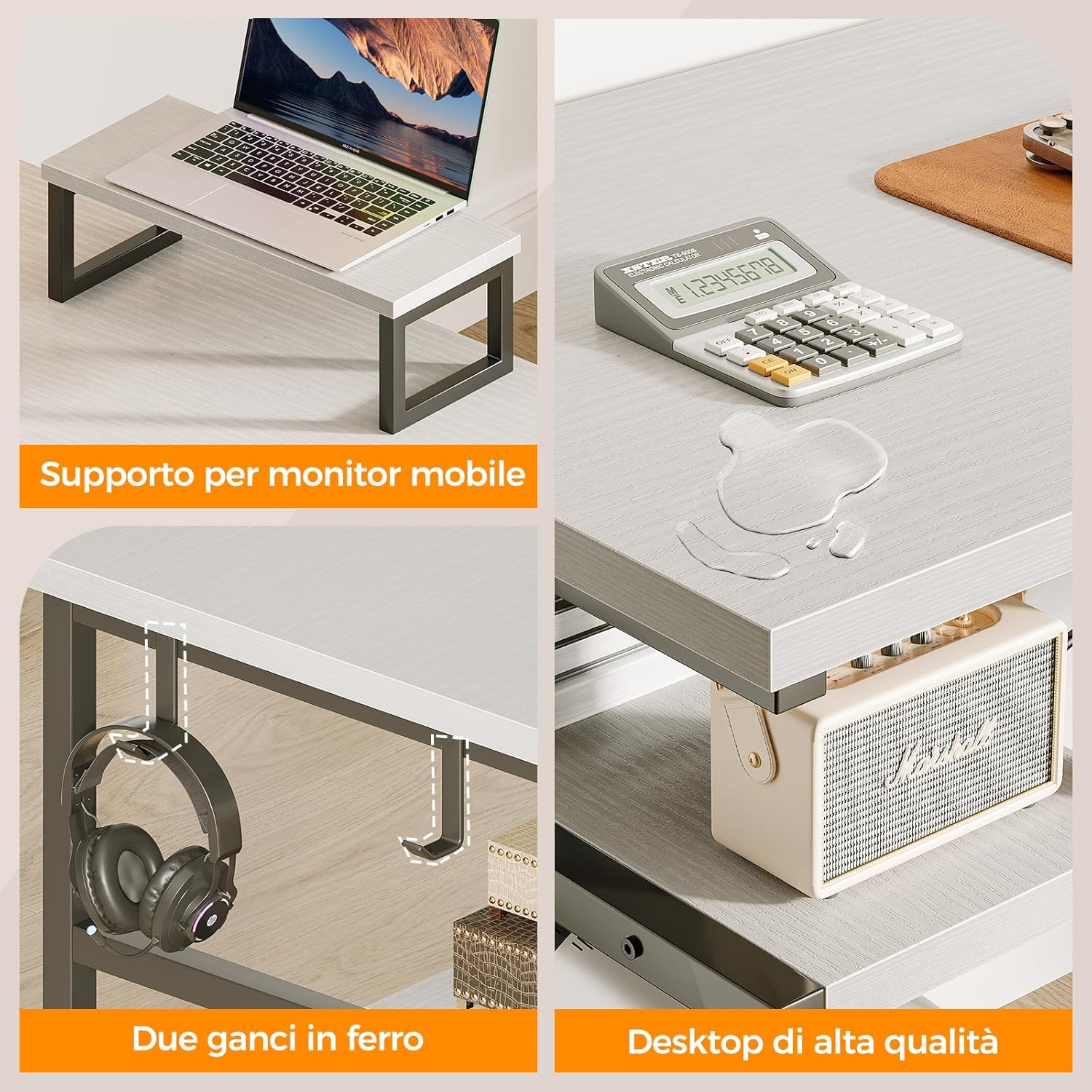
Image: Desk Features. This close-up view showcases key features: the portable monitor stand, the two convenient iron hooks for hanging items like headphones, and a demonstration of the desktop's high-quality, water-resistant surface.
Step 5: Final Tightening and Leveling
Once all components are in place, go back and fully tighten all screws. Adjust the foot pads at the bottom of the desk legs to ensure the desk is level and stable on your floor. This will prevent wobbling.
Operating Instructions
Your ODK L-Shaped Gaming Desk is designed for versatile use in various settings, including gaming, studying, and office work.
- Workspace Utilization: The L-shaped design maximizes your available corner space. Use one side for your primary computer setup and the other for secondary monitors, writing, or other tasks.
- Monitor Stand: The mobile monitor stand can be positioned anywhere on the desktop to elevate your screen to an ergonomic viewing height, reducing neck and eye strain.
- Storage: Utilize the integrated shelves for organizing books, files, and office supplies. The dedicated PC tower shelf keeps your computer off the floor, improving airflow and protecting it from dust.
- Iron Hooks: The two iron hooks are ideal for hanging headphones, cables, or small bags, keeping your desktop clear and organized.

Image: ODK L-Shaped Gaming Desk in Use. This image displays the fully assembled desk in a functional setup, showcasing its capacity to hold multiple monitors, a PC tower, and various accessories, highlighting its utility for both gaming and work environments.
Maintenance
Proper care and maintenance will extend the life and appearance of your ODK L-Shaped Gaming Desk.
- Cleaning: Wipe the desktop and metal frame with a soft, damp cloth. For stubborn stains, a mild soap solution can be used, followed by drying with a clean cloth. Avoid abrasive cleaners or harsh chemicals, as these can damage the surface finish.
- Spills: The desktop surface is designed to be water-resistant. In case of spills, wipe them immediately to prevent any potential damage or staining.
- Fasteners: Periodically check all screws and bolts to ensure they are tight. Loose fasteners can compromise the desk's stability. Retighten as needed.
- Weight Distribution: Distribute weight evenly across the desktop and shelves. Avoid placing excessively heavy items on one concentrated area.
Troubleshooting
If you encounter any issues with your ODK L-Shaped Gaming Desk, refer to the following common problems and solutions:
- Desk is wobbly:
- Ensure all assembly screws are fully tightened.
- Adjust the foot pads at the bottom of each leg to level the desk on uneven floors.
- Verify the desk is placed on a flat, stable surface.
- Parts do not fit together:
- Double-check the instruction manual to ensure you are using the correct parts for each step.
- Ensure parts are oriented correctly. Some pieces may only fit in one direction.
- Do not force parts. If a part does not fit, re-examine the previous steps.
- Missing hardware:
- Carefully check all packaging materials to ensure no small parts were overlooked.
- Contact ODK customer support for replacement parts.
Specifications
| Feature | Detail |
|---|---|
| Brand | ODK |
| Model | ZJZ-SZWJ |
| Color | White |
| Product Dimensions | 148 x 120 x 75 cm (Length x Width x Height) |
| Material | Engineered Wood (Desktop), Metal (Frame) |
| Item Weight | 22.7 Kilograms |
| Desk Design | L-shaped Computer Desk |
| Special Features | Mobile Monitor Stand, PC Tower Shelf, Storage Shelves, 2 Iron Hooks, Adjustable Foot Pads |
| Maximum Recommended Weight | 15 kg (per shelf/monitor stand) |
Warranty and Support
ODK is committed to providing a satisfactory customer experience. If you have any questions, concerns, or require assistance with your product, please do not hesitate to contact our customer support team. We are dedicated to resolving any issues promptly.
Please refer to your purchase documentation for specific warranty details and contact information.