
OIMIS AFO-10D-RC3
OIMIS Air Fryer Toaster Oven Instruction Manual
Model: AFO-10D-RC3
Introduction
Thank you for choosing the OIMIS 32QT Air Fryer Toaster Oven. This versatile appliance combines the functions of an air fryer, toaster, oven, rotisserie, and dehydrator, offering 21 preset cooking programs to simplify your culinary tasks. This manual provides essential information for safe operation, maintenance, and optimal use of your new appliance.
Important Safety Instructions
READ ALL INSTRUCTIONS BEFORE USE.
- Always place the appliance on a stable, level, heat-resistant surface. Ensure adequate ventilation around the unit.
- Do not touch hot surfaces. Use oven mitts or gloves when handling hot materials.
- To protect against electrical shock, do not immerse cord, plugs, or the appliance in water or other liquid.
- Close supervision is necessary when any appliance is used by or near children.
- Unplug from outlet when not in use and before cleaning. Allow to cool before putting on or taking off parts.
- Do not operate any appliance with a damaged cord or plug, or after the appliance malfunctions or has been damaged in any manner.
- The use of accessory attachments not recommended by the appliance manufacturer may cause injuries.
- Do not use outdoors.
- Do not let cord hang over edge of table or counter, or touch hot surfaces.
- Do not place on or near a hot gas or electric burner, or in a heated oven.
- Extreme caution must be used when moving an appliance containing hot oil or other hot liquids.
- To disconnect, turn any control to "off", then remove plug from wall outlet.
- Do not use appliance for other than intended use.
- OIMIS Air Fryer Toaster Oven features a patented dual duct system and double glass door to prevent heat from escaping and potential burns. The metal interior is 80% flame retardant with an ignition point over 1800°F for enhanced safety.
Product Overview and Components
Familiarize yourself with the parts of your OIMIS Air Fryer Toaster Oven to ensure proper operation.

Figure 1: Front view of the OIMIS Air Fryer Toaster Oven, showcasing its large capacity and digital control panel.
Main Unit Features:
- Control Panel: LED display with push knob and button operation for precise temperature and time control.
- Large Capacity Interior: 32QT (30L) capacity, capable of fitting a 13-inch pizza, 4-6 slices of toast, or a 7.7 lbs rotisserie chicken.
- Double Insulated Glass Door: Enhances heat retention and safety.
- Stainless Steel Handle: Designed to remain cool to the touch during operation.
- Patented Dual Duct System: Separate hot and cold air ducts for efficient cooking and lower surface temperature.
Included Accessories:
- Oven Rack
- Baking Pan
- Wire Crumb Tray
- Rotisserie Skewers
- Air Fry Basket
- Rotisserie Handle
- Rotisserie Fork
- Drip Tray

Figure 2: Illustration of the 32QT capacity and internal dimensions, demonstrating its ability to accommodate various food items.
Setup and First Use
- Unpacking: Carefully remove all packaging materials, including any internal packing and accessories.
- Cleaning: Before first use, wash all accessories (oven rack, baking pan, air fry basket, rotisserie parts) in warm, soapy water. Wipe the interior and exterior of the oven with a damp cloth. Dry thoroughly.
- Placement: Place the oven on a flat, stable, heat-resistant surface, ensuring at least 6 inches of clearance on all sides for proper ventilation. Do not place it directly against a wall or under cabinets.
- Initial Burn-in: It is recommended to run the oven empty for about 15-20 minutes at 400°F (200°C) to burn off any manufacturing residues. A slight odor or smoke may be present during this process; this is normal. Ensure the area is well-ventilated.
- Power Connection: Plug the power cord into a grounded electrical outlet.
Operating Instructions
Your OIMIS Air Fryer Toaster Oven features an intuitive control panel for easy operation.

Figure 3: Detailed view of the control panel, showing preset functions and control knob.
Control Panel Overview:
- ON/OFF Button: Powers the unit on or off.
- MENUS Button: Cycles through the 21 preset cooking functions.
- TEMP/TIME Button: Toggles between temperature and time adjustment.
- START/STOP Button: Starts or pauses the cooking cycle.
- LIGHT Button: Turns the interior light on or off.
- PREHEAT Button: Initiates the preheating cycle for selected functions.
- Control Knob: Rotate to adjust temperature, time, or select menu options. Press to confirm selection.
- DUAL COOK Button: Activates the dual cook function, allowing two functions to run consecutively.
Basic Operation:
- Power On: Press the ON/OFF button. The display will illuminate.
- Select Function: Press the MENUS button repeatedly or rotate the control knob to select your desired cooking function (e.g., Air Fry, Bake, Toast).
- Adjust Temperature/Time: Once a function is selected, the default temperature and time will display. Press the TEMP/TIME button to switch between adjusting temperature and time. Rotate the control knob to change values.
- Preheat (Optional): For functions like Air Fry or Bake, you may press the PREHEAT button. The oven will preheat to the set temperature and beep when ready.
- Start Cooking: Place food inside the oven. Press the START/STOP button to begin cooking.
- Pause/Stop: Press the START/STOP button during cooking to pause. Press again to resume. To stop completely, press and hold the START/STOP button.
21 Preset Functions:
The oven offers a wide range of presets for various cooking needs:
- Air Fry (for chips, wings, snacks)
- Toast (7 shade levels)
- Bake
- Roast
- Broil
- Reheat
- Warm
- Proof
- Dehydrate
- Pizza (4 flavors: F01, F02, F03, F04)
- Grill (for steak, root veggies)
- Cookies
- Bacon
- Bagel
- Defrost
- Dual Cook (combines any two functions)

Figure 4: Temperature range control from 90°F to 450°F, suitable for various cooking methods from yogurt to air frying.
Dual Cook Function:
The DUAL COOK function allows you to combine two cooking functions to run consecutively. For example, you can set the oven to air fry for a certain time, then automatically switch to bake for the remaining time.
- Select the first function and set its temperature and time.
- Press the DUAL COOK button.
- Select the second function and set its temperature and time.
- Press START/STOP to begin the dual cook cycle.
Rotisserie Function:
Ideal for roasting whole chickens or roasts up to 7.7 lbs.
- Assemble the rotisserie spit with your food securely fastened using the forks.
- Insert the rotisserie spit into the designated slots inside the oven.
- Select a suitable cooking function (e.g., Roast, Air Fry) and adjust temperature/time.
- Press START/STOP. The rotisserie will begin to rotate.
- Use the rotisserie handle to safely remove the hot spit after cooking.
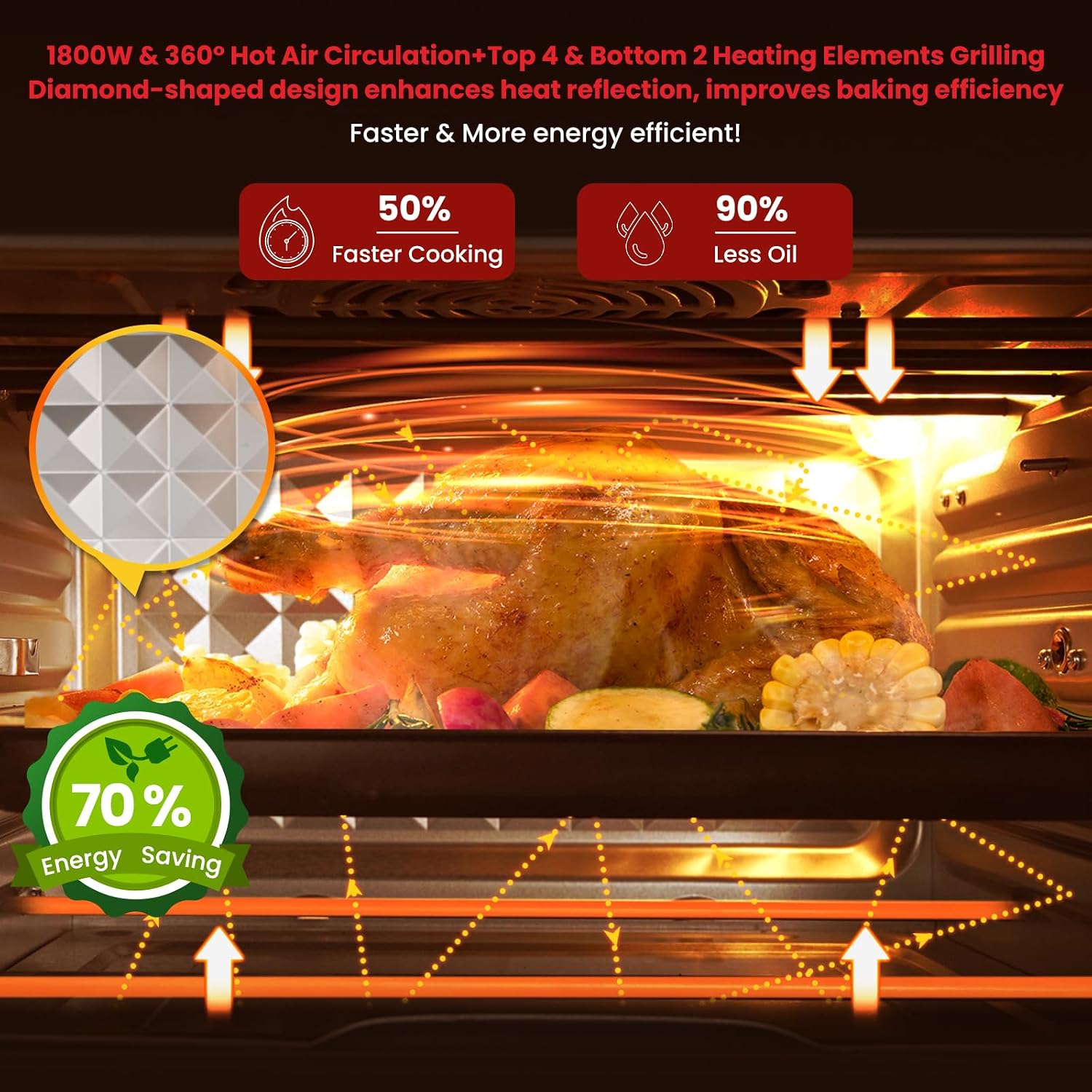
Figure 5: Illustration of 360° hot air circulation and heating elements for efficient and even cooking.

Figure 6: Explanation of the patented dual duct system, which includes separate hot and cold airflows for cooking efficiency and surface temperature reduction.
Maintenance and Cleaning
Regular cleaning will ensure the longevity and optimal performance of your OIMIS Air Fryer Toaster Oven.
- Always unplug the appliance from the power outlet and allow it to cool completely before cleaning.
- Interior Cleaning: Wipe the interior walls with a damp cloth and mild detergent. For stubborn stains, use a non-abrasive sponge. Do not use steel wool or abrasive cleaners.
- Exterior Cleaning: Wipe the exterior with a damp cloth. Do not immerse the appliance in water.
- Accessories: All removable accessories (oven rack, baking pan, air fry basket, rotisserie parts, crumb tray) can be washed in warm, soapy water. They are also dishwasher safe. Ensure they are completely dry before storing or reinserting into the oven.
- Crumb Tray: The crumb tray should be emptied and cleaned regularly to prevent grease buildup and potential fire hazards.
- Storage: Store the appliance in a cool, dry place when not in use.
Troubleshooting
If you encounter any issues with your OIMIS Air Fryer Toaster Oven, refer to the table below for common problems and solutions.
| Problem | Possible Cause | Solution |
|---|---|---|
| Appliance does not turn on. | Not plugged in; power outlet malfunction; appliance not properly connected. | Ensure the power cord is securely plugged into a working outlet. Check circuit breaker. |
| Food is not cooking evenly. | Overcrowding the basket/pan; incorrect temperature/time; food not flipped/rotated. | Do not overcrowd. Ensure proper air circulation. Adjust temperature/time. Flip or rotate food halfway through cooking. |
| White smoke coming from the oven. | Grease buildup; fatty foods. | Clean the oven interior and accessories thoroughly. For fatty foods, use a drip tray. |
| Appliance emits a burning smell. | Residue from first use; food particles burning. | This is normal for first use. For subsequent uses, clean the oven and accessories thoroughly. Ensure no food debris is left inside. |
| Rotisserie is not rotating. | Rotisserie spit not properly installed; food too heavy or unbalanced. | Ensure the rotisserie spit is correctly seated in its slots. Balance the food on the spit. Do not exceed weight limit (7.7 lbs). |
Specifications
| Feature | Detail |
|---|---|
| Brand | OIMIS |
| Model Number | AFO-10D-RC3 |
| Capacity | 32 Quarts (approx. 30 Liters) |
| Power/Wattage | 1800 Watts |
| Product Dimensions | 43 x 45.59 x 36.5 cm (16.93 x 17.95 x 14.37 inches) |
| Item Weight | 14.2 kg (31.3 lbs) |
| Material | Aluminum (interior), Glass (door) |
| Control Type | Knob and Push Button |
| Special Features | Dual Zone Features, Patented Dual Duct System, 360° Air Convection |
| Included Components | Oven Rack, Baking Pan, Wire Crumb Tray, Rotisserie Skewers, Air Fry Basket, Rotisserie Handle, Rotisserie Fork, Drip Tray |
Warranty and Support
For warranty information and customer support, please refer to the warranty card included with your product or contact OIMIS customer service directly. Keep your purchase receipt as proof of purchase.
For further assistance, visit the official OIMIS website or contact their support team using the contact information provided in your product packaging.
Related documentsAFO-10D-RC3


Ask a question about this manual
Ask about setup, troubleshooting, compatibility, parts, safety, or missing instructions. Manuals+ will review the question and use this page’s manual context to help answer it.