
Inkbird ISC-027BW
Inkbird ISC-027BW Wi-Fi & Bluetooth BBQ Smoker Temperature Controller User Manual
Model: ISC-027BW
1. Introduction
The Inkbird ISC-027BW is a sophisticated Wi-Fi and Bluetooth enabled BBQ smoker temperature controller designed to provide precise temperature management for various grills and smokers. It features an automatic smoker fan, four temperature probes, and smart functionalities accessible via a smartphone application, ensuring optimal cooking results with minimal manual intervention.
2. Package Contents
Upon unboxing, please verify that all the following components are included:
- ISC-027BW Temperature Controller Unit
- High-Efficient Smoker Fan
- 4 Food-Grade Stainless Steel Probes (3 meat probes, 1 oven probe)
- USB Power Cable
- Power Adapter
- Probe Clips (for ambient temperature measurement)
- Carrying Case
- User Manual

Figure 2.1: All components included in the Inkbird ISC-027BW package.
3. Setup Guide
3.1 Powering the Device
The ISC-027BW is USB-powered. Connect the provided USB cable to the controller and then to the power adapter. Plug the adapter into a standard electrical outlet. For outdoor use or portability, a 5V USB mobile power supply (power bank) can be used.
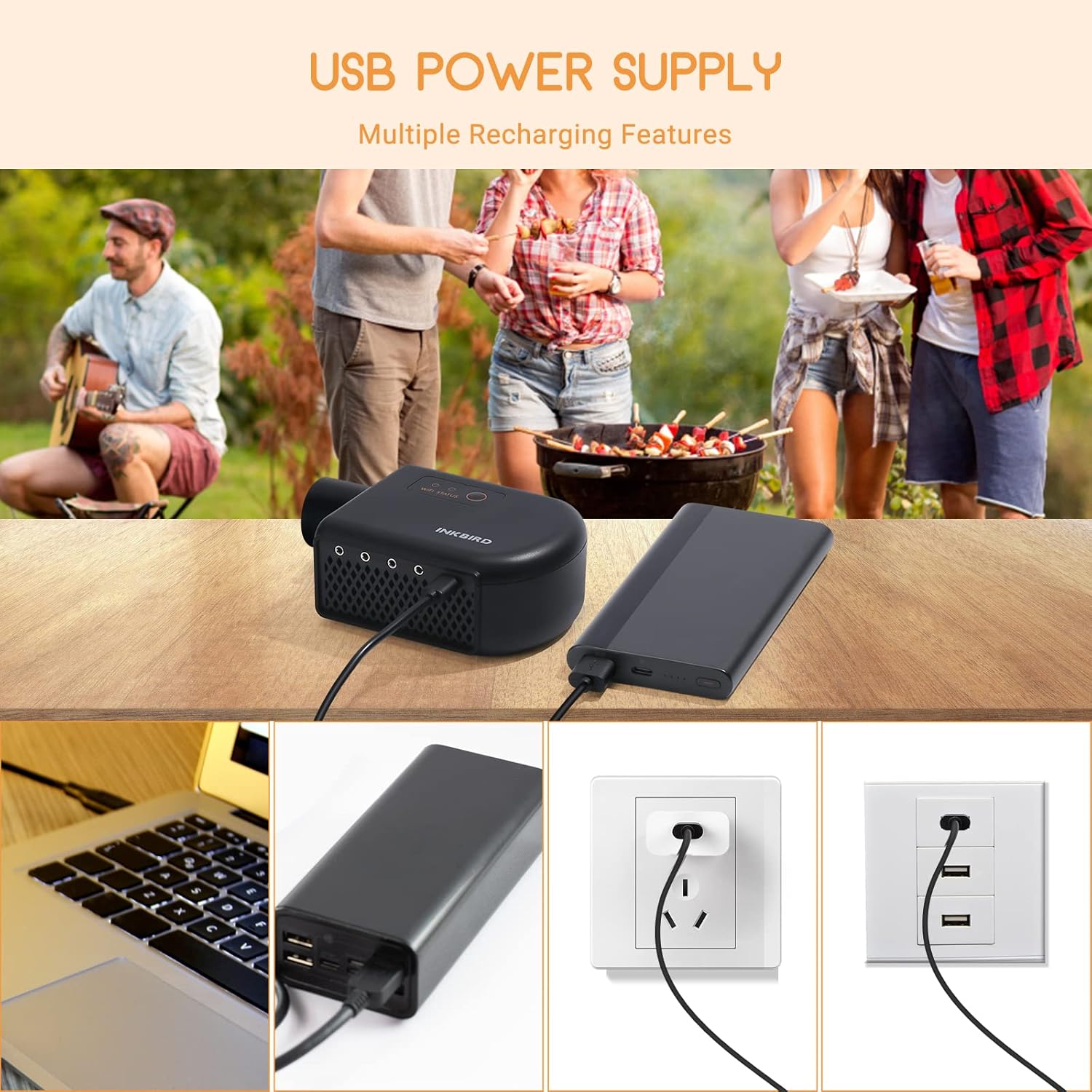
Figure 3.1: The ISC-027BW can be powered via USB from various sources.
3.2 Probe Connection
Insert the stainless steel probes into the designated ports on the controller. The probes are designed for both meat and ambient grill temperature measurement. Ensure probes are securely inserted.

Figure 3.2: Proper insertion of temperature probes for accurate measurement.
3.3 Fan Installation
Attach the smoker fan to your grill or smoker's air intake vent. The ISC-027BW controller fan is compatible with a wide range of grills, including Big Green Egg, Kamado Joe, Primo, Vision Grill, Akorn Kamado, and Weber models. Use the appropriate adapter or method to ensure a secure fit and proper airflow into the cooking chamber.

Figure 3.3: Compatibility and dimensions of the ISC-027BW fan for various grills.
3.4 App Download and Connection
Download the Inkbird Smart App from your smartphone's app store. The device supports both 2.4GHz Wi-Fi and Bluetooth 5.0 connectivity. Follow the in-app instructions to pair your ISC-027BW controller. Ensure your Wi-Fi network is 2.4GHz for Wi-Fi connection. Multiple smartphones can monitor the same controller, and one smartphone can control multiple controllers.

Figure 3.4: Wi-Fi and Bluetooth connectivity for smartphone control.
4. Operating Instructions
4.1 Temperature Setting and Monitoring
Once connected to the app, you can set your desired target temperature for the grill. The app displays real-time temperature readings from all connected probes. The controller's fan will automatically adjust its speed to maintain the set temperature within your grill.
4.2 Automatic Fan Control and Lid Detection
The built-in 5.0m/S high-efficient fan automatically adjusts its speed based on the grill's ambient temperature to maintain the desired cooking temperature. The device also features a smart grill lid detector: the fan will automatically stop blowing when the grill lid is detected as open and resume when the lid is closed. This feature enhances efficiency and conserves power.
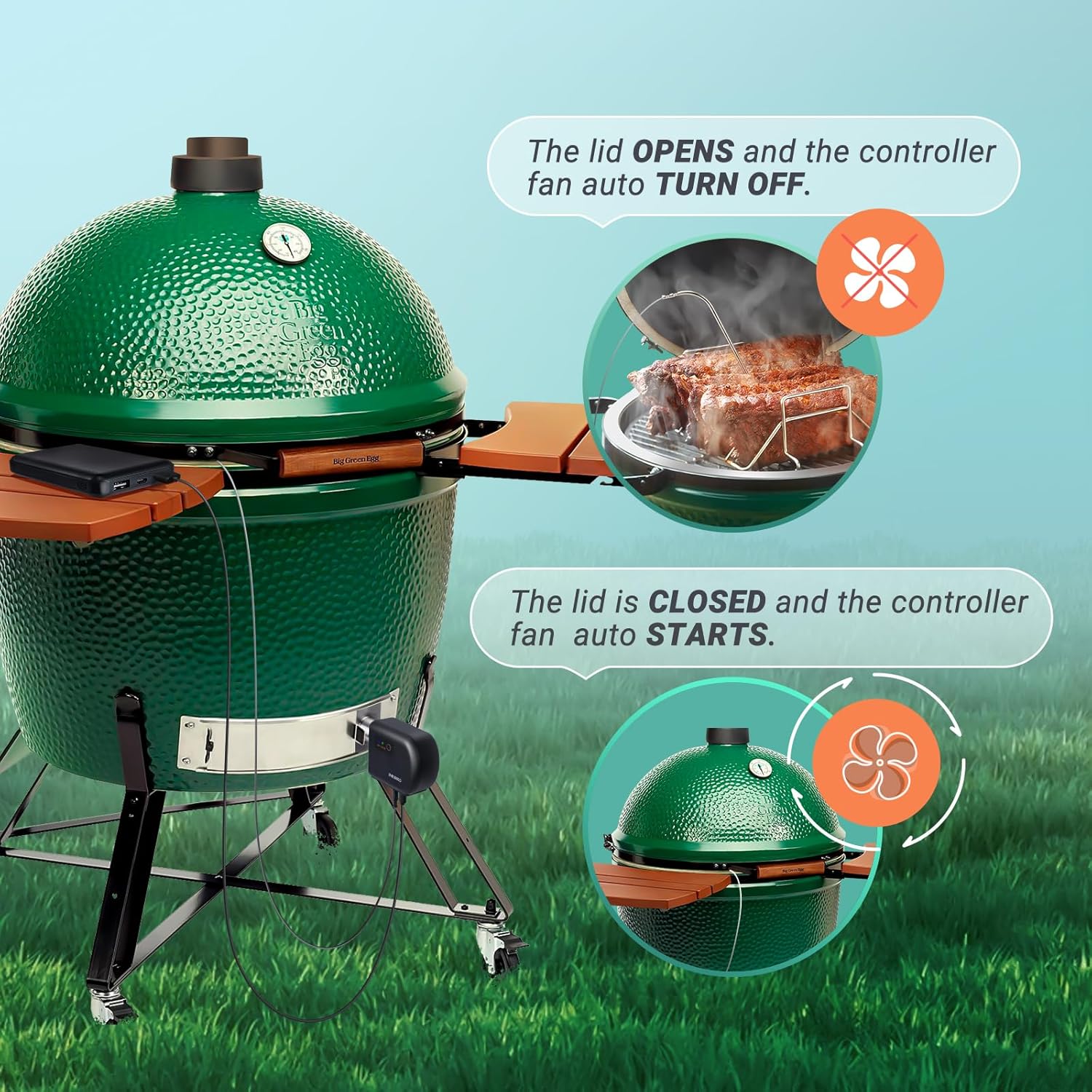
Figure 4.1: Smart lid detection for efficient fan operation.
4.3 Temperature Alarms and Timers
Set custom temperature alarms to be notified when your food or grill reaches a specific temperature, preventing overcooking or undercooking. Timer functions are also available to track cooking duration. Notifications are sent directly to your smartphone.

Figure 4.2: App notification for target temperature reached, enabling easy overnight cooking.
4.4 Data Logging and Graphs
The Smart App allows you to view historical temperature graphs for each probe and graphs of fan output. This data can be downloaded for analysis, helping you refine your cooking techniques.

Figure 4.3: App interface displaying timer function and temperature graph records.
5. Maintenance
5.1 Cleaning the Probes
After each use, clean the stainless steel probes with warm, soapy water. Wipe them thoroughly dry before storage. Do not immerse the probe connectors or the main controller unit in water.
5.2 Cleaning the Main Unit and Fan
Wipe the main controller unit and fan with a damp cloth. Avoid using abrasive cleaners or submerging the unit in water. Ensure the fan intake and exhaust are free from debris to maintain optimal performance.
5.3 Storage
Store the ISC-027BW and its accessories in the provided carrying case in a dry place when not in use to protect it from dust and damage.
6. Troubleshooting
| Problem | Possible Cause | Solution |
|---|---|---|
| Device not powering on. | No power supply; loose USB connection. | Ensure USB cable is securely connected and power adapter is plugged into a live outlet. Verify the power source (e.g., power bank) is charged and active. |
| Cannot connect to Wi-Fi/Bluetooth. | Incorrect Wi-Fi band; device too far from router/phone; app pairing issue. | Ensure your Wi-Fi network is 2.4GHz. Move the device closer to your router or smartphone. Restart the app and the controller, then attempt pairing again. |
| Inaccurate temperature readings. | Probe not fully inserted; probe damaged; calibration needed. | Ensure probes are fully inserted into the ports and the food/grill. Check probes for visible damage. Use the app's calibration function (±12℉/±12℃) if necessary. |
| Fan not operating or inconsistent. | Lid open; fan obstructed; temperature reached. | Close the grill lid to activate the fan. Check for any obstructions in the fan's intake or exhaust. The fan may stop if the target temperature is already achieved. |
7. Specifications
- Model: ISC-027BW
- Brand: Inkbird
- Connectivity: 2.4GHz Wi-Fi, Bluetooth 5.0
- Power Input: 5V USB
- Probe Quantity: 4 (Food-grade stainless steel)
- Temperature Accuracy: ±0.9℉ (±0.5℃)
- Calibration Function: ±12℉ (±12℃)
- Short-Time Measurement Range: 32℉~572℉ (0℃ to 300℃)
- Continuous Monitoring Range: 32℉~482℉ (0℃ to 250℃)
- Fan Efficiency: 5.0m/S high-efficient fan
- Special Features: Smart Grill Lid Detector, Temperature Alarm, Timer Function, Temperature Graph, Fan Output Graph
- Item Weight: 1.9 pounds (0.86 Kilograms)
- Package Dimensions: 9.13 x 7.52 x 3.78 inches
- Color: Black
8. Warranty and Support
Inkbird provides a 1-year warranty for the ISC-027BW temperature controller. Additionally, lifetime technical support is available to assist with any product-related inquiries or issues. Please refer to the official Inkbird website or contact customer service for detailed warranty terms and support contact information.

Figure 8.1: Warranty and technical support information.
Related Documents - ISC-027BW
 |
INKBIRD ISC-007BW Smoker Controller User Manual Comprehensive user manual for the INKBIRD ISC-007BW Smoker Controller. Learn about its features, specifications, how to connect via Wi-Fi or Bluetooth using the Inkbird Pro app, basic operation, and important safety precautions for optimal grilling and smoking. |
 |
INKBIRD ISC-007BW Smoker Controller User Manual and Specifications Comprehensive guide for the INKBIRD ISC-007BW Smoker Controller, covering setup, operation, specifications, Wi-Fi and Bluetooth connectivity, app usage, and safety precautions. |
 |
INKBIRD IBBQ-4T WiFi Meat Thermometer User Manual User manual for the INKBIRD IBBQ-4T WiFi meat thermometer. Provides setup, connection, specifications, troubleshooting, and safety information for grilling, smoking, and cooking. Features app control, 4 probes, and long-range monitoring. |
 |
INKBIRD ISC-007BW Smoker Controller User Manual Comprehensive user manual for the INKBIRD ISC-007BW Smoker Controller, detailing its features, specifications, setup, wireless connection (Wi-Fi and Bluetooth) via the Inkbird Pro app, basic operation, precautions, and FCC compliance information. |
 |
INKBIRD Smoker Controller ISC-028-BW User Manual User manual for the INKBIRD Smoker Controller ISC-028-BW, detailing its features, setup, operation, and troubleshooting. |
 |
INKBIRD IBT-26S Bluetooth & Wi-Fi Smart BBQ Thermometer User Manual Comprehensive user manual for the INKBIRD IBT-26S Smart BBQ Thermometer, detailing features, setup, wireless connection, battery care, specifications, and troubleshooting. |
Ask a question about this manual
Ask about setup, troubleshooting, compatibility, parts, safety, or missing instructions. Manuals+ will review the question and use this page’s manual context to help answer it.