
Introduction
This manual provides essential information for the safe and efficient operation, installation, and maintenance of your Cecotec Bolero Dresscode Serie 50 Inverter A 7 Kg integrated front-load washing machine. Please read these instructions carefully before using the appliance and retain them for future reference.
Safety Instructions
Always follow basic safety precautions when using electrical appliances to reduce the risk of fire, electric shock, and injury to persons. This appliance is intended for household use only.
- Ensure the power supply matches the rating label on the appliance.
- Do not operate the washing machine if the power cord or plug is damaged.
- Keep children and pets away from the appliance during operation.
- Do not open the detergent dispenser or door during a wash cycle, especially when the water level is high or temperature is hot.
- Unplug the appliance before cleaning or performing any maintenance.
- Do not install the appliance in areas exposed to direct sunlight or extreme temperatures.
Setup and Installation
1. Unpacking and Placement
Carefully remove all packaging materials. Ensure all transit bolts are removed from the rear of the machine before use. Failure to do so can cause severe vibration and damage.
Place the washing machine on a firm, level surface. This integrated model is designed to fit within standard kitchen cabinetry.

Figure 1: Front view of the washing machine with approximate dimensions: Width 60cm, Depth 55cm, Height 82cm.

Figure 2: The washing machine seamlessly integrated into a kitchen environment, demonstrating its design for built-in installation.
2. Leveling the Appliance
Adjust the leveling feet at the bottom of the machine to ensure it is perfectly stable and level. A level appliance reduces noise and vibration during operation.
3. Water and Drain Connections
- Connect the water inlet hose to a cold water tap with a 3/4-inch thread. Ensure connections are tight to prevent leaks.
- Position the drain hose into a standpipe or over the edge of a sink, ensuring it is securely fastened to prevent dislodgement during draining.
4. Electrical Connection
Plug the power cord into a grounded electrical outlet. Do not use extension cords or adapters.
Operating Instructions
1. Control Panel Overview
The control panel features a program selector dial, a digital display, and various function buttons for customizing your wash cycle.
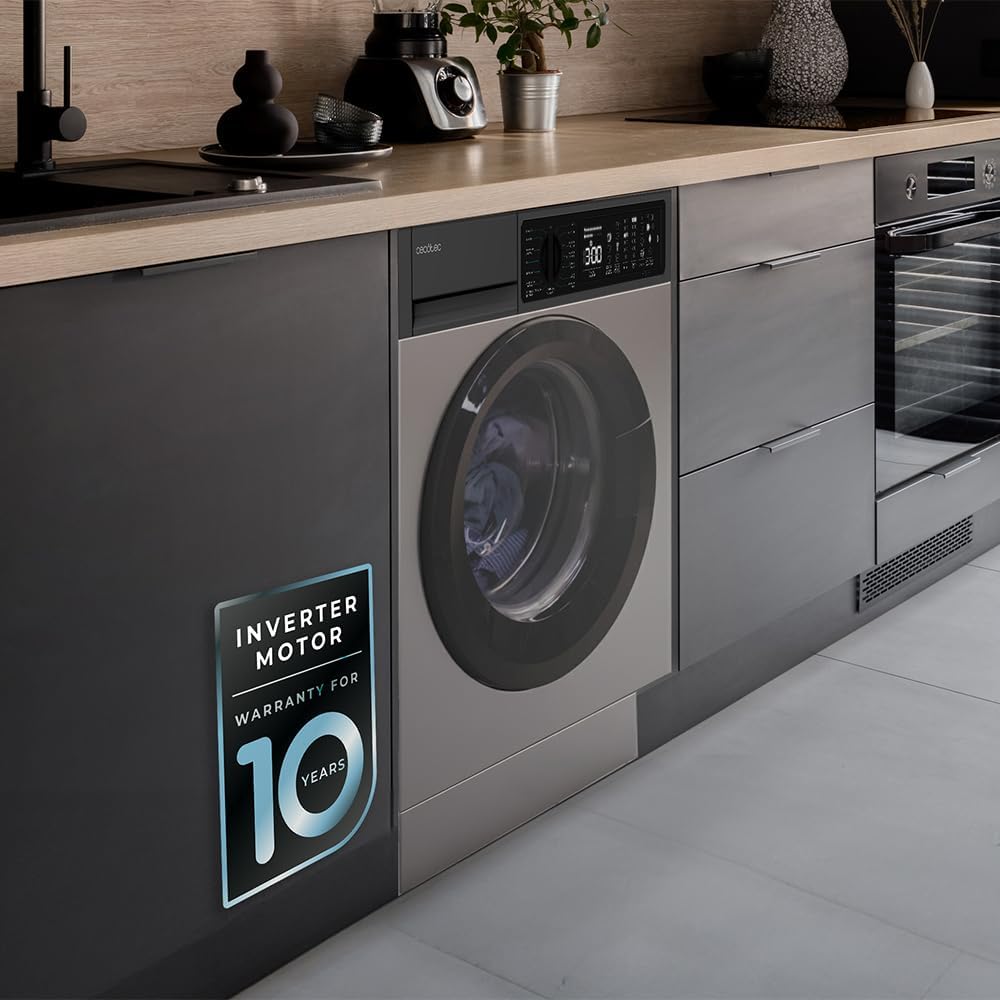
Figure 3: Detailed view of the control panel, showing the digital display, program options, temperature settings, and spin speeds.

Figure 4: The program selector dial allows you to choose from various wash cycles, including Jeans, Eco 40-60, Cotton, and specialized programs.
2. Loading Laundry
Open the washing machine door and load laundry, ensuring not to overload the drum. The maximum capacity for this model is 7 Kg. Distribute items evenly to prevent imbalance during spinning.

Figure 5: Prepare your laundry by sorting and placing it into the machine, ensuring the drum is not overfilled.
3. Adding Detergent and Softener
Pull out the detergent dispenser drawer. Add the appropriate amount of detergent to the main wash compartment and softener to the designated compartment. Close the drawer gently.
4. Program Selection and Customization
Turn the program selector dial to choose one of the 15 available programs. Use the function buttons to adjust settings such as temperature, spin speed, and activate special features.
- Available Programs: Jeans, Eco 40-60, Cotton, Cotton 20°C, Colors, Wool, Hand Wash, Spin/Drain, Anti-Allergy Care, Rinse, Express 15, Rapid 60', Dark/Wash, Mix, Sportswear.
- Temperature Control: Select from 20°C, 30°C, 40°C, 60°C, 90°C.
- Spin Speed: Choose from 400, 600, 800, 1000, 1200 rpm.
5. Special Functions
- SteamMax: This program uses added steam to penetrate fabrics, sterilizing and eliminating odors.
- Stain Match Plus: Select the type of stain and its intensity level (up to 3 levels) for optimized stain removal.
- Allergy Care: Sterilizes laundry with steam at 99.9% before each wash, effective even in cold water, to remove germs and bacteria.
- Delay Start: Program the machine to finish a cycle at a specific time, allowing you to plan your laundry around your schedule.
- Extra Rinse: Adds an additional rinse cycle to ensure no detergent residue remains on clothes.
- Save+/Speed+: Options to either save energy (Save+) or reduce wash time (Speed+).

Figure 6: The Stain Match Plus feature targets specific stain types for effective cleaning.

Figure 7: The Allergy Care program ensures thorough sterilization, ideal for sensitive items like baby clothes.

Figure 8: Utilize Save+ for energy efficiency or Speed+ for quicker wash cycles, depending on your needs.
6. Starting and Ending a Cycle
Press the Start/Pause button to begin the selected wash cycle. The digital display will show the remaining time. Once the cycle is complete, the machine will signal, and the door will unlock. Remove your laundry promptly.

Figure 9: The SteamMax function in action, enveloping laundry in steam for deep cleaning and odor removal.
Maintenance
1. Cleaning the Exterior
Wipe the exterior surfaces with a soft, damp cloth. Avoid abrasive cleaners or solvents that could damage the finish.
2. Cleaning the Detergent Dispenser
Regularly remove and clean the detergent dispenser drawer to prevent residue buildup. Rinse it under running water and dry before reinserting.
3. Cleaning the Drum
Periodically run a maintenance wash cycle (e.g., a hot wash with no laundry and a descaling agent) to clean the drum and remove any odors or residue.

Figure 10: The textured stainless steel drum interior is designed for effective washing and should be cleaned regularly.
4. Cleaning the Drain Filter
Locate the drain filter, usually at the bottom front of the machine. Open the cover, drain any residual water, and carefully remove and clean the filter of lint and debris. Reassemble securely.
Troubleshooting
Before contacting customer service, refer to the following table for common issues and their solutions:
| Problem | Possible Cause | Solution |
|---|---|---|
| Machine does not start | No power; Door not closed; Program not selected. | Check power connection; Ensure door is latched; Select a program and press Start. |
| Water not filling | Water tap closed; Inlet hose kinked; Water pressure too low. | Open water tap; Straighten hose; Check household water pressure. |
| Water not draining | Drain hose kinked or blocked; Drain filter clogged. | Check and clear drain hose; Clean drain filter. |
| Excessive vibration/noise | Transit bolts not removed; Machine not level; Uneven load. | Remove transit bolts; Adjust leveling feet; Redistribute laundry in the drum. |
| Detergent residue on clothes | Too much detergent; Detergent dispenser clogged; Insufficient rinse. | Reduce detergent amount; Clean dispenser; Select Extra Rinse option. |
Specifications
| Brand | Cecotec |
| Model Name | Bolero Dresscode 750 Bi Inverter Steel A |
| Model Number | 00129 |
| Type | Integrated Front-Load Washing Machine |
| Capacity | 7 Kg |
| Maximum Spin Speed | 1200 rpm |
| Energy Class | A |
| Number of Programs | 15 |
| Special Features | Inverter Motor, SteamMax, Stain Match Plus, Allergy Care, Delay Start, Extra Rinse, Auto Dose, High Efficiency, Temperature Control |
| Dimensions (W x D x H) | 60 cm x 55 cm x 82 cm (approximate, based on product image) |
| Material | Stainless Steel (drum interior), Steel (exterior finish) |
| Noise Level | 74 dB (from energy label) |
| Energy Consumption | 47 kWh / 100 cycles (from energy label) |
| Water Consumption | 48 L / 100 cycles (from energy label) |

Figure 11: EU Energy Label for the Cecotec Bolero Dresscode Serie 50 Inverter A 7 Kg washing machine, indicating its energy efficiency and consumption details. For more details, visit the official EU EPREL database: https://eprel.ec.europa.eu/qr/2041690
Warranty Information
This product comes with a standard 3-year warranty. The Inverter Motor specifically benefits from an extended 10-year warranty, reflecting its durability and advanced technology.

Figure 12: The Inverter Motor is highlighted with a 10-year warranty, ensuring long-term performance and reliability.
Please retain your proof of purchase for warranty claims. The warranty covers manufacturing defects under normal household use.
Customer Support
For further assistance, technical support, or warranty inquiries, please contact Cecotec customer service. You can find contact information on the official Cecotec website or through your retailer.
If purchased via Amazon, you may also contact the seller directly: Cecotec Official Store


