1. Introduction
This manual provides comprehensive instructions for the safe and efficient operation, setup, and maintenance of your Cecotec Conga Grasshopper 800 Connected Robotic Lawnmower. Please read this manual thoroughly before using the product to ensure proper functionality and to prevent damage or injury. This robotic lawnmower is designed to automatically maintain lawns up to 800 m².

Figure 1.1: The Cecotec Conga Grasshopper 800 Connected Robotic Lawnmower.
2. Safety Instructions
Always adhere to the following safety guidelines to ensure safe operation and prevent personal injury or damage to the device:
- Read the Manual: Before initial use, carefully read and understand all instructions in this manual.
- Children and Pets: Keep children, pets, and bystanders away from the robotic lawnmower when it is operating.
- Blade Safety: The blades are sharp. Exercise extreme caution when handling or cleaning the cutting deck. Always turn off the mower and disconnect power before performing any maintenance.
- Charging: Use only the original charging station and power adapter provided by Cecotec. Ensure the charging station is placed on a level, dry surface.
- Weather Conditions: The robot is IPX5 waterproof and features UV protection, allowing it to operate in various weather conditions. However, avoid operating during severe thunderstorms or heavy rain to protect the charging station.
- Slope Limit: The mower can handle slopes up to 35%. Do not attempt to operate on steeper inclines.
- Foreign Objects: Before mowing, clear the lawn of any foreign objects such as stones, toys, or wires that could damage the blades or the mower.
- Emergency Stop: Familiarize yourself with the emergency stop button on the mower.
3. Package Contents
Verify that all components are present and in good condition upon unpacking. The standard package includes:
- Cecotec Conga Grasshopper 800 Connected Robotic Lawnmower
- Charging Station
- Power Adapter
- 170-meter Perimeter Cable
- 230 Pegs for Perimeter Cable Installation
- 6 Fixing Screws for Charging Station
- 9 Replacement Cutting Blades
- User Manual

Figure 3.1: Robotic lawnmower and its included accessories, including the boundary wire, pegs, and blades.
4. Setup
4.1. Charging Station Placement
Select a suitable location for the charging station. It should be on a flat surface, preferably in a shaded area, and close to a power outlet. Ensure there is enough clear space around the station for the mower to dock easily.

Figure 4.1: The robotic lawnmower docked at its charging station.
4.2. Perimeter Cable Installation
The 170-meter perimeter cable defines the mowing area. Lay the cable around the perimeter of your lawn, ensuring it is taut and secured to the ground using the provided pegs. Maintain a minimum distance from obstacles and garden beds as specified in the detailed installation guide (refer to the full manual for specific distances).
4.3. Initial Charging
Once the charging station and perimeter cable are set up, place the robotic lawnmower on the charging station. Ensure the charging contacts align. The mower will begin charging automatically. Allow it to fully charge before its first operation.
4.4. App Connection
Download the CECOTEC app from your device's app store. Follow the in-app instructions to pair your robotic lawnmower with your smartphone. This will enable remote control, scheduling, and access to various settings.
5. Operating Instructions
5.1. Starting and Stopping
To start the mower, press the 'Start' button on the control panel or initiate mowing via the CECOTEC app. To stop, press the 'Stop' button on the mower or use the app. The mower will return to its charging station when its battery is low or when its schedule is complete.

Figure 5.1: User interacting with the robotic lawnmower's digital screen and tactile button panel.
5.2. App Control and Scheduling
The CECOTEC app allows you to:
- Start, pause, or stop mowing sessions remotely.
- Set daily or weekly mowing schedules.
- Adjust cutting height.
- Monitor the mower's status and battery level.
- Receive notifications and error alerts.

Figure 5.2: A user controlling the robotic lawnmower using the dedicated smartphone application.
5.3. Adjusting Cutting Height
The cutting height can be adjusted between 20 mm and 60 mm. Use the cutting height regulator dial located on the mower's top panel or adjust it via the CECOTEC app to suit your lawn's needs.
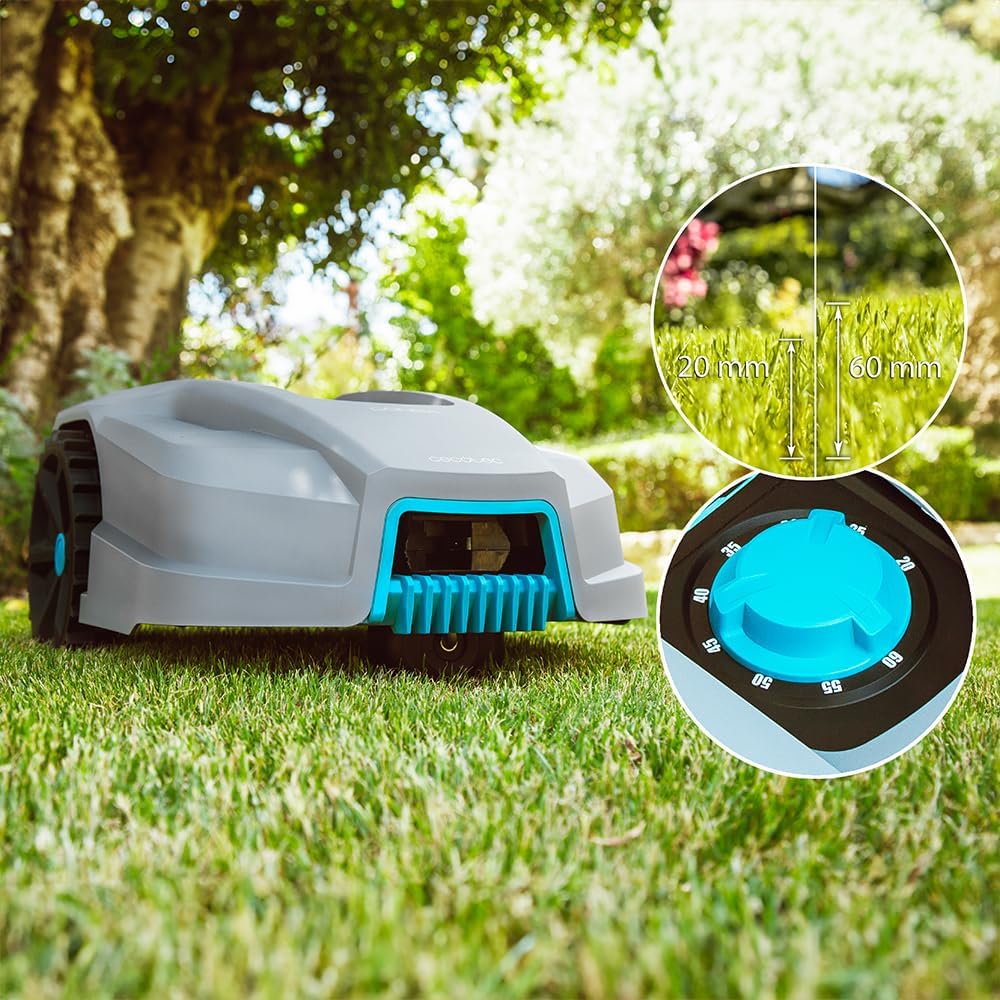
Figure 5.3: Close-up view of the cutting height adjustment dial, showing the range from 20mm to 60mm.
5.4. Navigating Slopes
The Conga Grasshopper 800 Connected is designed to handle slopes with a maximum incline of 35%. Its robust wheels and motor ensure effective mowing even on uneven terrain.

Figure 5.4: The robotic lawnmower efficiently navigating a sloped area of the lawn.
6. Maintenance
6.1. Blade Replacement
Regularly inspect the cutting blades for wear and damage. Replace all blades simultaneously to ensure balanced cutting. Always wear protective gloves and turn off the mower before replacing blades. Refer to the full manual for detailed blade replacement steps.
6.2. Cleaning the Mower
Periodically clean the robotic lawnmower, especially the cutting deck and wheels, to remove grass clippings and debris. Use a brush or damp cloth. Avoid using high-pressure water jets directly on the mower's electronic components.

Figure 6.1: The robotic lawnmower demonstrating its IPX5 water resistance during light rain.
6.3. Battery Care and Winter Storage
For optimal battery life, ensure the mower is fully charged before storing it for extended periods, especially during winter. Store the mower and charging station in a dry, frost-free environment.
7. Troubleshooting
If you encounter issues with your robotic lawnmower, refer to the following common problems and solutions:
| Problem | Possible Cause | Solution |
|---|---|---|
| Mower not starting | Low battery, emergency stop engaged, PIN not entered. | Charge the battery, release emergency stop, enter PIN. |
| Mower not charging | Poor contact with charging station, power supply issue. | Ensure mower is correctly docked, check power connection. |
| Mower stays within small area | Perimeter wire issue, sensor obstruction. | Inspect perimeter wire for breaks, clean sensors. |
| Uneven cutting | Dull or damaged blades. | Replace cutting blades. |
For more complex issues or error codes not listed, please consult the comprehensive troubleshooting section in the full user manual or contact Cecotec customer support.
8. Specifications
| Feature | Specification |
|---|---|
| Model Number | 04479 |
| Recommended Lawn Area | Up to 800 m² |
| Maximum Slope | 35% |
| Cutting Height | 20 - 60 mm (Adjustable) |
| Cutting Width | 180 mm |
| Battery Type | Lithium-ion |
| Noise Level | 55 dB |
| Water Resistance Rating | IPX5 |
| Product Dimensions (L x W x H) | 54.8 x 24.1 x 37.4 cm |
| Item Weight | 7.23 Kilograms |
| Perimeter Cable Length | 170 meters (Included) |
9. Warranty and Support
Cecotec offers a commitment to product longevity, with spare parts availability for up to 10 years. For warranty claims, technical support, or further assistance, please contact Cecotec customer service through their official website or the contact information provided in your product packaging. Always provide your model number (04479) and purchase details when seeking support.


