Introduction
This manual provides essential information for the safe and effective operation, maintenance, and troubleshooting of your Cecotec DrumFit WayHome 1200 Runner Sprint treadmill. Please read this manual thoroughly before initial use and retain it for future reference.
The DrumFit WayHome 1200 Runner Sprint is a foldable treadmill designed for home use, featuring an 1100 W motor, adjustable speed from 1 to 12 km/h, 12 predefined programs, an LED control panel, and a 110 x 40 cm running surface. It includes transport wheels for easy mobility, a magnetic safety system, a heart rate monitor, and manual incline adjustment.
Important Safety Instructions
WARNING: To reduce the risk of burns, fire, electric shock, or injury to persons, read all instructions before operating the treadmill.
- Always keep children and pets away from the treadmill when it is in use.
- Place the treadmill on a flat, stable surface with at least 2 meters of clear space behind it and 0.6 meters on each side.
- Ensure the safety key is properly attached to both the treadmill and your clothing before starting any exercise.
- Do not operate the treadmill if it has a damaged cord or plug, if it is not working properly, or if it has been dropped or damaged.
- Wear appropriate athletic footwear and clothing during exercise.
- Do not exceed the maximum user weight of 110 kg.
- Unplug the treadmill from the power outlet when not in use, before cleaning, and before performing any maintenance.
Product Components
Familiarize yourself with the main parts of your DrumFit WayHome 1200 Runner Sprint treadmill.

Figure 1: Overview of the Cecotec DrumFit WayHome 1200 Runner Sprint treadmill, showing its compact design and running surface.
- Running Belt
- Control Panel with LED Display
- Handrails with Heart Rate Sensors
- Safety Key Slot
- Manual Incline Adjustment Points
- Transport Wheels
- Folding Mechanism
Setup
1. Unpacking
Carefully remove the treadmill from its packaging. Inspect all components for any damage. Retain packaging materials for future storage or transport if needed.
2. Placement
Choose a suitable location for your treadmill. Ensure the surface is flat and stable. Maintain adequate clearance around the treadmill for safe operation and access.

Figure 2: The running surface measures 110 cm in length and 40 cm in width, providing ample space for walking or running.
3. Assembly (Minor Assembly Required)
- Carefully lift the console mast into the upright position.
- Secure the console mast using the provided bolts and tools.
- Ensure all connections are tight and secure before plugging in the unit.
4. Manual Incline Adjustment
The treadmill features 3 levels of manual incline. To adjust the incline, lift the rear of the treadmill and reposition the support bars into the desired slots. Always adjust incline before starting your workout and ensure both sides are set to the same level.

Figure 3: Detail of the manual incline adjustment points, allowing users to select from 3 different levels of elevation.
Operating Instructions
1. Powering On
Plug the power cord into a grounded electrical outlet. Insert the safety key into its designated slot on the control panel. The LED display will illuminate.
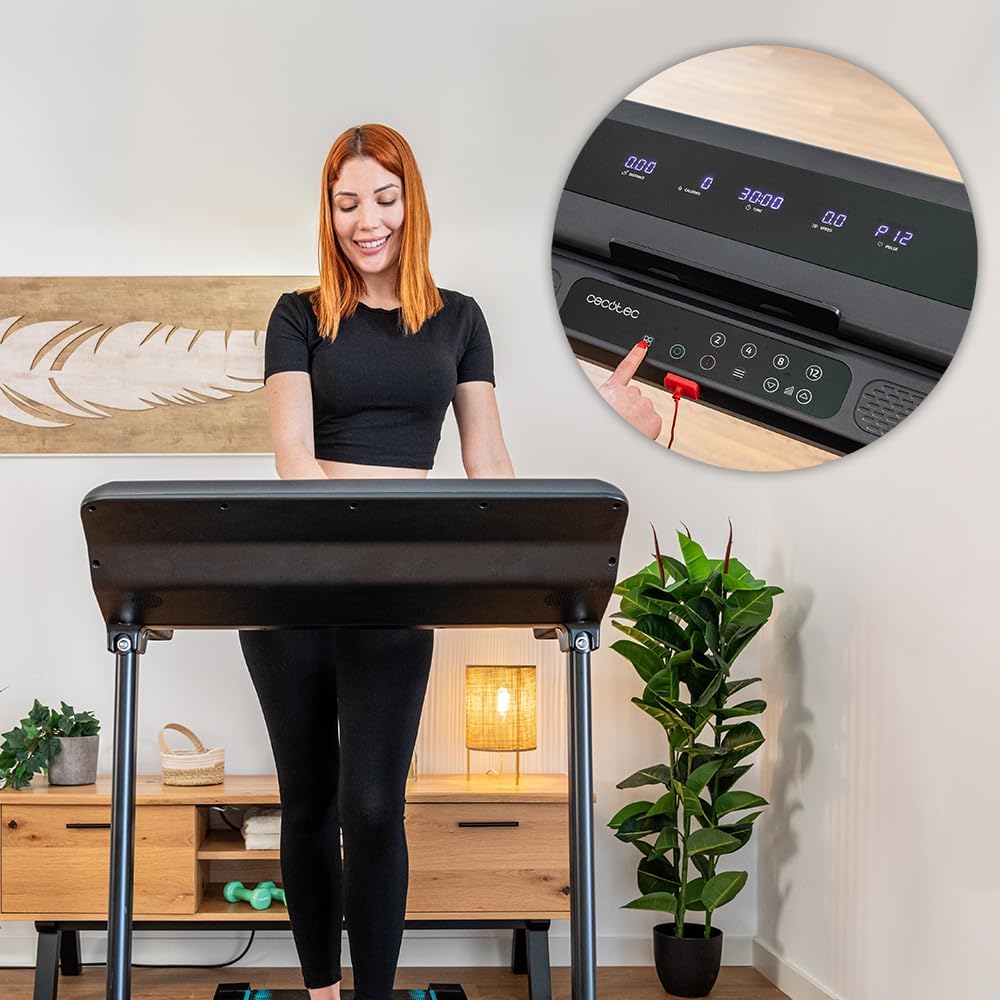
Figure 4: User engaging with the treadmill's control panel, highlighting the safety key insertion point and main controls.
2. Using the Control Panel
The LED display shows real-time data including speed, time, distance, and calories burned. The control panel features buttons for starting/stopping, adjusting speed, and selecting programs.

Figure 5: Detailed view of the LED display showing workout metrics and the intuitive control buttons for speed and program selection.
3. Starting a Workout
- Stand on the side rails of the treadmill.
- Attach the safety key clip to your clothing.
- Press the "START" button. The belt will begin to move at a low speed.
- Carefully step onto the moving belt.
- Adjust speed using the "+" and "-" buttons or quick speed buttons.
4. Pre-defined Programs
The treadmill offers 12 pre-defined programs. Press the "PROGRAM" button to cycle through the available programs. Each program has varying speed and incline profiles to provide diverse workouts.
5. Heart Rate Monitoring
Grasp the heart rate sensors on the handrails with both hands. Your heart rate will be displayed on the LED screen after a few seconds.
6. Stopping a Workout
Press the "STOP" button to gradually slow down and stop the treadmill belt. Alternatively, pulling the safety key will immediately stop the treadmill for emergency situations.

Figure 6: A user actively running on the treadmill, demonstrating its use during a workout session.
Maintenance
1. Cleaning
Regularly clean the treadmill with a damp cloth and mild detergent. Do not use abrasive cleaners or solvents. Wipe down the console and handrails after each use to remove sweat.
2. Lubrication
The running belt requires periodic lubrication to ensure smooth operation and prolong its lifespan. Refer to the specific lubrication instructions provided with your treadmill's lubricant kit. Typically, this is done every few months depending on usage.
3. Storage
The DrumFit WayHome 1200 Runner Sprint is foldable for convenient storage. To fold, ensure the treadmill is off and unplugged. Lift the running deck until it locks into the upright position. Use the transport wheels to move the treadmill to a suitable storage location.

Figure 7: The treadmill in its folded position, demonstrating its space-saving design and ease of storage.
Troubleshooting
| Problem | Possible Cause | Solution |
|---|---|---|
| Treadmill does not start. | Power cord not plugged in; Safety key not inserted; Circuit breaker tripped. | Ensure power cord is securely plugged in; Insert safety key fully; Check household circuit breaker. |
| Running belt slips or hesitates. | Belt needs lubrication; Belt tension is incorrect. | Lubricate the running belt as per maintenance instructions; Adjust belt tension (refer to specific instructions in full manual). |
| Unusual noise during operation. | Loose components; Motor issues; Belt friction. | Check all bolts and screws for tightness; If noise persists, contact customer support. |
| Heart rate monitor not reading. | Hands not firmly on sensors; Dry hands. | Ensure firm, consistent contact with both sensors; Lightly moisten hands if too dry. |
For issues not listed here, or if solutions do not resolve the problem, please contact Cecotec customer support.
Specifications
- Model: DrumFit WayHome 1200 Runner Sprint
- Model Number: 07187
- Power: 1100 W
- Speed Range: 1 - 12 km/h
- Running Surface: 110 x 40 cm
- Programs: 12 pre-defined
- Incline: Manual, 3 levels
- Display: LED (Speed, Time, Distance, Calories)
- Max User Weight: 110 kg
- Dimensions (L x W x H): 116 x 73.5 x 136 cm (unfolded)
- Weight: Approximately 32.96 kg
- Special Features: Foldable, Transport Wheels, Magnetic Safety System, Heart Rate Monitor, Device Holder
Warranty and Support
Warranty Information
Cecotec offers a 10-year availability for spare parts for this product. For specific warranty terms and conditions, please refer to the warranty card included with your purchase or visit the official Cecotec website.
Customer Support
If you have any questions, require technical assistance, or need to report an issue with your Cecotec DrumFit WayHome 1200 Runner Sprint treadmill, please contact Cecotec customer support through their official website or the contact information provided in your purchase documentation.
For more information, visit: www.cecotec.com


