
Tognana D2DMS01AVSP
Tognana Avantspace Cordless Vacuum Sealer Machine User Manual
Model: D2DMS01AVSP

Image: Tognana Avantspace branding with the vacuum sealer machine.
Product Overview
The Tognana Avantspace Cordless Vacuum Sealer Machine with integrated cutter is designed for efficient food preservation. This high-performance, rechargeable device offers maximum freedom of use without the need for a power cord. It features three primary functions: vacuum sealing, sealing dry and wet foods, and external vacuum pumping for compatible containers and bags.
This machine is ideal for preventing food spoilage by reducing aerobic microorganism activity, minimizing food waste, and extending food freshness. It also aids in efficient space management and odor control in your refrigerator. The package includes 10 vacuum bags, a USB-C charging cable, and a universal USB charging adapter.

Image: Front view of the Tognana Avantspace Cordless Vacuum Sealer Machine.
Safety Instructions
- Read all instructions carefully before using the appliance.
- Keep the appliance away from water or other liquids. Do not immerse the unit.
- Do not operate the appliance with a damaged cord or plug, or if the appliance malfunctions or has been damaged in any manner.
- This appliance is for household use only. Do not use outdoors.
- Supervise children closely when the appliance is in use.
- Do not use attachments not recommended by the manufacturer.
- Always ensure the lid is properly closed before operating.
- Allow the appliance to cool down between uses if performing multiple seals consecutively.
- Do not vacuum seal liquids without pre-freezing or using a container designed for liquids.
- Use only Tognana vacuum bags or compatible bags designed for vacuum sealing.
Setup
Unpacking
- Carefully remove the vacuum sealer and all accessories from the packaging.
- Check for any damage during transit. If damaged, do not use and contact customer support.
- Retain the packaging for future storage or transport.
Charging the Device
Before first use, fully charge the vacuum sealer. The device is cordless and rechargeable, providing maximum convenience.
- Connect the provided USB-C cable to the charging port on the vacuum sealer.
- Plug the USB-A end of the cable into the provided USB charging adapter.
- Plug the adapter into a standard wall outlet.
- The charging indicator light will illuminate. Once fully charged, the light may change color or turn off (refer to indicator light section for details).

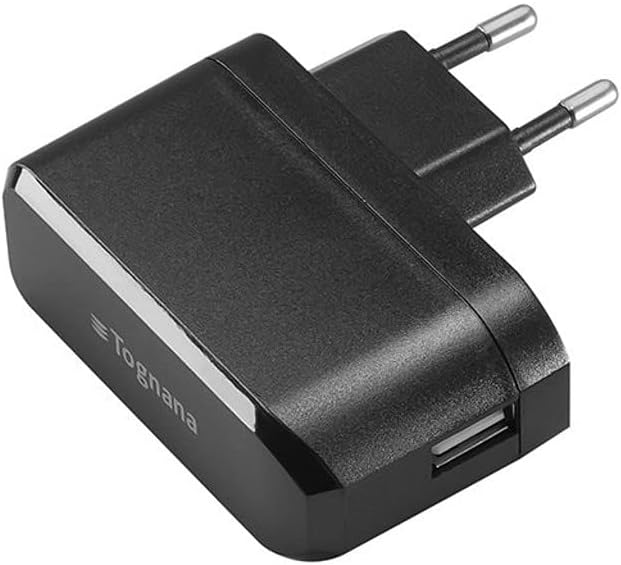
Image: Included USB-C charging cable and USB charging adapter.
Operating Instructions
Control Panel Overview

Image: Close-up view of the control panel with power, Vac Seal, Seal, and Spot Pumping buttons.
- Power Button (
 ): Turns the device on/off.
 - Vac Seal Button: Initiates the vacuuming process followed by sealing.
- Seal Button: Performs a sealing function only, without vacuuming. Useful for creating custom bag sizes or sealing delicate items.
- Spot Pumping Button: Used for external vacuuming of containers or bags with a valve.
Vacuum Sealing Bags
- Prepare your food item and place it inside a Tognana vacuum bag. Ensure there is at least 3 inches of space between the food and the top edge of the bag.
- Lay the open end of the bag flat into the vacuum channel of the machine. Ensure it is smooth and free of wrinkles.
- Close the lid firmly until you hear a click on both sides, indicating it is securely locked.
- Press the Vac Seal button. The machine will automatically remove air from the bag and then seal it.
- Once the process is complete, the indicator light will turn off. Open the lid by pressing the release buttons on the sides (if applicable) and remove the sealed bag.

Image: The vacuum sealer machine shown with various types of food items already sealed in vacuum bags.

Image: A stack of clear vacuum sealing bags, included with the machine.
Sealing Only
- Place the open end of the bag onto the sealing strip.
- Close the lid firmly.
- Press the Seal button. The machine will create a seal without vacuuming.
- Once complete, open the lid and remove the sealed bag.
External Vacuum Pumping (for containers/bags with valve)
- Connect one end of the external vacuum hose to the "Spot Pumping" port on the vacuum sealer.
- Connect the other end of the hose to the valve on your compatible vacuum container or bag.
- Press the Spot Pumping button. The machine will begin to extract air.
- Once the desired vacuum level is reached, the machine will stop automatically or you can press the button again to stop it.
- Remove the hose from the container/bag and the machine.

Image: Close-up of the external vacuum port on the machine with the hose connected.

Image: The external vacuum hose and adapter for use with compatible containers.
Maintenance
Cleaning the Appliance
- Always unplug the appliance before cleaning.
- Wipe the exterior of the machine with a soft, damp cloth. Do not use abrasive cleaners or solvents.
- Clean the vacuum channel and sealing strip regularly to prevent food residue buildup. Use a mild detergent if necessary, then wipe dry.
- Ensure all parts are completely dry before storing or next use.
Storage
Store the vacuum sealer in a cool, dry place. It is recommended to store the lid in the open position to prevent compression of the sealing gaskets, which can affect performance over time.

Image: The vacuum sealer machine with its lid open, revealing the vacuum channel and sealing strip, important areas for cleaning and maintenance.
Troubleshooting
| Problem | Possible Cause | Solution |
|---|---|---|
| Machine does not turn on. | Battery is low or depleted. | Charge the machine fully using the provided USB-C cable and adapter. |
| Machine is not vacuuming properly. | Lid not properly closed; Bag not positioned correctly; Bag is damaged; Food too close to bag opening. | Ensure lid is securely locked; Reposition bag, ensuring it's flat in the vacuum channel; Use a new bag; Ensure at least 3 inches of space from food to bag opening. |
| Bag is not sealing. | Sealing strip is dirty or wet; Bag is wrinkled; Sealing strip is worn. | Clean and dry the sealing strip; Smooth out the bag opening; Contact customer support if sealing strip is worn. |
| Vacuum is weak for external containers. | Hose not properly connected; Container/bag valve is faulty; Container/bag is not sealed properly. | Ensure hose is firmly attached to both machine and container/bag valve; Check container/bag for leaks or damage; Ensure container lid is securely closed. |
Specifications
| Feature | Detail |
|---|---|
| Brand | Tognana |
| Model Number | D2DMS01AVSP |
| Color | Black |
| Dimensions (L x W x H) | 37 x 15 x 7 cm (approx. 14.57 x 5.91 x 2.76 inches) |
| Weight | 1 Kilogram (approx. 2.2 lbs) |
| Power | 80 Watts |
| Voltage | 220V |
| Material | Plastic |
| Power Source | Battery Powered |
| Operation Mode | Automatic |
| Suction Power | -60 kPa |
| Included Accessories | 10 Vacuum Bags, USB-C Cable, USB Charging Adapter |
Warranty and Support
Information regarding specific warranty terms and conditions for the Tognana Avantspace Cordless Vacuum Sealer Machine is not available in the provided product data. Please refer to the product packaging or the manufacturer's official website for detailed warranty information.
For technical support, troubleshooting assistance, or to inquire about replacement parts, please contact Tognana customer service through their official channels. Contact information can typically be found on the product packaging or their corporate website.
Note: Availability of spare parts information is currently unavailable.
Related documentsD2DMS01AVSP

Ask a question about this manual
Ask about setup, troubleshooting, compatibility, parts, safety, or missing instructions. Manuals+ will review the question and use this page’s manual context to help answer it.