
Introduction
This manual provides essential information for the safe installation, operation, and maintenance of your Cecotec EnergySilence Aero 4200 Ceiling Fan with Light. Please read these instructions carefully before use and retain them for future reference.

Front view of the Cecotec EnergySilence Aero 4200 ceiling fan with its retractable blades partially extended and the integrated LED light illuminated.
Safety Instructions
- Ensure the power supply is disconnected before installation, maintenance, or cleaning.
- Installation must be performed by a qualified electrician in accordance with local wiring regulations.
- Mount the fan securely to a ceiling joist or structure capable of supporting its weight.
- Keep hands, hair, and clothing clear of the fan blades during operation.
- Do not operate the fan if any part is damaged or malfunctioning.
- This appliance is for indoor use only.
Package Contents
Verify that all components are present before beginning installation:
- Ceiling Fan Unit with Retractable Blades and LED Light
- Remote Control
- Mounting Bracket and Hardware
- Downrods (short and long options may be included)
- User Manual
Setup and Installation
Mounting the Fan
- Turn off power at the circuit breaker.
- Secure the mounting bracket to a ceiling joist or a suitable electrical junction box rated for fan support.
- Assemble the downrod to the fan motor housing.
- Carefully lift the fan assembly and hang it from the mounting bracket.
Electrical Connection
- Connect the fan's electrical wires to the household wiring according to the wiring diagram provided in the separate installation guide. Ensure all connections are secure.
- Tuck the wires into the junction box and secure the canopy to the mounting bracket.

The ceiling fan installed on a white ceiling, with its retractable blades fully retracted, appearing as a sleek light fixture.

The ceiling fan installed in a modern bedroom, providing both light and air circulation, with its blades extended.
Operating Instructions
Your Cecotec EnergySilence Aero 4200 fan is controlled via the included remote control.
Remote Control Functions

The remote control for the Cecotec EnergySilence Aero 4200 ceiling fan, showing buttons for speed, light, timer, and mode selection.
- Power Button: Turns the fan and light ON/OFF.
- Fan Speed (1-6): Selects one of six available fan speeds. Speed 1 is the lowest, Speed 6 is the highest.
- Light Button: Cycles through light color temperatures (cool white, neutral white, warm white).
- Timer Buttons (1H, 2H, 4H, 8H): Sets the fan to operate for a specified duration before automatically turning off.
- Summer/Winter Mode Button: Toggles between summer and winter operation modes.
Light Temperature Adjustment
Press the light button on the remote control to cycle through the three available light color temperatures: cool white, neutral white, and warm white, to suit your preference and ambiance.

An illustration demonstrating the three adjustable light temperature settings (cool white, neutral white, warm white) available on the ceiling fan.
Summer and Winter Modes
The fan features a reversible motor for year-round comfort:
- Summer Mode: Blades rotate counter-clockwise, pushing air downwards to create a cooling breeze.
- Winter Mode: Blades rotate clockwise, drawing warm air up towards the ceiling and distributing it evenly throughout the room, helping to reduce heating costs.

A diagram illustrating the airflow patterns for the summer mode (downward airflow for cooling) and winter mode (upward airflow for heat distribution) of the ceiling fan.
Maintenance
Cleaning
- Always disconnect power before cleaning.
- Wipe the fan housing and blades with a soft, damp cloth. Do not use abrasive cleaners or solvents.
- Ensure the fan is completely dry before restoring power.
Troubleshooting
- Fan does not operate: Check power supply, ensure remote control batteries are functional, and verify all wiring connections.
- Fan wobbles: Ensure all mounting screws are tightened, and blades are securely attached. Check for any bent blades.
- Light does not work: Check power supply, ensure remote control batteries are functional, and verify light bulb connection (if replaceable).
- Remote control not responding: Replace batteries in the remote control. Ensure there are no obstructions between the remote and the fan receiver.
Specifications
| Feature | Specification |
|---|---|
| Brand | Cecotec |
| Model Number | 00660 |
| Color | Black |
| Product Dimensions (L x W x H) | 53.5 x 53.5 x 22.5 cm (packaged); 106P x 106l x 45H cm (installed) |
| Power | 30 Watts |
| Voltage | 230 Volts (AC) |
| Material | Cotton Polyester (likely referring to internal components or packaging, actual fan materials are metal/plastic) |
| Number of Speeds | 6 |
| Energy Class | A to G (EU Energy Label E) |
| Noise Level | 45 Decibels |
| Item Weight | 6.25 Kilograms |
| Batteries | 2 AAA (included) |
| Fan Design | Ceiling Fan with Retractable Blades |
| Power Source | Corded Electric |
| Mounting Type | Ceiling Mount |
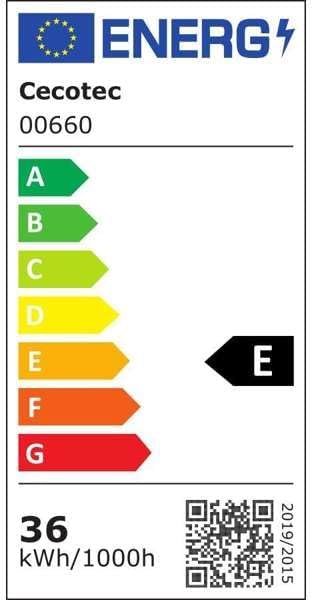
The EU energy label for the Cecotec 00660 ceiling fan, indicating its energy efficiency class and consumption. For more details, visit eprel.ec.europa.eu/qr/2143409.
Warranty and Support
Cecotec products are designed for durability and performance. This product includes a commitment to spare parts availability for 10 years from the date of purchase.
For technical support, warranty claims, or further assistance, please contact Cecotec customer service through their official website or the contact information provided with your purchase documentation.


