
1. Introduction
Thank you for choosing the Cecotec EnergySilence Aero 5600 Ceiling Fan. This manual provides essential information for the safe installation, operation, and maintenance of your new ceiling fan. Please read it thoroughly before use and keep it for future reference.
The EnergySilence Aero 5600 is a 40W, 52-inch (132 cm) ceiling fan featuring a high-performance DC motor, integrated 18W LED light, remote control, and Wi-Fi connectivity. It offers 6 speeds, 3 aerodynamic blades, a winter/summer mode, and an 8-hour timer. Its IP44 certification allows for both indoor and outdoor use.
2. Safety Instructions
- Ensure the power supply is disconnected before installation, maintenance, or cleaning.
- Installation must be performed by a qualified electrician in accordance with local wiring regulations.
- The mounting structure must be capable of supporting the fan's weight (approximately 5 kg) and dynamic loads during operation.
- Maintain a minimum clearance of 2.3 meters (7.5 feet) from the floor to the fan blades and at least 0.5 meters (1.6 feet) from the blades to any walls or obstacles.
- Do not insert objects into the fan blades while it is operating.
- This appliance is not intended for use by persons (including children) with reduced physical, sensory, or mental capabilities, or lack of experience and knowledge, unless they have been given supervision or instruction concerning use of the appliance by a person responsible for their safety.
- Children should be supervised to ensure that they do not play with the appliance.
- For outdoor use, ensure the fan is installed in a covered area to protect it from direct exposure to severe weather conditions, despite its IP44 rating.
3. Package Contents
Verify that all components are present and undamaged:
- Cecotec EnergySilence Aero 5600 Ceiling Fan unit
- 3 Aerodynamic Blades
- Remote Control
- Mounting Bracket and Hardware
- User Manual
4. Installation
Follow these general steps for installation. Refer to the detailed diagrams in the included printed manual for specific wiring and mounting instructions.
- Prepare the Mounting Location: Ensure the ceiling joist or support structure can safely hold the fan's weight. Install the mounting bracket securely.
- Assemble the Fan: Attach the 3 aerodynamic blades to the motor housing. Connect the LED light fixture.
- Wiring: Connect the fan's electrical wires to your household wiring according to the provided wiring diagram. Ensure all connections are secure and insulated.
- Mount the Fan: Carefully lift the fan and attach it to the mounting bracket. Secure all screws.
- Test Operation: Restore power and test the fan and light functions using the remote control.

Figure 1: The Cecotec EnergySilence Aero 5600 ceiling fan with its three wooden-style blades and integrated LED light.

Figure 2: The ceiling fan installed in an outdoor covered patio area, demonstrating its suitability for external environments.

Figure 3: The fan operating in an outdoor setting, highlighting its IP44 water and dust protection rating.
5. Operation
Your EnergySilence Aero 5600 fan can be controlled via the included remote control or a smartphone app.
5.1 Remote Control Functions
The remote control allows you to:
- Turn the fan ON/OFF.
- Adjust fan speed (6 levels).
- Turn the LED light ON/OFF.
- Activate Winter/Summer mode.
- Set the timer (1, 2, 4, or 8 hours).
5.2 Wi-Fi Control (Smartphone App)
Download the official Cecotec app to your smartphone. Follow the in-app instructions to pair your fan. Wi-Fi control enables remote operation and access to all fan functions.
5.3 Winter/Summer Mode
The fan features a motor rotation inversion system:
- Summer Mode: Blades rotate counter-clockwise to create a downward breeze, providing a cooling effect.
- Winter Mode: Blades rotate clockwise to circulate warm air trapped near the ceiling downwards, improving heat distribution.

Figure 4: The included remote control and a smartphone displaying the Cecotec control app.

Figure 5: Graphic representation of the 6 available fan speeds.

Figure 6: Icon illustrating the fan's winter and summer operating modes.

Figure 7: Icon representing the fan's 8-hour timer function.
6. Maintenance
Regular maintenance ensures optimal performance and longevity of your fan.
- Cleaning: Disconnect power before cleaning. Use a soft, damp cloth to wipe down the fan blades and motor housing. Do not use abrasive cleaners or solvents.
- Blade Inspection: Periodically check the blades for any damage or imbalance.
- Tighten Fasteners: Ensure all mounting screws and blade attachment screws remain tight.
- Light Source: The integrated LED light is designed for long life. If replacement is needed, contact qualified service personnel.
7. Troubleshooting
If you encounter issues, refer to the following common problems and solutions:
- Fan does not start: Check power supply, ensure remote control batteries are functional, and verify all wiring connections.
- Fan makes excessive noise: Ensure all screws are tight, blades are balanced, and there are no obstructions.
- Remote control not working: Replace batteries. Ensure the remote is within range and pointed towards the fan's receiver.
- Wi-Fi connection issues: Ensure your router is working, the fan is within Wi-Fi range, and you have followed the app's pairing instructions correctly. Try resetting the fan's Wi-Fi module if necessary.
- Light not working: Check power supply. If the LED light is faulty, professional service may be required.
8. Technical Specifications
| Feature | Specification |
|---|---|
| Brand | Cecotec |
| Model Number | 08240 |
| Color | Wood | Stainless Steel |
| Product Dimensions (L x W x H) | 132 x 132 x 31 cm (52 x 52 x 12.2 inches) |
| Power | 40 Watts |
| Voltage | 230 Volts |
| Material | Alloy Steel |
| Number of Speeds | 6 |
| Special Features | Timer, Wi-Fi Control, Remote Control, LED Light, Winter/Summer Mode, IP44 Protection |
| Item Weight | 5 Kilograms |
| Electric Fan Design | Ceiling Fan |
| Power Source | Corded Electric |
| Mounting Type | Ceiling Mount |

Figure 8: The fan's diameter is 132 cm (52 inches).

Figure 9: The fan's height from the ceiling to the bottom of the light fixture is 31 cm.
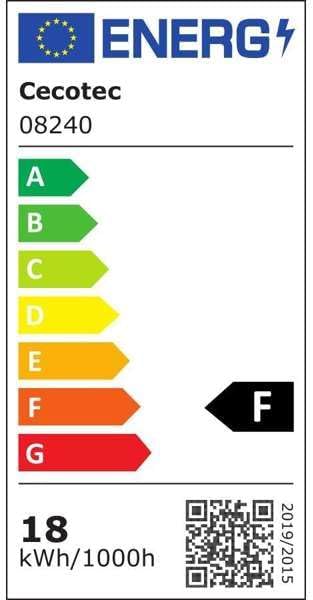
Figure 10: Energy efficiency label for the Cecotec 08240 fan, indicating an F rating and 18 kWh/1000h consumption. For more details, visit the EPREL database.
9. Warranty and Support
Cecotec products are manufactured to high-quality standards. This product comes with a standard manufacturer's warranty. Please refer to the warranty card included in your package for specific terms and conditions.
Spare Parts Availability: Spare parts for this model are available for a period of 10 years from the date of purchase.
For technical support, troubleshooting assistance, or warranty claims, please contact Cecotec customer service through their official website or the contact information provided in your product documentation.


