
1. Introduction
This manual provides essential instructions for the safe and efficient operation, maintenance, and troubleshooting of your Cecotec Conga 4000 Carpet & Spot Clean Upholstery Vacuum Cleaner. Please read this manual thoroughly before first use and retain it for future reference.
2. Safety Instructions
- Always ensure the power cord is undamaged and properly connected to a suitable electrical outlet.
- Do not immerse the appliance, power cord, or plug in water or other liquids.
- Keep hands, hair, loose clothing, and all body parts away from openings and moving parts.
- Do not use the appliance to pick up flammable or combustible liquids, such as gasoline, or use in areas where they may be present.
- Do not pick up anything that is burning or smoking, such as cigarettes, matches, or hot ashes.
- Use only low-foaming cleaning solutions specifically designed for carpet and upholstery cleaners. Excessive foam can damage the unit.
- Unplug the appliance from the outlet when not in use and before cleaning or servicing.
- This appliance is for household use only.
3. Product Overview
Familiarize yourself with the components of your Conga 4000 cleaner.

Figure 3.1: Overall view of the Cecotec Conga 4000 cleaner, showing the main unit with clean and dirty water tanks, handle, and attached hose with a cleaning nozzle.
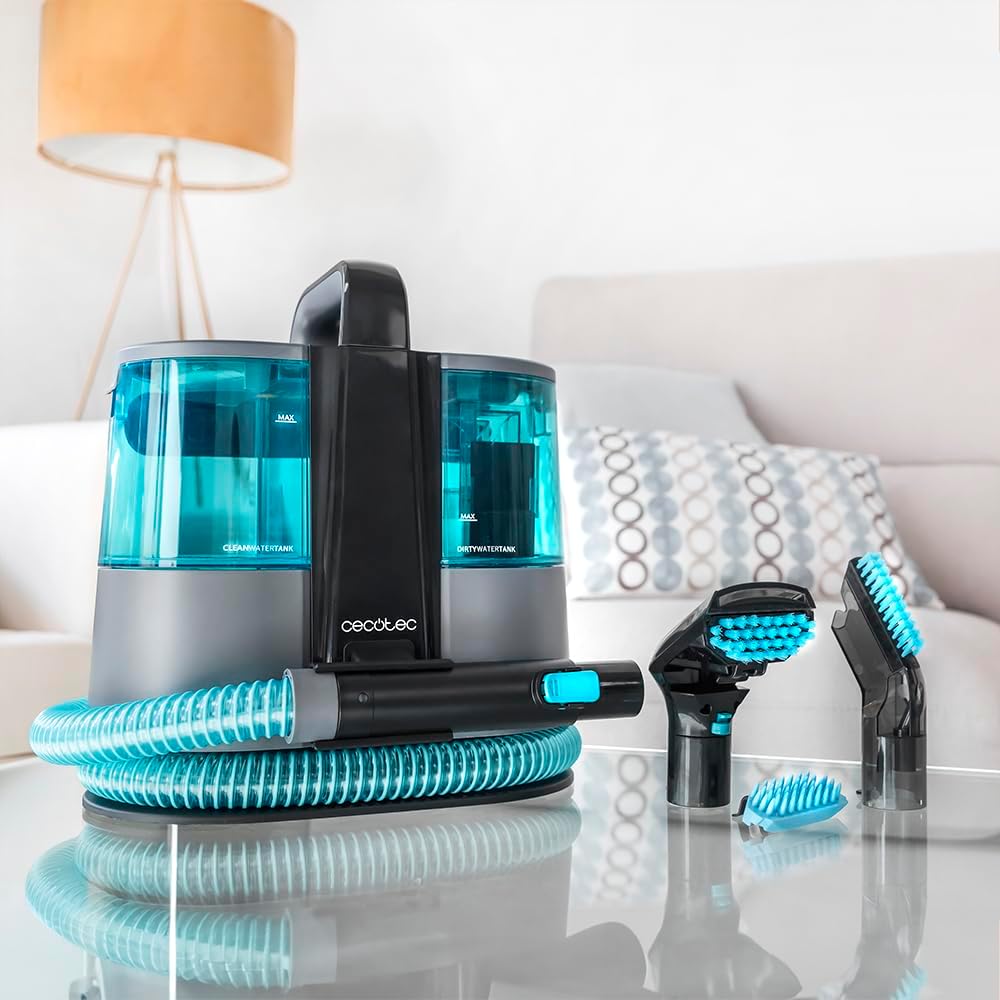
Figure 3.2: The Conga 4000 unit displayed with its included accessories, including two liquid suction nozzles (one with a brush, one 2-in-1 brush) and the main hose.
Components:
- Main Unit with Handle
- Clean Water Tank (1 Liter capacity)
- Dirty Water Tank (0.85 Liter capacity)
- Flexible Hose (1.2 m length)
- Power Cable (4 m length)
- Liquid Suction Nozzle with Brush
- 2-in-1 Brush Nozzle
4. Setup
4.1 Unpacking and Assembly
- Carefully remove all components from the packaging.
- Attach the flexible hose securely to the designated port on the main unit.
- Select the appropriate cleaning nozzle for your task and attach it to the end of the hose.
4.2 Filling the Clean Water Tank

Figure 4.1: Demonstrates the easy removal of the clean and dirty water tanks for filling or emptying.
- Remove the clean water tank from the main unit.
- Fill the tank with clean water. Warm water can be used for enhanced cleaning.
- If using a cleaning solution, add 5 to 10 ml of a low-foaming cleaning fluid to the clean water tank. Do not exceed this amount to prevent excessive foam.
- Securely reattach the clean water tank to the main unit.
5. Operating Instructions
5.1 General Operation
- Plug the power cable into a suitable electrical outlet.
- Turn on the appliance using the power switch.
- Position the cleaning nozzle over the area to be cleaned.
- Press the spray trigger on the nozzle to dispense water or cleaning solution onto the surface.
- Move the nozzle slowly over the wet area, applying gentle pressure, to vacuum up the dirty water.
- Repeat the spray and vacuum process as needed until the area is clean.

Figure 5.1: The cleaning nozzle spraying water onto a carpet surface, initiating the cleaning process.

Figure 5.2: A user demonstrating the spot cleaning function on a carpet, effectively removing a visible stain.
5.2 Cleaning Upholstery
The Conga 4000 is suitable for cleaning various upholstery types. Always test a small, inconspicuous area first to ensure colorfastness and material compatibility.

Figure 5.3: The cleaner being used to refresh and clean an upholstered armchair, highlighting its versatility.

Figure 5.4: A detailed view of the cleaning nozzle in action on a sofa cushion, demonstrating effective spot treatment.
6. Maintenance
6.1 Emptying and Cleaning Tanks
- After each use, unplug the appliance.
- Remove the dirty water tank and empty its contents into a drain.
- Rinse both the dirty water tank and the clean water tank with fresh water.
- Allow tanks to air dry before reassembling or storing.
6.2 Cleaning Nozzles and Hose
- Detach the cleaning nozzle(s) from the hose.
- Rinse the nozzles and the interior of the hose with clean water to remove any residue.
- Ensure all parts are dry before storage.
6.3 Storage
- Wrap the power cable around the integrated hook for tidy storage.
- Store the appliance and its accessories in a dry, cool place, away from direct sunlight.
7. Troubleshooting
| Problem | Possible Cause | Solution |
|---|---|---|
| No spray from nozzle | Clean water tank is empty Spray nozzle is clogged | Refill clean water tank Clean the spray nozzle |
| Low suction power | Dirty water tank is full Hose or nozzle is clogged Tank lids not properly sealed | Empty dirty water tank Clear any blockages Ensure tanks are securely closed |
| Excessive foam | Too much cleaning solution used Incorrect type of cleaning solution | Reduce amount of solution Use only low-foaming solutions |
| Appliance does not turn on | Not plugged in Power outlet malfunction | Check power connection Test outlet with another appliance |
8. Specifications
| Feature | Specification |
|---|---|
| Model | Conga 4000 (08425) |
| Power | 400 W |
| Voltage | 400 Volts (as per product data, typically refers to motor voltage or internal component rating, actual operating voltage depends on region) |
| Clean Water Tank Capacity | 1 Liter |
| Dirty Water Tank Capacity | 0.85 Liter |
| Suction Power | 12 kPa |
| Hose Length | 1.2 m |
| Power Cable Length | 4 m |
| Motion Radius | Up to 5 m |
| Product Dimensions (L x W x H) | 38 x 34 x 37 cm |
| Item Weight | 3.6 kg |
9. Warranty and Support
For information regarding warranty coverage, service, or technical support, please refer to the warranty card included with your product or contact Cecotec customer service directly. Contact details can typically be found on the manufacturer's official website.


