
Introduction
This manual provides essential information for the safe and efficient operation of your Cecotec Bolero Dresscode 8300 Inverter Max A washing machine. Please read these instructions carefully before installation, use, and maintenance. Keep this manual for future reference.

Front view of the Cecotec Bolero Dresscode 8300 Inverter Max A washing machine, highlighting its sleek design and 8 kg capacity.
Safety Instructions
Always follow basic safety precautions when using electrical appliances to reduce the risk of fire, electric shock, and injury to persons.
- Ensure the appliance is properly grounded.
- Do not allow children to play with or operate the washing machine.
- Never force the door open during operation.
- Unplug the appliance before cleaning or performing any maintenance.
- Do not install the washing machine in a damp environment or where it may be exposed to rain.
Setup and Installation
1. Unpacking
Carefully remove all packaging materials. Remove the transport bolts from the rear of the machine before use. Keep packaging materials out of reach of children.
2. Positioning
Place the washing machine on a firm, level surface. Ensure there is adequate space around the machine for ventilation and access.

Side view of the Cecotec Bolero Dresscode 8300 Inverter Max A washing machine, illustrating its dimensions: 85 cm height, 60 cm width, and 50 cm depth.
3. Water Connection
Connect the water inlet hose to a cold water tap with a 3/4-inch thread. Ensure all connections are tight to prevent leaks.
4. Drainage
Position the drain hose correctly into a standpipe or over the edge of a sink, ensuring it is securely fastened to prevent displacement during operation.
5. Electrical Connection
Plug the power cord into a grounded electrical outlet (230 Volts AC). Do not use extension cords or adapters.
6. Leveling
Adjust the feet of the washing machine to ensure it is perfectly level. This prevents excessive vibration and noise during operation.
Operating Instructions
1. Loading Laundry
Open the door and load the laundry into the drum. Do not overload the machine; ensure there is enough space for clothes to move freely. The machine has an 8 kg load capacity.

A user loading a large duvet into the washing machine, demonstrating the spacious drum capacity.
2. Adding Detergent
Pull out the detergent dispenser drawer and add the appropriate amount of detergent and fabric softener to their respective compartments.
3. Selecting a Program
Turn the program selector knob on the control panel to choose one of the 15 available washing programs. Options include Cotton, Synthetic, Mix, Wool, Baby Care, Sportswear, Bed Linens, Express 15', Rapid 45', Rinse & Spin, Spin Only, ECO 40-60, 20°C, Steam, and Drum Clean.
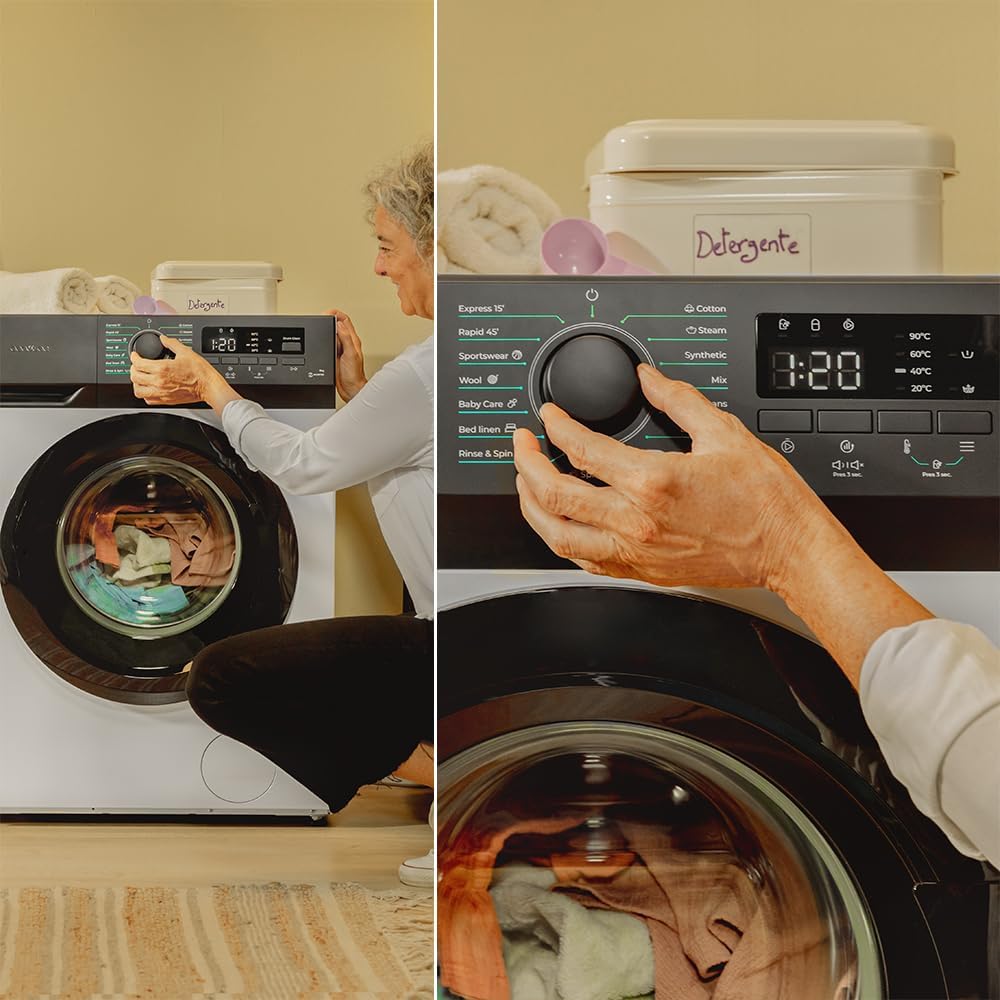
A user adjusting the program selector knob on the washing machine's control panel, which features an LED display and various program options.
4. Customizing Settings
Use the buttons on the LED display panel to adjust settings such as spin speed (up to 1400 rpm), temperature, and to activate special functions like SteamMax, Extra Rinse, or Delay Start (0-24 h).

A close-up of the washing machine's LED display, showing the digital timer and various indicator icons for temperature, spin speed, and special functions.
5. Starting a Cycle
Press the Start/Pause button to begin the selected washing cycle. The LED display will show the remaining time.
6. KidLock Function
Activate the KidLock feature to prevent accidental changes to settings or interruption of a cycle by children.
7. My Fav Function
The My Fav function allows you to memorize your most frequently used program and settings for quick selection in the future.
Maintenance and Care
Regular maintenance ensures the longevity and optimal performance of your washing machine.
1. Cleaning the Drum (DrumClean)
Use the dedicated DrumClean program periodically to clean the interior of the drum and remove any residue or odors.
2. Cleaning the Detergent Dispenser
Remove and clean the detergent dispenser drawer regularly to prevent detergent buildup and mold growth.
3. Cleaning the Filter
Locate and clean the drain pump filter at the bottom front of the machine. This should be done periodically to remove lint and small objects.
4. External Cleaning
Wipe the exterior of the machine with a soft, damp cloth. Do not use abrasive cleaners or solvents.
Troubleshooting
If you encounter issues, refer to the following common problems and solutions before contacting customer service.
| Problem | Possible Cause | Solution |
|---|---|---|
| Machine does not start | Power cord unplugged, door not closed properly, program not selected. | Check power connection, ensure door is latched, select a program and press Start. |
| No water intake | Water tap closed, inlet hose kinked, water pressure too low. | Open water tap, straighten hose, check household water pressure. |
| Excessive vibration/noise | Machine not level, transport bolts not removed, uneven load. | Adjust leveling feet, remove transport bolts, redistribute laundry. |
| Water not draining | Drain hose kinked or blocked, drain pump filter clogged. | Check and clear drain hose, clean drain pump filter. |
Specifications
- Brand: Cecotec
- Model Number: 02792
- Capacity: 8 Kilograms
- Maximum Spin Speed: 1400 rpm
- Energy Efficiency Class: A
- Product Dimensions (L x W x H): 50 x 60 x 85 cm
- Weight: 62 Kilograms
- Voltage: 230 Volts (AC)
- Programs: 15 (including SteamMax, DrumClean, My Fav)
- Motor Type: Inverter Plus Motor
- Control Panel: LED Display with Buttons
- Special Features: Delay Start (0-24 h), KidLock, Extra Rinse
- Included Components: Washing machine (accessories may vary)
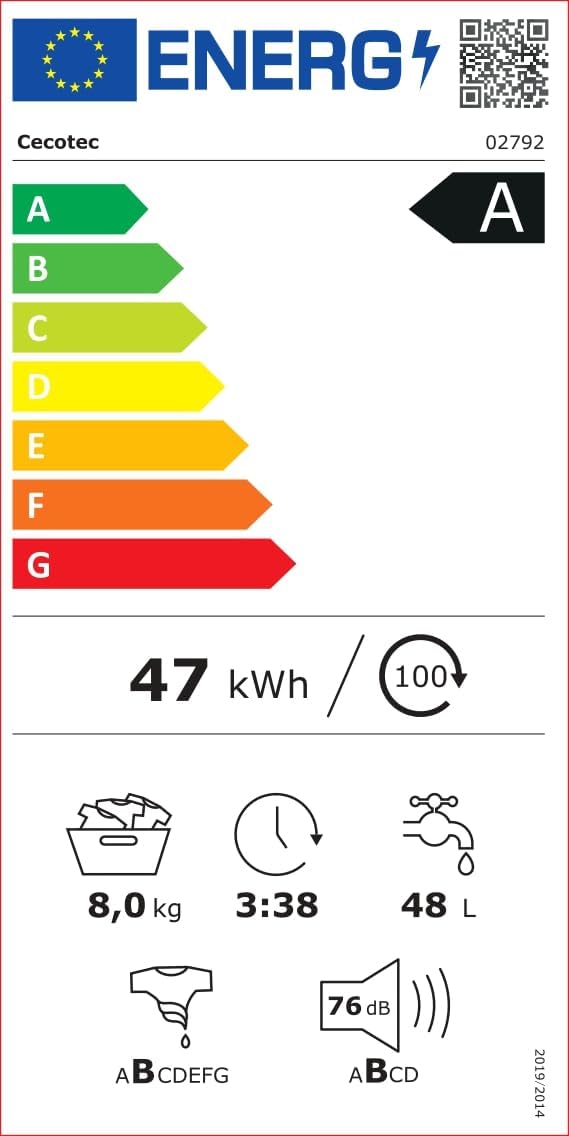
Energy label for the Cecotec Bolero Dresscode 8300 Inverter Max A washing machine, indicating its Class A energy efficiency, 8 kg capacity, 47 kWh/100 cycles, 3:38 program duration, 48 L water consumption, and 76 dB noise level.
For detailed energy information, scan the QR code or visit: https://eprel.ec.europa.eu/qr/1618167

Product information sheet providing additional technical details and compliance information.
Warranty Information
The minimum warranty period offered by the supplier for this product is 3 years. Please retain your proof of purchase for warranty claims. Spare parts availability information is currently unavailable.
Customer Support
For further assistance, technical support, or to inquire about spare parts, please visit the official Cecotec website or contact their customer service department.
Official Website: www.storececotec.es


