
Introduction
Thank you for purchasing the SJRC F7 PRO Drone. This advanced quadrocopter features a 4K HD camera with a 3-axis mechanical gimbal, 5G FPV transmission, and powerful brushless motors. It is designed for users seeking a professional-grade aerial photography and videography experience. This manual provides essential information for safe operation, setup, maintenance, and troubleshooting to ensure optimal performance of your drone.
Safety Guidelines
Adhering to these safety guidelines is crucial for preventing accidents, injuries, and property damage.
- Pre-Flight Check: Always inspect the drone, remote controller, and batteries before each flight. Ensure all components are in good working order.
- Environmental Conditions: Do not fly in strong winds (above Level 5), heavy rain, snow, or fog. Avoid flying near power lines, buildings, or crowded areas.
- Line of Sight: Maintain visual line of sight with the drone at all times during flight.
- Battery Safety: Use only original or approved batteries. Do not overcharge or puncture batteries. Discontinue use if batteries are damaged or swollen.
- Propeller Safety: Keep hands, face, and loose clothing away from rotating propellers. Ensure propellers are correctly installed and free from damage.
- Respect Privacy: Be mindful of privacy laws and regulations when using the camera.
- Local Regulations: Familiarize yourself with and adhere to all local aviation laws and regulations regarding drone operation.
Package Contents
Verify that all items are present in your package:
- SJRC F7 PRO Drone
- Remote Controller
- Intelligent Flight Batteries (x2)
- USB Charging Cable
- Spare Propellers
- Screwdriver
- User Manual
- Storage Bag
Drone Components Overview
Familiarize yourself with the main components of your SJRC F7 PRO drone.

Image: The SJRC F7 PRO drone, showcasing its foldable design, four propellers, and the integrated camera with gimbal at the front. This view provides a general understanding of the drone's overall structure.
- Propellers: Four sets of propellers for lift and thrust.
- Brushless Motors: Provide efficient and powerful flight.
- Flight Battery Compartment: Located at the rear of the drone.
- 4K HD Camera: Captures high-resolution photos and videos.
- 3-Axis Mechanical Gimbal: Stabilizes the camera for smooth footage.
- GPS Module: Enables precise positioning and intelligent flight features.
- Vision Positioning System: Assists with stable hovering in environments without GPS.

Image: A detailed view of the drone's 3-axis mechanical gimbal and camera. Arrows indicate the approximate range of motion for pitch (about 120 degrees), lateral (about 70 degrees), and direction (about 60 degrees), highlighting its stabilization capabilities.
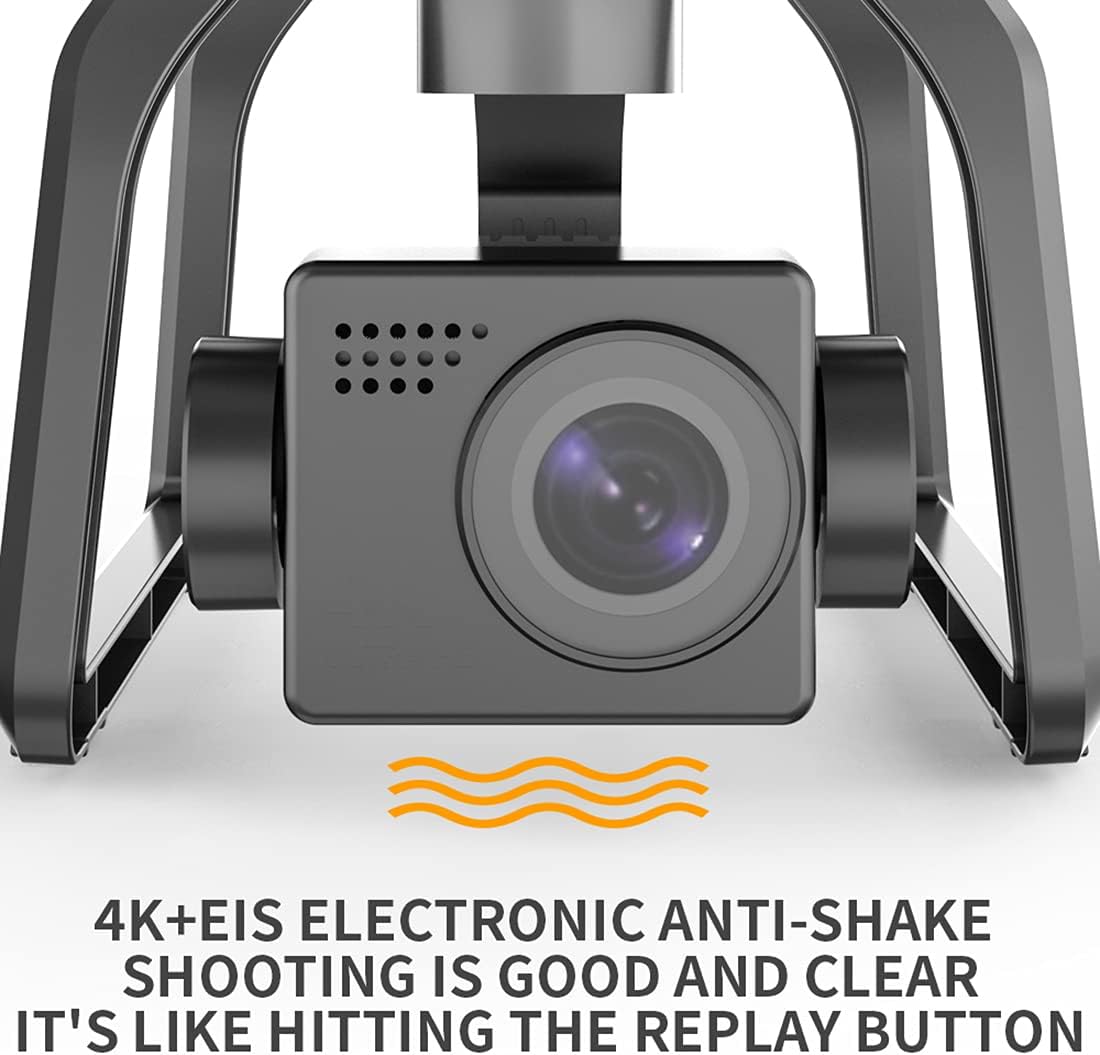
Image: A close-up of the drone's 4K camera, emphasizing its Electronic Image Stabilization (EIS) feature. The text indicates that '4K+EIS Electronic Anti-Shake shooting is good and clear', ensuring stable and high-quality video recording.
Battery Charging
Drone Battery
- Connect the drone battery to the provided USB charging cable.
- Plug the USB cable into a 5V/2A USB power adapter (not included).
- The charging indicator on the battery will show its status (e.g., red for charging, green for fully charged).
- Charging typically takes 4-5 hours for a full charge.
Remote Controller Battery
- Connect the remote controller to the USB charging cable.
- Plug the USB cable into a 5V/1A USB power adapter.
- The indicator lights on the remote controller will show charging status.
- Charging typically takes 1-2 hours for a full charge.
Setup
1. Unfolding the Drone
- Gently unfold the front arms first, then the rear arms until they click into place.
- Ensure all arms are fully extended and locked.
2. Propeller Installation
- Match the propellers with the corresponding motor shafts (A to A, B to B).
- Securely fasten the propellers using the provided screws and screwdriver.
- Ensure propellers are free from damage and installed correctly to avoid flight instability.
3. Battery Installation
- Insert the fully charged intelligent flight battery into the battery compartment at the rear of the drone until it clicks securely.
- Press the power button on the battery to turn on the drone.
4. Remote Controller Pairing
- Turn on the remote controller.
- Turn on the drone.
- The drone and remote controller should automatically pair. If not, follow the specific pairing instructions in the quick start guide (usually involves holding a button on the remote while powering on).
5. App Download and Connection
- Download the official SJRC F7 PRO app from your mobile device's app store.
- Connect your mobile device to the drone's Wi-Fi network (usually named 'SJRC-F7PRO-XXXXXX').
- Open the app to view the FPV feed and access intelligent flight modes.
6. Compass and Gimbal Calibration
- Perform compass calibration before the first flight and whenever flying in a new location. Follow the instructions in the app or quick start guide (typically involves rotating the drone horizontally and vertically).
- The gimbal will self-calibrate upon powering on. Ensure the drone is on a flat, stable surface during startup.
Operating Instructions
1. Pre-Flight Checks
- Ensure batteries are fully charged for both drone and remote.
- Check propellers for damage and correct installation.
- Verify GPS signal strength (at least 7-8 satellites for stable flight).
- Confirm successful connection between drone, remote, and app.
2. Take-Off
- Manual Take-Off: Push both joysticks down and outwards to start the motors. Then, slowly push the left joystick up to ascend.
- Auto Take-Off: Press the one-key take-off button on the remote or in the app. The drone will automatically ascend to a safe height and hover.

Image: The SJRC F7 PRO drone in flight over a lush forest, demonstrating its aerial capabilities. The image suggests smooth and stable flight, suitable for capturing scenic views.
3. Basic Flight Controls
- Left Joystick (Mode 2):
- Up/Down: Ascend/Descend
- Left/Right: Rotate Left/Right (Yaw)
- Right Joystick (Mode 2):
- Up/Down: Fly Forward/Backward (Pitch)
- Left/Right: Fly Left/Right (Roll)
4. Camera Operation
- Photo: Press the photo button on the remote or in the app to capture a still image.
- Video: Press the video button to start/stop recording.
- Gimbal Control: Use the gimbal dial on the remote to adjust the camera's pitch angle.
5. Intelligent Flight Modes
- Altitude Hold: The drone maintains a stable altitude, allowing the pilot to focus on direction.
- Follow Me: The drone will automatically follow the remote controller or mobile device, recording your movements. Ensure sufficient space and clear line of sight.
- Auto Return (RTH): When activated or if signal is lost, the drone will automatically return to its take-off point using GPS. Ensure the RTH point is accurately recorded before flight.

Image: The SJRC F7 PRO drone with an overlay illustrating its GPS Positioning System. The text 'FLYING AS STEADY AS MOUNT TAI' emphasizes the stability provided by GPS, ensuring precise flight control and hovering.

Image: A hand holding a smartphone displaying a live FPV feed from the drone, with the drone flying in the background over a mountainous landscape. Text highlights 'About 3000m' range, '4K The big shot', and 'Repeater + 5G system Strong signal', indicating extended range and high-quality video transmission.
6. Landing
- Manual Landing: Slowly pull the left joystick down to descend. Once landed, push both joysticks down and inwards to stop the motors.
- Auto Landing: Press the one-key landing button on the remote or in the app. The drone will automatically descend and land.
Maintenance
- Cleaning: Use a soft, dry cloth to clean the drone body and camera lens. Avoid using liquids or solvents.
- Propeller Inspection: Regularly check propellers for cracks, bends, or chips. Replace damaged propellers immediately.
- Motor Care: Keep motors free from dust and debris. Do not attempt to lubricate motors.
- Battery Storage: Store batteries in a cool, dry place, partially charged (around 50-60%) if not used for extended periods.
- Firmware Updates: Check the official SJRC website or app for any available firmware updates to ensure optimal performance and new features.
Troubleshooting
| Problem | Possible Cause | Solution |
|---|---|---|
| Drone does not power on | Low battery; Battery not properly inserted | Charge battery; Reinsert battery securely |
| Remote controller not connecting | Not paired; Low remote battery | Perform pairing procedure; Charge remote battery |
| Unstable flight/Drifting | No GPS signal; Compass not calibrated; Damaged propellers | Fly in open area with strong GPS; Calibrate compass; Replace propellers |
| No FPV feed in app | Not connected to drone Wi-Fi; App not open | Connect to drone's Wi-Fi; Open the app |
| Poor image/video quality | Dirty camera lens; Gimbal not stable; Insufficient light | Clean lens; Ensure gimbal calibration; Fly in good lighting conditions |
Specifications
| Feature | Detail |
|---|---|
| Model | SJRC F7 PRO |
| Brand | SJRC |
| Camera | 4K HD with EIS Electronic Anti-Shake |
| Gimbal | 3-axis Mechanical Gimbal |
| Motor Type | Brushless Motor |
| Connectivity | 5G FPV |
| Special Features | Foldable, Integrated Camera, Rechargeable, GPS Positioning System, Auto Return, Altitude Hold, Follow Me |
| Control Type | Remote Control |
| Skill Level | Advanced, Professional |
| Wind Resistance | Level 5 (approximate) |
| Included Components | Drone, Remote Controller, Batteries (x2), USB Charging Cable, Spare Propellers, Screwdriver, Storage Bag |

Image: The SJRC F7 PRO drone positioned against a split background of ocean and mountains, illustrating its capability in varied environments. Text highlights 'Wind resistance level 5', 'Four Brushless motor', and '3200 r Power output', indicating robust performance.
Warranty and Support
For warranty information and technical support, please refer to the warranty card included in your package or visit the official SJRC website. Keep your purchase receipt as proof of purchase for any warranty claims.
If you encounter issues not covered in this manual, please contact SJRC customer service for assistance.