
1. Introduction
The FarPoint Versa Smart Task Light is a versatile and durable lighting tool designed for various tasks and emergency situations. It features multiple lighting modes, including a powerful flashlight, a broad side beam work light, and a red flashing emergency beacon. Its compact design, magnetic base, and IPX4 water resistance make it suitable for indoor, outdoor, camping, and emergency uses.

Figure 1: FarPoint Versa Smart Task Light Product Packaging.
2. Setup
2.1 Battery Installation
The FarPoint Versa Smart Task Light requires 3 AA alkaline batteries (included). To install or replace batteries:
- Unscrew the cap at the bottom of the light.
- Insert 3 AA alkaline batteries, ensuring correct polarity (+/-) as indicated inside the battery compartment.
- Screw the cap back on securely.
Caution: Do not mix old and new batteries. Do not mix alkaline, standard (carbon-zinc), or rechargeable (nickel-cadmium) batteries. Dispose of used batteries properly.
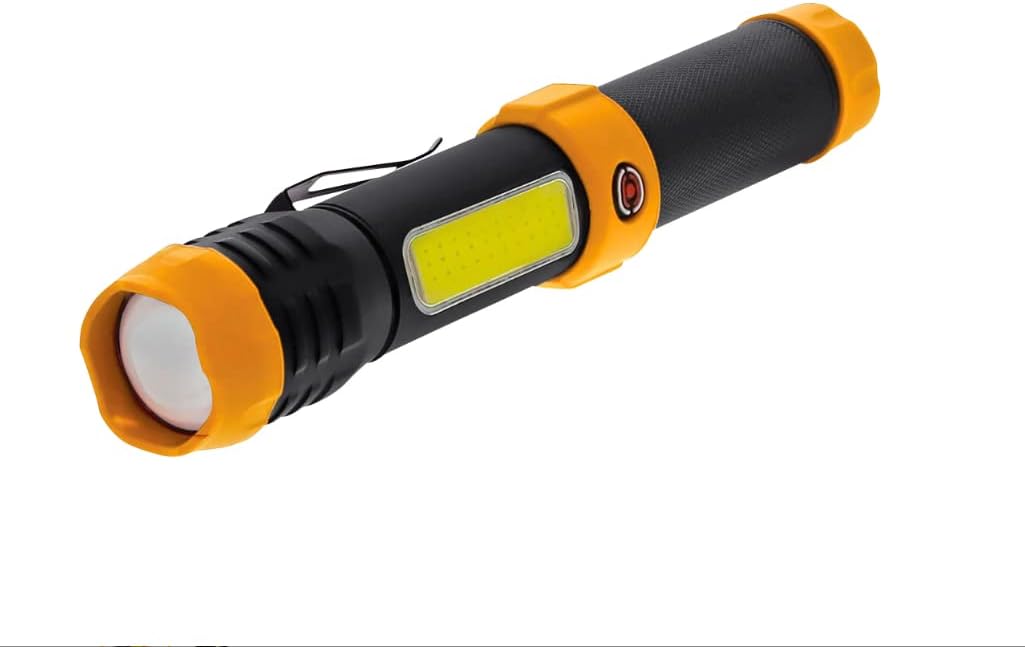
Figure 2: FarPoint Versa Smart Task Light.
3. Operating Instructions
The FarPoint Versa Smart Task Light features a 5-mode switch for easy operation. Press the power button repeatedly to cycle through the modes:
- 1st Press: Turns on the Flashlight (Max Beam).
- 2nd Press: Turns on the Side Beam (Max output).
- 3rd Press: Turns on the Side Beam (Low output).
- 4th Press: Activates the Red Flashing Emergency beacon.
- 5th Press: Turns the light OFF.
3.1 Additional Features
- Magnetic Base: The light features a strong magnetic base, allowing it to be securely attached to metal surfaces for hands-free operation.
- Pocket/Belt Clip: A convenient clip is integrated for easy carrying and attachment to pockets or belts.

Figure 3: Operation and Specifications Overview.
4. Maintenance
4.1 Cleaning
To clean the light, wipe it with a soft, damp cloth. Do not use abrasive cleaners or solvents, as they may damage the surface.
4.2 Storage
When storing the light for extended periods, remove the batteries to prevent leakage and corrosion. Store in a cool, dry place away from direct sunlight.
5. Troubleshooting
- Light does not turn on:
- Check if batteries are inserted correctly with proper polarity.
- Replace old or depleted batteries with new AA alkaline batteries.
- Ensure the battery cap is screwed on tightly.
- Light is dim or flickers:
- Batteries may be low. Replace with new AA alkaline batteries.
- Ensure battery contacts are clean and free of corrosion.
6. Specifications
| Feature | Detail |
|---|---|
| Product Name | FarPoint Versa Smart Task Light |
| Model | Versa Smart Task Light |
| Flashlight Output | 200 Lumens (Top Beam) |
| Side Beam Output | 500 Lumens (Max), 150 Lumens (Low) |
| Emergency Light | Red Flashing Beacon |
| Battery Type | 3 x AA Alkaline Batteries |
| Run Time (Top Beam) | Up to 12 hours |
| Run Time (Side Beam Max) | Up to 4 hours |
| Run Time (Side Beam Low) | Up to 15 hours |
| Run Time (Red Flashing) | Up to 40 hours |
| Water Resistance | IPX4 Rated |
| Impact Resistance | Impact-resistant silicone/plastic body (Drop Tested 1m) |
| Special Features | Magnetic Base, Pocket/Belt Clip |
| Material | Silicone, Plastic |
| Color | Red |
7. Important Notices & Safety Information
- Proposition 65 Warning: This product can expose you to chemicals including lead, which is known to the State of California to cause cancer and birth defects or other reproductive harm. For more information, go to www.P65Warnings.ca.gov.
- Magnetic Warning: This product and or packaging can expose you to chemicals - including lead, which is known to the State of California to cause cancer and birth defects or other reproductive harm. For more information, go to www.P65Warnings.ca.gov. This product contains a magnet that may interfere with the proper function of pacemakers and other implanted medical devices. Consult your physician before use.
- Choking Hazard: Small parts. Not for children under 3 years.
- Do not look directly into the LED light source.
- Do not immerse in water.
8. Warranty & Support
For product support and inquiries, please visit the official Farpoint website or contact WCI, Inc. directly.
- Product Support Website: www.farpoint.com
- Manufacturer: WCI, Inc. Commerce, CA 90040
- Designed in: The U.S.A.
- Manufactured in: China
Please retain your purchase receipt for any warranty claims.