1. Introduction
The TAKSTAR DMS-D7 is a professional 7-piece drum microphone kit designed for capturing high-quality audio from drum sets and other percussion instruments. This kit is suitable for both live performance and studio recording environments, offering specialized microphones for various drum components to ensure accurate sound reproduction. This manual provides essential information for the proper setup, operation, and maintenance of your DMS-D7 microphone kit.

Image 1.1: The TAKSTAR DMS-D7 7-piece drum microphone kit, designed for optimal drum set recording.
2. Package Contents
Carefully unpack your TAKSTAR DMS-D7 kit and verify that all components are present. The kit includes:
- 1 x TA-8330 Bass Drum Microphone
- 4 x TA-8230 Snare Drum Microphones
- 2 x PCM-6100 Condenser Microphones
- 4 x MH-8 Drum Clip Stands
- 5 x MH-7 Clamps
- 2 x CH-58 Stands
- 2 x Windscreens (for condenser microphones)

Image 2.1: Visual representation of the DMS-D7 kit's packing list, showing all included microphones and accessories.

Image 2.2: The durable aluminum storage case for the TAKSTAR DMS-D7 microphone kit, providing protection and portability.
3. Product Overview
The DMS-D7 kit features a selection of microphones specifically engineered for different drum components:
3.1 TA-8330 Bass Drum Microphone
This dynamic microphone is designed to capture the powerful, energetic bass effects of kick drums. It features a full low-frequency response, ensuring a thick and impactful sound.

Image 3.1: Details of the TA-8330 bass drum microphone, including its frequency response chart, highlighting its low-frequency capabilities.
3.2 TA-8230 Snare/Tom Microphones
These dynamic microphones are optimized for snare drums and tom-toms. They provide a good balance of low and mid frequencies, capturing the characteristic punch and resonance of these drums.

Image 3.2: A close-up view of the dynamic microphones (TA-8330 and TA-8230) included in the kit.
3.3 PCM-6100 Condenser Microphones
The PCM-6100 condenser microphones are designed for overhead applications, such as suspended cymbals and hi-hats. They offer a wide frequency response and fine high-frequency resolution, effectively suppressing noise and feedback to deliver clear, detailed sound.

Image 3.3: Details of the PCM-6100 condenser microphone, including its frequency response chart, illustrating its wide frequency capture.

Image 3.4: A close-up view of the PCM-6100 condenser microphones.
3.4 General Features
All microphones in the DMS-D7 kit feature a rugged metal body construction, ensuring durability and reliability in various environments. The kit comes with a portable aluminum storage case for secure transport and protection of the microphones and accessories.
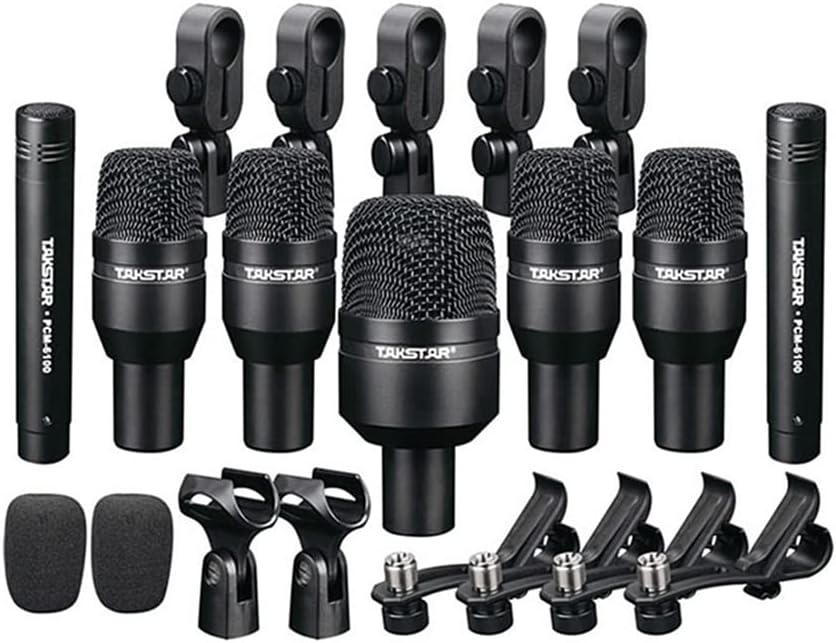
Image 3.5: The complete TAKSTAR DMS-D7 drum microphone kit, showcasing all microphones and mounting hardware.
4. Setup
Follow these general steps to set up your TAKSTAR DMS-D7 drum microphone kit:
- Unpack and Identify: Remove all microphones and accessories from the carrying case. Familiarize yourself with each microphone type (TA-8330, TA-8230, PCM-6100) and their corresponding mounts (MH-8 drum clips, MH-7 clamps, CH-58 stands).
- Attach Mounts: Secure the MH-8 drum clips to the rims of your snare and tom drums. Attach the MH-7 clamps to appropriate stands or drum hardware for the TA-8330 bass drum microphone. Use the CH-58 stands for the PCM-6100 condenser microphones, positioning them as overheads.
- Mount Microphones: Carefully attach each microphone to its designated mount. Ensure they are securely fastened but do not overtighten.
- Connect Cables: Use standard XLR cables (not included) to connect each microphone to your audio interface or mixer. Ensure all connections are firm.
- Phantom Power: For the PCM-6100 condenser microphones, activate +48V phantom power on your audio interface or mixer. Dynamic microphones (TA-8330, TA-8230) do not require phantom power.

Image 4.1: The various microphones and their associated mounting hardware, including drum clips and stands, ready for setup.
5. Operating Instructions
Once the microphones are physically set up and connected, follow these guidelines for optimal operation:
- Microphone Placement:
- Kick Drum (TA-8330): Position the microphone inside or just outside the kick drum's resonant head for a full, punchy sound. Experiment with distance and angle to achieve desired tone.
- Snare Drum (TA-8230): Place the microphone a few inches above the snare drum rim, angled towards the center of the drum head. A second TA-8230 can be used underneath the snare for additional snare wire sound.
- Toms (TA-8230): Mount the microphones a few inches above the tom heads, angled towards the center.
- Overheads/Cymbals (PCM-6100): Position the condenser microphones above the drum kit, typically one on each side, to capture the overall sound of the cymbals and the kit's ambience. Ensure they are equidistant from the snare drum for phase coherence.
- Gain Staging: Adjust the gain (input level) on your audio interface or mixer for each microphone. Aim for a strong signal without clipping (distortion).
- Monitoring: Listen to the microphone signals through headphones or studio monitors. Make adjustments to placement and gain as needed to achieve a balanced and clear sound.
- Equalization (EQ) and Compression: Apply EQ and compression on your mixer or DAW as necessary to shape the sound of each drum and integrate them into the overall mix.
6. Maintenance
Proper maintenance will extend the lifespan and performance of your microphone kit:
- Cleaning: Use a soft, dry cloth to wipe down the microphone bodies and grilles after each use. For grilles, a soft brush can remove dust or debris. Avoid using liquid cleaners directly on the microphones.
- Storage: Always store the microphones and accessories in the provided aluminum carrying case when not in use. This protects them from dust, moisture, and physical damage.
- Cable Care: Coil XLR cables neatly after use. Avoid sharp bends or kinks that can damage the internal wiring.
- Environmental Conditions: Avoid exposing the microphones to extreme temperatures, high humidity, or direct sunlight.
7. Troubleshooting
If you encounter issues with your DMS-D7 microphone kit, consider the following:
- No Sound from a Microphone:
- Check all XLR cable connections at both the microphone and the audio interface/mixer.
- Ensure the correct input channel is selected on your mixer/interface.
- For PCM-6100 condenser microphones, verify that +48V phantom power is activated on the corresponding channel.
- Test with a different XLR cable to rule out a faulty cable.
- If possible, test the microphone on a different input channel or with another audio device.
- Poor Sound Quality (e.g., weak signal, distortion):
- Adjust the gain (input level) on your mixer/interface. Too low gain results in a weak signal; too high gain causes distortion.
- Check microphone placement. Moving the microphone closer to the sound source can increase signal strength.
- Ensure no other audio sources are causing interference.
- Feedback:
- Reduce the gain of the problematic microphone or the overall output volume.
- Reposition microphones to avoid pointing directly at speakers or monitors.
- Use EQ to cut problematic frequencies.
8. Specifications
Key technical specifications for the TAKSTAR DMS-D7 Drum Microphone Kit:
| Feature | Specification |
|---|---|
| Model Number | DMS D7 |
| Brand | TAKSTAR |
| Connectivity Technology | XLR |
| Compatible Devices | Audio Interfaces, Mixers, Some Microphone Stands with Built-in Preamps |
| Item Weight | 8.34 pounds |
| Package Dimensions | 18.5 x 15 x 4.53 inches |
| Manufacturer | TAKSTAR |
9. Warranty and Support
For warranty information, technical support, or service inquiries regarding your TAKSTAR DMS-D7 Drum Microphone Kit, please refer to the warranty card included in your package or visit the official TAKSTAR website. Contacting the manufacturer directly will ensure you receive accurate and timely assistance.
Manufacturer: TAKSTAR
Website: Visit the TAKSTAR Store on Amazon


