1. Introduction
Welcome to the GODOX MoveLink Mini LT KIT 2 user manual. This document provides detailed instructions for the setup, operation, and maintenance of your 2.4GHz wireless microphone system, designed for use with Apple Lightning devices.
1.1 Package Contents
Verify that all items listed below are included in your package:
- Transmitter (MoveLink Mini TX) x2
- Receiver (MoveLink Mini RX) x1
- Wind foam x2
- Pin x1
- Charging Case (ML-C2) (for Kit 2) x1
- USB to Type-C Data Cable x1
- Strap for the Charging Case x1
- 3.5mm TRS Audio Adapter (MoveLink Mini Adpt.1) x1
- 3.5mm TRRS Audio Adapter (MoveLink Mini Adpt.2) x1
- Lightning Adapter (MoveLink Mini Adpt.LT) (for LT kit) x1
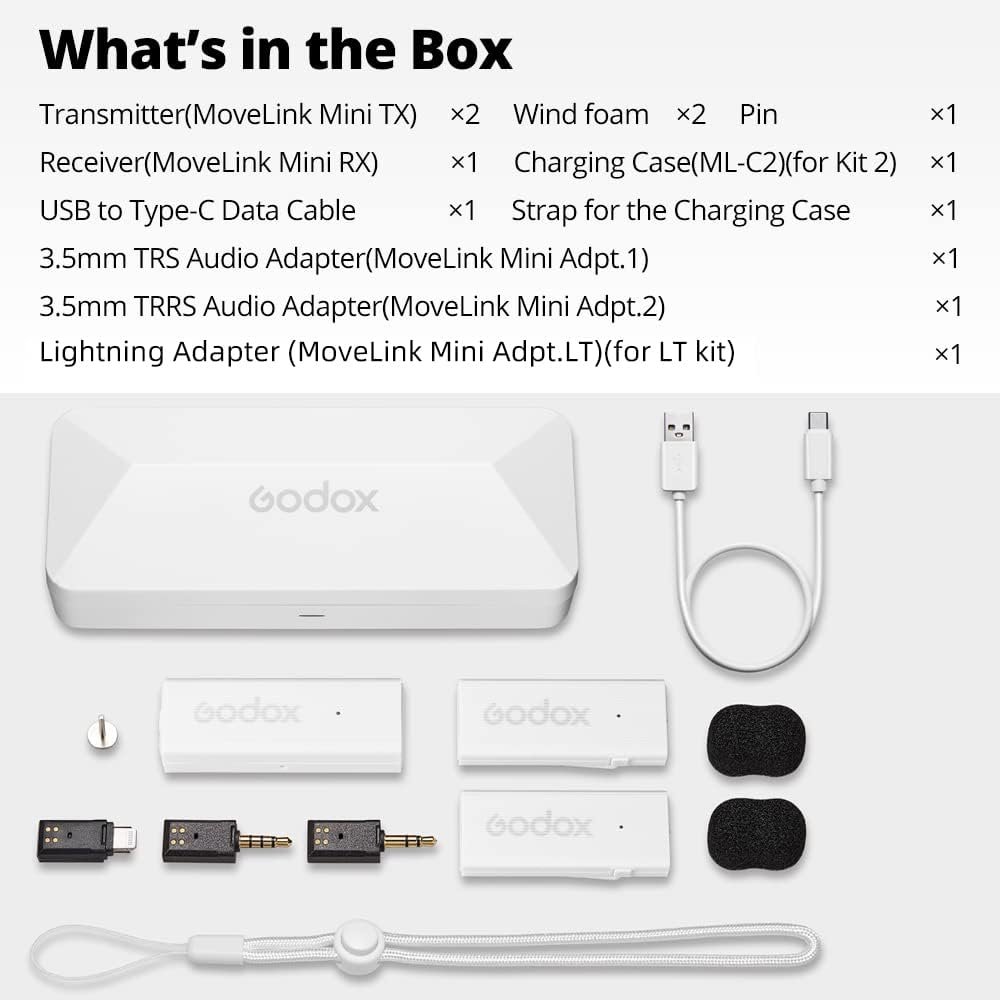
Figure 1: Included components of the MoveLink Mini LT KIT 2.
2. Product Overview
2.1 Components
The GODOX MoveLink Mini LT KIT 2 system consists of two transmitters (TX), one receiver (RX), and a charging case. Each component is designed for portability and ease of use.
2.1.1 Transmitter (TX)
The transmitter is a compact, lightweight unit designed to be clipped directly onto clothing. It features an integrated omnidirectional microphone and controls for muting and noise reduction.
2.1.2 Receiver (RX)
The receiver connects to your recording device (smartphone, tablet, camera) and receives audio signals from the transmitters. It includes controls for gain adjustment.
2.1.3 Charging Case
The charging case not only protects and stores the components but also charges them and facilitates the pairing process.

Figure 2: Dimensions of the Transmitter and Receiver.
3. Setup
3.1 Charging
Before initial use, fully charge the transmitters and receiver. Place them into the charging case. Connect the provided USB-C cable to the charging case and a power source. The charging case itself can be charged via its USB-C port.
3.2 Pairing
The MoveLink Mini system is designed for easy pairing. Follow these steps to pair your devices:
- Place both transmitters and the receiver into the charging case.
- Close the charging case.
- Open the charging case and locate the "PAIR" button inside.
- Click the "PAIR" button. The devices will automatically connect.

Figure 3: Pressing the PAIR button in the charging case.
3.3 Connecting to Your Device
The MoveLink Mini LT is specifically designed for Apple Lightning devices. Use the appropriate adapter for your recording equipment:
- For Apple Lightning devices (iPhone, iPad): Connect the Lightning Adapter to the receiver, then plug the receiver into your device's Lightning port.
- For devices requiring TRS/TRRS: Use the included 3.5mm TRS or TRRS audio adapters as needed.

Figure 4: Transmitter clipped to clothing for recording.
4. Operating Instructions
4.1 Transmitter Functions
- Power On/Off: The transmitter powers on automatically when removed from the charging case and powers off when returned.
- Mute/Noise Reduction: Briefly press the on/off button on the transmitter to mute the microphone or to activate/deactivate noise reduction.
- Placement: Clip the transmitter directly onto your collar or clothing for optimal audio capture.
4.2 Receiver Functions
- Power On/Off: The receiver powers on automatically when removed from the charging case and powers off when returned.
- Gain Control: Briefly press the on/off button on the receiver to cycle through gain levels: first level (-33dB) and second level (-43dB).
4.3 Two-Person Recording
The dual-channel design allows for simultaneous recording from two transmitters, making it ideal for interviews, podcasts, or vlogging with multiple speakers.

Figure 5: Using the MoveLink Mini for two-person recording scenarios.
5. Maintenance
5.1 Cleaning
Use a soft, dry cloth to clean the devices. Avoid using liquids, solvents, or abrasive cleaners, as these can damage the components.
5.2 Storage
Store the MoveLink Mini LT KIT 2 in its charging case when not in use. This protects the components from dust and physical damage and ensures they remain charged for your next use.
5.3 Battery Care
The built-in lithium-ion batteries provide approximately 6 hours of operation for transmitters and 8 hours for the receiver on a single charge. For optimal battery life, avoid exposing the devices to extreme temperatures and fully charge them regularly, especially if storing for extended periods.
6. Troubleshooting
6.1 No Sound or Low Volume
- Ensure both transmitters and the receiver are powered on and successfully paired.
- Check the receiver's gain setting and adjust if necessary.
- Verify the receiver is securely connected to your recording device.
- Confirm your recording device's audio input settings are correctly configured to recognize the external microphone.
6.2 Pairing Failure
- Place all components back into the charging case, close it, and then reopen to re-attempt the automatic pairing process.
- Ensure all devices are sufficiently charged.
6.3 Short Transmission Range
- Ensure there are no significant physical obstructions (e.g., walls, large metal objects) between the transmitter and receiver.
- Avoid environments with strong 2.4GHz wireless interference from other devices (e.g., Wi-Fi routers, other wireless microphones).
7. Specifications
| Feature | Detail |
|---|---|
| Power Source | Battery Powered |
| Number of Batteries | 1 Lithium Ion batteries required (included) |
| Hardware Platform | Smartphone |
| Number of Channels | 2 |
| Manufacturer | AMBITFUL |
| Item Weight | 15.8 ounces |
| Package Dimensions | 7.83 x 4.33 x 2.52 inches |
| ASIN | B0BPSST6GH |
| Item Model Number | MoveLink Mini LT |
| Battery Type | Lithium Ion |
| Color Name | white |
| Size | LT 2x TX Transmitters + 1x Receiver |
| Brand | GODOX |
| Connectivity Technology | USB |
| Connector Type | Lightning, 1/8" TRS |
| Special Feature | Clip |
| Compatible Devices | Smartphone |
| Included Components | Godox MoveLink Mini LT KIT 2 White |
| Polar Pattern | Omnidirectional |
| Audio Sensitivity | 30 Decibels |
| Microphone Form Factor | Mini |
7. Warranty and Support
GODOX products are covered by a limited warranty. Please refer to the official GODOX website or your retailer for specific warranty terms and conditions applicable to your region.
7.1 Contact Information
For technical support or customer service, please contact:
- Manufacturer: GODOX Photo Equipment Co., Ltd
- Address: Building 2, Yaochuan Industrial Zone, Tangwei Community, Fuhai Street, Bao'an District, Shenzhen, 518103, China
- Phone: +86-755-29609320
- Fax: +86-755-25723413
- Email: godox@godox.com
- Website: www.godox.com
7.2 Product Identification
For warranty claims or support, please provide the following product details:
- Model: MoveLink Mini LT
- ASIN: B0BPSST6GH
- UPC/Serial Number: 02300034698